
SDL 开发实战(三):使用 SDL 绘制基本图形
在上文 SDL 开发实战(二):SDL 2.0 核心 API 解析 我们讲解了SDL最核心的API,并结合Hello World代码了解了SDL渲染画面的基本原理。
本文我们来讲一下,如何使用SDL的API绘制基本的图形。
SDL中绘制基本图形的 API并不多,主要是 点、线、矩形、填充矩形。其它图形都可以通过 点、线、矩形组合出来。
0、设置画笔的颜色
设置画笔颜色是绘制图形的首要步骤,函数方法为SDL_SetRenderDrawColor,下面是函数的原型:
int SDL_SetRenderDrawColor(SDL_Renderer* renderer,   // 渲染器

                         Uint8   r,     // 红

                         Uint8   g,     // 绿

                         Uint8   b,     // 蓝

                         Uint8   a)     // 透明值
设置好画笔的颜色后,我们就可以开始绘制了我们想要的图形了,如果需要修改绘制颜色的色值,可以再次调用此函数即可。
1. 绘制一个点
我们可以使用SDL_RenderDrawPoint函数可以绘制一个点,下面是函数的原型:
int SDL_RenderDrawPoint(SDL_Renderer* renderer, int x, int y)
渲染器为参数renderer,绘制的坐标为x,y。
2. 绘制多个点
我们可以使用SDL_RenderDrawPoints函数绘制多个点,下面是函数的原型:
int SDL_RenderDrawPoints(SDL_Renderer* renderer, const SDL_Point* points, int count)
其中points为绘制的点的数组,count为要绘制的点的个数。
3. 绘制直线
我们可以使用SDL_RenderDrawLine函数绘制一条之间,下面是函数的原型:
int SDL_RenderDrawLine(SDL_Renderer* renderer,  // 渲染器

                     int    x1,    // 端点1的x坐标

                     int    y1,    // 端点1的y坐标

                     int    x2,    // 段点2的x坐标

                     int    y2)    // 端点2的y坐标
渲染器为参数renderer,两个端点的坐标为(x1,y1)和(x2,y2)。
4. 绘制多条线
我们可以使用SDL_RenderDrawLines函数绘制多条直线,下面是函数的原型:
int SDL_RenderDrawLines(SDL_Renderer* renderer, const SDL_Point* points, int count)
该函数会将使用两个相邻的点之间进行连线。最终画出你想画的图形。如画三角形,多边形或圆形。
5. 绘制矩形
我们可以使用SDL_RenderDrawRect函数绘制矩形,下面是函数的原型:
int SDL_RenderDrawRect(SDL_Renderer* renderer, const SDL_Rect* rect)
rect: 是要绘制的一块区域。它包括x,y,w,h这些元素。
6. 填充矩形
我们可以使用SDL_RenderFillRect函数绘制矩形,下面是函数的原型:
int SDL_RenderFillRect(SDL_Renderer* renderer, const SDL_Rect* rect)使用指定的色彩填充一块矩形。rect: 是要绘制的一块区域,包括x,y,w,h这些元素。
7. 填充多块矩形
我们可以使用SDL_RenderFillRect函数绘制矩形,下面是函数的原型:
int SDL_RenderDrawRects(SDL_Renderer* renderer, const SDL_Rect* rects, int count)其中 rects 为矩形数组,count为矩形个数。
实战
代码:
// SDL.cpp : 此文件包含 "main" 函数。程序执行将在此处开始并结束。

//

#include "pch.h"

#include <iostream>

extern "C" {

#include "SDL.h"

}

#define POINTS_COUNT 4

static SDL_Point points[POINTS_COUNT] = {

    {, },

    {, },

    {, },

    {, }

};

static SDL_Rect bigrect = { ,,,  };

int main(int argc, char* argv[])

{

    int flag = ;

    SDL_Window *window;                    // Declare a pointer

    SDL_Renderer *renderer;

    SDL_Init(SDL_INIT_VIDEO);              // Initialize SDL2

    // Create an application window with the following settings:

    window = SDL_CreateWindow(

        "SDL2 Draw Window",                  // window title

        SDL_WINDOWPOS_UNDEFINED,           // initial x position

        SDL_WINDOWPOS_UNDEFINED,           // initial y position

        ,                               // width, in pixels

        ,                               // height, in pixels

        SDL_WINDOW_SHOWN // flags - see below

    );

    // Check that the window was successfully created

    if (window == NULL) {

        // In the case that the window could not be made...

        printf("Could not create window: %s\n", SDL_GetError());

        return ;

    }

    /* We must call SDL_CreateRenderer in order for draw calls to affect this window. */

    renderer = SDL_CreateRenderer(window, -, );

    /* Select the color for drawing. It is set to red here. */

    SDL_SetRenderDrawColor(renderer, , , , );

    /* Clear the entire screen to our selected color. */

    SDL_RenderClear(renderer);

    SDL_SetRenderDrawColor(renderer, , , , SDL_ALPHA_OPAQUE);

    SDL_RenderDrawLines(renderer, points, POINTS_COUNT);

    SDL_Rect rect = { , , ,  };

    SDL_RenderDrawRect(renderer, &rect);

    SDL_SetRenderDrawColor(renderer, , , , );

    SDL_RenderFillRect(renderer, &rect);

    SDL_SetRenderDrawColor(renderer, , , , );

    SDL_RenderFillRect(renderer, &bigrect);

    /* Up until now everything was drawn behind the scenes.

       This will show the new, red contents of the window. */

    SDL_RenderPresent(renderer);

    // The window is open: could enter program loop here (see SDL_PollEvent())

    SDL_Delay();  // Pause execution for 5000 milliseconds, for example

    //destory renderer

    if (renderer) {

        SDL_DestroyRenderer(renderer);

    }

    // Close and destroy the window

    SDL_DestroyWindow(window);

    // Clean up

    SDL_Quit();

    return ;

}
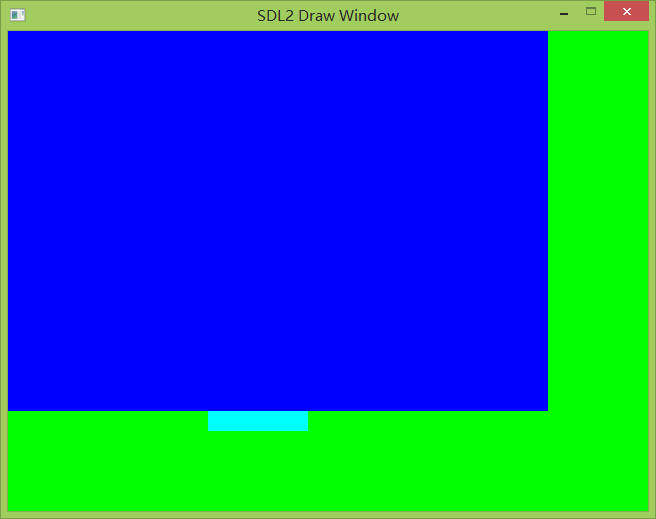
运行效果:
SDL 开发实战(三):使用 SDL 绘制基本图形的更多相关文章
- 【C语言探索之旅】 第三部分第一课:SDL开发游戏之安装SDL
内容简介 1.课程大纲 2.第三部分第一课: SDL开发游戏之安装SDL 3.第三部分第二课预告: SDL开发游戏之创建窗口和画布 课程大纲 我们的课程分为四大部分,每一个部分结束后都会有练习题,并会 ...
- SDL 开发实战(二):SDL 2.0 核心 API 解析
在上一篇文章 SDL 开发实战(一):SDL介绍及开发环境配置 中,我们配置好了SDL的开发环境,并成功运行了SDL的Hello World 代码.但是可能大部分人还是读不太明白具体Hello Wol ...
- SDL 开发实战(五): SDL 纹理渲染
本文我们讲一下如何使用SDL_Texture将视频纹理渲染出来. 1. SDL 视频渲染相关对象 SDL 视频渲染主要涉及到四个对象:SDL_Window.SDL_Render.SDL_Texture ...
- SDL 开发实战(七): SDL 多线程与锁机制
为什么要用多线程?在音视频领域主要是实现音视频同步.实现了音视频同步,我们的播放器就基本上合格了. 这里我们将讲解一下SDL的多线程与锁机制. 多线程的好处主要是能使程序更加充分利用硬件(主要是CPU ...
- SDL 开发实战(一):SDL介绍及开发环境配置
一.什么是SDL? SDL是 “Simple DirectMedia Layer”的缩写,SDL是一个开源的跨平台的多媒体库,封装了复杂的音视频底层操作,简化了音视频处理的难度. SDL使用C语言写成 ...
- SDL 开发实战(七): 使用 SDL 实现 PCM播放器
在上文,我们做了YUV播放器,这样我们就入门了SDL播放视频.下面我们来做一个PCM播放,即使用SDL播放PCM数据. 下面说明一下使用SDL播放PCM音频的基本流程,主要分为两大部分:初始化SDL. ...
- SDL 开发实战(六): 使用 SDL 实现 YUV 播放器
前面铺垫了这么多,现在终于进入核心的主题了,那就是使用SDL播放视频,本节我们将使用SDL播放YUV视频,也就是做一个YUV播放器. 下面说明一下使用SDL播放YUV视频的基本流程,主要分为两大部分: ...
- SDL 开发实战(四): SDL 事件处理
在前面学习SDL的例子运行时,我们发现我们的窗口只停留了几秒,但是如果设置更长时间显然也有其他的弊端. 那么有没有一种好的办法可以解决这个问题呢?例如:能不能让窗口一直显示,直到检测到用户用鼠标点击关 ...
- spring-cloud-square开发实战(三种类型全覆盖)
欢迎访问我的GitHub 这里分类和汇总了欣宸的全部原创(含配套源码):https://github.com/zq2599/blog_demos 本篇概览 前文<五分钟搞懂spring-clou ...
随机推荐
- HTML 文本内容居中
简单描述:使用bootstrap 的model弹出框,里边的标题内容是靠左的,想把内容居中. 操作:给标题的class加上"text-center". 另外 我发现,在使用mode ...
- 一次String的错误使用
今日,在写代码的过程中,程序执行一个方法居然出现了heap space溢出的异常. 从来还没有遇到这样的异常,打断点发现是做字符串拼接时出现此异常. 所以知道了是String使用的异常,因为我做的操作 ...
- JS中this指向问题相关知识点及解析
概括:this指向在函数定义的时候是无法确定的,只有在函数调用执行的时候才能确定this最终指向了谁,this最终指向的是调用它的对象(常见的说法,后面有小小的纠正): 例1: 图中的函数fn1其实是 ...
- Shell编程-条件测试 | 基础篇
什么是Shell Shell是一个命令解释器,它会解释并执行命令行提示符下输入的命令.除此之外,Shell还有另一个功能,如果要执行多条命令,它可以将这组命令存放在一个文件中,然后可以像执行Linux ...
- Jmeter中实现base64加密
Jmeter已不再提供内置base64加密函数,遇到base64加密需求,需要通过beanshell实现 直接上beanshell代码: import org.apache.commons.net.u ...
- Spring IoC的原理为什么是反射而不是new
因为Spring在加载类的实例时,我们知道其实是用工厂的方式,给出一个个实例,而在工厂里面,用了单例,但是真正实例化,则是反射的newInstance来创建对象,而不是new. 那么,为什么是反射的n ...
- 关机,重启BAT命令
关机命令shutdown -s -t 重启命令 shutdown -r -t
- 展开被 SpringBoot 玩的日子 《 六 》 整合 Mybatis
上次整合了JPA ,但是很多人觉得JPA 并不是那么好用,这都是习惯问题,我本人也比较习惯Mybatis ,所以,今天就整合一下Mybatis,到网上找了一下关于spring boot和mybatis ...
- Spark环境搭建(五)-----------Spark生态圈概述与Hadoop对比
Spark:快速的通用的分布式计算框架 概述和特点: 1) Speed,(开发和执行)速度快.基于内存的计算:DAG(有向无环图)的计算引擎:基于线程模型: 2)Easy of use,易用 . 多语 ...
- Android中的数据持久化机制
Android中几种最简单但是却最通用的数据持久化技术:SharedPreference.实例状态Bundle和本地文件. Android的非确定性Activity和应用程序生存期使在会话间保留UI状 ...