
TextInputLayout 用法
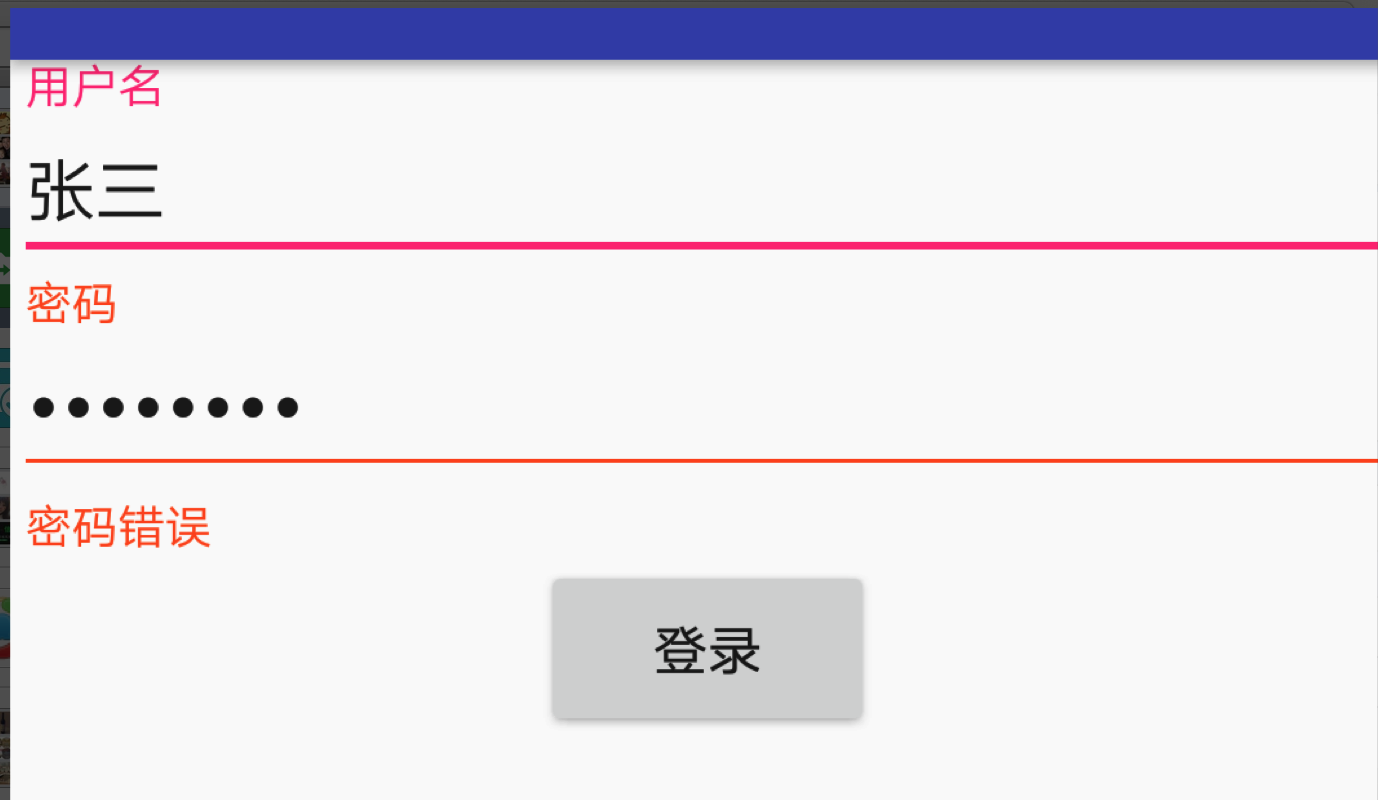
<?xml version="1.0" encoding="utf-8"?>

<LinearLayout

    xmlns:android="http://schemas.android.com/apk/res/android"

    android:layout_width="match_parent"

    android:layout_height="match_parent"

    android:orientation="vertical"

    >

    <!--只能有一个子控件,必须是edit-->

    <android.support.design.widget.TextInputLayout

        android:layout_width="match_parent"

        android:id="@+id/tl_username"

        android:layout_height="wrap_content">

        <android.support.design.widget.TextInputEditText

            android:layout_width="match_parent"

            android:layout_height="wrap_content"

            android:hint="用户名"

            android:maxLength="25"

            android:maxLines="1"

            />

    </android.support.design.widget.TextInputLayout>

    <android.support.design.widget.TextInputLayout

        android:layout_width="match_parent"

        android:id="@+id/tl_password"

        android:layout_height="wrap_content">

        <android.support.design.widget.TextInputEditText

            android:layout_width="match_parent"

            android:layout_height="wrap_content"

            android:hint="密码"

            android:maxLength="25"

            android:maxLines="1"

            android:inputType="textPassword"

            />

    </android.support.design.widget.TextInputLayout>

    <Button

        android:layout_width="wrap_content"

        android:layout_height="wrap_content"

        android:text="登录"

        android:layout_gravity="center_horizontal"

        android:id="@+id/btnLogin"

        />

</LinearLayout>
package com.xiaozhuyisheng.jinjiedemos.activity;

import android.support.design.widget.TextInputLayout;

import android.view.View;

import com.xiaozhuyisheng.jinjiedemos.BaseActivity;

import com.xiaozhuyisheng.jinjiedemos.R;

import butterknife.BindView;

public class TextInputLayoutDemoActivity extends BaseActivity {

    @BindView(R.id.tl_password)

    TextInputLayout tl_password;

    @Override

    protected int initLayoutID() {

        return R.layout.activity_text_input;

    }

    @Override

    protected void initLogic() {

        findViewById(R.id.btnLogin).setOnClickListener(new View.OnClickListener() {

            @Override

            public void onClick(View view) {

                tl_password.setError("密码错误");

            }

        });

    }

}
TextInputLayout 用法的更多相关文章
- Android5.0之TextInputLayout、FloatingActionButton的使用
TextInputLayout和FloatingActionButton都属于MD风格的控件,比起普通的EditText和Button.ImageButton,TextInputLayout和Floa ...
- 【Android - MD】之TextInputLayout的使用
TextInputLayout是Android 5.0新特性--Material Design中的一个布局控件,主要用来嵌套EditText,实现数据输入时的一些效果,如: 当输入框获取焦点时,输入提 ...
- Android学习之Design Support Library中TextInputLayout的使用
今天学习了一个Android Design Support Library 中的TextInputLayout控件,感觉还不错,较之以往的Editetxt,多了几分灵活性,使用也非常easy,故此给大 ...
- Android Material Design控件学习(三)——使用TextInputLayout实现酷市场登录效果
前言 前两次,我们学习了 Android Material Design控件学习(一)--TabLayout的用法 Android Material Design控件学习(二)--Navigation ...
- Android Design Support Library(2)- TextInputLayout的使用
原创文章,转载请注明 http://blog.csdn.net/leejizhou/article/details/50494634 这篇文章介绍下Android Design Support Lib ...
- 【Android - 控件】之MD - TextInputLayout的使用
TextInputLayout是Android 5.0新特性——Material Design中的一个布局控件,主要用来嵌套EditText,实现数据输入时的一些效果,如: 当输入框获取焦点时,输入提 ...
- EditText 基本用法
title: EditText 基本用法 tags: EditText,编辑框,输入框 --- EditText介绍: EditText 在开发中也是经常用到的控件,也是一个比较必要的组件,可以说它是 ...
- jquery插件的用法之cookie 插件
一.使用cookie 插件 插件官方网站下载地址:http://plugins.jquery.com/cookie/ cookie 插件的用法比较简单,直接粘贴下面代码示例: //生成一个cookie ...
- Java中的Socket的用法
Java中的Socket的用法 Java中的Socket分为普通的Socket和NioSocket. 普通Socket的用法 Java中的 ...
随机推荐
- DirectX11 With Windows SDK--21 鼠标拾取
前言 拾取是一项非常重要的技术,不论是电脑上用鼠标操作,还是手机的触屏操作,只要涉及到UI控件的选取则必然要用到该项技术.除此之外,一些类似魔兽争霸3.星际争霸2这样的3D即时战略游戏也需要通过拾取技 ...
- 轴对称 Navier-Stokes 方程组的点态正则性准则 II
在 [Wei, Dongyi. Regularity criterion to the axially symmetric Navier-Stokes equations. J. Math. Anal ...
- maven私库nexus2.11.4迁移升级到nexus3.12.0
nexus简介 nexus是一个强大的maven仓库管理器,它极大的简化了本地内部仓库的维护和外部仓库的访问. nexus是一套开箱即用的系统不需要数据库,它使用文件系统加Lucene来组织数据 .n ...
- COM 类工厂中 CLSID 为 {000209FF-0000-0000-C000-000000000046} 的组件失败,原因是出现以下错误: 80070005 拒绝访问。最新解决方案
检索 COM 类工厂中 CLSID 为 {000209FF-0000-0000-C000-000000000046} 的组件失败,原因是出现以下错误: 80070005 拒绝访问. (异常来自 HRE ...
- 本地图片上传与H5适配知识
最近用到本地图片上传作为API的参数,在网上看了许多,记录一下,以后可能用的着(仅自己记录用,看不清请绕路) function getObjectURL(file) { var url = null ...
- 第四章Android移植环境搭建
第四章Android移植环境搭建 这一章主要学习如何搭建 Android 移植的环境.因为 Android 底层是基于 Linux 内核的,所以本章从交叉编译环境等嵌入式开发环境的搭建开始,介绍了 B ...
- mac 电脑进入root用户
一.使用命令:sudo su -:命令执行后输入密码
- 027_git添加多账号设置
一. 注意事项: (1)公钥文件权限设置问题 现象: Permissions 0644 for '/Users/arunyang/.ssh/id_rsa_ele_me.pub' are too ope ...
- web富文本编辑器收集
1.UEditor 百度的. 优点:插件多,基本满足各种需求,类似贴吧中的回复界面. 缺点:不再维护,文档极少,使用并不普遍,图片只能上传到本地服务器,如果需要上传到其他服务器需要改动源码,较为难办, ...
- eclipse解决maven编码UTF-8的不可映射字符
1.同时指定<project.build.sourceEncoding>属性和<encoding>的方式可适用于Maven2和Maven3. 2.在Maven3中可以只增加&l ...