
2、SpringBoot接口Http协议开发实战8节课(7-8)
7、SpringBoot2.x文件上传实战
简介:讲解HTML页面文件上传和后端处理实战
1、讲解springboot文件上传 MultipartFile file,源自SpringMVC
1)静态页面直接访问:localhost:8080/index.html
注意点:
如果想要直接访问html页面,则需要把html放在springboot默认加载的文件夹下面
2)MultipartFile 对象的transferTo方法,用于文件保存(效率和操作比原先用FileOutStream方便和高效)
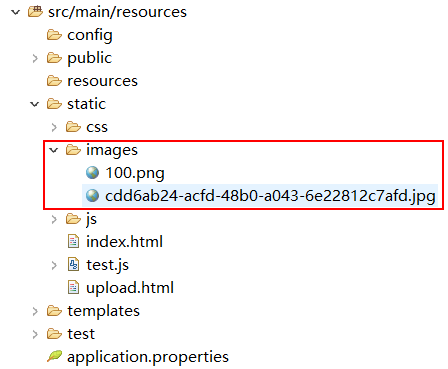
访问路径 http://localhost:8080/images/cdd6ab24-acfd-48b0-a043-6e22812c7afd.jpg
代码示例:
FileController.java:
 package net.xdclass.demo.controller;

 import java.io.File;

 import java.io.IOException;

 import java.util.UUID;

 import javax.servlet.http.HttpServletRequest;

 import net.xdclass.demo.domain.JsonData;

 import org.springframework.stereotype.Controller;

 import org.springframework.web.bind.annotation.RequestMapping;

 import org.springframework.web.bind.annotation.RequestParam;

 import org.springframework.web.bind.annotation.ResponseBody;

 import org.springframework.web.multipart.MultipartFile;

 /**

  * 功能描述:文件测试

  *

  * <p> 创建时间:Apr 22, 2018 11:22:29 PM </p>

  */

 @Controller

 public class FileController {

     @RequestMapping(value = "/api/v1/gopage")

     public Object index() {

         return "index";

     }

     private static final String filePath = "L:/Workspaces/Eclipse_Neon/txkt/SpringBootClass/xdclass_springboot/src/main/resources/static/images/";//末尾需要加/,这样才能写进来

     @RequestMapping(value = "upload")

     @ResponseBody

     public JsonData upload(@RequestParam("head_img") MultipartFile file, HttpServletRequest request) {

         // file.isEmpty(); 判断图片是否为空

         // file.getSize(); 图片大小进行判断

         String name = request.getParameter("name");

         System.out.println("用户名:" + name);

         // 获取文件名

         String fileName = file.getOriginalFilename();

         System.out.println("上传的文件名为:" + fileName);

         // 获取文件的后缀名,比如图片的jpeg,png

         String suffixName = fileName.substring(fileName.lastIndexOf("."));

         System.out.println("上传的后缀名为:" + suffixName);

         // 文件上传后的路径

         fileName = UUID.randomUUID() + suffixName;

         System.out.println("转换后的名称:" + fileName);

         File dest = new File(filePath + fileName);

         try {

             file.transferTo(dest);

             return new JsonData(0, fileName);

         } catch (IllegalStateException e) {

             e.printStackTrace();

         } catch (IOException e) {

             e.printStackTrace();

         }

         return new JsonData(-1, "fail to save ", null);

     }

 }
JsonData.java:
 package net.xdclass.demo.domain;

 import java.io.Serializable;

 public class JsonData implements Serializable {

     private static final long serialVersionUID = 1L;

     //状态码,0表示成功,-1表示失败

     private int code;

     //结果

     private Object data;

     //错误描述

     private String msg;

     public int getCode() {

         return code;

     }

     public String getMsg() {

         return msg;

     }

     public void setMsg(String msg) {

         this.msg = msg;

     }

     public void setCode(int code) {

         this.code = code;

     }

     public Object getData() {

         return data;

     }

     public void setData(Object data) {

         this.data = data;

     }

     public JsonData(int code, Object data) {

         super();

         this.code = code;

         this.data = data;

     }

     public JsonData(int code, String msg,Object data) {

         super();

         this.code = code;

         this.msg = msg;

         this.data = data;

     }

 }
上传成功
8、jar包方式运行web项目的文件上传和访问处理(核心知识)
简介:讲解SpingBoot2.x使用 java -jar运行方式的图片上传和访问处理
1、文件大小配置,启动类里面配置
@Bean
public MultipartConfigElement multipartConfigElement() {
MultipartConfigFactory factory = new MultipartConfigFactory();
//单个文件最大
factory.setMaxFileSize("10240KB"); //KB,MB
/// 设置总上传数据总大小
factory.setMaxRequestSize("1024000KB");
return factory.createMultipartConfig();
}
2、打包成jar包,需要增加maven依赖
<build>
<plugins>
<plugin>
<groupId>org.springframework.boot</groupId>
<artifactId>spring-boot-maven-plugin</artifactId>
</plugin>
</plugins>
</build>
如果没加相关依赖,执行maven打包,运行后会报错:no main manifest attribute, in XXX.jar
GUI:反编译工具,作用就是用于把class文件转换成java文件
3、文件上传和访问需要指定磁盘路径
application.properties中增加下面配置
1) web.images-path=/Users/jack/Desktop(存储路径)
2) spring.resources.static-locations=classpath:/META-INF/resources/,classpath:/resources/,classpath:/static/,classpath:/public/,classpath:/test/,file:${web.upload-path}
4、文件服务器:fastdfs,阿里云oss,nginx搭建一个简单的文件服务器
2、SpringBoot接口Http协议开发实战8节课(7-8)的更多相关文章
- 2、SpringBoot接口Http协议开发实战8节课(1-6)
1.SpringBoot2.xHTTP请求配置讲解 简介:SpringBoot2.xHTTP请求注解讲解和简化注解配置技巧 1.@RestController and @RequestMapping是 ...
- 小D课堂 - 零基础入门SpringBoot2.X到实战_第2节 SpringBoot接口Http协议开发实战_6、SpringBoot2.xHTTP请求配置讲解
1.SpringBoot2.xHTTP请求配置讲解 简介:SpringBoot2.xHTTP请求注解讲解和简化注解配置技巧 1.@RestController and @RequestMapping是 ...
- 小D课堂【SpringBoot】接口Http协议开发实战
---恢复内容开始--- ====================2.SpringBoot接口Http协议开发实战 ============================= 1.SpringBoot ...
- centos mysql 实战 第一节课 安全加固 mysql安装
centos mysql 实战 第一节课 安全加固 mysql安装 percona名字的由来=consultation 顾问+performance 性能=per con a mysql ...
- 11、Logback日志框架介绍和SpringBoot整合实战 2节课
1.新日志框架LogBack介绍 简介:日志介绍和新日志框架Logback讲解 1.常用处理java的日志组件 slf4j,log4j,logback,common-logging 等 ...
- SpringBoot整合定时任务和异步任务处理 3节课
1.SpringBoot定时任务schedule讲解 定时任务应用场景: 简介:讲解什么是定时任务和常见定时任务区别 1.常见定时任务 Java自带的java.util.Timer类 ...
- SpringBoot2.x整合Redis实战 4节课
1.分布式缓存Redis介绍 简介:讲解为什么要用缓存和介绍什么是Redis,新手练习工具 1.redis官网 https://redis.io/download 2.新手 ...
- SpringBoot微服务电商项目开发实战 --- api接口安全算法、AOP切面及防SQL注入实现
上一篇主要讲了整个项目的子模块及第三方依赖的版本号统一管理维护,数据库对接及缓存(Redis)接入,今天我来说说过滤器配置及拦截设置.接口安全处理.AOP切面实现等.作为电商项目,不仅要求考虑高并发带 ...
- SpringBoot微服务电商项目开发实战 --- Redis缓存雪崩、缓存穿透、缓存击穿防范
最近已经推出了好几篇SpringBoot+Dubbo+Redis+Kafka实现电商的文章,今天再次回到分布式微服务项目中来,在开始写今天的系列五文章之前,我先回顾下前面的内容. 系列(一):主要说了 ...
随机推荐
- Uva1001-floyd算法-建图
给出一些球,球内的时间为零,球之间的速度为10每单位. 给两个点,求最短时间. 把每一个球当做点,球间的距离就是floyd的d数组.之后跑一遍floyd wa了两发因为d数组定义成int了 #incl ...
- Mysterious Bacteria LightOJ - 1220
题意: 给出一个数x 求 x = bp 的p的最大值 解析: 算术基本定理 分解质因数 任何一个数x都可以表示为 x == p1a1 * p2a2 * ````` * pnan 即 b ...
- 自学Python1.5-Centos内python2识别中文
自学Python之路 自学Python1.5-Centos内python2识别中文 方法一,python推荐使用utf-8编码方案 经验一:在开头声明: # -*- coding: utf-8 -*- ...
- SharePoint 2013 首页修改
最近客户要求统一首页的风格,所以对各网站的首页进行了统一的修改. 1. 左边导航菜单修改: 修改的地方: Site Settings –> Look and feel –> Navigat ...
- synchronized的实现原理与应用
Java代码在编译后会变成Java字节码,字节码被类加载器加载到JVM里,JVM执行字节码,最终需要转化为汇编指令在CPU上执行,Java中所使用的并发机制依赖于JVM的实现和CPU的指令. sync ...
- POJ3287(BFS水题)
Description Farmer John has been informed of the location of a fugitive cow and wants to catch her i ...
- CF 1000
水爆了...... 当然不是题目水,而是我水. 第一题,看完题目我稍微惊了一下,有点难度(并不). 开个map,先加后减,统计正数即可. 第二题,看完我冷汗就流下来了,有点难啊,这是B难度? 趴床上推 ...
- A1078. Hashing
The task of this problem is simple: insert a sequence of distinct positive integers into a hash tabl ...
- Sublime Text3—系统设置
摘要 软件的设置分为系统设置和快捷键设置两项,这次分享系统设置,Sublime Text3-自带快捷键介绍前面已分享过. 正文 菜单依次选择Preferences | Settings,我们修改设置不 ...
- (大数 万进制) N! hdu1042
N! Time Limit: 10000/5000 MS (Java/Others) Memory Limit: 262144/262144 K (Java/Others) Total Subm ...