
mybatis 10: 动态sql --- part2
< foreach >标签
作用
- 用来进行循环遍历,完成循环条件的查询,批量删除,批量增加,批量更新
用法
- 循环查询 + 批量删除 + 批量增加 + 批量更新
UsersMapper.java
package com.example.mapper;

import com.example.pojo.User;

import java.util.List;

/**

 * 数据访问层的接口,定义对数据库完成的CRUD的操作

 */

public interface UsersMapper {

    //循环查询

    List<User> getByIds(Integer []id_array);

    //批量删除

    int deleteByIds(Integer []id_array);

    //批量插入

    int insertBatch(List<User> users);

    //批量更新

    int updateBatch(List<User> users);

}
UsersMapper.xml
<?xml version="1.0" encoding="UTF-8" ?>

<!DOCTYPE mapper PUBLIC "-//mybatis.org//DTD Mapper 3.0//EN" "http://mybatis.org/dtd/mybatis-3-mapper.dtd">

<mapper namespace="com.example.mapper.UsersMapper">

    <!--

        //循环查询

        List<User> getByIds(Integer []id_array);

    -->

    <select id="getByIds" resultType="user">

        select

            <include refid="allColumns"/>

        from

            users

        where

            id

        in

            <foreach collection="array" item="id" open="(" close=")" separator=",">

                #{id}

            </foreach>

    </select>

    <!--

        //批量删除

        int deleteByIds(Integer []id_array);

    -->

    <delete id="deleteByIds">

        delete from

                   users

        where

            id

        in

        <foreach collection="array" item="id" separator="," open="(" close=")">

            #{id}

        </foreach>

    </delete>

    <!--

        //批量插入

        int insertBatch(List<User> users);

    -->

    <insert id="insertBatch">

        insert into

            users(username, birthday, sex, address)

        values

            <foreach collection="list" item="user" separator=",">

                (#{user.userName}, #{user.birthday}, #{user.sex}, #{user.address})

            </foreach>

    </insert>

    <!--

        //批量更新

        int updateBatch(List<User> users);

        private Integer id;

        private String userName;

        private Date birthday;

        private String sex;

        private String address;

    -->

    <update id="updateBatch">

        <foreach collection="list" item="user" separator=";">

            update

                users

            <set>

                <if test="user.userName != null and user.userName != ''">

                    username=#{user.userName},

                </if>

                <if test="user.birthday != null">

                    birthday=#{user.birthday},

                </if>

                <if test="user.sex != null and user.sex != ''">

                    sex=#{user.sex},

                </if>

                <if test="user.address != null and user.address != ''">

                    address=#{user.address},

                </if>

            </set>

            where

                id=#{user.id}

        </foreach>

    </update>

</mapper>
映射文件分析
当入参是数组时,parameterType可以不写,
- 其实只有当入参类型是实体类时,才必须指明其类型,其他类型的数据皆可不写
< foreach >标签的属性说明
- collection:指明待遍历的数据容器的类型,可选的有三个:array,list,map
- item:给遍历出的每个元素指定一个名称,便于在标签内使用
- open 和 close:原先sql语句,in后面待遍历的数据放在括号中,这里通过标签属性的形式来实现
- 可以将sql语句和标签的书写分隔开,使得代码更加直观
- 注意:这是循环外层的括号,用来容纳所有的元素,循环内部的元素自身的括号不能用这对标签,要手动加上
- 是否要使用 open 和 close标签的说明:
<!-- 批量删除时使用 -->

<foreach collection="array" item="id" separator="," open="(" close=")">

     #{id}

 </foreach>

<!-- 批量插入时未使用 -->

 <foreach collection="list" item="user" separator=",">

     <!-- 为元素手动添加括号 -->

     (#{user.userName}, #{user.birthday}, #{user.sex}, #{user.address})

 </foreach>

<!-- 不同选择的依据:

	看被遍历的元素是否要放在同一个括号内,需要则使用open 和 close标签,否则不用

	元素自身需要括号,则手动添加

-->
- separator:遍历出的元素之间用什么符号分隔,mybatis框架会确保间隔符号的正确使用
- 正确使用是指:间隔符号的个数以及出现在元素之间的位置(如果有多个元素的话)
进行批量更新操作时
- 本质:由底层解析出的sql语句可知,本质执行的是多条独立的update语句
- 这也决定了< update >标签内应该是一个 < foreach >标签,分隔符应该是";",用来间隔多条相互独立的update语句
- 注意:这与执行一条update语句,影响多行记录是不同的,必须在jdbc.properties文件中的url的值后新增配置:allowMultiQueries=true
jdbc.driverClassName=com.mysql.cj.jdbc.Driver

jdbc.url=jdbc:mysql://ip:3306/ssm?useUnicode=true&characterEncoding=utf8&allowMultiQueries=true

jdbc.username=XXXX

jdbc.password=YYYY
- 不修改jdbc.properties时报错
- 本质:由底层解析出的sql语句可知,本质执行的是多条独立的update语句
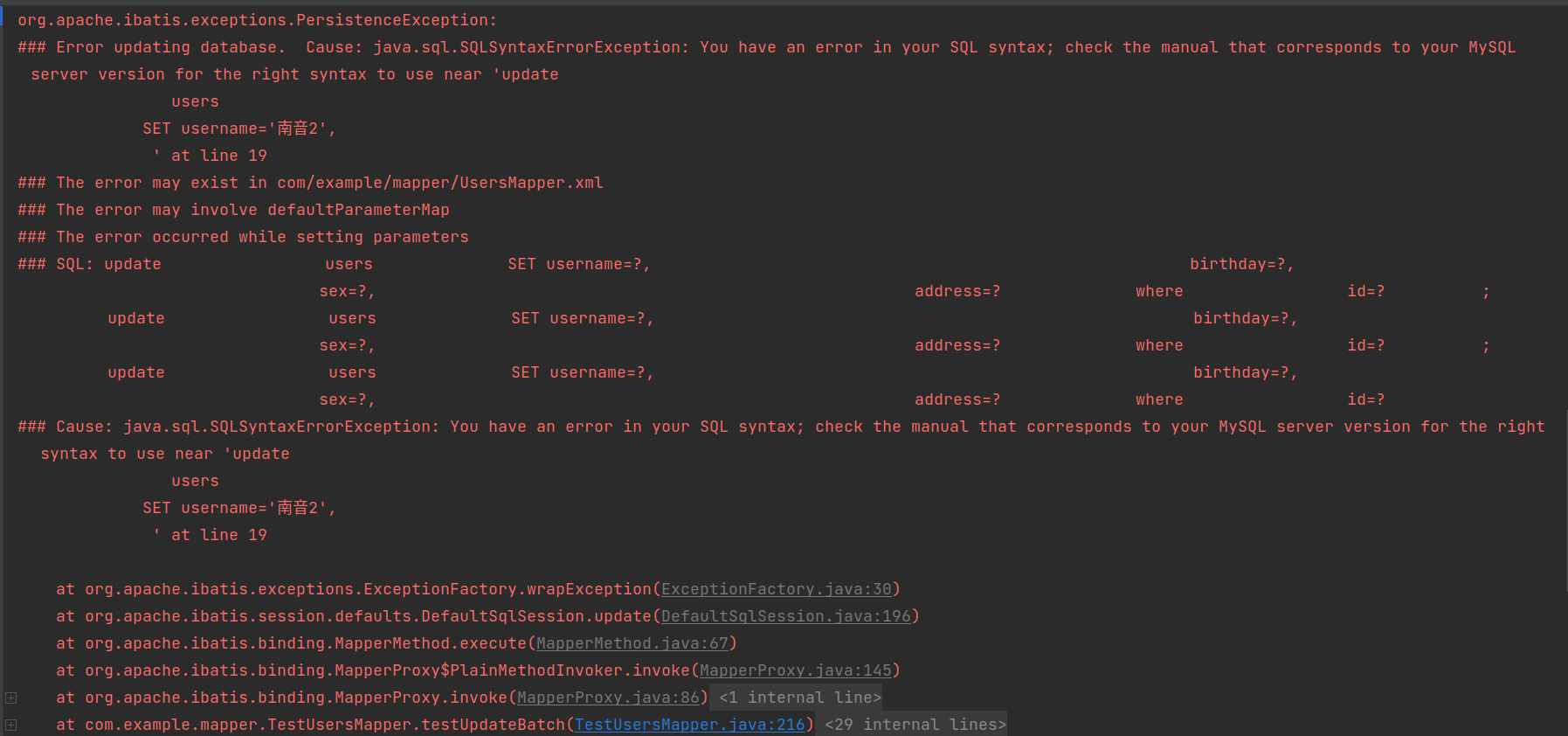
- 各sql标签在底层分别被解析为
//批量查询

==>  Preparing: select id, username, birthday, sex, address from users where id in ( ? , ? , ? )
//批量删除

==>  Preparing: delete from users where id in ( ? , ? )
//批量插入

==>  Preparing: insert into users(username, birthday, sex, address) values (?, ?, ?, ?) , (?, ?, ?, ?) , (?, ?, ?, ?)
//批量更新

==>  Preparing:

update users SET username=?, birthday=?, sex=?, address=? where id=? ;

update users SET username=?, birthday=?, sex=?, address=? where id=? ;

update users SET username=?, birthday=?, sex=?, address=? where id=?
测试代码
package com.example.mapper;

import com.example.pojo.User;

import org.apache.ibatis.io.Resources;

import org.apache.ibatis.session.SqlSession;

import org.apache.ibatis.session.SqlSessionFactory;

import org.apache.ibatis.session.SqlSessionFactoryBuilder;

import org.junit.After;

import org.junit.Before;

import org.junit.Test;

import java.io.IOException;

import java.io.InputStream;

import java.lang.reflect.Array;

import java.util.List;

public class TestUsersMapper {

    //时间刷

    SimpleDateFormat date = new SimpleDateFormat("yyyy-MM-dd");

    //SqlSession对象

    SqlSession sqlSession;

    //mybatis动态代理对象

    UsersMapper usersMapper;

    //获取SqlSession

    @Before

    public void getSqlSession() throws IOException {

        //读取核心配置文件

        InputStream in = Resources.getResourceAsStream("SqlMapConfig.xml");

        //创建SqlSessionFactory对象

        SqlSessionFactory factory = new SqlSessionFactoryBuilder().build(in);

        //获取SqlSession

        sqlSession = factory.openSession();

        //获取mybatis动态代理对象

        usersMapper = sqlSession.getMapper(UsersMapper.class);

    }

    //归还SqlSession

    @After

    public void closeSession(){

        sqlSession.close();

    }

    //循环查询测试

    @Test

    public void testGetByIds(){

        Integer []id_array = {1, 3, 5};

        List<User> users = usersMapper.getByIds(id_array);

        users.forEach(System.out::println);

    }

    //批量删除测试

    @Test

    public void testDeleteByIds(){

        Integer []id_array = {3, 29};

        int num = usersMapper.deleteByIds(id_array);

        if(num == 2){

            System.out.println("批量删除成功!");

            sqlSession.commit();

        }else{

            System.out.println("批量删除失败!");

        }

    }

    //批量插入测试

    @Test

    public void testInsertBatch() throws ParseException {

        User u1 = new User("西决", date.parse("2001-01-01"), "男", "北京");

        User u2 = new User("南音", date.parse("2002-02-02"), "女", "北京");

        User u3 = new User("北北", date.parse("2003-03-03"), "男", "北京");

        List<User> users = new ArrayList<>();

        users.add(u1);

        users.add(u2);

        users.add(u3);

        int num = usersMapper.insertBatch(users);

        if(num == 3){

            System.out.println("批量插入成功!");

            sqlSession.commit();

        }else{

            System.out.println("批量插入失败!");

        }

    }

    //批量更新测试

    @Test

    public void testUpdateBatch() throws ParseException {

        User u1 = new User(31,"西决2", date.parse("2001-01-01"), "男", "北京");

        User u2 = new User(32,"南音2", date.parse("2002-02-02"), "女", "北京");

        User u3 = new User(33,"北北2", date.parse("2003-03-03"), "男", "北京");

        List<User> users = new ArrayList<>();

        users.add(u1);

        users.add(u2);

        users.add(u3);

        int num = usersMapper.updateBatch(users);

        if(num == 1){

            System.out.println("批量更新成功!");

            sqlSession.commit();

        }else{

            System.out.println("批量更新失败!");

        }

    }

}
测试代码分析(着重分析一下批量更新)
- 在执行批量更新操作时,为什么数据表的记录明明修改了3条,输出结果中更新结果的返回值却是1呢?
- 更新后的数据表,修改了3条记录
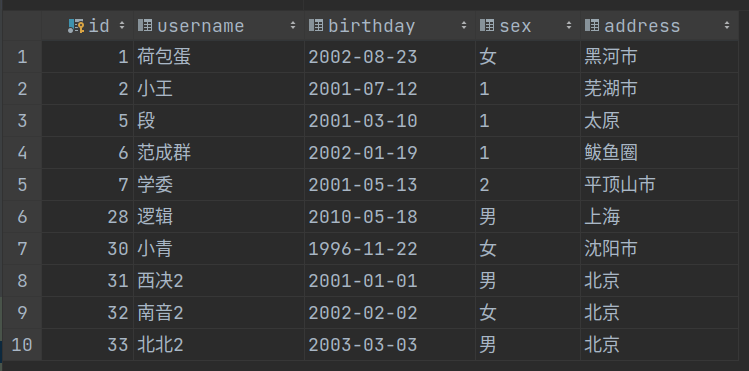
- 批量更新后的返回结果
<==    Updates: 1

批量更新成功!
原因:
- 首先要区别< update >标签和update语句:在 < update >标签中有一个< foreach >标签,他循环了3条相互独立的update语句
- 注意:每条update语句恰巧都只是修改了一条记录,所以< update >标签返回3次1后结束,因为循环3次后循环标签结束了
- 对于如下测试代码,num其实被赋值3次,num的值是最后一次赋值的结果,本次测试恰好是:1
- 其实笔者不太确定num是否被赋值了3,但是根据底层输出的结果可知,起作用的一定是最后一条update语句影响的记录条数
- 不是循环的3条update语句影响条数的和,因为输出结果:是1,而不是3
int num = usersMapper.updateBatch(users);
输出结果
//批量查询结果

Checking to see if class com.example.mapper.TestUsersMapper matches criteria [is assignable to Object]

Checking to see if class com.example.mapper.UsersMapper matches criteria [is assignable to Object]

Opening JDBC Connection

Created connection 16148478.

Setting autocommit to false on JDBC Connection [com.mysql.cj.jdbc.ConnectionImpl@f667fe]

==>  Preparing: select id, username, birthday, sex, address from users where id in ( ? , ? , ? )

==> Parameters: 1(Integer), 3(Integer), 5(Integer)

<==    Columns: id, username, birthday, sex, address

<==        Row: 1, 荷包蛋, 2002-08-23, 女, 黑河市

<==        Row: 3, 小张, 1999-02-22, 1, 长沙

<==        Row: 5, 段, 2001-03-10, 1, 太原

<==      Total: 3

Users{id=1, userName='荷包蛋', birthday=Fri Aug 23 00:00:00 CST 2002, sex='女', address='黑河市'}

Users{id=3, userName='小张', birthday=Mon Feb 22 00:00:00 CST 1999, sex='1', address='长沙'}

Users{id=5, userName='段', birthday=Sat Mar 10 00:00:00 CST 2001, sex='1', address='太原'}

Resetting autocommit to true on JDBC Connection [com.mysql.cj.jdbc.ConnectionImpl@f667fe]

Closing JDBC Connection [com.mysql.cj.jdbc.ConnectionImpl@f667fe]

Returned connection 16148478 to pool.

Process finished with exit code 0
//批量删除结果

Checking to see if class com.example.mapper.TestUsersMapper matches criteria [is assignable to Object]

Checking to see if class com.example.mapper.UsersMapper matches criteria [is assignable to Object]

Opening JDBC Connection

Created connection 544966217.

Setting autocommit to false on JDBC Connection [com.mysql.cj.jdbc.ConnectionImpl@207b8649]

==>  Preparing: delete from users where id in ( ? , ? )

==> Parameters: 3(Integer), 29(Integer)

<==    Updates: 2

批量删除成功!

Committing JDBC Connection [com.mysql.cj.jdbc.ConnectionImpl@207b8649]

Resetting autocommit to true on JDBC Connection [com.mysql.cj.jdbc.ConnectionImpl@207b8649]

Closing JDBC Connection [com.mysql.cj.jdbc.ConnectionImpl@207b8649]

Returned connection 544966217 to pool.

Process finished with exit code 0
//批量增加结果

Checking to see if class com.example.mapper.TestUsersMapper matches criteria [is assignable to Object]

Checking to see if class com.example.mapper.UsersMapper matches criteria [is assignable to Object]

Opening JDBC Connection

Created connection 749604930.

Setting autocommit to false on JDBC Connection [com.mysql.cj.jdbc.ConnectionImpl@2cae1042]

==>  Preparing: insert into users(username, birthday, sex, address) values (?, ?, ?, ?) , (?, ?, ?, ?) , (?, ?, ?, ?)

==> Parameters: 西决(String), 2001-01-01 00:00:00.0(Timestamp), 男(String), 北京(String), 南音(String), 2002-02-02 00:00:00.0(Timestamp), 女(String), 北京(String), 北北(String), 2003-03-03 00:00:00.0(Timestamp), 男(String), 北京(String)

<==    Updates: 3

批量插入成功!

Committing JDBC Connection [com.mysql.cj.jdbc.ConnectionImpl@2cae1042]

Resetting autocommit to true on JDBC Connection [com.mysql.cj.jdbc.ConnectionImpl@2cae1042]

Closing JDBC Connection [com.mysql.cj.jdbc.ConnectionImpl@2cae1042]

Returned connection 749604930 to pool.

Process finished with exit code 0
//批量更新结果

Checking to see if class com.example.mapper.TestUsersMapper matches criteria [is assignable to Object]

Checking to see if class com.example.mapper.UsersMapper matches criteria [is assignable to Object]

Opening JDBC Connection

Created connection 1718322084.

Setting autocommit to false on JDBC Connection [com.mysql.cj.jdbc.ConnectionImpl@666b83a4]

==>  Preparing: update users SET username=?, birthday=?, sex=?, address=? where id=? ; update users SET username=?, birthday=?, sex=?, address=? where id=? ; update users SET username=?, birthday=?, sex=?, address=? where id=?

==> Parameters: 西决2(String), 2001-01-01 00:00:00.0(Timestamp), 男(String), 北京(String), 31(Integer), 南音2(String), 2002-02-02 00:00:00.0(Timestamp), 女(String), 北京(String), 32(Integer), 北北2(String), 2003-03-03 00:00:00.0(Timestamp), 男(String), 北京(String), 33(Integer)

<==    Updates: 1

批量更新成功!

Committing JDBC Connection [com.mysql.cj.jdbc.ConnectionImpl@666b83a4]

Resetting autocommit to true on JDBC Connection [com.mysql.cj.jdbc.ConnectionImpl@666b83a4]

Closing JDBC Connection [com.mysql.cj.jdbc.ConnectionImpl@666b83a4]

Returned connection 1718322084 to pool.

Process finished with exit code 0
mybatis 10: 动态sql --- part2的更多相关文章
- 利用MyBatis的动态SQL特性抽象统一SQL查询接口
1. SQL查询的统一抽象 MyBatis制动动态SQL的构造,利用动态SQL和自定义的参数Bean抽象,可以将绝大部分SQL查询抽象为一个统一接口,查询参数使用一个自定义bean继承Map,使用映射 ...
- MyBatis的动态SQL详解
MyBatis的动态SQL是基于OGNL表达式的,它可以帮助我们方便的在SQL语句中实现某些逻辑,本文详解mybatis的动态sql,需要的朋友可以参考下 MyBatis 的一个强大的特性之一通常是它 ...
- Mybatis解析动态sql原理分析
前言 废话不多说,直接进入文章. 我们在使用mybatis的时候,会在xml中编写sql语句. 比如这段动态sql代码: <update id="update" parame ...
- mybatis 使用动态SQL
RoleMapper.java public interface RoleMapper { public void add(Role role); public void update(Role ro ...
- MyBatis框架——动态SQL、缓存机制、逆向工程
MyBatis框架--动态SQL.缓存机制.逆向工程 一.Dynamic SQL 为什么需要动态SQL?有时候需要根据实际传入的参数来动态的拼接SQL语句.最常用的就是:where和if标签 1.参考 ...
- 使用Mybatis实现动态SQL(一)
使用Mybatis实现动态SQL 作者 : Stanley 罗昊 [转载请注明出处和署名,谢谢!] 写在前面: *本章节适合有Mybatis基础者观看* 前置讲解 我现在写一个查询全部的 ...
- MyBatis探究-----动态SQL详解
1.if标签 接口中方法:public List<Employee> getEmpsByEmpProperties(Employee employee); XML中:where 1=1必不 ...
- mybatis中的.xml文件总结——mybatis的动态sql
resultMap resultType可以指定pojo将查询结果映射为pojo,但需要pojo的属性名和sql查询的列名一致方可映射成功. 如果sql查询字段名和pojo的属性名不一致,可以通过re ...
- mybatis.5.动态SQL
1.动态SQL,解决关联sql字符串的问题,mybatis的动态sql基于OGNL表达式 if语句,在DeptMapper.xml增加如下语句; <select id="selectB ...
随机推荐
- Java ES 实现or查询
es mapping里有三个字段: A:Integer B:Integer C:TEXT 现在想实现一个查询,来检索 ( (A =1 and B=2) or (c like "test ...
- Python Beautiful Soup库
Beautiful Soup库 Beautiful Soup库:https://www.crummy.com/software/BeautifulSoup/ 安装Beautiful Soup: 使用B ...
- Web 前端实战(三):雷达图
前言 在<Canvas 线性图形(五):多边形>实现了绘制多边形的函数.本篇文章将记录如何绘制雷达图.最终实现的效果是这样的: 绘制雷达图 雷达图里外层 如动图中所示,雷达图从里到外一共有 ...
- SQL Server默认数据库存放位置
更新记录 2022年6月13日 发布. Windows操作系统 C:\Program Files\Microsoft SQL Server\MSSQLxx_xx.MSSQLSERVER\MSSQL\D ...
- wappalyzer 上各种开源框架功能
Underscore.js 官网地址:https://underscorejs.org/ 一个JavaScript实用库,提供了一整套函数式编程的实用功能,但是没有扩展任何JavaScrip ...
- 分享一个基于 netty 的 java 开源项目
1.简介 中微子代理(neutrino-proxy)是一个基于 netty 的.开源的 java 内网穿透项目.遵循 MIT 许可,因此您可以对它进行复制.修改.传播并用于任何个人或商业行为. 2.项 ...
- Linux系统安全配置
1.物理安全 硬件服务器,关闭从CD/DVD等这些方面的软启动方式.同时也可以设置BIOS密码,并且要有限制访问的策略与各类流程管控. 还可以禁用USB设备来达到安全的目的: centos7x 安装d ...
- typescript+webpack构建一个js库
依赖说明 入口文件 tsconfig配置 webpack配置文件 webpack入口文件配置 webpack为typescript和less文件配置各自的loader webpack的output配置 ...
- appium简单使用
App 测试通常会用到的工具 adb :Android 的控制工具,用于获取Android的各种数据和控制 Appium Desktop:内嵌了Appium Server和Inspector的综合工具 ...
- Image-Text Matching
重要性和意义: Image-text matching has received a large amount of interest since it associates different mo ...