
spark pipeline 例子
"""

Pipeline Example.

"""

# $example on$

from pyspark.ml import Pipeline

from pyspark.ml.classification import LogisticRegression

from pyspark.ml.feature import HashingTF, Tokenizer

# $example off$

from pyspark.sql import SparkSession

if __name__ == "__main__":

    spark = SparkSession\

        .builder\

        .appName("PipelineExample")\

        .getOrCreate()

    # $example on$

    # Prepare training documents from a list of (id, text, label) tuples.

    training = spark.createDataFrame([

        (0, "a b c d e spark", 1.0),

        (1, "b d", 0.0),

        (2, "spark f g h", 1.0),

        (3, "hadoop mapreduce", 0.0)

    ], ["id", "text", "label"])

    # Configure an ML pipeline, which consists of three stages: tokenizer, hashingTF, and lr.

    tokenizer = Tokenizer(inputCol="text", outputCol="words")

    hashingTF = HashingTF(inputCol=tokenizer.getOutputCol(), outputCol="features")

    lr = LogisticRegression(maxIter=10, regParam=0.001)

    pipeline = Pipeline(stages=[tokenizer, hashingTF, lr])

    # Fit the pipeline to training documents.

    model = pipeline.fit(training)

    # Prepare test documents, which are unlabeled (id, text) tuples.

    test = spark.createDataFrame([

        (4, "spark i j k"),

        (5, "l m n"),

        (6, "spark hadoop spark"),

        (7, "apache hadoop")

    ], ["id", "text"])

    # Make predictions on test documents and print columns of interest.

    prediction = model.transform(test)

    selected = prediction.select("id", "text", "probability", "prediction")

    for row in selected.collect():

        rid, text, prob, prediction = row

        print("(%d, %s) --> prob=%s, prediction=%f" % (rid, text, str(prob), prediction))

    # $example off$

    spark.stop()
"""

Decision Tree Classification Example.

"""

from __future__ import print_function

# $example on$

from pyspark.ml import Pipeline

from pyspark.ml.classification import DecisionTreeClassifier

from pyspark.ml.feature import StringIndexer, VectorIndexer

from pyspark.ml.evaluation import MulticlassClassificationEvaluator

# $example off$

from pyspark.sql import SparkSession

if __name__ == "__main__":

    spark = SparkSession\

        .builder\

        .appName("DecisionTreeClassificationExample")\

        .getOrCreate()

    # $example on$

    # Load the data stored in LIBSVM format as a DataFrame.

    data = spark.read.format("libsvm").load("data/mllib/sample_libsvm_data.txt")

    # Index labels, adding metadata to the label column.

    # Fit on whole dataset to include all labels in index.

    labelIndexer = StringIndexer(inputCol="label", outputCol="indexedLabel").fit(data)

    # Automatically identify categorical features, and index them.

    # We specify maxCategories so features with > 4 distinct values are treated as continuous.

    featureIndexer =\

        VectorIndexer(inputCol="features", outputCol="indexedFeatures", maxCategories=4).fit(data)

    # Split the data into training and test sets (30% held out for testing)

    (trainingData, testData) = data.randomSplit([0.7, 0.3])

    # Train a DecisionTree model.

    dt = DecisionTreeClassifier(labelCol="indexedLabel", featuresCol="indexedFeatures")

    # Chain indexers and tree in a Pipeline

    pipeline = Pipeline(stages=[labelIndexer, featureIndexer, dt])

    # Train model.  This also runs the indexers.

    model = pipeline.fit(trainingData)

    # Make predictions.

    predictions = model.transform(testData)

    # Select example rows to display.

    predictions.select("prediction", "indexedLabel", "features").show(5)

    # Select (prediction, true label) and compute test error

    evaluator = MulticlassClassificationEvaluator(

        labelCol="indexedLabel", predictionCol="prediction", metricName="accuracy")

    accuracy = evaluator.evaluate(predictions)

    print("Test Error = %g " % (1.0 - accuracy))

    treeModel = model.stages[2]

    # summary only

    print(treeModel)

    # $example off$

    spark.stop()
管道里的主要概念
MLlib提供标准的接口来使联合多个算法到单个的管道或者工作流,管道的概念源于scikit-learn项目。
1.数据框:机器学习接口使用来自Spark SQL的数据框形式数据作为数据集,它可以处理多种数据类型。比如,一个数据框可以有不同的列存储文本、特征向量、标签值和预测值。
2.转换器:转换器是将一个数据框变为另一个数据框的算法。比如,一个机器学习模型就是一个转换器,它将带有特征数据框转为预测值数据框。
3.估计器:估计器是拟合一个数据框来产生转换器的算法。比如,一个机器学习算法就是一个估计器,它训练一个数据框产生一个模型。
4.管道:一个管道串起多个转换器和估计器,明确一个机器学习工作流。
5.参数:管道中的所有转换器和估计器使用共同的接口来指定参数。
工作原理
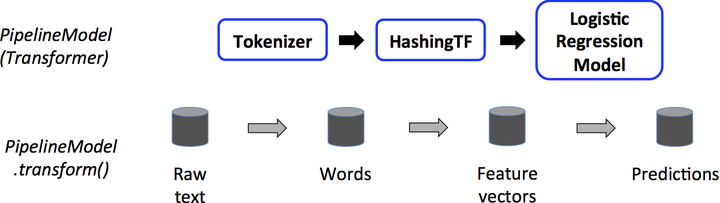
管道由一系列有顺序的阶段指定,每个状态时转换器或估计器。每个状态的运行是有顺序的,输入的数据框通过每个阶段进行改变。在转换器阶段,transform()方法被调用于数据框上。对于估计器阶段,fit()方法被调用来产生一个转换器,然后该转换器的transform()方法被调用在数据框上。
下面的图说明简单的文档处理工作流的运行。
spark pipeline 例子的更多相关文章
- spark JavaDirectKafkaWordCount 例子分析
spark JavaDirectKafkaWordCount 例子分析: 1. KafkaUtils.createDirectStream( jssc, String.class, String.c ...
- Spark Pipeline官方文档
ML Pipelines(译文) 官方文档链接:https://spark.apache.org/docs/latest/ml-pipeline.html 概述 在这一部分,我们将要介绍ML Pipe ...
- Spark SQL例子
综合案例分析 现有数据集 department.json与employee.json,以部门名称和员工性别为粒度,试计算每个部门分性别平均年龄与平均薪资. department.json如下: {&q ...
- Spark Pipeline
一个简单的Pipeline,用作estimator.Pipeline由有序列的stages组成,每个stage是一个Estimator或者一个Transformer. 当Pipeline调用fit,s ...
- Spark Streaming 例子
NetworkWordCount.scala /* * Licensed to the Apache Software Foundation (ASF) under one or more * con ...
- 看到了一个pipeline例子,
pipeline { agent any options { timestamps() } parameters { string(name: 'GIT_BRANCH', defaultValue: ...
- spark执行例子eclipse maven打包jar
首先在eclipse Java EE中新建一个Maven project具体选项如下 点击Finish创建成功,接下来把默认的jdk1.5改成jdk1.8 然后编辑pom.xml加入spark-cor ...
- spark scala 例子
object ScalaApp { def main(args: Array[String]): Unit = { var conf = new SparkConf() conf.setMaster( ...
- Spark.ML之PipeLine学习笔记
地址: http://spark.apache.org/docs/2.0.0/ml-pipeline.html Spark PipeLine 是基于DataFrames的高层的API,可以方便用户 ...
随机推荐
- angular-事件
ng-click事件 1 2 3 4 5 6 7 8 9 10 11 12 13 14 15 16 17 18 19 20 21 22 23 24 <div ng-app="myApp ...
- $.ajax() 获取不到return 返回值
/*常见错误示例 直接在 ajax 里面return 结果 */ function demo(){ $.ajax({ url : 'test.do', type : "post", ...
- Spring中 @Autowired标签与 @Resource标签 的区别(转)
spring不但支持自己定义的@Autowired注解,还支持由JSR-250规范定义的几个注解,如:@Resource. @PostConstruct及@PreDestroy. 1. @Autowi ...
- volley源代码解析(六)--HurlStack与HttpClientStack之争
Volley中网络载入有两种方式,各自是HurlStack与HttpClientStack.我们来看Volley.java中的一段代码 if (stack == null) {//假设没有限定stac ...
- HDU 5228 ZCC loves straight flush( BestCoder Round #41)
题目链接:pid=5228">ZCC loves straight flush pid=5228">题面: pid=5228"> ZCC loves s ...
- Android BLE与终端通信(三)——client与服务端通信过程以及实现数据通信
Android BLE与终端通信(三)--client与服务端通信过程以及实现数据通信 前面的终究仅仅是小知识点.上不了台面,也仅仅能算是起到一个科普的作用.而同步到实际的开发上去,今天就来延续前两篇 ...
- Oracle 实现 mysql 更新 update limit
oracle给人的感觉非常落后.使用非常不方便,Toad 这个软件又笨又迟钝.pl/sql更是,90年代的界面风格,速度还卡得要死.并且oracle不支持limit .by default7#zbph ...
- pyspark kafka createDirectStream和createStream 区别
from pyspark.streaming.kafka import KafkaUtils kafkaStream = KafkaUtils.createStream(streamingContex ...
- proxy in java
[Static] IFeature.java ImpicateF.java Runport.java StaticProxy.java IFeature.java package UProxy.sta ...
- shell-3.bash的基本功能:通配符和其他特殊字符
1. 2.