
调用xml文件的bean
AcTest.class
package com.zyz.db;

import com.zyz.dao.PersonDao;

import org.springframework.context.ApplicationContext;

import org.springframework.context.support.ClassPathXmlApplicationContext;

import org.springframework.context.support.FileSystemXmlApplicationContext;

import org.springframework.jdbc.datasource.DriverManagerDataSource;

/**

 * Created by zyz on 2016-8-5.

 */

public class AcTest {

    public static void main(String[] args){

//        方法1:使用FileSystemXmlApplicationContext

        ApplicationContext ac1=new FileSystemXmlApplicationContext("src/main/webapp/WEB-INF/applicationContext-jdbc.xml");

        DriverManagerDataSource dataSource=(DriverManagerDataSource) ac1.getBean("dataSource");

        System.out.println(dataSource.getUsername());

//        方法2:使用ClassPathXmlApplicationContext

        ApplicationContext ac2=new ClassPathXmlApplicationContext("beans.xml");

        PersonDao personDao=(PersonDao)ac2.getBean("personDao");
System.out.println(personDao.getVersion());
System.out.println(personDao.getPersons().get(0).getName()); } }
方法1:只要指定xml文件的在项目中的相对位置
方法2:从classpath位置读xml文件,即编译后class文件存放的位置.
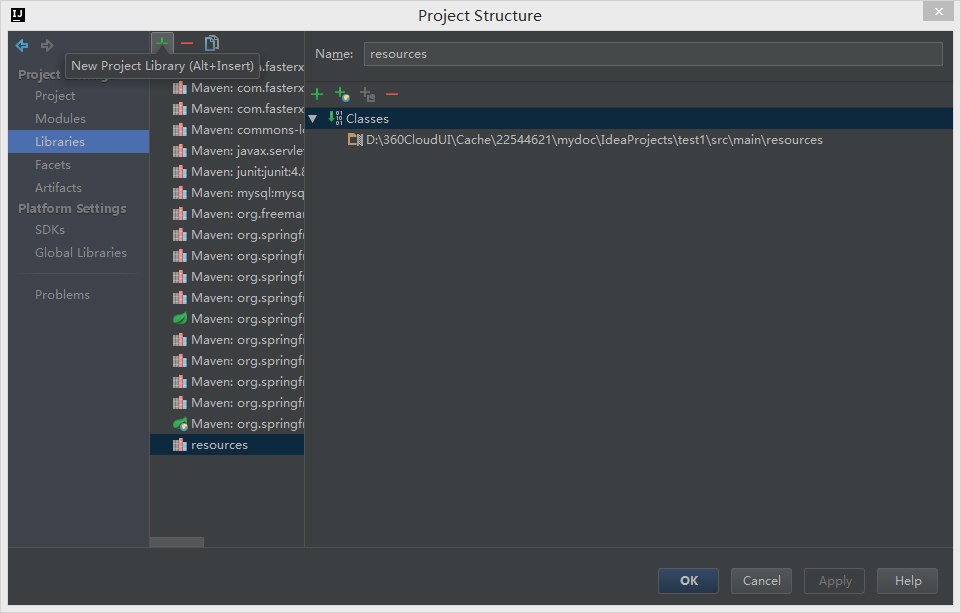
可以先将xml文件放入resources文件夹,然后将resources文件夹加入到classpath,在idea中:
"File"->"Project Structure",出现对话框,添加resources文件夹,编译运行后,系统会将xml文件复制到classes文件夹中
applicationContext-jdbc.xml
<?xml version="1.0" encoding="UTF-8"?>
<beans xmlns="http://www.springframework.org/schema/beans"
xmlns:xsi="http://www.w3.org/2001/XMLSchema-instance"
xmlns:jdbc="http://www.springframework.org/schema/jdbc"
xsi:schemaLocation="http://www.springframework.org/schema/beans
http://www.springframework.org/schema/beans/spring-beans.xsd
http://www.springframework.org/schema/jdbc http://www.springframework.org/schema/jdbc/spring-jdbc-3.2.xsd
"> <!--配置mysql数据库-->
<bean id="dataSource" class="org.springframework.jdbc.datasource.DriverManagerDataSource">
<property name="driverClassName">
<value>com.mysql.jdbc.Driver</value>
</property>
<property name="url">
<value>jdbc:mysql://localhost:3306/school?useUnicode=true&characterEncoding=UTF-8</value>
</property>
<property name="username">
<value>root</value>
</property>
<property name="password">
<value>root</value>
</property>
</bean> <!--jdbcTemplate和数据库关联-->
<bean id="jdbcTemplate" class="org.springframework.jdbc.core.JdbcTemplate">
<property name = "dataSource" ref="dataSource"/>
</bean>
</beans>
beans.xml
<?xml version="1.0" encoding="UTF-8"?>

<beans xmlns="http://www.springframework.org/schema/beans"

       xmlns:xsi="http://www.w3.org/2001/XMLSchema-instance"

       xsi:schemaLocation="http://www.springframework.org/schema/beans http://www.springframework.org/schema/beans/spring-beans.xsd">

    <bean id="personDao" class="com.zyz.dao.PersonDao">

        <property name="version">

            <value>3.85</value>

        </property>

    </bean>

</beans>
调用xml文件的bean的更多相关文章
- Spring框架入门之基于xml文件配置bean详解
关于Spring中基于xml文件配置bean的详细总结(spring 4.1.0) 一.Spring中的依赖注入方式介绍 依赖注入有三种方式 属性注入 构造方法注入 工厂方法注入(很少使用,不推荐,本 ...
- 01_1_jdom调用xml文件
01_1_jdom调用xml文件 1. 导入jdom.jar包 2. xml文件内容 test.xml <?xml version="1.0" encoding=" ...
- 4. Spring 如何通过 XML 文件配置Bean,以及如何获取Bean
在 Spring 容器内拼凑 bean 叫做装配.装配 bean 的时候,你是在告诉容器,需要哪些 bean ,以及容器如何使用依赖注入将它们配合在一起. 理论上,bean 装配的信息可以从任何资源获 ...
- Struts2 学习笔记——struts.xml文件之Bean的配置
Struts2的大部分核心组件不是以硬编码的形式写在代码中,而是通过自身的IoC容器来管理的. Struts2以可配置的形式来管理核心组件,所以开发者可以很容易的扩展框架的核心组件.当开发者需要扩展或 ...
- tomcat与springmvc 结合 之---第19篇(下,补充) springmvc 加载.xml文件的bean标签的过程
writedby 张艳涛,上一篇写了springmvc对<mvc:annoXXXX/>标签的解析过程,其实是遗漏重要的细节,因为理解的不深入吧 今天接着解析<bean>标签 & ...
- 又一本springmvc学习指南 之---第22篇 springmvc 加载.xml文件的bean标签的过程
writedby 张艳涛,今天看spring mvc 学习指南的第2章,特意提下这个作者是how tomcat works 俩个作者之一, 喜欢上一本书的风格,使用案例来讲述原理, 在做第一个案例的时 ...
- 使用配置类而不使用XML文件(代替bean.xml)对spring进行配置
以下类是一个配置类,它的作用和bean.xml是一样的注解: @Configuration 作用: 用于指定当前类是一个spring配置类,当创建容器时会从该类上加载注解. 获取容器时需要使用Anno ...
- tomcat与springmvc 结合 之---第19篇 springmvc 加载.xml文件的bean 过程
writedby 张艳涛,看springmvc 的源码太难了,怎么办, 这篇文章主要分析了看透springmvc的第9章结尾的 如何解析xml 命名空间标签 <?xml version=&quo ...
- Java JSON、XML文件/字符串与Bean对象互转解析
前言 在做web或者其他项目中,JSON与XML格式的数据是大家经常会碰见的2种.在与各种平台做数据对接的时候,JSON与XML格式也是基本的数据传递格式,本文主要简单的介绍JSON/XML ...
随机推荐
- ubuntu12.04+proftpd1.3.4a的系统用户+虚拟用户权限应用实践
目录: 一.什么是Proftpd? 二.Proftpd的官方网站在哪里? 三.在哪里下载? 四.如何安装? 1)系统用户的配置+权限控制 2)虚拟用户的配置+权限控制 一.什么是Proftpd? ...
- UNICODE与UTF8和GBK之间的关系
http://wenku.baidu.com/link?url=bheGEzfSjEx-QX-ciME5oKooKYE08_NJZ02l2kKFa7kVZJ4t8Ks2uSNByovgP2QL6btq ...
- MyEclipse Spring 学习总结二 Bean的生命周期
文件结构可以参考上一节 Bean的生命周期有方法有:init-method,destroy-method ApplicationContext.xml 文件配置如下: <?xml version ...
- 电脑ip(本地ip和本机ip)
1.localhost:localhost 是个域名,不是地址,它可以被配置为任意的 IP 地址,不过通常情况下都指向 127.0.0.1(ipv4)和 [::1](ipv6) 2.127.0.0.1 ...
- 每日学习心得:SharePoint 为列表中的文件夹添加子项(文件夹)、新增指定内容类型的子项、查询列表中指定的文件夹下的内容
前言: 这里主要是针对列表中的文件下新增子项的操作,同时在新建子项时,可以为子项指定特定的内容类型,在某些时候需要查询指定的文件夹下的内容,针对这些场景都一一给力示例和说明,都是一些很小的知识点,希望 ...
- oracle数据库对象使用说明
1.创建一个分区表,并插入一些数据,同时查询出每个分区的数据. 答:创建分区表如下 2.创建一个视图,并给出一个查询语句. 3.在当前用户下创建一个同义词,用于查询scott用户下的dept表,并给出 ...
- NHibernate和 FluentNHibernate
NHibernate有两类配置文件,一个是数据库连接配置文件(一般写到程序配置文件里),另一个是数据表和实体的映射文件(实体类.hbm.xml) 开源的框架Fluent NHibernate,有了它, ...
- (转)无法将类型为“Microsoft.Office.Interop.Word.ApplicationClass”的 COM 对象强制转换为接口类型“Microsoft.Office.Interop.Word._Application”。此操作失败的原因是对 IID 为“{00020970-
HRESULT:0x80030002 无法将类型为“Microsoft.Office.Interop.Word.ApplicationClass”的 COM 对象强制转换为接口类型“Microsoft ...
- 【javascript基础】3、变量和作用域
前言 这篇和大家说一下javascript中的变量和作用域,由于是将基础嘛,主要给大家捋一下知识,不想翻开书复习的道友可以看一下,打算刚开始学习javascript的同学可以扫一眼. PS:jQuer ...
- Nginx基本配置
1.Nginx官网下载安装程序,http://nginx.org/ 2.启动命令 启动:start nginx.exe停止:nginx -s stop 重新加载: nginx -s reload 3. ...