
关于PushKit的使用总结
1.PushKit的认识
(1)概念
ios8苹果新引入了名为pushkit的框架和一种新的push通知类型,被称作voip push.该push方式旨在提供区别于普通apns push的能力,通过这种push方式可以使app执行制定的代码(在弹出通知给用户之前);而该通知的默认行为和apns通知有所区别,它的默认行为里面是不会弹出通知的
(2)作用
pushkit中的voippush,可以帮助我们提升voip应用的体验,优化voip应用的开发实现,降低voip应用的电量消耗,它需要我们重新规划和设计我们的voip应用,从而得到更好的体验(voip push可以说是准实时的,实侧延时1秒左右);苹果的目的是提供这样一种能力,可以让我们抛弃后台长连接的方案,也就是说应用程序通常不用维持和voip服务器的连接,在呼叫或者收到呼叫时,完成voip服务器的注册;当程序被杀死或者手机重启动时,都可以收到对方的来电,正常开展voip的业务。也就是说,我们当前可以利用它来优化voip的体验,增加接通率;
2.PushKit的使用教程
(1)创建指定APP ID(非通配)
与远程推送类似,App ID不能使用通配ID必须使用指定APP ID并且生成配置文件中选择Push Notifications服务,一般的开发配置文件无法完成注册;应用程序的Bundle Identifier必须和生成配置文件使用的APP ID完全一致。
(2)创建voip服务的证书
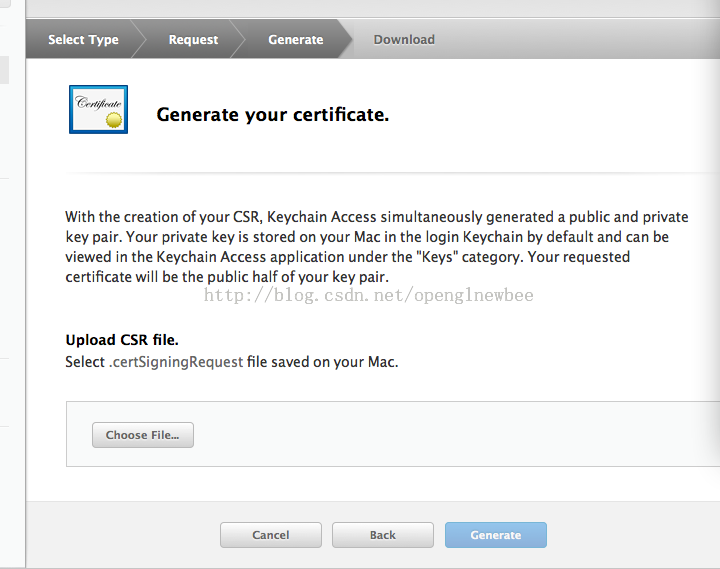
跟apns push类似,pushkit的voippush也需要申请证书,voip push的证书申请步骤截图如下:



(3)导出证书为.pem格式(证书和私钥)
详细方法见:http://www.cnblogs.com/cy568searchx/
(4)把.pem文件提供给服务端
(5)在appDelegate中注册PushKit的服务(与注册通知相同),ios8.0方式如下:
UIUserNotificationSettings *userNotifySetting = [UIUserNotificationSettings settingsForTypes:UIUserNotificationTypeBadge | UIUserNotificationTypeSound | UIUserNotificationTypeAlert categories:nil];

[[UIApplication sharedApplication] registerUserNotificationSettings:userNotifySetting];

[[UIApplication sharedApplication] registerForRemoteNotifications];
3 代码中集成
(1)在应用启动(appdelegate的didfinishlaunchwithoptions)后或根控制器的初始化等方法内调用如下代码:
 PKPushRegistry *pushRegistry = [[PKPushRegistry alloc] initWithQueue:dispatch_get_main_queue()];

 pushRegistry.delegate = self;

 pushRegistry.desiredPushTypes = [NSSet setWithObject:PKPushTypeVoIP];
(2) 在appdelegate或框架viewcontroller类中实现voip push的代理:
- (void)pushRegistry:(PKPushRegistry *)registry didUpdatePushCredentials:(PKPushCredentials *)credentials forType:(NSString *)type { }
上面的代理方法是设备从苹果服务器获取到了voip token,然后传递给应用程序;我们需要把这个token传递到push服务器(和apns push类似,我们也是要传递apns token到push服务器,但是这两个token的获取方式不同,分别在不同的代理方法中回调给应用,且这两个token的内容也是不同的)。
(3)在一切正常的情况下,push server在获取到用户的voip token之后,如下回调会在push server下发消息到对应token的设备时被触发
- (void)pushRegistry:(PKPushRegistry *)registry didReceiveIncomingPushWithPayload:(PKPushPayload *)payload forType:(NSString *)type { }
上面的回调代码里仅仅打印了日志,触发了一个本地通知;这个代理方法是收到voip push通知时触发的;
如果一切正常,该通知在手机重启、应用被系统回收、手动kill程序的情况下,依然能够被触发,且可以有一段时间用来执行自己的代码(比如voip注册等)
注:应用申请一个精确ID的mobile provision打包;
为了测试方便:可以通过一个网上的一个MAC应用Demo:PushMeBaby
下面是比较官方的一份说明文档:
What PushKit does and why you should use it.
In iOS 8 Apple introduced PushKit as part of their effort to improve battery life, performance, and stability for VoIP applications such as Skype, WhatsApp, and LINE.
Previously, VoIP apps needed to maintain a persistent connection in order to receive calls. Keeping a connection open in the background, drains the battery as well as causes all kinds of problems when the app crashes or is terminated by the user.
PushKit is meant to solve these problems by offering a high-priorty push notification with a large payload. The VoIP app receives the notification in the background, sets up the connection and displays a local notification to the user. When the user swipes the notification, the call is ready to connect.
This guide will walk you through the steps to setup a VoIP application. We'll be using Swift to implement this example. Source files from this example are available on Github.
Differences from regular APNS Push Notifications
VoIP push notifications are different than regular APNS notifications mainly in how they are setup from the iOS app. Instead of using application.registerForRemoteNotifications() and handling the received notifications in application:didReceiveRemoteNotification, we use PushKit and thePKPushRegistryDelegate to request a device token and handle the delegate methods.
Unlike regular push notifications, PushKit does not prompt the user to accept VoIP pushes. PushKit will always grant a device token to apps that have the VoIP entitlements without asking for approval. Further, VoIP pushes do not have any UI and do not show an alert. They act more like content-available pushes, and you must handle the received notification and present a local notification.
| Regular Push | VoIP Push | |
|---|---|---|
| Getting Device Token | application.registerForRemoteNotifications() |
set PKPushRegistry.desiredPushTypes |
| Handle Registration | application:didRegisterForRemoteNotificationsWithDeviceToken: |
pushRegistry:didUpdatePushCredentials |
| Handle Received Notification | application:didReceiveRemoteNotification |
pushRegistry:didReceiveIncomingPushWithPayload |
| Payload Size | 2048 bytes | 4096 bytes |
| Certificate Type | iOS Push Services | VoIP Services |
| Requires User Consent | Yes | No* |
* The user must agree to receive local notifications.
关于PushKit的使用总结的更多相关文章
- IOS的APNS和PushKit门道详述
基本功 iOS在诞生之初为了最大程度的保证用户体验,做了一些高瞻远瞩且影响深远的设计.APNs(Apple Push Notification service)就是其中一项. 早期iOS设备的内存和C ...
- PushKit和传统长连接方式的比较
iOS and PushKit This post will cover basic concepts for VoIP apps on iOS. I will not post any code ( ...
- iOS 系统架构
https://developer.apple.com/library/ios/documentation/Miscellaneous/Conceptual/iPhoneOSTechOverview/ ...
- 【腾讯Bugly干货分享】QQ电话适配iOS10 Callkit框架
本文来自于腾讯bugly开发者社区,非经作者同意,请勿转载,原文地址:http://dev.qq.com/topic/58009392302e4725036142fc Dev Club 是一个交流移动 ...
- iOS各个版本的新特性介绍
官方汇总 What's News in iOS iOS 9.3 to iOS 10.0 API Differences Objective-C /usr/include Accelerate Audi ...
- iOS10新特性之CallKit开发详解:锁屏接听和来电识别
国庆节过完了,回家好好休息一天,今天好好分享一下CallKit开发.最近发现好多吃瓜问CallKit的VoIP开发适配,对iOS10的新特性开发和适配也在上个月完成,接下来就分享一下VoIP应用如何使 ...
- 关于Socket建立长连接遇到的bug信息
下面是本人在Socket连接的开发中遇到的bug总结 1."远程服务器关闭了Socket长连接'的错误信息 2.关于"kCFStreamNetworkServiceTypeVoIP ...
- device framework(设备框架)
Table A-1 Device frameworks Name First available Prefixes Description Accelerate.framework 4.0 cbla ...
- iOS8新增加的frameworks, 在目前基于7以上开发的情况下, 使用下列sdk要注意设置成optional
Added frameworks: AVKitCloudKitCoreAudioKitCoreAuthenticationHealthKitHomeKitLocalAuthenticationMeta ...
随机推荐
- windows下基于sublime text3的nodejs环境搭建
第一步:先安装sublime text3.详细教程可自行百度,这边不具体介绍了. 第二步.安装nodejs插件,有两种方式 第一种方式:直接下载https://github.com/tanepiper ...
- 【BZOJ】1180: [CROATIAN2009]OTOCI & 2843: 极地旅行社(lct)
http://www.lydsy.com/JudgeOnline/problem.php?id=1180 今天状态怎么这么不好..................................... ...
- NSString 处理技巧:分割字符串
摘要 string类型是objective-c中用的最多的类型之一,有时会出现字符串中有我们不想要的字符. 如 "hello world"中的空格,或是"hello/wo ...
- [zt]不到最后一秒你永远不知道结局且震撼你心灵的高端电影
总有一部电影,让你憋着尿直到看完~~~ http://share.renren.com/share/230538513/17679574169?from=0101090202&shfrom=0 ...
- Qt 程序和窗口添加图标
Qt项目在打包发布之后都需要有个个性的程序图标和窗口图标,这样会使程序更加美观大方,下面我们分别来看如何给程序和窗口分别添加图标.我们需要两种格式的图片,一种是.ico的,用来给程序添加图标,一种是. ...
- hdu Train Problem I
这道题是道简单的栈模拟题,只要按照真实情况用栈进行模拟即可: #include<stdio.h> #include<string.h> #include<stack> ...
- OC学习笔记——类别(Category)
类别,有些程序员又称之为分类. 类别是一种为现有的类添加新方法的方式,尤其是为系统的做扩展的时候,不用继承系统类,可以直接为类添加新的方法.也可以覆盖系统类的方法. 如: @interface NSO ...
- MyBatis 配置sql语句输出
版权声明:本文为博主原创文章,未经博主允许不得转载. 此处使用log4j,加入jar包,然后在src路径下加入:log4j.properties文件 填入以下配置就可以打印了 log4j.rootLo ...
- spring aop中的propagation的7种配置的意思
1.前言. 在声明式的事务处理中,要配置一个切面,即一组方法,如 <tx:advice id="txAdvice" transaction-manager="txM ...
- [项目机会]citrix 虚拟桌面对于java等高CPU占用率如何解决
citrix 虚拟桌面对于java等高CPU占用率如何解决 问题1:java等客户端对于虚拟桌面cpu影响较大,但是有些用户的确需要使用java支持的程序,是否可以通过其他途径来解决? 问题2:对于其 ...