
HarmonyOS三方件开发指南(8)——RoundedImage
【小年答谢,新春送礼】免费抽取1000元京东卡+更多新春好礼~查看详情>>>
目录:
1. RoundedImage组件功能介绍
1.1. 功能介绍:
RoundedImage组件可以将图片显示成圆形,椭圆形,圆角矩形,目前仅支持上述三种样式显示。
1.2. 模拟器上运行效果:
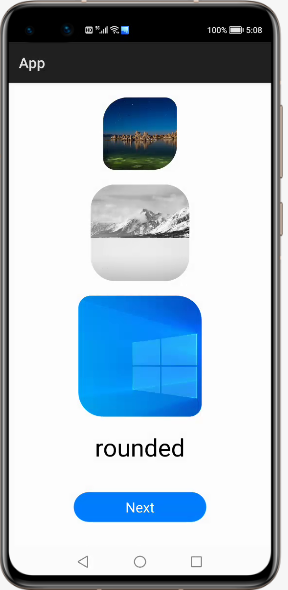
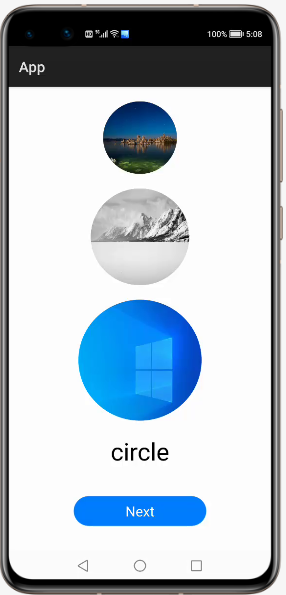

2. RoundedImage使用方法
2.1. 新建工程,增加组件Har包依赖
在应用模块中添加HAR,只需要将library-debug.har复制到entry\libs目录下即可(由于build.gradle中已经依赖的libs目录下的*.har,因此不需要再做修改)。
2.2. 修改主页面的布局文件
修改主页面的布局文件ability_main.xml,增加com.custom.library.RoundedImage组件,组件的宽和高自定义。
<?xml version="1.0" encoding="utf-8"?>

<DirectionalLayout

    xmlns:ohos="http://schemas.huawei.com/res/ohos"

    ohos:height="match_parent"

    ohos:width="match_parent"

    ohos:orientation="vertical">

    <com.custom.library.RoundedImage

        ohos:id="$+id:image1"

        ohos:height="300"

        ohos:width="300"

        ohos:top_margin="20vp"

        ohos:layout_alignment="center"/>

    <com.custom.library.RoundedImage

        ohos:id="$+id:image2"

        ohos:height="400"

        ohos:width="400"

        ohos:layout_alignment="center"

        ohos:top_margin="20vp"/>

    <com.custom.library.RoundedImage

        ohos:id="$+id:image3"

        ohos:height="500"

        ohos:width="500"

        ohos:layout_alignment="center"

        ohos:top_margin="20vp"/>

</DirectionalLayout>
2.3. 修改MainAbilitySlince的UI加载代码
在MainAbilitySlince类的onStart函数中。
增加如下代码可显示圆角矩形:
@Override

public void onStart(Intent intent) {

    super.onStart(intent);

    super.setUIContent(ResourceTable.Layout_ability_main);

    RoundedImage roundedImage1 = (RoundedImage) findComponentById(ResourceTable.Id_image1);

    roundedImage1.setPixelMapToRoundedRect(ResourceTable.Media_photo, 100, 50, 100, 50);

    RoundedImage roundedImage2 = (RoundedImage) findComponentById(ResourceTable.Id_image2);

    roundedImage2.setPixelMapToRoundedRect(ResourceTable.Media_photo1, 100, 100, 100, 100);

    RoundedImage roundedImage3 = (RoundedImage) findComponentById(ResourceTable.Id_image3);

    roundedImage3.setPixelMapToRoundedRect(ResourceTable.Media_photo2, 50, 100, 50, 100);

    }
增加如下代码可显示圆形:
@Override

public void onStart(Intent intent) {

    super.onStart(intent);

    super.setUIContent(ResourceTable.Layout_ability_main);

    RoundedImage roundedImage1 = (RoundedImage) findComponentById(ResourceTable.Id_image1);

    roundedImage1.setPixelMapToCircleImage(ResourceTable.Media_photo);

    RoundedImage roundedImage2 = (RoundedImage) findComponentById(ResourceTable.Id_image2);

    roundedImage2.setPixelMapToCircleImage(ResourceTable.Media_photo1);

    RoundedImage roundedImage3 = (RoundedImage) findComponentById(ResourceTable.Id_image3);

    roundedImage3.setPixelMapToCircleImage(ResourceTable.Media_photo2);

}
增加如下代码可显示椭圆形:
@Override

public void onStart(Intent intent) {

    super.onStart(intent);

    super.setUIContent(ResourceTable.Layout_ability_main);

    RoundedImage roundedImage1 = (RoundedImage) findComponentById(ResourceTable.Id_image1);

    roundedImage1.setPixelMapToOvalImage(ResourceTable.Media_photo3);

    RoundedImage roundedImage2 = (RoundedImage) findComponentById(ResourceTable.Id_image2);

    roundedImage2.setPixelMapToOvalImage(ResourceTable.Media_photo4);

    RoundedImage roundedImage3 = (RoundedImage) findComponentById(ResourceTable.Id_image3);

    roundedImage3.setPixelMapToOvalImage(ResourceTable.Media_photo5);

}
3. RoundedImage开发实现
3.1. 新建一个Module
新建一个Module,类型选择HarmonyOS Library,模块名为library。
3.2. 新建一个RoundedImage类
新建一个RoundedImage类,继承自Image类,实现DrawTask.onDraw接口,代码如下:
用于绘制圆形:
@Override

public void onDraw(Component component, Canvas canvas) {

    float centerX = getWidth() / 2f;

    float centerY = getHeight() / 2f;

    float radius = Math.min(centerX, centerY);

    Paint paint = new Paint();

    Shader shader = new PixelMapShader(holder, Shader.TileMode.CLAMP_TILEMODE, Shader.TileMode.CLAMP_TILEMODE);

    paint.setShader(shader, Paint.ShaderType.SWEEP_SHADER);

    canvas.drawCircle(centerX, centerY, radius, paint);

}
用于绘制椭圆形:
@Override

public void onDraw(Component component, Canvas canvas) {

    Paint paint = new Paint();

    Shader shader = new PixelMapShader(holder, Shader.TileMode.CLAMP_TILEMODE, Shader.TileMode.CLAMP_TILEMODE);

    paint.setShader(shader, Paint.ShaderType.SWEEP_SHADER);

    PixelMap pixelMap = holder.getPixelMap();

    int min = Math.min(pixelMap.getImageInfo().size.width, pixelMap.getImageInfo().size.height);

    int radiusX = Math.min(min, minImageLength);

    float halfRadiusX = radiusX / 2f;

    float quarterRadiusX = radiusX / 4f;

    float left = getWidth() / 2f - halfRadiusX;

    float right = getWidth() / 2f + halfRadiusX;

    float top = getHeight() / 2f - quarterRadiusX;

    float bottom = getHeight() / 2f + quarterRadiusX;

    RectFloat rect = new RectFloat(left, top, right, bottom);

    canvas.drawOval(rect, paint);

}
用于设置圆角矩形,调用Image方法进行设置:
setCornerRadii(new float[]{topLeft, topLeft, topRigth, topRigth, bottomRight, bottomRight, bottomLeft, bottomLeft});3.3. 编译HAR包
利用Gradle可以将HarmonyOS Library库模块构建为HAR包,构建HAR包的方法如下:
在Gradle构建任务中,双击PackageDebugHar或PackageReleaseHar任务,构建Debug类型或Release类型的HAR。
待构建任务完成后,可以在loadingview> bulid > outputs > har目录中,获取生成的HAR包。
项目源代码地址:https://github.com/isoftstone-dev/RoundedImage_HarmonyOS
欢迎交流:HOS@isoftstone.com
作者:软通田可辉
想了解更多内容,请访问: 51CTO和华为官方战略合作共建的鸿蒙技术社区https://harmonyos.51cto.com
【小年答谢,新春送礼】免费抽取1000元京东卡+更多新春好礼~查看详情>>>
HarmonyOS三方件开发指南(8)——RoundedImage的更多相关文章
- HarmonyOS三方件开发指南(12)——cropper图片裁剪
鸿蒙入门指南,小白速来!0基础学习路线分享,高效学习方法,重点答疑解惑--->[课程入口] 目录:1. cropper组件功能介绍2. cropper使用方法3. cropper组件开发实现4. ...
- HarmonyOS三方件开发指南(13)-SwipeLayout侧滑删除
鸿蒙入门指南,小白速来!0基础学习路线分享,高效学习方法,重点答疑解惑--->[课程入口] 目录:1. SwipeLayout组件功能介绍2. SwipeLayout使用方法3. SwipeLa ...
- HarmonyOS三方件开发指南(14)-Glide组件功能介绍
<HarmonyOS三方件开发指南>系列文章合集 引言 在实际应用开发中,会用到大量图片处理,如:网络图片.本地图片.应用资源.二进制流.Uri对象等,虽然官方提供了PixelMap进行图 ...
- HarmonyOS三方件开发指南(15)-LoadingView功能介绍
目录: 1. LoadingView组件功能介绍2. Lottie使用方法3. Lottie开发实现4.<HarmonyOS三方件开发指南>系列文章合集 1. LoadingView组件功 ...
- HarmonyOS三方件开发指南(16)-VideoCache 视频缓存
目录: 1.引言 2.功能介绍 3.VideoCache使用指南 4.VideoCache开发指南 5.<HarmonyOS三方件开发指南>系列文章合集 引言 对于视频播放器这个app大家 ...
- HarmonyOS三方件开发指南(17)-BottomNavigationBar
目录: 1.引言 2.功能介绍 3.BottomNavigationBar使用指南 4.BottomNavigationBar开发指南 5.<HarmonyOS三方件开发指南>文章合集 引 ...
- HarmonyOS三方件开发指南(19)-BGABadgeView徽章组件
目录: 1.引言 2.功能介绍 3.BGABadgeView 使用指南 4.BGABadgeView 开发指南 5.<HarmonyOS三方件开发指南>系列文章合集 引言 现在很多的APP ...
- HarmonyOS三方件开发指南(4)——Logger组件
目录: 1. Logger功能介绍 2. Logger使用方法 3. Logger开发实现 4. 源码上传地址 1. Logger功能介绍1.1. ...
- HarmonyOS三方件开发指南(5)——Photoview组件
PhotoView使用说明 1. PhotoView功能介绍1.1 组件介绍: PhotoView是一个继承自Image的组件,不同之处在于:它可以进行图击放大功能,手势缩放功能(暂无 ...
随机推荐
- volatile 关键字精讲
1.错误案例 通过一个案例引出volatile关键字,例如以下代码示例 : 此时没有加volatile关键字两个线程间的通讯就会有问题 public class ThreadsShare { priv ...
- Head First 设计模式 —— 10. 迭代器 (Iterator) 模式
思考题 public void printMenu() { PancakeHouseMenu pancakeHouseMenu = new PancakeHouseMenu(); ArrayList ...
- 【JS学习】var let const声明变量的异同点
[JS学习]var let const声明变量的异同点 前言: 本博客系列为学习后盾人js教程过程中的记录与产出,如果对你有帮助,欢迎关注,点赞,分享.不足之处也欢迎指正,作者会积极思考与改正. 总述 ...
- 【Oracle】迁移表到其他的表空间
有些时候需要将表迁移到其他的表空间,在将表空间做相关的操作 下面是命令如何迁移表空间 SQL> alter table 表名 move tablespace 表空间名; 如果有很多的表想要迁移的 ...
- kubernets集群的安全防护(上)
一 了解认证机制 1.1 API的服务器在接收来自客户端的请求的时候会对发起的用户进行几个步骤 认证插件进行认证,确认发起的用户是外部用户,还是集群中的某个命名空间里面的pod 确认用户属于哪个 ...
- kubernets之Ingress资源
一 Ingress集中式的kubernets服务转发控制器 1.1 认识Ingress的工作原理 注意:图片来源于kubernets in action一书,如若觉得侵权,请第一时间联系博主进行删 ...
- CMU数据库(15-445)Lab0-环境搭建
0.写在前面 从这篇文章开始.开一个新坑,记录以下自己做cmu数据库实验的过程,同时会分析一下除了要求我们实现的代码之外的实验自带的一些代码.争取能够对实现一个数据库比较了解.也希望能写进简历.让自己 ...
- .NET 项目中的单元测试
.NET 项目中的单元测试 Intro "不会写单元测试的程序员不是合格的程序员,不写单元测试的程序员不是优秀的工程师." -- 一只想要成为一个优秀程序员的渣逼程序猿. 那么问题 ...
- React 入门-redux 和 react-redux
React 将页面元素拆分成组件,通过组装展示数据.组件又有无状态和有状态之分,所谓状态,可以简单的认为是组件要展示的数据.React 有个特性或者说是限制单向数据流,组件的状态数据只能在组件内部修改 ...
- HTML基础复习1
网页:HTML(超文本标记语言) 网页分为静态网页和动态网页,区别:动态网页中可以加入脚本代码,还可以动态的引入数据库中的信息. HTML的结构 <html> <head>头信 ...