
【Flutter】容器类组件之Container容器
前言
Container是一个组合类容器,它本身不对应具体的RenderObject,它是DecoratedBox、ConstrainedBox、Transform、Padding、Align等组件组合的一个多功能容器,所以只需通过一个Container组件可以实现同时需要装饰、变换、限制的场景。
接口描述
Container({

    Key key,

    // 文字对齐方式

    this.alignment,

    // 容器内补白,属于decoration的装饰范围

    this.padding,

    // 背景色

    Color color,

    // 背景装饰

    Decoration decoration,

    // 前景装束

    this.foregroundDecoration,

    // 容器的宽度和高度

    double width,

    double height,

    // 容器大小的限制范围

    BoxConstraints constraints,

    // 容器外补白,不属于decoration的装饰范围

    this.margin,

    // 变换

    this.transform,

    this.child,

  })
接口说明
- 容器的大小可以通过width、height属性来指定,也可以通过constraints来指定;如果它们同时存在时,width、height优先。实际上Container内部会根据width、height来生成一个constraints。
- color和decoration是互斥的,如果同时设置它们则会报错!实际上,当指定color时,Container内会自动创建一个decoration。
代码示例
// Container容器

// Container是一个组合类容器,它本身不对应具体的RenderObject,它是DecoratedBox、ConstrainedBox、Transform、Padding、Align等组件组合的一个多功能容器,

// 所以只需通过一个Container组件可以实现同时需要装饰、变换、限制的场景。

import 'package:flutter/material.dart';

class ContainerTest extends StatelessWidget {

  @override

  Widget build(BuildContext context) {

    return Scaffold(

      appBar: AppBar(

        title: Text('Container容器'),

      ),

      body: Column(

        mainAxisAlignment: MainAxisAlignment.center,

        children: <Widget>[

          //

          Container(

            // 容器外填充

            margin: EdgeInsets.only(top: 50.0, left: 120.0),

            // 卡片大小

            constraints: BoxConstraints.tightFor(width: 200.0, height: 150.0),

            // 背景修饰

            decoration: BoxDecoration(

              // 背景径向渐变

              gradient: RadialGradient(

                colors: [Colors.red, Colors.orange],

                center: Alignment.topLeft,

                radius: .98,

              ),

              // 卡片阴影

              boxShadow: [

                BoxShadow(

                  color: Colors.black54,

                  offset: Offset(2.0, 2.0),

                  blurRadius: 4.0

                )

              ]

            ),

            // 卡片倾斜变换

            transform: Matrix4.rotationZ(.2),

            alignment: Alignment.center,

            child: Text('Hello', style: TextStyle(color: Colors.white, fontSize: 40.0),),

          )

        ],

      ),

    );

  }

}
总结
可以发现,直观的感觉就是margin的留白是在容器外部,而padding的留白是在容器内部,需要记住这个重要差异。事实上,Container内margin和padding都是通过Padding 组件来实现的。
通过以下代码对比:
Container(

  margin: EdgeInsets.all(20.0), //容器外补白

  color: Colors.orange,

  child: Text("Hello world!"),

),

Container(

  padding: EdgeInsets.all(20.0), //容器内补白

  color: Colors.orange,

  child: Text("Hello world!"),

),
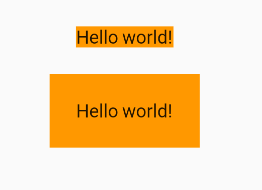
等价于
Padding(

  padding: EdgeInsets.all(20.0),

  child: DecoratedBox(

    decoration: BoxDecoration(color: Colors.orange),

    child: Text("Hello world!"),

  ),

),

DecoratedBox(

  decoration: BoxDecoration(color: Colors.orange),

  child: Padding(

    padding: const EdgeInsets.all(20.0),

    child: Text("Hello world!"),

  ),

),
【Flutter】容器类组件之Container容器的更多相关文章
- 【Flutter】容器类组件之装饰容器
前言 DecoratedBox可以在其子组件绘制前后绘制一些装饰,例如背景,边框,渐变等. 接口描述 const DecoratedBox({ Key key, // 代表要绘制的装饰 @requir ...
- Flutter Container容器组件、Text文本组件详解
import 'package:flutter/material.dart'; void main(){ runApp(MyApp()); } class MyApp extends Stateles ...
- Flutter常用组件(Widget)解析-Container
一个组件它往往包含了一些常见的painting, positioning和sizing这样的小部件. Container相当于我们常用的div,在Flutter中用的非常多,现在来看看Containe ...
- 【Flutter】容器类组件之Scaffold、TabBar、底部导航
前言 一个完整的路由页可能会包含导航栏.抽屉菜单(Drawer)以及底部Tab导航菜单等.Flutter Material组件库提供了一些现成的组件来减少开发任务.Scaffold是一个路由页的骨架, ...
- Flutter 基础组件:进度指示器
前言 Material 组件库中提供了两种进度指示器:LinearProgressIndicator和CircularProgressIndicator,它们都可以同时用于精确的进度指示和模糊的进度指 ...
- Flutter 父子组件传值
Flutter 父子组件传值 一父传子: 父中: void onButtonChange(val1,val2,val3){ print('============================子向父 ...
- flutter 基础组件
TextWidget class TextWidget extends StatelessWidget { final TextStyle _textStyle = TextStyle( fontSi ...
- Flutter InkWell - Flutter每周一组件
Flutter Inkwell使用详解 该文章属于[Flutter每周一组件]系列,其它组件可以查看该系列下的文章,该系列会不间断更新:所有组件的demo已经上传值Github: https://gi ...
- 关于Container容器以及IoC注入机制的认识
container 容器的概念: 1 container 是一个Java 所编写的程序,用于对象之间之间管理对象关系. 主要的java EE 容器如下: Java容器类包含List.ArrayList ...
随机推荐
- 串口数据监视 Serial Port Monitor
串口数据监视工具 Serial Port Monitor可以在其它应用读写串口时监视串口数据, 很好用,但只有15天试用期.
- MySQL和sparkSQL合并行
表A 表B 从表A到表B MySQL 写法:select name, group_concat(score seperate ';') as score from A group by name sp ...
- window+nginx+php
今天在Windows上配置了下nginx,看了不少其他大牛们记录的博客,自己也操作了一番,记录一下备忘. nginx download: http://nginx.org/en/download.ht ...
- git基础使用(超级详细)
使用git前的步骤: 1. 安装git (安装步骤省略) 2. 使用git设置用户名和邮箱 git config --global user.name "Your Name" gi ...
- Spring Boot 日志各种使用姿势,是时候捋清楚了!
@ 目录 1. Java 日志概览 1.1 总体概览 1.2 日志级别 1.3 综合对比 1.4 最佳实践 2. Spring Boot 日志实现 2.1 Spring Boot 日志配置 2.2 L ...
- git单人本地操作
git配置个人信息 git config --global user.name "用户名" git config --global user.email "邮箱" ...
- 网站开发学习Python实现-Django项目部署-同步之前写的博客(6.2.2)
@ 目录 1.说明 2.思路 3.代码 关于作者 1.说明 之前写的博客都在csdn和博客园中 要将博客同步到自己的博客网站中 因为都是使用markdown格式书写的,所以直接爬取上传就完事 2.思路 ...
- 多任务-python实现-gevent(2.1.15)
@ 目录 1.说明 2.代码 关于作者 1.说明 上个博文携程实现的多任务 依然是一个进程,一个线程,只不过执行了不同的代码部分 这里使用gevent,或者greenlet 当gevent执行的时候遇 ...
- 算法(Java实现)—— KMP算法
KMP算法 应用场景 字符串匹配问题 有一个字符串str1 = " hello hello llo hhello lloh helo" 一个子串str2 = "hello ...
- Log4Net日志的简单使用示例
前言 源码参考示例地址 http://www.51aspx.com/Code/log4netusedemo/2707 本例博客园源码 https://files.cnblogs.com/files/m ...