
springboot2.x下actuator模块
一、简介
spring-boot-starter-actuator模块是一个spring提供的监控模块。我们在开运行发过程中,需要实时和定时监控服务的各项状态和可用性。Spring Boot的spring-boot-starter-actuator 模块(健康监控)功能提供了很多监控所需的接口,可以对应用系统进行配置查看、相关功能统计等。
二、实现
在maven的pom中引入:
<dependency>
<groupId>org.springframework.boot</groupId>
<artifactId>spring-boot-starter-actuator</artifactId>
</dependency>
如果使用HTTP调用的方式,还需要这个依赖:
<dependency>
<groupId>org.springframework.boot</groupId>
<artifactId>spring-boot-starter-web</artifactId>
</dependency>
spring:

  application:

    name: spring-cloud-consul-consumer

server:

  port:

management:

  server:

    port: 54001  #如果不配置,默认与服务端口一致

  health:

    db:

      enabled: true

    mail:

      enabled: true

  endpoint:

    env:

      enabled: true

  endpoints:

    web:

      exposure:

        include: "*"
访问:http://localhost:54001/health 这是springboot1.x的访问
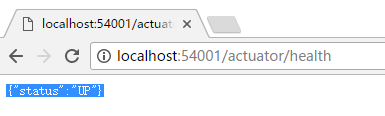
springboot2.x 后 http://localhost:54001/actuator/health
结果:
2、info:配置
info:

  app:

    name: "@project.name@" #从pom.xml中获取

    description: "@project.description@"

    version: "@project.version@"

    spring-boot-version: "@project.parent.version@"
访问:http://localhost:54001/actuator/info
{"app":{"name":"demo","description":"Demo project for Spring Boot","version":"0.0.1-SNAPSHOT","spring-boot-version":"2.1.0.RELEASE"}}
更多端点访问,可以访问:http://localhost:54001/actuator查看。
{"_links":{"self":{"href":"http://localhost:54001/actuator","templated":false},

"archaius":{"href":"http://localhost:54001/actuator/archaius","templated":false},

"auditevents":{"href":"http://localhost:54001/actuator/auditevents","templated":false},

"beans":{"href":"http://localhost:54001/actuator/beans","templated":false},

"caches-cache":{"href":"http://localhost:54001/actuator/caches/{cache}","templated":true},

"caches":{"href":"http://localhost:54001/actuator/caches","templated":false},

"health":{"href":"http://localhost:54001/actuator/health","templated":false},

"health-component":{"href":"http://localhost:54001/actuator/health/{component}","templated":true},

"health-component-instance":{"href":"http://localhost:54001/actuator/health/{component}/{instance}","templated":true},

"conditions":{"href":"http://localhost:54001/actuator/conditions","templated":false},

"configprops":{"href":"http://localhost:54001/actuator/configprops","templated":false},
"env":{"href":"http://localhost:54001/actuator/env","templated":false},
"env-toMatch":{"href":"http://localhost:54001/actuator/env/{toMatch}","templated":true},

"info":{"href":"http://localhost:54001/actuator/info","templated":false},
"loggers":{"href":"http://localhost:54001/actuator/loggers","templated":false},

"loggers-name":{"href":"http://localhost:54001/actuator/loggers/{name}","templated":true},
"heapdump":{"href":"http://localhost:54001/actuator/heapdump","templated":false},

"threaddump":{"href":"http://localhost:54001/actuator/threaddump","templated":false},
"metrics":{"href":"http://localhost:54001/actuator/metrics","templated":false},

"metrics-requiredMetricName":{"href":"http://localhost:54001/actuator/metrics/{requiredMetricName}","templated":true},

"scheduledtasks":{"href":"http://localhost:54001/actuator/scheduledtasks","templated":false},
"httptrace":{"href":"http://localhost:54001/actuator/httptrace","templated":false},

"mappings":{"href":"http://localhost:54001/actuator/mappings","templated":false},

"refresh":{"href":"http://localhost:54001/actuator/refresh","templated":false},

"features":{"href":"http://localhost:54001/actuator/features","templated":false},

"service-registry":{"href":"http://localhost:54001/actuator/service-registry","templated":false},

"consul":{"href":"http://localhost:54001/actuator/consul","templated":false}}}
更多详细内容参考:https://blog.csdn.net/Dreamhai/article/details/81077903
springboot2.x下actuator模块的更多相关文章
- Node.js(window)基础(2)——node环境下的模块,模块间调用
参考:http://www.liaoxuefeng.com/wiki/001434446689867b27157e896e74d51a89c25cc8b43bdb3000/00143450241959 ...
- Linux下PAM模块学习总结
在Linux中执行有些程序时,这些程序在执行前首先要对启动它的用户进行认证,符合一定的要求之后才允许执行,例如login, su等.在Linux中进行身份或是状态的验证程序是由PAM来进行的,PAM( ...
- erlang下lists模块sort(排序)方法源码解析(二)
上接erlang下lists模块sort(排序)方法源码解析(一),到目前为止,list列表已经被分割成N个列表,而且每个列表的元素是有序的(从大到小) 下面我们重点来看看mergel和rmergel ...
- erlang下lists模块sort(排序)方法源码解析(一)
排序算法一直是各种语言最简单也是最复杂的算法,例如十大经典排序算法(动图演示)里面讲的那样 第一次看lists的sort方法的时候,蒙了,几百行的代码,我心想要这么复杂么(因为C语言的冒泡排序我记得不 ...
- python import引入不同路径下的模块
转载 python 包含子目录中的模块方法比较简单,关键是能够在sys.path里面找到通向模块文件的路径. 下面将具体介绍几种常用情况: (1)主程序与模块程序在同一目录下: 如下面程序结构: `- ...
- 转: springboot2.0下hystrix.stream 404
springboot2.0下hystrix dashboard Unable to connect to Command Metric Stream解决办法https://blog.csdn.net/ ...
- 利用python 下paramiko模块无密码登录
利用python 下paramiko模块无密码登录 上次我个大家介绍了利用paramiko这个模块,可以模拟ssh登陆远程服务器,并且可以返回执行的命令结果,这次给大家介绍下如何利用已经建立的密钥 ...
- MSF下ms17_010_psexec模块使用技巧
0x01 前言 MS17-010 的psexec是针对Microsoft Windows的两款最受欢迎的漏洞进行攻击. CVE-2017-0146(EternalChampion / EternalS ...
- Maven环境下多模块项目构建
Maven环境下多模块项目构建 一.新建项目 1.建立我们的父模块par 2.建立我们的子模块dao层 3.建立我们的子模块service层 4.建立我们的子模块web层 5.全部配置完成后,怎么把我 ...
随机推荐
- spring-boot 环境搭建(一)
环境 jdk 8 tomcat 8.5 sts 4.4.2 maven 3.6.1 新建 maven 项目 首先创建一个普通的 maven 项目. pom.xml <project xmlns= ...
- centerOS7安装lnmp环境
视频地址: https://www.bilibili.com/video/av55251610?p=65 安装nginx http://nginx.org 点击 download vim /etc/y ...
- pytest参数化的两种方式
1.传统方式 import requests,pytest from Learning.variable import * # 定义变量 #url = "https://www.baidu. ...
- logback替换log4j
1.新建logback.xml放在src目录下(放在src下会自动加载,不需要再web.xml配置) 2.引入必要的jar包:
- (๑•̀ㅂ•́)و✧QQ用户信息管理系统
这是第二篇文章,就直接切主题 这次剖析的也是自己的作业之一:QQ信息管理系统 一:(此处省略了建Proarams类,其实目的只是想强调把连接语句单独放一个类里更容易调用,命名规范如图) 二:(导入SQ ...
- 阿里P8架构师谈:MySQL慢查询优化、索引优化、以及表等优化总结
更多内容:https://www.toutiao.com/i6599796228886626829/?tt_from=weixin&utm_campaign=client_share& ...
- SVN主从备份
SVN主从备份 两套环境:192.168.67.63(主SVN) 192.168.67.60(从SVN) 1.主环境上已经装好SVN并且存在数据仓库/home/svndata在从环境上,新建一/hom ...
- 怎么处理Win7系统备份还原提示代码0x80042302的错误?
我们都知道Win7系统自带备份还原功能,可以在电脑遇到小问题时通过还原至之前备份的正常系统来解决,非常的方便.但是有些用户在使用备份还原功能时,系统会提示0x80042302错误,这该怎么办呢?下面好 ...
- STM32WB AHB总线、APB总线与外设
方框图: 如图所示: 1)APB1外设 2)APB2外设 3)AHB1外设 4)AHB2外设 5)AHB3外设 6)AHB4外设(ABH共享总线外设) 内存映射关系图:
- 【转】通过lombok带你读透Builder构建器
原地址:https://www.jianshu.com/p/0d8fc3df3647?from=timeline&isappinstalled=0 很久之前,我在<effective j ...