
Scrapy - 小说爬虫
实例解析 - 小说爬虫
页面分析
共有三级页面
一级页面 大目录
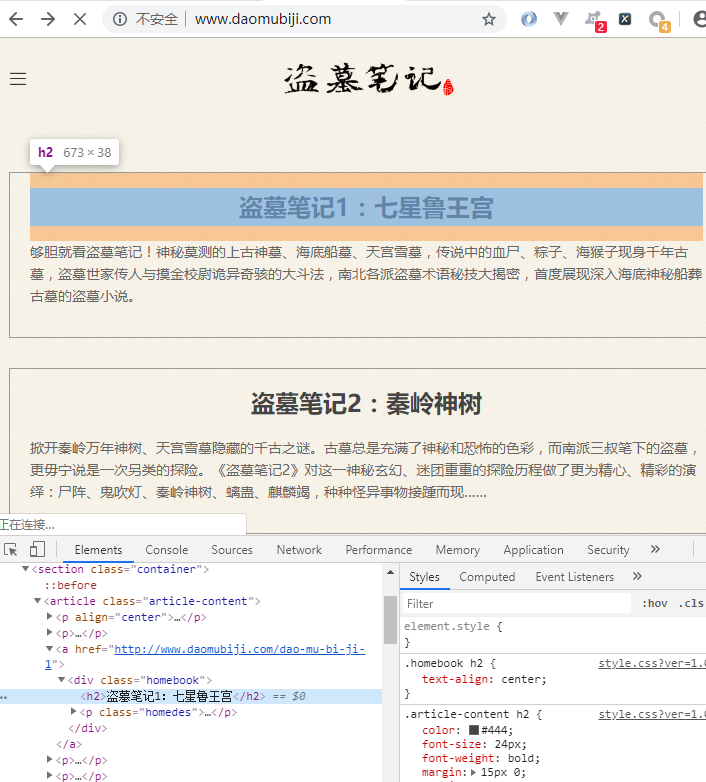
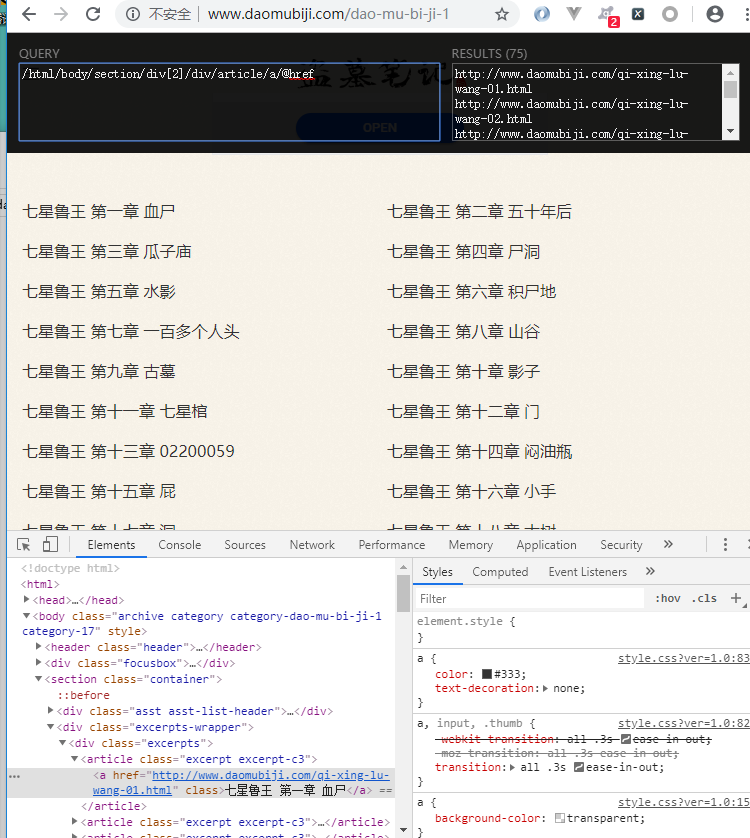
二级页面 章节目录
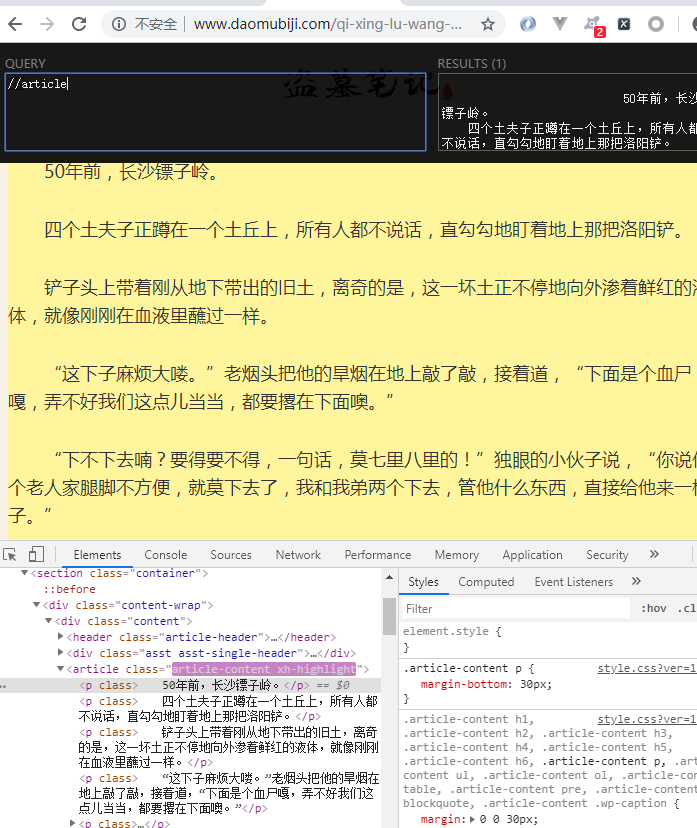
三级界面 章节内容
爬取准备
一级界面
http://www.daomubiji.com/
二级页面xpath
直接复制的 xpath
/html/body/section/article/a/@href
这里存在着反爬虫机制, 改变了页面结构
在返回的数据改变了页面结构, 需要换为下面的 xpath 才可以
//ul[@class="sub-menu"]/li/a/@href
三级页面xpath
//article
项目准备
begin.py
pycharm 启动文件,方便操作
from scrapy import cmdline

cmdline.execute('scrapy crawl daomu --nolog'.split())
settings.py
相关的参数配置
BOT_NAME = 'Daomu'


SPIDER_MODULES = ['Daomu.spiders']

NEWSPIDER_MODULE = 'Daomu.spiders'


ROBOTSTXT_OBEY = False

LOG_LEVEL = 'WARNING'


DEFAULT_REQUEST_HEADERS = {

  'Accept': 'text/html,application/xhtml+xml,application/xml;q=0.9,*/*;q=0.8',

  'Accept-Language': 'en',

  'User-Agent':'Mozilla/5.0 (Windows NT 6.1; WOW64) AppleWebKit/537.36 (KHTML, like Gecko) Chrome/74.0.3729.131 Safari/537.36',

}


ITEM_PIPELINES = {

   'Daomu.pipelines.DaomuPipeline': 300,

}
逻辑代码
items.py
指定相关期望数据
 -*- coding: utf-8 -*-

# Define here the models for your scraped items

#

# See documentation in:

# https://doc.scrapy.org/en/latest/topics/items.html

import scrapy

class DaomuItem(scrapy.Item):

    # define the fields for your item here like:

    # 卷名

    juan_name = scrapy.Field()

    # 章节数

    zh_num = scrapy.Field()

    # 章节名

    zh_name = scrapy.Field()

    # 章节链接

    zh_link = scrapy.Field()

    # 小说内容

    zh_content = scrapy.Field()
daomu.py
爬虫文件
# -*- coding: utf-8 -*-

import scrapy

from ..items import DaomuItem

class DaomuSpider(scrapy.Spider):

    name = 'daomu'

    allowed_domains = ['www.daomubiji.com']

    start_urls = ['http://www.daomubiji.com/']

    # 解析一级页面,提取 盗墓笔记1 2 3 ... 链接

    def parse(self, response):

        # print(response.text)

        one_link_list = response.xpath(

            '//ul[@class="sub-menu"]/li/a/@href'

        ).extract()

        # print('*' * 50)

        # print(one_link_list)

        # 把链接交给调度器入队列

        for one_link in one_link_list:

            yield scrapy.Request(

                url=one_link,

                callback=self.parse_two_link

            )

    # 解析二级页面

    def parse_two_link(self, response):

        # 基准xpath,匹配所有章节对象列表

        article_list = response.xpath('//article')

        # print(article_list)

        # 依次获取每个章节信息

        for article in article_list:

            # 创建item对象

            item = DaomuItem()

            info = article.xpath('./a/text()'). \

                extract_first().split()

            print(info)  # ['秦岭神树篇', '第一章', '老痒出狱']

            item['juan_name'] = info[0]

            item['zh_num'] = info[1]

            item['zh_name'] = info[2]

            item['zh_link'] = article.xpath('./a/@href').extract_first()

            # 把章节链接交给调度器

            yield scrapy.Request(

                url=item['zh_link'],

                # 把item传递到下一个解析函数

                meta={'item': item},

                callback=self.parse_three_link

            )

    # 解析三级页面

    def parse_three_link(self, response):

        item = response.meta['item']

        # 获取小说内容

        item['zh_content'] = '\n'.join(response.xpath(

            '//article[@class="article-content"]'

            '//p/text()'

        ).extract())

        yield item

        # '\n'.join(['第一段','第二段','第三段'])
pipelines.py
持久化处理
# -*- coding: utf-8 -*-

# Define your item pipelines here

#

# Don't forget to add your pipeline to the ITEM_PIPELINES setting

# See: https://doc.scrapy.org/en/latest/topics/item-pipeline.html

class DaomuPipeline(object):

    def process_item(self, item, spider):

        filename = 'downloads/{}-{}-{}.txt'.format(

            item['juan_name'],

            item['zh_num'],

            item['zh_name']

        )

        f = open(filename,'w')

        f.write(item['zh_content'])

        f.close()

        return item
Scrapy - 小说爬虫的更多相关文章
- 使用scrapy制作的小说爬虫
使用scrapy制作的小说爬虫 爬虫配套的django网站 https://www.zybuluo.com/xuemy268/note/63660 首先是安装scrapy,在Windows下的安装比 ...
- 爬虫(十八):Scrapy框架(五) Scrapy通用爬虫
1. Scrapy通用爬虫 通过Scrapy,我们可以轻松地完成一个站点爬虫的编写.但如果抓取的站点量非常大,比如爬取各大媒体的新闻信息,多个Spider则可能包含很多重复代码. 如果我们将各个站点的 ...
- 爬虫学习之基于Scrapy的爬虫自动登录
###概述 在前面两篇(爬虫学习之基于Scrapy的网络爬虫和爬虫学习之简单的网络爬虫)文章中我们通过两个实际的案例,采用不同的方式进行了内容提取.我们对网络爬虫有了一个比较初级的认识,只要发起请求获 ...
- C#最基本的小说爬虫
新手学习C#,自己折腾弄了个简单的小说爬虫,实现了把小说内容爬下来写入txt,还只能爬指定网站. 第一次搞爬虫,涉及到了网络协议,正则表达式,弄得手忙脚乱跑起来效率还差劲,慢慢改吧. 爬的目标:htt ...
- scrapy爬虫学习系列二:scrapy简单爬虫样例学习
系列文章列表: scrapy爬虫学习系列一:scrapy爬虫环境的准备: http://www.cnblogs.com/zhaojiedi1992/p/zhaojiedi_python_00 ...
- Scrapy框架-----爬虫
说明:文章是本人读了崔庆才的Python3---网络爬虫开发实战,做的简单整理,希望能帮助正在学习的小伙伴~~ 1. 准备工作: 安装Scrapy框架.MongoDB和PyMongo库,如果没有安装, ...
- Scrapy创建爬虫项目
1.打开cmd命令行工具,输入scrapy startproject 项目名称 2.使用pycharm打开项目,查看项目目录 3.创建爬虫,打开CMD,cd命令进入到爬虫项目文件夹,输入scrapy ...
- Scrapy - CrawlSpider爬虫
crawlSpider 爬虫 思路: 从response中提取满足某个条件的url地址,发送给引擎,同时能够指定callback函数. 1. 创建项目 scrapy startproject mysp ...
- 第三百五十六节,Python分布式爬虫打造搜索引擎Scrapy精讲—scrapy分布式爬虫要点
第三百五十六节,Python分布式爬虫打造搜索引擎Scrapy精讲—scrapy分布式爬虫要点 1.分布式爬虫原理 2.分布式爬虫优点 3.分布式爬虫需要解决的问题
随机推荐
- 第二章 Django之python安装(1)
Python 安装 Django 由百分百的纯 Python 代码编写而成,因此必须在系统中安装 Python .Django 需要 2.3 或更高版本的 Python.如果使用的是 Linux 或 ...
- Rocketmq 集群部署
10.1.0.178 配置文件 broker-a-m.properties brokerClusterName=PaymentClusterbrokerName=broker-anamesrvAddr ...
- idou老师教你学Istio 24:如何在Istio使用Prometheus进行监控
使用Prometheus进行监控是Istio提供的监控能力之一.Istio提供丰富的监控能力,为网格中的服务收集遥测数据.Mixer是负责提供策略控制和遥测收集的Istio组件. Istio通过Mix ...
- git rev-list 按照时间来列出两个 commit id 之间的相差数
git rev-list 按照时间来列出两个 commit id 之间的相差数 git rev-list: Lists commit objects in reverse chronological ...
- DeviceSupport 路径
/Applications/Xcode.app/Contents/Developer/Platforms/iPhoneOS.platform/DeviceSuppor
- 洛谷P1197 星球大战【并查集】
题目:https://www.luogu.org/problemnew/show/P1197 题意:有n个结点m条无向边,k次操作每次摧毁一个结点并询问此时有多少连通块. 思路:平时在线的搞多了都没想 ...
- Node.js 调试小技巧
小技巧--使用 supervisor如果你有 PHP 开发经验,会习惯在修改 PHP 脚本后直接刷新浏览器以观察结果,而你在开发 Node.js 实现的 HTTP 应用时会发现,无论你修改了代码的哪一 ...
- 012_Linux驱动之_wait_event_interruptible
1. 首先这篇博客讲解得挺好的,推荐 wait_event_interruptible 使用方法 2 .函数原型: #define wait_event_interruptible(wq, condi ...
- 安装Discuz
1.下载Discuz 版本文件 http://download.comsenz.com/DiscuzX/3.2/Discuz_X3.2_SC_GBK.zip 2.下载PHP http://window ...
- ueditor+word图片上传
最近公司做项目需要实现一个功能,在网页富文本编辑器中实现粘贴Word图文的功能. 我们在网站中使用的Web编辑器比较多,都是根据用户需求来选择的.目前还没有固定哪一个编辑器 有时候用的是UEditor ...