
构建ASP.NET MVC4+EF5+EasyUI+Unity2.x注入的后台管理系统(13)-系统日志和异常的处理③
上一节我们讲了如何捕获异常和记录日志,这一节我们讲,没有捕获的或者忘记捕获的异常包括404错误等,我们统一处理这个异常。
这一讲是利用 Application_Error 捕获所有异常,全局的异常处理为了减少代码,统一异常处理,Application_Error位于Global.asax里面,
protected void Application_Error(object sender, EventArgs e)
当一个异常在调用堆栈中没有被处理,也没有被框架代码处理时,我们说这个异常未处理,它将被ASP.NET捕获
它将捕获所有 Application 级别的 UnhandleException 和 HttpException(比如:访问的页面不存在等)
总之,在这里处理的话,那么在页面中的所有 try/catch 处理都可以不要了,但是我们为了记录日志,在BLL层还是要try catch
对此未处理错误的处理方法是显示一个页面,列出该未处理异常的详细情况。
我们通过 Application_Error事件把错误写进对应的文件里面或者数据库中。
 /// <summary>

        /// 全局的异常处理

        /// </summary>

        /// <param name="sender"></param>

        /// <param name="e"></param>

        protected void Application_Error(object sender, EventArgs e)

        {

            string s = HttpContext.Current.Request.Url.ToString();

            HttpServerUtility server = HttpContext.Current.Server;

            if (server.GetLastError() != null)

            {

                Exception lastError = server.GetLastError();

                // 此处进行异常记录,可以记录到数据库或文本,也可以使用其他日志记录组件。

                ExceptionHander.WriteException(lastError);

                Application["LastError"] = lastError;

                int statusCode = HttpContext.Current.Response.StatusCode;

                string exceptionOperator = "/SysException/Error";

                try

                {

                    if (!String.IsNullOrEmpty(exceptionOperator))

                    {

                        exceptionOperator = new System.Web.UI.Control().ResolveUrl(exceptionOperator);

                        string url = string.Format("{0}?ErrorUrl={1}", exceptionOperator, server.UrlEncode(s));

                        string script = String.Format("<script language='javascript' type='text/javascript'>window.top.location='{0}';</script>", url);

                        Response.Write(script);

                        Response.End();

                    }

                }

                catch { }

            }

        }
嘿嘿,我创造了一个错误 Convert.ToInt16("dddd");下面是错误的显示页面
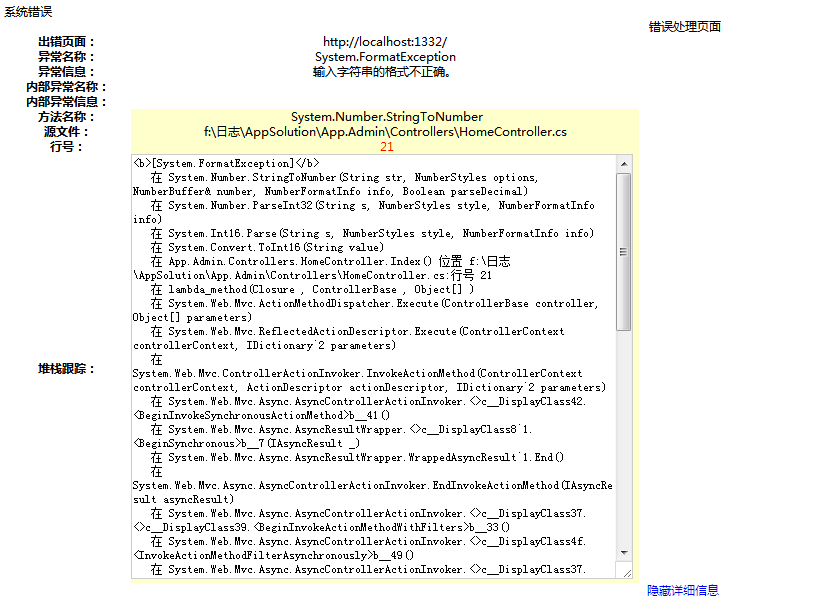
关于错误页面的制作在控制器SysExceptionController增加
       public ActionResult Error()

        {

            BaseException ex = new BaseException();

            return View(ex);

        }
添加BaseException类
 public class BaseException

    {

        #region 变量

        private string exceptionMessage;

        private string exceptionName;

        private string innerExceptionMessage;

        private string innerExceptionName;

        private bool isShow;

        private Exception outermostException;

        private string sourceErrorFile;

        private string sourceErrorRowID;

        private string stackInfo;

        private string targetSite;

        #endregion

        #region 属性

        public string ErrorPageUrl

        {

            get

            {

                return this.GetExceptionUrl();

            }

        }

        public Exception Exception

        {

            get

            {

                return (HttpContext.Current.Session["Exception"] as Exception);

            }

            private set

            {

                HttpContext.Current.Session["Exception"] = value;

            }

        }

        public string ExceptionMessage

        {

            get

            {

                return this.exceptionMessage;

            }

            private set

            {

                this.exceptionMessage = value;

            }

        }

        public string ExceptionName

        {

            get

            {

                return this.exceptionName;

            }

            private set

            {

                this.exceptionName = value;

            }

        }

        public string InnerExceptionMessage

        {

            get

            {

                return this.innerExceptionMessage;

            }

            private set

            {

                this.innerExceptionMessage = value;

            }

        }

        public string InnerExceptionName

        {

            get

            {

                return this.innerExceptionName;

            }

            private set

            {

                this.innerExceptionName = value;

            }

        }

        public bool IsShowStackInfo

        {

            get

            {

                return this.isShow;

            }

            private set

            {

                this.isShow = value;

            }

        }

        public string SourceErrorFile

        {

            get

            {

                return this.sourceErrorFile;

            }

            private set

            {

                this.sourceErrorFile = value;

            }

        }

        public string SourceErrorRowID

        {

            get

            {

                return this.sourceErrorRowID;

            }

            private set

            {

                this.sourceErrorRowID = value;

            }

        }

        public string StackInfo

        {

            get

            {

                return this.stackInfo;

            }

            private set

            {

                this.stackInfo = value;

            }

        }

        public string TargetSite

        {

            get

            {

                return this.targetSite;

            }

            private set

            {

                this.targetSite = value;

            }

        }

        #endregion

        public BaseException()

        {

            this.outermostException = null;

            this.exceptionName = null;

            this.exceptionMessage = null;

            this.innerExceptionName = null;

            this.innerExceptionMessage = null;

            this.targetSite = null;

            this.stackInfo = null;

            this.sourceErrorFile = null;

            this.sourceErrorRowID = null;

            this.isShow = false;

            try

            {

                this.Exception = HttpContext.Current.Application["LastError"] as Exception;

                if (this.Exception != null)

                {

                    this.outermostException = this.Exception;

                    if ((this.Exception is HttpUnhandledException) && (this.Exception.InnerException != null))

                    {

                        this.Exception = this.Exception.InnerException;

                    }

                    this.ExceptionName = this.GetExceptionName(this.Exception);

                    this.ExceptionMessage = this.GetExceptionMessage(this.Exception);

                    if (this.Exception.InnerException != null)

                    {

                        this.InnerExceptionName = this.GetExceptionName(this.Exception.InnerException);

                        this.InnerExceptionMessage = this.GetExceptionMessage(this.Exception.InnerException);

                    }

                    this.TargetSite = this.GetTargetSite(this.Exception);

                    this.StackInfo = this.GetStackInfo(this.Exception);

                    if ((this.outermostException is HttpUnhandledException) && (this.outermostException.InnerException != null))

                    {

                        this.StackInfo = this.StackInfo + "\r\n<a href='#' onclick=\"if(document.getElementById('phidden').style.display=='none') document.getElementById('phidden').style.display='block'; else document.getElementById('phidden').style.display='none'; return false;\"><b>[" + this.outermostException.GetType().ToString() + "]</b></a>\r\n";

                        this.StackInfo = this.StackInfo + "<pre id='phidden' style='display:none;'>" + this.outermostException.StackTrace + "</pre>";

                    }

                    this.SourceErrorFile = this.GetSourceErrorFile();

                    this.SourceErrorRowID = this.GetSourceErrorRowID();

                    this.IsShowStackInfo = true;

                }

                HttpContext.Current.Session["LastError"] = null;

            }

            catch (Exception exception)

            {

                this.ExceptionMessage = "异常基页出错" + exception.Message;

            }

        }

        #region 方法

        private string GetExceptionMessage(Exception ex)

        {

            return ex.Message;

        }

        private string GetExceptionMessageForLog()

        {

            StringBuilder builder = new StringBuilder();

            builder.AppendFormat("<ExceptionName>{0}</ExceptionName>", this.ExceptionName);

            builder.AppendFormat("<ExceptionMessage>{0}</ExceptionMessage>", this.ExceptionMessage);

            builder.AppendFormat("<InnerExceptionName>{0}</InnerExceptionName>", this.InnerExceptionName);

            builder.AppendFormat("<InnerExceptionMessage>{0}</InnerExceptionMessage>", this.InnerExceptionMessage);

            builder.AppendFormat("<TargetSite>{0}</TargetSite>", this.TargetSite);

            builder.AppendFormat("<ErrorPageUrl>{0}</ErrorPageUrl>", this.ErrorPageUrl);

            builder.AppendFormat("<SourceErrorFile>{0}</SourceErrorFile>", this.SourceErrorFile);

            builder.AppendFormat("<SourceErrorRowID>{0}</SourceErrorRowID>", this.SourceErrorRowID);

            return builder.ToString();

        }

        private string GetExceptionMessageForMail()

        {

            StringBuilder builder = new StringBuilder();

            builder.Append("<ExceptionInfo>");

            builder.Append(this.GetExceptionMessageForLog());

            builder.AppendFormat("<StackInfo><![CDATA[{0}]]></StackInfo>", this.StackInfo);

            builder.Append("</ExceptionInfo>");

            return builder.ToString();

        }

        private string GetExceptionName(Exception ex)

        {

            string str = null;

            if (ex != null)

            {

                str = ex.GetType().FullName;

            }

            return str;

        }

        private string GetExceptionUrl()

        {

            string str = null;

            if (HttpContext.Current.Request["ErrorUrl"] != null)

            {

                str = HttpContext.Current.Request["ErrorUrl"].ToString();

            }

            return str;

        }

        private string GetSourceErrorFile()

        {

            string stackInfo = this.StackInfo;

            string[] strArray = new string[];

            if (stackInfo == null)

            {

                return stackInfo;

            }

            strArray = stackInfo.Split(new string[] { "位置", "行号" }, StringSplitOptions.RemoveEmptyEntries);

            if (strArray.Length >= )

            {

                stackInfo = strArray[];

                if (stackInfo.LastIndexOf(":") == (stackInfo.Length - ))

                {

                    stackInfo = stackInfo.Substring(, stackInfo.Length - );

                }

                return stackInfo;

            }

            return "";

        }

        private string GetSourceErrorRowID()

        {

            string stackInfo = this.StackInfo;

            string[] strArray = new string[];

            if (stackInfo == null)

            {

                return stackInfo;

            }

            strArray = stackInfo.Split(new string[] { "行号" }, StringSplitOptions.RemoveEmptyEntries);

            if (strArray.Length >= )

            {

                stackInfo = strArray[].Trim();

                string[] strArray2 = stackInfo.Split(new string[] { "\r\n" }, StringSplitOptions.RemoveEmptyEntries);

                if (strArray2.Length >= )

                {

                    stackInfo = strArray2[];

                }

                return stackInfo;

            }

            return "";

        }

        private string GetStackInfo(Exception ex)

        {

            string str = null;

            if (ex != null)

            {

                str = "<b>[" + ex.GetType().ToString() + "]</b>\r\n" + ex.StackTrace;

                if (ex.InnerException != null)

                {

                    str = this.GetStackInfo(ex.InnerException) + "\r\n" + str;

                }

            }

            return str;

        }

        private string GetTargetSite(Exception ex)

        {

            string str = null;

            if (ex != null)

            {

                ex = this.GetBenmostException(ex);

                MethodBase targetSite = ex.TargetSite;

                if (targetSite != null)

                {

                    str = string.Format("{0}.{1}", targetSite.DeclaringType, targetSite.Name);

                }

            }

            return str;

        }

        protected Exception GetBenmostException(Exception ex)

        {

            while (true)

            {

                if (ex.InnerException != null)

                {

                    ex = ex.InnerException;

                }

                else

                {

                    return ex;

                }

            }

        }

        #endregion

    }
BaseException
添加Error视图
@model App.Admin.Controllers.BaseException
@{
ViewBag.Title = "异常处理页面";
Layout = "~/Views/Shared/_Index_Layout.cshtml";
}
<h2>系统错误</h2>
<div style="text-align:center;">
<table width="100%" class="blueTab" border="" cellspacing="" cellpadding="">
<tr>
<td colspan="">
<table cellspacing="" cellpadding="" width="100%" border="">
<tbody>
<tr>
<td >
错误处理页面</td>
</tr>
</tbody>
</table>
</td>
</tr>
<tr id="youhaotishi" >
<td colspan="" align="left">
欢迎您光临本网站!网站运行发生错误,请与管理员联系。错误原因可能如下:
<br />
.非法访问页面.
<br />
.您输入的数据错误.
<br />
.您访问的页面不存在.
<br />
.内容不存在,或已被删除.
<br />
.系统忙,请稍候再试.
</td>
</tr>
<tbody id="detailInformation" style="display: none;">
<tr>
<td width="20%" class="alignRight" nowrap>
<strong>出错页面:</strong>
</td>
<td class="alignLeft">
@Html.DisplayFor(model => model.ErrorPageUrl) </td>
</tr>
<tr>
<td class="alignRight" nowrap>
<strong>异常名称:</strong>
</td>
<td class="alignLeft">
@Html.DisplayFor(model => model.ExceptionName) </td>
</tr>
<tr>
<td class="alignRight" nowrap>
<strong>异常信息:</strong>
</td>
<td class="alignLeft">
@Html.DisplayFor(model => model.ExceptionMessage) </td>
</tr>
<tr id="trInnerExceptionName" runat="server">
<td class="alignRight" nowrap>
<strong>内部异常名称:</strong>
</td>
<td class="alignLeft">
@Html.DisplayFor(model => model.InnerExceptionName) </td>
</tr>
<tr id="trInnerExceptionMessage" runat="server">
<td class="alignRight" nowrap>
<strong>内部异常信息:</strong>
</td>
<td class="alignLeft">
@Html.DisplayFor(model => model.InnerExceptionMessage)
</td>
</tr>
<tr id="trExceptionMethod" runat="server">
<td class="alignRight" nowrap>
<strong>方法名称:</strong>
</td>
<td class="alignLeft" style="background-color: #ffffcc;">
@Html.DisplayFor(model => model.TargetSite) </td>
</tr>
<tr id="trExceptionSource" runat="server">
<td class="alignRight" nowrap>
<strong>源文件:</strong>
</td>
<td class="alignLeft" style="background-color: #ffffcc;">
@Html.DisplayFor(model => model.SourceErrorFile)
</td>
</tr>
<tr id="trExceptionRowId" runat="server">
<td class="alignRight" nowrap>
<strong>行号:</strong>
</td>
<td class="alignLeft" style="background-color: #ffffcc; color: Red">
@Html.DisplayFor(model => model.SourceErrorRowID) </td>
</tr>
<tr runat="server" id="trStack" visible="false">
<td class="alignRight">
<strong>堆栈跟踪:</strong>
</td>
<td class="alignLeft" style="background-color: #ffffcc;">
<code>
<pre id="litStack"><textarea name="errormsg" cols="" rows="" readonly="readonly">@Html.DisplayFor(model => model.StackInfo) </textarea> </pre>
</code>
</td>
</tr>
</tbody>
</table>
<a id="showMessage" href="#" onclick="ShowErrorMessage();return false;">显示详细信息</a>
</div>
<script type="text/javascript">
var isShowMessage = true;
function ShowErrorMessage() {
var obj = document.getElementById("showMessage")
var detailInformation = document.getElementById("detailInformation");
var youhaotishi = document.getElementById("youhaotishi");
if (isShowMessage) {
obj.innerText = "隐藏详细信息";
isShowMessage = false;
detailInformation.style.display = "block";
youhaotishi.style.display = "none";
}
else {
obj.innerText = "显示详细信息";
isShowMessage = true;
detailInformation.style.display = "none";
youhaotishi.style.display = "block";
}
}
</script>
Error.cshtml
由于系统是后台系统,我并没有做得很漂亮的错误页面(实际很丑),大家发货你的想象力和美工能力,造一个好看的,记得共享给我,有奖
构建ASP.NET MVC4+EF5+EasyUI+Unity2.x注入的后台管理系统(13)-系统日志和异常的处理③的更多相关文章
- 构建ASP.NET MVC4+EF5+EasyUI+Unity2.x注入的后台管理系统(1)-前言与目录(持续更新中...)
转自:http://www.cnblogs.com/ymnets/p/3424309.html 曾几何时我想写一个系列的文章,但是由于工作很忙,一直没有时间更新博客.博客园园龄都1年了,却一直都是空空 ...
- 构建ASP.NET MVC4+EF5+EasyUI+Unity2.x注入的后台管理系统(48)-工作流设计-起草新申请
原文:构建ASP.NET MVC4+EF5+EasyUI+Unity2.x注入的后台管理系统(48)-工作流设计-起草新申请 系列目录 创建新表单之后,我们就可以起草申请了,申请按照严格的表单步骤和分 ...
- 构建ASP.NET MVC4+EF5+EasyUI+Unity2.x注入的后台管理系统(47)-工作流设计-补充
原文:构建ASP.NET MVC4+EF5+EasyUI+Unity2.x注入的后台管理系统(47)-工作流设计-补充 系列目录 补充一下,有人要表单的代码,这个用代码生成器生成表Flow_Form表 ...
- 构建ASP.NET MVC4+EF5+EasyUI+Unity2.x注入的后台管理系统(46)-工作流设计-设计分支
原文:构建ASP.NET MVC4+EF5+EasyUI+Unity2.x注入的后台管理系统(46)-工作流设计-设计分支 系列目录 步骤设置完毕之后,就要设置好流转了,比如财务申请大于50000元( ...
- 构建ASP.NET MVC4+EF5+EasyUI+Unity2.x注入的后台管理系统(45)-工作流设计-设计步骤
原文:构建ASP.NET MVC4+EF5+EasyUI+Unity2.x注入的后台管理系统(45)-工作流设计-设计步骤 系列目录 步骤设计很重要,特别是规则的选择. 我这里分为几个规则 1.按自行 ...
- 构建ASP.NET MVC4+EF5+EasyUI+Unity2.x注入的后台管理系统(44)-工作流设计-设计表单
原文:构建ASP.NET MVC4+EF5+EasyUI+Unity2.x注入的后台管理系统(44)-工作流设计-设计表单 系列目录 设计表单是比较复杂的一步,完成一个表单的设计其实很漫长,主要分为四 ...
- 构建ASP.NET MVC4+EF5+EasyUI+Unity2.x注入的后台管理系统(43)-工作流设计-字段分类设计
原文:构建ASP.NET MVC4+EF5+EasyUI+Unity2.x注入的后台管理系统(43)-工作流设计-字段分类设计 系列目录 建立好42节的表之后,每个字段英文表示都是有意义的说明.先建立 ...
- 构建ASP.NET MVC4+EF5+EasyUI+Unity2.x注入的后台管理系统(42)-工作流设计01
原文:构建ASP.NET MVC4+EF5+EasyUI+Unity2.x注入的后台管理系统(42)-工作流设计01 工作流在实际应用中还是比较广泛,网络中存在很多工作流的图形化插件,可以做到拉拽的工 ...
- 构建ASP.NET MVC4+EF5+EasyUI+Unity2.x注入的后台管理系统(40)-精准在线人数统计实现-【过滤器+Cache】
原文:构建ASP.NET MVC4+EF5+EasyUI+Unity2.x注入的后台管理系统(40)-精准在线人数统计实现-[过滤器+Cache] 系列目录 上次的探讨没有任何结果,我浏览了大量的文章 ...
- 构建ASP.NET MVC4+EF5+EasyUI+Unity2.x注入的后台管理系统(41)-组织架构
原文:构建ASP.NET MVC4+EF5+EasyUI+Unity2.x注入的后台管理系统(41)-组织架构 本节开始我们要实现工作流,此工作流可以和之前的所有章节脱离关系,也可以紧密合并. 我们当 ...
随机推荐
- Shell特殊变量
$ 表示当前Shell进程的ID,即pid $echo $$ 运行结果 特殊变量列表 变量 含义 $0 当前脚本的文件名 $n 传递给脚本或函数的参数.n 是一个数字,表示第几个参数.例如,第一个参数 ...
- Android笔记——Button点击事件几种写法
Button点击事件:大概可以分为以下几种: 匿名内部类 定义内部类,实现OnClickListener接口 定义的构造方法 用Activity实现OnClickListener接口 指定Button ...
- AES加密
package com.edu.hpu; import java.math.BigInteger; import java.security.MessageDigest; import java.se ...
- PhotoView实现图片随手势的放大缩小的效果
项目需求:在listView的条目中如果有图片,点击条目,实现图片的放大,并且图片可以根据手势来控制图片放大缩小的比例.类似于微信朋友圈中查看好友发布的照片所实现的效果. 思路是这样的:当点击条目的时 ...
- EntityFramework.Extended 支持 MySql
EntityFramework.Extended 默认不支持 MySql,需要配置如下代码: [DbConfigurationType(typeof(DbContextConfiguration))] ...
- Velocity笔记--使用Velocity获取动态Web项目名的问题
以前使用jsp开发的时候,可以通过request很轻松的获取到根项目名,现在换到使用velocity渲染视图,因为已经不依赖servlet,request等一些类的环境,而Web项目的根项目名又不是写 ...
- javascript动画系列第二篇——磁性吸附
× 目录 [1]范围限定 [2]拖拽范围 [3]磁性吸附 前面的话 上一篇,我们介绍了元素拖拽的实现.但在实际应用中,常常需要为拖拽的元素限定范围.而通过限定范围,再增加一些辅助的措施,就可以实现磁性 ...
- Flexible 弹性盒子模型之CSS flex-shrink 属性
实例 让第二个元素收缩到其他元素的三分之一: 效果预览 div:nth-of-type(2){flex-shrink:3;} 浏览器支持 表格中的数字表示支持该属性的第一个浏览器的版本号. 紧跟在 - ...
- js闭包for循环总是只执行最后一个值得解决方法
<style> li{ list-style: none;width:40px;height: 40px;text-align:center;line-height: 40px;curso ...
- 【从零开始学BPM,Day2】默认表单开发
[课程主题]主题:5天,一起从零开始学习BPM[课程形式]1.为期5天的短任务学习2.每天观看一个视频,视频学习时间自由安排. [第二天课程] Step 1 软件下载:H3 BPM10.0全开放免费下 ...