
SiteMesh详解
Sitemesh是一种页面装饰技术:它通过过滤器(filter)来拦截页面访问,据被访问页面的URL找到合适的装饰模板等等,感兴趣的朋友可以了解下哦
一,基本概念
1,Sitemesh是一种页面装饰技术 :
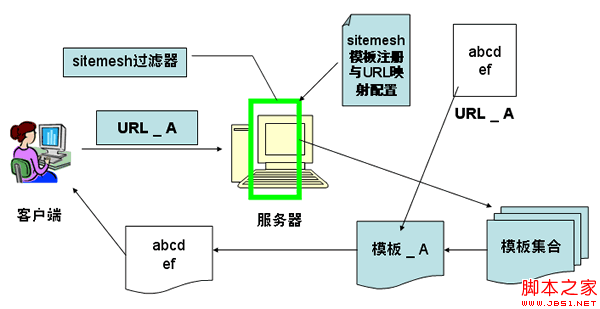
1 :它通过过滤器(filter)来拦截页面访问
2 :根据被访问页面的URL找到合适的装饰模板
3 :提取被访问页面的内容,放到装饰模板中合适的位置
4 :最终将装饰后的页面发送给客户端。
2,在sitemesh中,页面分为两种:装饰模板和普通页面。
1)装饰模板,是指用于修饰其它页面的页面。
2)普通页面,一般指各种应用页面。
3,接下来,我们通过一个简单的例子来说明一下sitemesh修饰网页的基本原理。
二,模板修饰网页的原理
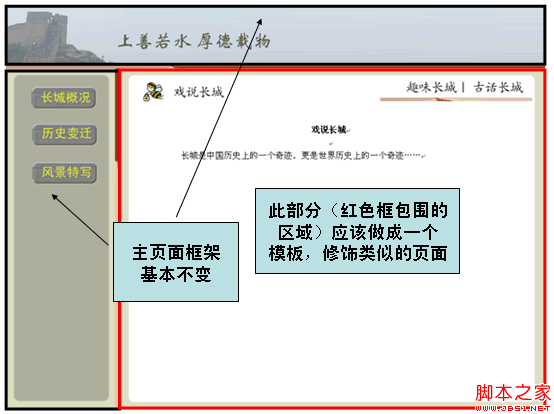
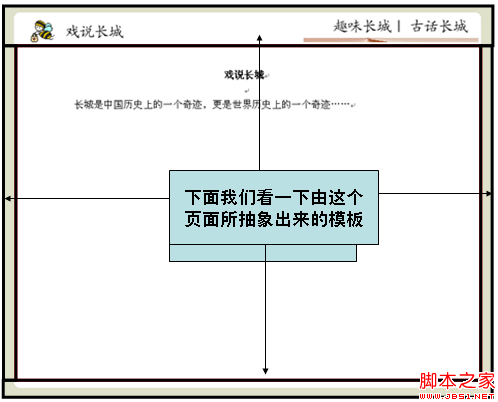
通过Sitemesh的注册机制,告诉Sitemesh,当访问该路径时使用XXX模板(假定使用前面那个模板)来修饰被访问页面。
当用户在左边导航栏点击“戏说长城”( /ShowGreatWall.do)时,右边的“戏说长城”页面将会被指定的模板修饰
总结上面过程,Sitemesh修饰网页的基本原理,可以通过下面来说明:
三,Sitemesh的配置与使用
1)WEB-INF/web.xml中加入filter定义与sitemesh的taglib定义
<filter>

<filter-name>sitemesh</filter-name>

<filter-class>com.opensymphony.module.sitemesh.filter.PageFilter</filter-class>

</filter>

<filter-mapping>

<filter-name>sitemesh</filter-name>

<url-pattern>/*</url-pattern>

</filter-mapping>

<taglib>

<taglib-uri>sitemesh-decorator</taglib-uri>

<taglib-location>/WEB-INF/sitemesh-decorator.tld</taglib-location>

</taglib>

<taglib>

<taglib-uri>sitemesh-page</taglib-uri>

<taglib-location>/WEB-INF/sitemesh-page.tld</taglib-location>

</taglib>
2)创建WEB-INF/decorators.xml,在该文件中配置有哪些模板,以及每个模板具体修饰哪些URL,另外也可以配置哪些URL不需要模板控制 , decorators.xml的一个例子如下:
<excludes>

<pattern>/Login*</pattern>

</excludes>

<decorators defaultdir="/decorators">

<decorator name="main" page=“DecoratorMainPage.jsp">

<pattern>/*</pattern>

</decorator>

<decorator name=“pop" page=“PopPage.jsp">

<pattern>/showinfo.jsp*</pattern>

<pattern>

/myModule/GreatWallDetailAction.do*

</pattern>

</decorator>

</decorators>
3)我们看一个修饰模板的例子
<%@page contentType="text/html;?charset=GBK"%>

<%@taglib uri="sitemesh-decorator"?prefix="decorator" %>

<html>

<head>

<title> <decorator:title/> </title>

<decorator:head/>

</head>

<body>

Hello World <hr/>

<decorator:body/>

</body>

</html>
4)我们看一个被修饰的页面的例子:
<%@ page contentType="text/html;?charset=GBK"%>

<html>

<head>

<title>Hello World</title>

</head>

<body>

<p>Decorated page goes here.</p

</body>

</html>
5)我们看一下装饰模板中可以使用的Sitemesh标签
<decorator:head />
取出被装饰页面的head标签中的内容。
<decorator:body />
取出被装饰页面的body标签中的内容。
<decorator:title default="" />
取出被装饰页面的title标签中的内容。default为默认值
<decorator:getProperty property="" default="" writeEntireProperty=""/>
取出被装饰页面相关标签的属性值。
writeEntireProperty表明,是显示属性的值还是显示“属性=值”
Html标签的属性
Body标签的属性
Meta标签的属性
注意如果其content值中包含“>或<”会报错,需转码,例如<等等
default是默认值
<decorator:usePage id="" />
将被装饰页面构造为一个对象,可以在装饰页面的JSP中直接引用。
6)看一个在装饰模板中使用标签的例子
代码如下:
<html lang=“ <decorator:getProperty property=‘lang’/> ”>

<head>

<title> <decorator:title default=“你好” /> </title>

<decorator:head />

</head>

<body <decorator:getProperty property=“body.onload" writeEntireProperty=“1"/> >

从meta中获取变量company的名称:

<decorator:getProperty property=“meta.company”/>

下面是被修饰页面的body中的内容:

<decorator:body />

<decorator:usePage id=“myPage" />

<%=myPage.getRequest().getAttribute(“username”)%>

</body>

</html>
7)看一下相应的在被修饰页面中的代码:
代码如下:
<html lang=“en”>

<head>

<title>我的sitemesh</title>

<meta name=“company” content=“smartdot”/>

<meta name=“Author” content=“zhangsan”/>

<script>

function count(){return 10;}

</script>

</head>

<body onload=“count()”>

<p>这是一个被修饰页面</p>

</body>

</html>
四,总结
1,Sitemesh最为重要的就是做用于修饰的模板,并在decorators.xml中配置这些模板用于修饰哪些页面。因此使用Sitemesh的主要过程就是:做装饰模板,然后在decorators.xml中配置URL Pattern
2,分析整个工程,看哪些页面需要抽象成模板,例如二级页面、三级页面、弹出窗口等等可能都需要做成相应的模板,一般来说,一个大型的OA系统,模板不会超过8个。
— — —— — — — — — — — — — — — — — — — — — — — — —
如果某个特殊的需求请求路径在过滤器的范围内,但又不想使用模板怎么办?
你总不能这么不讲道理吧!
大家放心吧,SiteMesh早就考虑到这一点了,上面第5步说道的decorators.xml这个时候就起到作用了!
下面是我的decorators.xml:
<?xml version="1.0" encoding="ISO-8859-1"?>

<decorators defaultdir="/decorators">

<!-- Any urls that are excluded will never be decorated by Sitemesh -->

<excludes>

<pattern>/index.jsp*</pattern>

<pattern>/login/*</pattern>

</excludes>

<decorator name="main" page="main.jsp">

<pattern>/*</pattern>

</decorator>

</decorators>
decorators.xml有两个主要的结点:
decorator结点指定了模板的位置和文件名,通过pattern来指定哪些路径引用哪个模板
excludes结点则指定了哪些路径的请求不使用任何模板
如上面代码,/index.jsp和凡是以/login/开头的请求路径一律不使用模板;
另外还有一点要注意的是:decorators结点的defaultdir属性指定了模板文件存放的目录;
decorators.xml还有另一种配置方式,如下:
<?xml version="1.0" encoding="UTF-8"?>

<decorators defaultdir="/WEB-INF/views">

    <!-- 默认装饰页面, 在需要装饰的页面增加<meta name="decorator" content="default"/> -->

    <decorator name="blank" page="layouts/blank.jsp" />

    <decorator name="default" page="layouts/default.jsp" />

    <!-- CMS基础主题装饰页面 -->

    <decorator name="cms_default_basic" page="modules/cms/front/themes/basic/layouts/default.jsp" />

    <decorator name="cms_default_weixin" page="modules/cms/front/themes/weixin/layouts/default.jsp" />

</decorators>
其中模板的定义如下
 <%@ page contentType="text/html;charset=UTF-8"%>

 <%@ taglib prefix="sitemesh" uri="http://www.opensymphony.com/sitemesh/decorator" %>

 <!DOCTYPE html>

 <html style="overflow-x:auto;overflow-y:auto;">

 <head>

     <title><sitemesh:title/></title>

     <%@include file="/WEB-INF/views/include/head.jsp" %>

     <sitemesh:head/>

 </head>

 <body>

     <sitemesh:body/>

 </body>

 </html>
此时在需要装饰的页面中用
<meta name="decorator" content="default"/>引入装饰模板即可。
SiteMesh详解的更多相关文章
- 常见 jar包详解
常见 jar包详解 jar包 用途 axis.jar SOAP引擎包 commons-discovery-0.2.jar 用来发现.查找和实现可插入式接口,提供一些一般类实例化.单件的生命周期 ...
- Thymeleaf3语法详解和实战
Thymeleaf3语法详解 Thymeleaf是Spring boot推荐使用的模版引擎,除此之外常见的还有Freemarker和Jsp.Jsp应该是我们最早接触的模版引擎.而Freemarker工 ...
- 【struts2基础】配置详解
一.struts2工作原理(网友总结,千遍一律) 1 客户端初始化一个指向Servlet容器(例如Tomcat)的请求2 这个请求经过一系列的过滤器(Filter)(这些过滤器中有一个叫做Action ...
- struts-2.3.24.1中的jar的详解
Struts2.3.24.1核心Jar包详解 antlr-2.7.2.jar 语言转换工具,它是接受词文法语言描述,并能产生识别这些语言的语句的程序的一种工具 a ...
- SiteMesh3使用实例和详解
一.SiteMesh介绍 SiteMesh是一个网页布局和修饰的框架,利用它可以将网页的内容和页面结构分离,以达到页面结构共享的目的.[来自百度百科] 通俗的理解就是,SiteMesh把页面中变化的和 ...
- Linq之旅:Linq入门详解(Linq to Objects)
示例代码下载:Linq之旅:Linq入门详解(Linq to Objects) 本博文详细介绍 .NET 3.5 中引入的重要功能:Language Integrated Query(LINQ,语言集 ...
- 架构设计:远程调用服务架构设计及zookeeper技术详解(下篇)
一.下篇开头的废话 终于开写下篇了,这也是我写远程调用框架的第三篇文章,前两篇都被博客园作为[编辑推荐]的文章,很兴奋哦,嘿嘿~~~~,本人是个很臭美的人,一定得要截图为证: 今天是2014年的第一天 ...
- EntityFramework Core 1.1 Add、Attach、Update、Remove方法如何高效使用详解
前言 我比较喜欢安静,大概和我喜欢研究和琢磨技术原因相关吧,刚好到了元旦节,这几天可以好好学习下EF Core,同时在项目当中用到EF Core,借此机会给予比较深入的理解,这里我们只讲解和EF 6. ...
- Java 字符串格式化详解
Java 字符串格式化详解 版权声明:本文为博主原创文章,未经博主允许不得转载. 微博:厉圣杰 文中如有纰漏,欢迎大家留言指出. 在 Java 的 String 类中,可以使用 format() 方法 ...
随机推荐
- 数组Mex
题目描述 请设计一个高效算法,查找数组中未出现的最小正整数. 给定一个整数数组A和数组的大小n,请返回数组中未出现的最小正整数.保证数组大小小于等于500. 测试样例: [-1,2,3,4],4 返回 ...
- 调度 Quartz 时间格式配置
1. CronTrigger时间格式配置说明 CronTrigger配置格式: 格式: [秒] [分] [小时] [日] [月] [周] [年]
- swift系统学习第三章
第九节:结构体-sturt //: Playground - noun: a place where people can play import UIKit /* swift学习第九节 结构体:st ...
- nginx源码学习资源(不断更新)
nginx源码学习是一个痛苦又快乐的过程,下面列出了一些nginx的学习资源. 首先要做的当然是下载一份nginx源码,可以从nginx官方网站下载一份最新的. 看了nginx源码,发现这是一份完全没 ...
- jQuery对象与DOM对象之间的转换
刚开始学习jQuery,可能一时会分不清楚哪些是jQuery对象,哪些是DOM对象.至于DOM对象不多解释,我们接触的太多了,下面重点介绍一下jQuery,以及两者相互间的转换. 什么是jQuery对 ...
- LeetCode Longest Increasing Subsequence (LIS O(nlogn))
题意: 给一个数组,求严格递增的最长递增子序列的长度. 思路: 开销是一个额外的O(n)的数组.lower_bound(begin,end,val)的功能是:返回第一个大于等于val的地址. clas ...
- Linux 下网络性能优化方法简析
概述 对于网络的行为,可以简单划分为 3 条路径:1) 发送路径,2) 转发路径,3) 接收路径,而网络性能的优化则可基于这 3 条路径来考虑.由于数据包的转发一般是具备路由功能的设备所关注,在本文中 ...
- ARM异常中断处理
ARM异常中断处理 在ARM体系中,通常有以下3种方式控制程序的执行流程: 在正常程序执行过程中,每执行一条ARM指令,程序计数器寄存器(PC)的值加4个字节:每执行一条Thumb指令,程序计数器寄存 ...
- SourceTree不出现用户登录窗口,提示错误fatal: unable to access'...'; error setting certificate verify locations
SourceTree不出现用户登录窗口,提示错误fatal: unable to access'...'; error setting certificate verify locations; .. ...
- 冒泡排序(C++版)
/** Bubble Sort * * Key * * position: where swap * * iter: sub-position in each trip * */ template & ...