
unity之定制脚本模板
1、unity的脚本模板
using System.Collections;

using System.Collections.Generic;

using UnityEngine;

public class NewBehaviourScript : MonoBehaviour {

    // Use this for initialization

    void Start () {

    }

    // Update is called once per frame

    void Update () {

    }

}
2、修改默认脚本模板
////////////////////////////////////////////////////////////////////

//                          _ooOoo_                               //

//                         o8888888o                              //

//                         88" . "88                              //

//                         (| ^_^ |)                              //

//                         O\  =  /O                              //

//                      ____/`---'\____                           //

//                    .'  \\|     |//  `.                         //

//                   /  \\|||  :  |||//  \                        //

//                  /  _||||| -:- |||||-  \                       //

//                  |   | \\\  -  /// |   |                       //

//                  | \_|  ''\---/''  |   |                       //

//                  \  .-\__  `-`  ___/-. /                       //

//                ___`. .'  /--.--\  `. . ___                     //

//              ."" '<  `.___\_<|>_/___.'  >'"".                  //

//            | | :  `- \`.;`\ _ /`;.`/ - ` : | |                 //

//            \  \ `-.   \_ __\ /__ _/   .-` /  /                 //

//      ========`-.____`-.___\_____/___.-`____.-'========         //

//                           `=---='                              //

//      ^^^^^^^^^^^^^^^^^^^^^^^^^^^^^^^^^^^^^^^^^^^^^^^^^^        //

//            佛祖保佑       永不宕机     永无BUG                 //

////////////////////////////////////////////////////////////////////

using System.Collections;

using System.Collections.Generic;

using UnityEngine;

public class #SCRIPTNAME# : MonoBehaviour {

    // Use this for initialization

    void Start () {

        #NOTRIM#

    }

    // Update is called once per frame

    void Update () {

        #NOTRIM#

    }

}
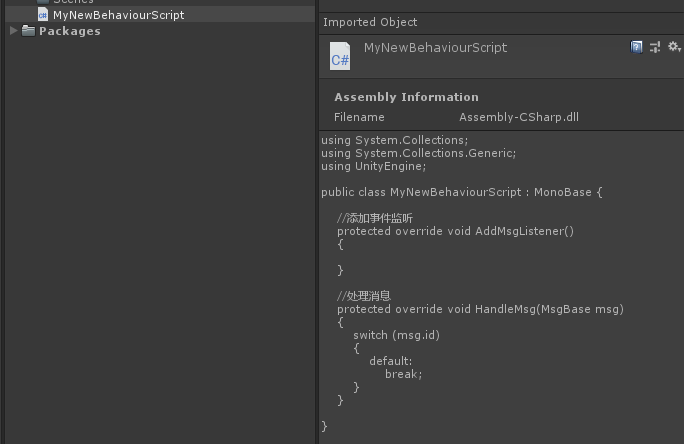
3、拓展脚本模板
using System.Collections;

using System.Collections.Generic;

using UnityEngine;

public class MyNewBehaviourScript : MonoBase {

    //添加事件监听

    protected override void AddMsgListener()

    {

    }

    //处理消息

    protected override void HandleMsg(MsgBase msg)

    {

        switch (msg.id)

        {

            default:

                break;

        }

    }

}
using UnityEditor;

using UnityEngine;

using System;

using System.IO;

using UnityEditor.ProjectWindowCallback;

using System.Text;

using System.Text.RegularExpressions;

public class CreateTemplateScript {

    //脚本模板路径

    private const string TemplateScriptPath = "Assets/Editor/MyTemplateScript.cs.txt";

    //菜单项

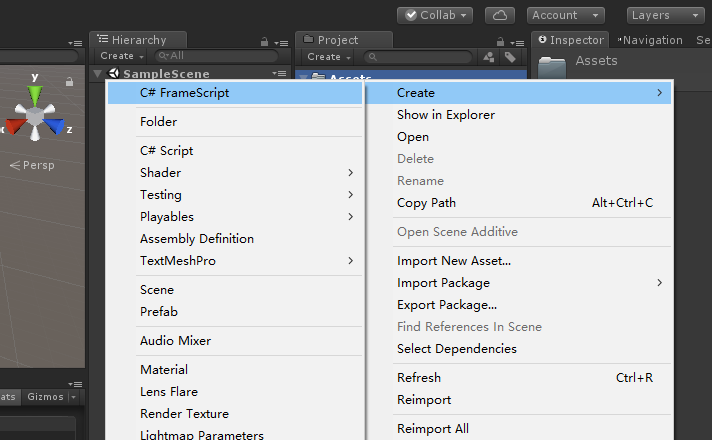
    [MenuItem("Assets/Create/C# FrameScript", false, )]

    static void CreateScript()

    {

        string path = "Assets";

        foreach (UnityEngine.Object item in Selection.GetFiltered(typeof(UnityEngine.Object),SelectionMode.Assets))

        {

            path = AssetDatabase.GetAssetPath(item);

            if (!string.IsNullOrEmpty(path) && File.Exists(path))

            {

                path = Path.GetDirectoryName(path);

                break;

            }

        }

        ProjectWindowUtil.StartNameEditingIfProjectWindowExists(, ScriptableObject.CreateInstance<CreateScriptAsset>(),

        path + "/MyNewBehaviourScript.cs",

        null, TemplateScriptPath);

    }

}

class CreateScriptAsset : EndNameEditAction

{

    public override void Action(int instanceId, string newScriptPath, string templatePath)

    {

        UnityEngine.Object obj= CreateTemplateScriptAsset(newScriptPath, templatePath);

        ProjectWindowUtil.ShowCreatedAsset(obj);

    }

    public static UnityEngine.Object CreateTemplateScriptAsset(string newScriptPath, string templatePath)

    {

        string fullPath = Path.GetFullPath(newScriptPath);

        StreamReader streamReader = new StreamReader(templatePath);

        string text = streamReader.ReadToEnd();

        streamReader.Close();

        string fileNameWithoutExtension = Path.GetFileNameWithoutExtension(newScriptPath);

        //替换模板的文件名

        text = Regex.Replace(text, "MyTemplateScript", fileNameWithoutExtension);

        bool encoderShouldEmitUTF8Identifier = true;

        bool throwOnInvalidBytes = false;

        UTF8Encoding encoding = new UTF8Encoding(encoderShouldEmitUTF8Identifier, throwOnInvalidBytes);

        bool append = false;

        StreamWriter streamWriter = new StreamWriter(fullPath, append, encoding);

        streamWriter.Write(text);

        streamWriter.Close();

        AssetDatabase.ImportAsset(newScriptPath);

        return AssetDatabase.LoadAssetAtPath(newScriptPath, typeof(UnityEngine.Object));

    }

}
4、总结
unity之定制脚本模板的更多相关文章
- 定制自己的Unity脚本模板
有时候想给脚本添加符合自己编程习惯的内容,或是一些个性化信息.而作为一个多多少少有点强迫症的人,这种东西要加就得每个脚本都加上,不然看着多不爽! 于是就得每添加一个脚本就去修改一下,很麻烦. 但是,在 ...
- 修改Unity脚本模板的方法合计
作为一个习惯于偷懒的程序,重复性的无聊内容是最让人无奈的事,就比如我们创建Unity脚本之后,需要手动调整生成的新脚本的格式.编码.内容:如果我们要编写的是编辑器或者服务器端脚本,需要修改的内容就会更 ...
- 【Cocos谁学谁会】定制属于自己的脚本模板
版权申明: 本文原创首发于以下网站,您可以自由转载,但必须加入完整的版权声明 博客园:https://www.cnblogs.com/MogooStudio/ csdn博客:https://blog. ...
- Unity 添加,修改默认创建脚本模板
Unity 默认创建的脚本可以添加也可以修改,不需要修改Editor. 一.找到模板目录 \Editor\Data\Resources\ScriptTemplates 二.如果要修改模板,直接打开修改 ...
- Tips12: 私人定制 专属的Unity3D 脚本模板
在使用U3D的过程中,新建一个C#脚本,它包含着空的Start()和Update()函数. 根据个人习惯的不同,可能有些人有着自己的脚本风格,每次进去都增删改很麻烦,这里介绍一个更改新建脚本模板的方 ...
- 《转》Unity3D研究院编辑器之创建Lua脚本模板
Unity里能创建 c#脚本模板,但是如果我想创建Lua脚本模板怎么办呢?拓展一下编辑器吧. 设置一下Lua脚本的模板地址 : Assets/Editor/Lua/Template/lua.lua ...
- Unity3d自定义脚本模板
这是一个小技巧,打开Unity安装目录,如: C:\Program Files (x86)\Unity\Editor\Data\Resources\ScriptTemplates /* * * Tit ...
- 如何修改新建脚本模板-ScriptTemplates(Unity3D开发之十五)
猴子原创,欢迎转载.转载请注明: 转载自Cocos2Der-CSDN,谢谢! 原文地址: http://blog.csdn.net/cocos2der/article/details/44957631 ...
- unity中js脚本与c#脚本互相调用
unity中js脚本与c#脚本互相调用 test1.js function OnGUI() { if(GUI.Button(Rect(25,25,100,30),"JS Call CS& ...
随机推荐
- TFS应用层服务器获取F5用户的真实IP地址(高可用性)
当用户数量达到一定级别(例如2千)以上,为保证TFS系统的持续服务,最大程度减少因系统宕机对研发团队的影响,系统管理员一般会考虑应用层和数据库层的高可用性方案. 在应用层的高可用性方案中,目前比较常见 ...
- 使用ABP框架踩过的坑系列3
从架构角度来讲,ApplicationService究竟应该如何定位,一种说法是直接对应用例UseCase, 也就是直接对应UI, 这个UI是广义的,不仅仅是浏览器的页面,也包括API调用.还是从我曾 ...
- web窗体ListView配置分页
一.配置objectDataSource 1.选择业务逻辑层的类,再选择对应的分页方法 2.配置Select对应的方法,必须是一个带两个整型参数的方法,第一个参数表示要查看的第一条记录的前一条,第二个 ...
- .net mvc使用FlexPaper插件实现在线预览PDF,EXCEL,WORD的方法
FlexPaper插件可以实现在浏览器中在线预览pdf,word,excel等. 在网上看到很多关于这个插件实现预览的技术,但是很难做到word和excel在线预览. pdf很好实现. 首先下载相关的 ...
- DI spring.net简单使用
IOC或DI spring.net简单使用 一.spring.net是什么? Spring 框架本是 Java 平台上一个应用非常多的.开源的框架.虽然语言是固定的,但是好的方法应该是通用的,于是 ...
- Day 12 装饰器,开发封闭.
一.什么是装饰器 装饰器本质上就是一个python函数,他可以让其他函数在不需要做任何代码变动的前提下,增加额外的功能,装饰器的返回值也是一个函数对象. 装饰器的应用场景:比如插入日志,性能测试,事务 ...
- 前端入门CSS(1)
day48 参考:https://www.cnblogs.com/liwenzhou/p/7999532.html CSS的几种引入方式 行内样式 行内式是在标记的style属性中设定CSS样式,不推 ...
- MySQL(外键变种)
day58 外键的变种 a. 用户表和部门表 用户: 不唯一 1 alex ...
- Elasticsearch java API (23)查询 DSL Geo查询
地理查询编辑 Elasticsearch支持两种类型的地理数据: geo_point纬度/经度对字段的支持,和 geo_shape领域,支持点.线.圆.多边形.多等. 这组查询: geo_shape ...
- JMeter基础:请求参数Parameters 、Body Data的区别
使用Jmeter测试时,很多人不知道请求参数Parameters .Body Data的区别和用途,这里简单介绍下 先了解一个接口的基本概念 在客户机和服务器之间进行请求-响应时,HTTP协议中包括G ...