
unity之定制脚本模板
1、unity的脚本模板
using System.Collections;

using System.Collections.Generic;

using UnityEngine;

public class NewBehaviourScript : MonoBehaviour {

    // Use this for initialization

    void Start () {

    }

    // Update is called once per frame

    void Update () {

    }

}
2、修改默认脚本模板
////////////////////////////////////////////////////////////////////

//                          _ooOoo_                               //

//                         o8888888o                              //

//                         88" . "88                              //

//                         (| ^_^ |)                              //

//                         O\  =  /O                              //

//                      ____/`---'\____                           //

//                    .'  \\|     |//  `.                         //

//                   /  \\|||  :  |||//  \                        //

//                  /  _||||| -:- |||||-  \                       //

//                  |   | \\\  -  /// |   |                       //

//                  | \_|  ''\---/''  |   |                       //

//                  \  .-\__  `-`  ___/-. /                       //

//                ___`. .'  /--.--\  `. . ___                     //

//              ."" '<  `.___\_<|>_/___.'  >'"".                  //

//            | | :  `- \`.;`\ _ /`;.`/ - ` : | |                 //

//            \  \ `-.   \_ __\ /__ _/   .-` /  /                 //

//      ========`-.____`-.___\_____/___.-`____.-'========         //

//                           `=---='                              //

//      ^^^^^^^^^^^^^^^^^^^^^^^^^^^^^^^^^^^^^^^^^^^^^^^^^^        //

//            佛祖保佑       永不宕机     永无BUG                 //

////////////////////////////////////////////////////////////////////

using System.Collections;

using System.Collections.Generic;

using UnityEngine;

public class #SCRIPTNAME# : MonoBehaviour {

    // Use this for initialization

    void Start () {

        #NOTRIM#

    }

    // Update is called once per frame

    void Update () {

        #NOTRIM#

    }

}
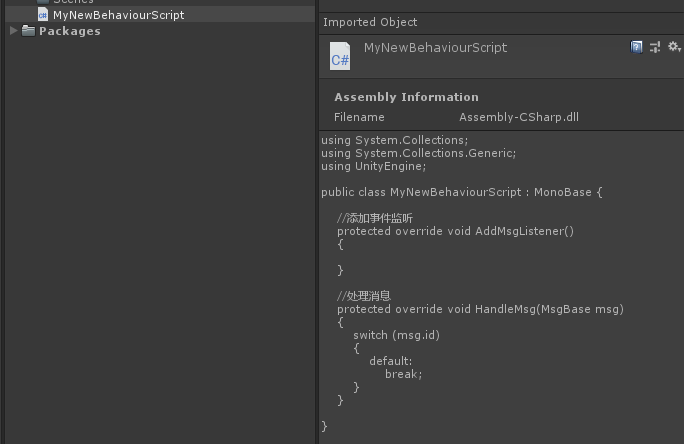
3、拓展脚本模板
using System.Collections;

using System.Collections.Generic;

using UnityEngine;

public class MyNewBehaviourScript : MonoBase {

    //添加事件监听

    protected override void AddMsgListener()

    {

    }

    //处理消息

    protected override void HandleMsg(MsgBase msg)

    {

        switch (msg.id)

        {

            default:

                break;

        }

    }

}
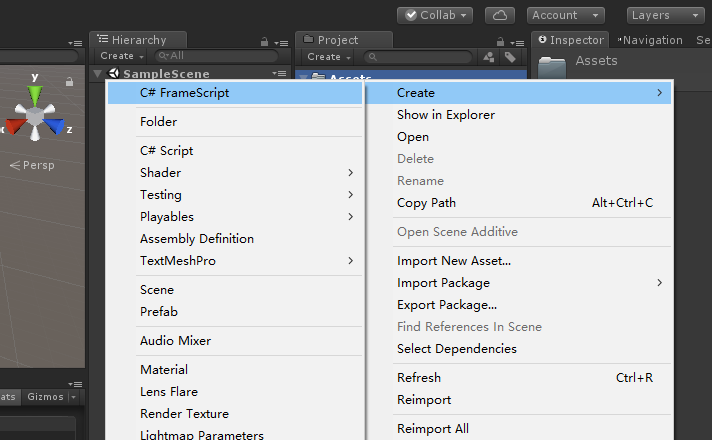
using UnityEditor;

using UnityEngine;

using System;

using System.IO;

using UnityEditor.ProjectWindowCallback;

using System.Text;

using System.Text.RegularExpressions;

public class CreateTemplateScript {

    //脚本模板路径

    private const string TemplateScriptPath = "Assets/Editor/MyTemplateScript.cs.txt";

    //菜单项

    [MenuItem("Assets/Create/C# FrameScript", false, )]

    static void CreateScript()

    {

        string path = "Assets";

        foreach (UnityEngine.Object item in Selection.GetFiltered(typeof(UnityEngine.Object),SelectionMode.Assets))

        {

            path = AssetDatabase.GetAssetPath(item);

            if (!string.IsNullOrEmpty(path) && File.Exists(path))

            {

                path = Path.GetDirectoryName(path);

                break;

            }

        }

        ProjectWindowUtil.StartNameEditingIfProjectWindowExists(, ScriptableObject.CreateInstance<CreateScriptAsset>(),

        path + "/MyNewBehaviourScript.cs",

        null, TemplateScriptPath);

    }

}

class CreateScriptAsset : EndNameEditAction

{

    public override void Action(int instanceId, string newScriptPath, string templatePath)

    {

        UnityEngine.Object obj= CreateTemplateScriptAsset(newScriptPath, templatePath);

        ProjectWindowUtil.ShowCreatedAsset(obj);

    }

    public static UnityEngine.Object CreateTemplateScriptAsset(string newScriptPath, string templatePath)

    {

        string fullPath = Path.GetFullPath(newScriptPath);

        StreamReader streamReader = new StreamReader(templatePath);

        string text = streamReader.ReadToEnd();

        streamReader.Close();

        string fileNameWithoutExtension = Path.GetFileNameWithoutExtension(newScriptPath);

        //替换模板的文件名

        text = Regex.Replace(text, "MyTemplateScript", fileNameWithoutExtension);

        bool encoderShouldEmitUTF8Identifier = true;

        bool throwOnInvalidBytes = false;

        UTF8Encoding encoding = new UTF8Encoding(encoderShouldEmitUTF8Identifier, throwOnInvalidBytes);

        bool append = false;

        StreamWriter streamWriter = new StreamWriter(fullPath, append, encoding);

        streamWriter.Write(text);

        streamWriter.Close();

        AssetDatabase.ImportAsset(newScriptPath);

        return AssetDatabase.LoadAssetAtPath(newScriptPath, typeof(UnityEngine.Object));

    }

}
4、总结
unity之定制脚本模板的更多相关文章
- 定制自己的Unity脚本模板
有时候想给脚本添加符合自己编程习惯的内容,或是一些个性化信息.而作为一个多多少少有点强迫症的人,这种东西要加就得每个脚本都加上,不然看着多不爽! 于是就得每添加一个脚本就去修改一下,很麻烦. 但是,在 ...
- 修改Unity脚本模板的方法合计
作为一个习惯于偷懒的程序,重复性的无聊内容是最让人无奈的事,就比如我们创建Unity脚本之后,需要手动调整生成的新脚本的格式.编码.内容:如果我们要编写的是编辑器或者服务器端脚本,需要修改的内容就会更 ...
- 【Cocos谁学谁会】定制属于自己的脚本模板
版权申明: 本文原创首发于以下网站,您可以自由转载,但必须加入完整的版权声明 博客园:https://www.cnblogs.com/MogooStudio/ csdn博客:https://blog. ...
- Unity 添加,修改默认创建脚本模板
Unity 默认创建的脚本可以添加也可以修改,不需要修改Editor. 一.找到模板目录 \Editor\Data\Resources\ScriptTemplates 二.如果要修改模板,直接打开修改 ...
- Tips12: 私人定制 专属的Unity3D 脚本模板
在使用U3D的过程中,新建一个C#脚本,它包含着空的Start()和Update()函数. 根据个人习惯的不同,可能有些人有着自己的脚本风格,每次进去都增删改很麻烦,这里介绍一个更改新建脚本模板的方 ...
- 《转》Unity3D研究院编辑器之创建Lua脚本模板
Unity里能创建 c#脚本模板,但是如果我想创建Lua脚本模板怎么办呢?拓展一下编辑器吧. 设置一下Lua脚本的模板地址 : Assets/Editor/Lua/Template/lua.lua ...
- Unity3d自定义脚本模板
这是一个小技巧,打开Unity安装目录,如: C:\Program Files (x86)\Unity\Editor\Data\Resources\ScriptTemplates /* * * Tit ...
- 如何修改新建脚本模板-ScriptTemplates(Unity3D开发之十五)
猴子原创,欢迎转载.转载请注明: 转载自Cocos2Der-CSDN,谢谢! 原文地址: http://blog.csdn.net/cocos2der/article/details/44957631 ...
- unity中js脚本与c#脚本互相调用
unity中js脚本与c#脚本互相调用 test1.js function OnGUI() { if(GUI.Button(Rect(25,25,100,30),"JS Call CS& ...
随机推荐
- [MySQL Tips]:如何删除unique key约束
[场景]: 假设最初创建了一个表bank,在street属性上添加了unique约束. create table branch( branch_name ) not null primary key, ...
- 学习sqlserve的一些笔记
创建表: create table 表名 { //定义列名 id ,) primary key,//自动编号:从1开始每次增长1,约束:主键约束 name ) not null //非空约束 } 表数 ...
- 基于MVC框架Aspose.Words打印到Word中写法
控件bin文件下载地址:https://download.csdn.net/download/u012949335/10610726 //前端打印写法 @{ ViewBag.Title = " ...
- Asp.Net从相对路径获取绝对路径的方法(不需要httpcontext上下文也可)
//如果拿不到当前HttpContext上下文的话可以用该方法取得绝对路径 var filePath = HostingEnvironment.MapPath("需要获取绝对路径 的 相对路 ...
- java入门——第一个java程序
来源:https://course.tianmaying.com/java-basic%2Bjava-hello-world# java的基础特征 1 Java是一种大小写敏感的语言 2 程序的文件名 ...
- Java基础学习篇---------static
一.static的使用 1.使用static定义的属性往往通过类名直接调用,它的属性(方法)不属于某一个的对象的.所以对象没有创建之前就可以对static的属性的调用,方法亦如此. 2.static ...
- 「BZOJ1095」[ZJOI2007] Hide 捉迷藏
题目描述 Jiajia和Wind是一对恩爱的夫妻,并且他们有很多孩子.某天,Jiajia.Wind和孩子们决定在家里玩捉迷藏游戏.他们的家很大且构造很奇特,由N个屋子和N-1条双向走廊组成,这N-1条 ...
- 1. scrapy的安装
1.安装lxml pip install lxml 2.安装twisted 在https://www.lfd.uci.edu/~gohlke/pythonlibs/#twisted网站搜索twiste ...
- 《Vue 编程房内考》
古人有云:码农爱coding,则为之计深远. 众人问:何为之? 古人曰:底层.算法和架构. 众木然. 古人又曰:多看源码. 以下内容是我在学习 Vue-2.5.2 源码时的一个总结. 第一章 活捉Vu ...
- mysql导入数据错误
ERROR 29 (HY000): File '/tmp/cun' not found (Errcode: 13) # sudo /etc/init.d/apparmor reload(重新加载) 大 ...