
WPF---数据绑定之PasswordBox绑定(八)
一、概述
众所周知,绑定的源既可以是依赖属性也可以是普通的CLR属性,而绑定的目标只能是依赖属性。
控件PasswordBox的Password属性不是依赖属性,不可以作为绑定的目标与后台数据进行绑定,而在MVVM模式中,前台和后台的绑定是经常需要的,为了达到这种目的,我们可以借助附加属性来实现PasswordBox的Password属性的绑定。
二、绑定思路
思路如下:
1)定义一个PasswordBoxHelper类,在类中定义PasswordProperty、AttachProperty和IsUpdatingProperty三个附加属性以及相应的属性改变事件;
2)在AttachProperty的OnAttachPropertyChanged事件中添加PasswordBox的PasswordChanged事件处理程序,这样PasswordBox控件中输入密码的时候,就会触发PasswordBoxHelper类中PasswordChanged事件处理函数;
3)PasswordChanged事件处理函数执行的时候,把控件中的信息赋值给PasswordBoxHelper类中的依赖属性PasswordProperty;
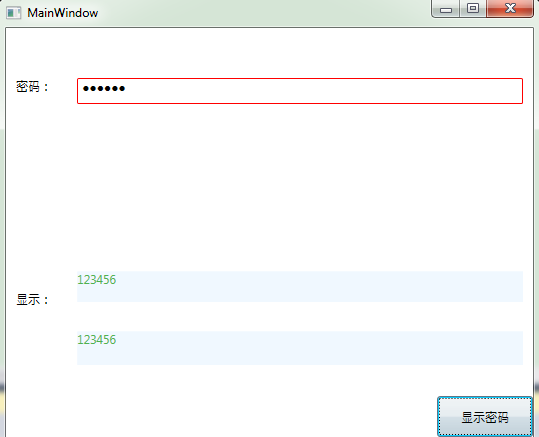
三、Demo
 1 <Window x:Class="PasswordBinding.MainWindow"

 2         xmlns="http://schemas.microsoft.com/winfx/2006/xaml/presentation"

 3         xmlns:x="http://schemas.microsoft.com/winfx/2006/xaml"

 4         xmlns:d="http://schemas.microsoft.com/expression/blend/2008"

 5         xmlns:mc="http://schemas.openxmlformats.org/markup-compatibility/2006"

 6         xmlns:local="clr-namespace:PasswordBinding"

 7         mc:Ignorable="d"

 8         Title="MainWindow" Height="447.125" Width="525">

 9     <Grid>

10         <Grid.RowDefinitions>

11             <RowDefinition Height="134*"/>

12             <RowDefinition Height="101*"/>

13         </Grid.RowDefinitions>

14         <Grid.ColumnDefinitions>

15             <ColumnDefinition Width="60*"/>

16             <ColumnDefinition Width="457*"/>

17         </Grid.ColumnDefinitions>

18         <TextBlock Margin="10 50" Text="密码:"></TextBlock>

19         <PasswordBox Grid.Row="0" Grid.Column="1" Margin="10,50,10,157" BorderBrush="Red" local:PasswordBoxHelper.Attach ="True" Name="pwd"

20                      local:PasswordBoxHelper.Password ="{Binding Password, Mode=TwoWay, UpdateSourceTrigger=PropertyChanged}"/>

21         <TextBlock Margin="10,30,10,10" Text="显示:" Grid.Row="1" Grid.Column="0"></TextBlock>

22         <TextBlock Grid.Row="1" Grid.Column="1" Margin="10,70,10,72" Background="AliceBlue" Foreground="#FF4EB24E" Name="tbl" />

23         <!--附加属性绑定的时候,记得一定要加括号!!!-->

24         <TextBlock Grid.Column="1" Margin="10,10,10,135" Background="AliceBlue" Foreground="#FF4EB24E" Grid.Row="1" Text="{Binding ElementName=pwd, Path=(local:PasswordBoxHelper.Password)}"  />

25         <Button Grid.Row="1" Grid.Column="1" Margin="370,135,0,0" Content="显示密码" Click="Button_Click" ></Button>

26

27     </Grid>

28 </Window>
 1 using System.Windows;

 2

 3 namespace PasswordBinding

 4 {

 5     /// <summary>

 6     /// Interaction logic for MainWindow.xaml

 7     /// </summary>

 8     public partial class MainWindow : Window

 9     {

10         //private string password;

11

12         //public string Password

13         //{

14         //    get { return password; }

15         //    set { password = value; }

16         //}

17

18         public string Password//依赖属性具有自动通知的能力,不需要实现INotifi接口

19         {

20             get { return (string)GetValue(PasswordProperty); }

21             set { SetValue(PasswordProperty, value); }

22         }

23

24         // Using a DependencyProperty as the backing store for Password.  This enables animation, styling, binding, etc...

25         public static readonly DependencyProperty PasswordProperty =

26             DependencyProperty.Register("Password", typeof(string), typeof(MainWindow), new PropertyMetadata(""));

27

28

29         public MainWindow()

30         {

31             InitializeComponent();

32             this.DataContext = this;

33         }

34

35         private void Button_Click(object sender, RoutedEventArgs e)

36         {

37             //tbl.Text = password;

38             tbl.Text = PasswordBoxHelper.GetPassword(pwd);

39         }

40     }

41 }
 1 using System.Windows;

 2 using System.Windows.Controls;

 3

 4 namespace PasswordBinding

 5 {

 6

 7     public static class PasswordBoxHelper

 8     {

 9

10         public static readonly DependencyProperty PasswordProperty = DependencyProperty.RegisterAttached("Password", typeof(string), typeof(PasswordBoxHelper),

11                                                                                                           new FrameworkPropertyMetadata(string.Empty, OnPasswordPropertyChanged));

12         public static readonly DependencyProperty AttachProperty = DependencyProperty.RegisterAttached("Attach", typeof(bool), typeof(PasswordBoxHelper), new PropertyMetadata(false, OnAttachPropertyChanged));

13

14         private static readonly DependencyProperty IsUpdatingProperty = DependencyProperty.RegisterAttached("IsUpdating", typeof(bool), typeof(PasswordBoxHelper));

15

16

17         public static void SetAttach(DependencyObject dp, bool value)

18         {

19             dp.SetValue(AttachProperty, value);

20         }

21

22         public static bool GetAttach(DependencyObject dp)

23         {

24             return (bool)dp.GetValue(AttachProperty);

25         }

26

27         public static string GetPassword(DependencyObject dp)

28         {

29             return (string)dp.GetValue(PasswordProperty);

30         }

31

32         public static void SetPassword(DependencyObject dp, string value)

33         {

34             dp.SetValue(PasswordProperty, value);

35         }

36

37         private static bool GetIsUpdating(DependencyObject dp)

38         {

39             return (bool)dp.GetValue(IsUpdatingProperty);

40         }

41

42         private static void SetIsUpdating(DependencyObject dp, bool value)

43         {

44             dp.SetValue(IsUpdatingProperty, value);

45         }

46

47         private static void OnPasswordPropertyChanged(DependencyObject sender, DependencyPropertyChangedEventArgs e)

48         {

49             PasswordBox passwordBox = sender as PasswordBox;

50             passwordBox.PasswordChanged -= PasswordChanged;

51             if (!(bool)GetIsUpdating(passwordBox))

52             {

53                 passwordBox.Password = (string)e.NewValue;

54             }

55             passwordBox.PasswordChanged += PasswordChanged;

56         }

57

58         private static void OnAttachPropertyChanged(DependencyObject sender, DependencyPropertyChangedEventArgs e)

59         {

60             PasswordBox passwordBox = sender as PasswordBox;

61             if (passwordBox == null)

62             {

63                 return;

64             }

65             if ((bool)e.OldValue)

66             {

67                 passwordBox.PasswordChanged -= PasswordChanged;

68             }

69             if ((bool)e.NewValue)

70             {

71                 passwordBox.PasswordChanged += PasswordChanged;

72             }

73         }

74

75         private static void PasswordChanged(object sender, RoutedEventArgs e)

76         {

77             PasswordBox passwordBox = sender as PasswordBox;

78             SetIsUpdating(passwordBox, true);

79             SetPassword(passwordBox, passwordBox.Password);

80             SetIsUpdating(passwordBox, false);

81         }

82     }

83 }
WPF---数据绑定之PasswordBox绑定(八)的更多相关文章
- WPF 数据绑定Binding
什么是数据绑定? Windows Presentation Foundation (WPF) 数据绑定为应用程序提供了一种简单而一致的方法来显示数据以及与数据交互. 通过数据绑定,您可以对两个不同对象 ...
- WPF数据绑定Binding(二)
WPF数据绑定Binding(二) 1.UI控件直接的数据绑定 UI对象间的绑定,也是最基本的形式,通常是将源对象Source的某个属性值绑定 (拷贝) 到目标对象Destination的某个属性上. ...
- WPF——数据绑定(一)什么是数据绑定
注意:本人初学WPF,文中可能有表达或者技术性问题,欢迎指正!谢谢! 一:什么是数据绑定? “Windows Presentation Foundation (WPF) 数据绑定为应用程序提供了一种简 ...
- 剖析WPF数据绑定机制
引言 WPF框架采取的是MVVM模式,也就是数据驱动UI,UI控件(Controls)被严格地限制在表示层内,不会参与业务逻辑的处理,只是通过数据绑定(Data Binding)简单忠实地表达与之绑定 ...
- WPF 10天修炼 第十天- WPF数据绑定
WPF数据绑定 数据绑定到元素属性是将源对象指定为一个WPF元素,并且源属性是一个依赖属性,依赖属性内置了变更通知.当改变源对象依赖属性值之后,绑定目标可以立即得到更新,开发人员不需要手动编写响应事件 ...
- WPF——TargetNullValue(如何在绑定空值显示默认字符)
原文:WPF--TargetNullValue(如何在绑定空值显示默认字符) 说明:在数据绑定时,如果有些字段为空值,那么在数据绑定时可以用默认值来显示为空的字段. </Grid> { L ...
- 微软原文翻译:适用于.Net Core的WPF数据绑定概述
原文链接,大部分是机器翻译,仅做了小部分修改.英.中文对照,看不懂的看英文. Data binding overview in WPF 2019/09/19 Data binding in Windo ...
- CPF 入门教程 - 数据绑定和命令绑定(二)
CPF netcore跨平台UI框架 系列教程 CPF 入门教程(一) CPF 入门教程 - 数据绑定和命令绑定(二) 数据绑定和Wpf类似,支持双向绑定.数据绑定和命令绑定是UI和业务逻辑分离的基础 ...
- C#WPF数据绑定模板化操作四步走
前言:WPF数据绑定对于WPF应用程序来说尤为重要,本文将讲述使用MVVM模式进行数据绑定的四步走用法: 具体实例代码如下: 以下代码仅供参考,如有问题请在评论区留言,谢谢 1 第一步:声明一个类用来 ...
- WPF窗体视图中绑定Resources文件中字符串时,抛出:System.Windows.Markup.StaticExtension
问题描述: 在Resources.resx定义了一个静态字符串字段Title,并在WPF窗体视图中绑定为窗体的标题: Title="{x:Static local:Resources.Tit ...
随机推荐
- 前端开发入门到进阶第三集【js进行url解析】
https://www.cnblogs.com/yuanzhiguo/p/8241644.html
- js检测客户端是否安装
前言 需求背景:一个web下载页面,需要检测pc是否安装了客户端软件(windows软件).网页上有一个打开客户端按钮.若安装了客户端软件,则直接打开,否则下载软件.支持web下载页面在iframe下 ...
- 就想搞明白,component-scan 是怎么把Bean都注册到Spring容器的!
作者:小傅哥 博客:https://bugstack.cn 沉淀.分享.成长,让自己和他人都能有所收获! 一.前言 忒复杂,没等搞明白大促都过去了! 你经历过618和双11吗?你加入过大促时候那么多复 ...
- 【洛谷P2041 分裂游戏】数学+瞎蒙
分析 我们推不出n=3的图,开始猜测,答案在n>2时无解.(<-正解) AC代码 #include <bits/stdc++.h> using namespace std; i ...
- MERCY靶机
仅供个人娱乐 靶机信息 下载地址:https://drive.google.com/uc?id=1YzsW1lCKjo_WEr6Pk511DXQBFyMMR14y&export=downloa ...
- 🔥 LeetCode 热题 HOT 100(51-60)
142. 环形链表 II 思路:快慢指针,快慢指针相遇后,慢指针回到头,快慢指针步伐一致一起移动,相遇点即为入环点 /** * Definition for singly-linked list. * ...
- 数据结构和算法学习笔记十五:多路查找树(B树)
一.概念 1.多路查找树(multi-way search tree):所谓多路,即是指每个节点中存储的数据可以是多个,每个节点的子节点数也可以多于两个.使用多路查找树的意义在于有效降低树的深度,从而 ...
- linux安装虚拟环境的步骤
1.创建名为env_wcs,python版本为3.6的虚拟环境conda create -n env_wcs python=3.6conda create -n my_ env numpy matpl ...
- Nacos 自动更新配置不生效问题
版本 Nacos 1.4.1 SpringCloud 2020.0.3 解决方案 bootstrap.properties 增加应用名配置即可 spring.application.name=serv ...
- openssl not found 离线安装的openssl问题
离线安装问题 正常我们在Linux中按照 nginx的openssl依赖都是通过 yum来安装的,但是由于一些特殊的服务器公司不让服务器连接互联网,所以就导致我们必须通过离线方式来进行安装,但是我们离 ...