
am335x system upgrade kernel uart(七)
1 Scope of Document
This document describes UART hardware design, uart driver porting
2 Requiremen
2.1 Function Requirement
Uboot enable uart0 for debug, Kernel enable uart0 uart1 uart2 uart3.
2.2 Performance Requirement
Support common uart rx tx function.
3 Hardware Overview
uart interface,pin map:
// uart 0
AM335X_UART0_RXD
AM335X_UART0_TXD
// uart 1
AM335X_UART1_RXD
AM335X_UART1_TXD
// uart 2
AM335X_UART2_RXD
AM335X_UART2_TXD
// uart 3
AM335X_UART3_RXD
AM335X_UART3_TXD

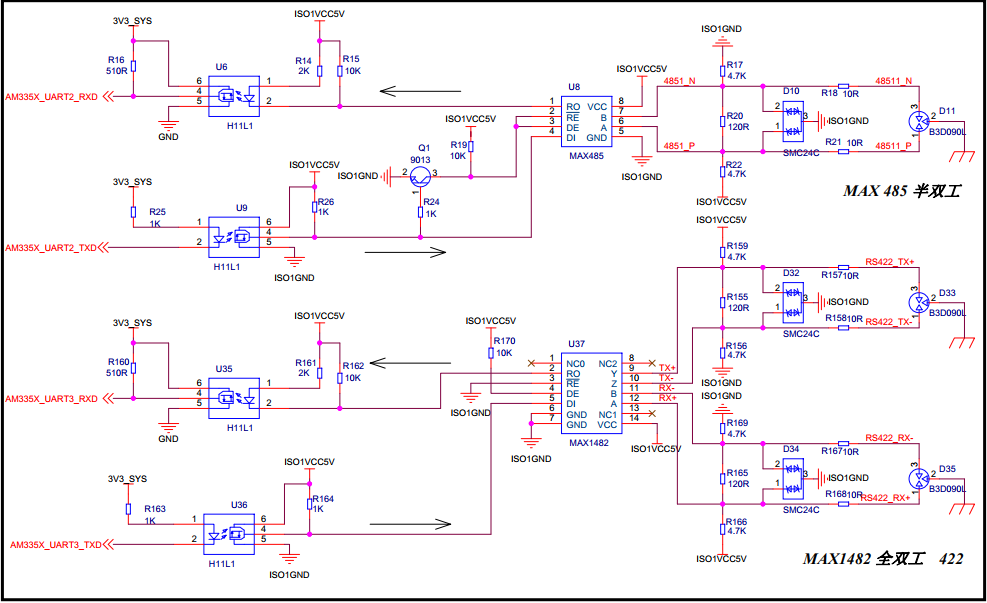
Figure 1 uart interface block diagram
4 Functional Description
4.1 UART DRIVER Overview
The UART Driver enables the UART’s available on the device. The driver configures the UART hardware and interfaces with a number of standard linux tools (ex. stty, minicom, etc.) to enable the configuration and usage of the hardware. The H/W UARTs available will vary by SoC and system configuration.
4.2 UART
4.2.1 Overview
The UART driver can be used to send/receive raw ASCII characters from the User Interface as shown by the below diagram..
4.2.1 User Layer
The UART driver leverages the TTY framework within Linux. This framework uses typical file I/O operations to interact with the UART. This interface allows userspace modules to easily be developed to read/write the /dev/ttyxx to exchange data over the UART. Since this is a very common Linux framework, there are many standard tools that can be used to interact with it. These tools, like stty, minicom, picocom, and many others, can easily be used to exercise a UART for data exchange.

Features
- Exposes UART to User Space via /dev/tty*
- Supports multiple baud rates and UART capabilities
- Hardware Flow Control
5 Porting
5.1 Uboot porting
In uboot default enable debug uart, so do not need to modify.
5.2 Kernel porting
Index: am335x-evm.dts
uart1_pins: pinmux_uart1_pins {
pinctrl-single,pins = <
AM33XX_IOPAD(0x980, PIN_INPUT_PULLUP | MUX_MODE1) /* uart1_rxd.uart1_rxd */
AM33XX_IOPAD(0x984, PIN_OUTPUT_PULLDOWN | MUX_MODE1) /* uart1_txd.uart1_txd */
>;
};
uart2_pins: pinmux_uart2_pins {
pinctrl-single,pins = <
AM33XX_IOPAD(0x92c, PIN_INPUT_PULLUP | MUX_MODE1) /* mii1_txclk.uart2_rxd */
AM33XX_IOPAD(0x930, PIN_OUTPUT_PULLDOWN | MUX_MODE1) /* mii1_rxclk.uart2_txd */
>;
};
uart3_pins: pinmux_uart3_pins {
pinctrl-single,pins = <
AM33XX_IOPAD(0x934, PIN_INPUT_PULLUP | MUX_MODE1) /* mii1_rxd3.uart3_rxd */
AM33XX_IOPAD(0x938, PIN_OUTPUT_PULLDOWN | MUX_MODE1) /* mii1_rxd2.uart3_txd */
>;
};
&uart1 {
pinctrl-names = "default";
pinctrl-0 = <&uart1_pins>;
status = "okay";
};
&uart2 {
pinctrl-names = "default";
pinctrl-0 = <&uart2_pins>;
status = "okay";
};
&uart3 {
pinctrl-names = "default";
pinctrl-0 = <&uart3_pins>;
status = "okay";
};
6 Follow-up
Uart loop test code:
#include <stdio.h>
#include <stdlib.h>
#include <string.h>
#include <unistd.h>
#include <sys/types.h>
#include <sys/stat.h>
#include <fcntl.h>
#include <termios.h>
#include <errno.h>
#include <pthread.h>
#include <sys/ioctl.h>
#define FALSE 1
#define TRUE 0
int fd=-1;
char buff[512];
int speed_arr[] = { B115200, B57600, B38400, B19200, B9600, B4800,
B2400, B1200};
int name_arr[] = {115200, 57600, 38400, 19200, 9600, 4800, 2400, 1200};
#define debugnum(data,len,prefix) \
{ \
unsigned int i; \
for (i = 0;i < len;i++) { \
if(prefix) \
printf("0x%02x ",data[i]); \
else \
printf("%02x ",data[i]); \
} \
}
void set_speed(int fd, int speed)
{
int i;
int status;
struct termios Opt;
tcgetattr(fd, &Opt);
for ( i= 0; i < sizeof(speed_arr) / sizeof(int); i++)
{
if (speed == name_arr[i])
{
tcflush(fd, TCIOFLUSH);
cfsetispeed(&Opt, speed_arr[i]);
cfsetospeed(&Opt, speed_arr[i]);
status = tcsetattr(fd, TCSANOW, &Opt);
if (status != 0)
perror("tcsetattr fd1");
return;
}
tcflush(fd,TCIOFLUSH);
}
}
int set_Parity(int fd,int databits,int stopbits,int parity)
{
struct termios options;
if ( tcgetattr( fd,&options) != 0)
{
perror("SetupSerial 1");
return(FALSE);
}
options.c_cflag &= ~CSIZE;
switch (databits)
{
case 7:
options.c_cflag |= CS7;
break;
case 8:
options.c_cflag |= CS8;
break;
default:
fprintf(stderr,"Unsupported data size\n");
return (FALSE);
}
switch (parity)
{
case 'n':
case 'N':
options.c_cflag &= ~PARENB;
options.c_iflag &= ~INPCK;
break;
case 'o':
case 'O':
options.c_cflag |= (PARODD | PARENB);
options.c_iflag |= INPCK;
break;
case 'e':
case 'E':
options.c_cflag |= PARENB;
options.c_cflag &= ~PARODD;
options.c_iflag |= INPCK;
break;
case 'S':
case 's':
options.c_cflag &= ~PARENB;
options.c_cflag &= ~CSTOPB;
break;
default:
fprintf(stderr,"Unsupported parity\n");
return (FALSE);
}
switch (stopbits)
{
case 1:
options.c_cflag &= ~CSTOPB;
break;
case 2:
options.c_cflag |= CSTOPB;
break;
default:
fprintf(stderr,"Unsupported stop bits\n");
return (FALSE);
}
options.c_iflag &= ~(IGNBRK|BRKINT|PARMRK|ISTRIP|INLCR|IGNCR|ICRNL|IXON);
options.c_oflag &= ~OPOST;
options.c_lflag &= ~(ECHO|ECHONL|ICANON|ISIG|IEXTEN);
/* Set input parity option */
if (parity != 'n')
options.c_iflag |= INPCK;
options.c_cc[VTIME] = 150; // 15 seconds
options.c_cc[VMIN] = 0;
tcflush(fd,TCIFLUSH); /* Update the options and do it NOW */
if (tcsetattr(fd,TCSANOW,&options) != 0)
{
perror("SetupSerial 3");
return (FALSE);
}
return (TRUE);
}
void receivethread(void)
{
int nread;
while(1)
{
if((nread = read(fd,buff,100))>0) //接收数据
{
printf("[RECEIVE] Len is %d,content is :\n",nread);
buff[nread]='\0';
printf("%s\n",buff);
}
usleep(100/**1000*/);
}
return;
}
int main(int argc, char *argv[])
{
char str[500];
pthread_t receiveid;
int c, ctrlbits;
/*
参数个数小于1则返回,按如下方式执行:
./uart_test /dev/ttyAT1
*/
if (argc < 2) {
printf("Useage: %s dev\n", argv[0]);
exit(0);
}
printf("test\n");
fd = open(argv[1], O_RDWR);
if (fd < 0){
printf("open device %s faild\n", argv[1]);
exit(0);
}
set_speed(fd,115200); //设置串口波特率
set_Parity(fd,8,1,'N'); //设置8位数据位,1位停止位,无校验等其他设置。
pthread_create(&receiveid,NULL,(void*)receivethread,NULL);//创建接收线程
while(1)
{
printf("Please Input string to send to %s\n:",argv[1]);
scanf("%s", str);
if(strlen(str)>0){
//发送数据
write(fd, str, strlen(str));
write(fd, "\n", strlen("\n"));
usleep(200*1000);
}
}
close(fd);
exit(0);
}
am335x system upgrade kernel uart(七)的更多相关文章
- am335x system upgrade kernel tf(五)
1 Scope of Document This document describes TF hardware design 2 Requiremen 2.1 Functi ...
- am335x system upgrade kernel ethernet(四)
1 Scope of Document This document describes ethernet hardware design and porting KZS8081 to ubo ...
- am335x system upgrade kernel gpio(九)
1 Hardware Overview gpio interface,pin map: AM335X_I2C0_W_C----------------------MCASP0_AXR1 /* ...
- am335x system upgrade kernel can(八)
1 Scope of Document This document describes can bus hardware design and can bus driver developm ...
- am335x system upgrade kernel i2c rtc eeprom(六)
1 Scope of Document This document describes i2c bus hardware design and support i2c-devices: ee ...
- am335x system upgrade kernel ec20 simcom7600ce(十一)
1 Scope of Document This document describes 4G hardware design, support quectel ec20 4G module/ ...
- am335x system upgrade kernel usb stroage(十)
1 Scope of Document This document describes USB hardware design, support stardard usb2.0 port o ...
- am335x system upgrade kernel f-ram fm25l16b(十六)
1 Scope of Document This document describes SPI F-RAM hardware design 2 Requiremen 2.1 ...
- am335x system upgrade kernel emmc(十八)
1 Scope of Document This document describes EMMC hardware design 2 Requiremen 2.1 Func ...
随机推荐
- Java 总结篇2
第02章:数据类型和运算符 一.概述: 1.数据类型:int.float.char.boolean 2.运算符:算术运算符.赋值运算符.关系运算符.逻辑运算符.位运算符(了解即可).条件运算符 3.基 ...
- logrus 剖析之 hook
logrus 通过实现 Hook接口扩展 hook 机制,可以根据需求将日志分发到任意的存储介质, 比如 es, mq 或者监控报警系统,及时获取异常日志.可以说极大的提高了日志系统的可扩展性. ho ...
- Ubuntu下载搜狗输入法
实在...因为百度上写的就很好了,所以这里就直接“链”了.. https://jingyan.baidu.com/article/2d5afd6933a67b85a2e28e9f.html
- isolate sqflite demo
main.dart import 'package:flutter/material.dart'; import 'demo_isolates.dart'; import 'package:rxdar ...
- ElementUI 源码定制防坑指南
背景 我司OA系统公文管理模块Office在线编辑使用的是金格IWebOffice中间件[PPAPI插件,通过<object>标签加载],IWebOffice在chrome中设置div盒子 ...
- Web应用的生命周期(客户端)
典型的一个Web应用的生命周期从用户在浏览器输入一串URL,或者单击一个链接开始(就是访问一个页面).而这个生命周期的结束就是我们关闭这个页面. 响应流程: 用户输入一个 URL(生命周期开始) 客户 ...
- 智表ZCELL产品发布企业版
为了满足部分企业用户无限分发的需要,智表插件在专业版基础上推出企业版本(http://zcell.net/productinfo.html),功能与专业版本保持一致.授权方式采用提供企业客户授权工具, ...
- ..\USER\stm32f10x.h(428): error: #67: expected a "}" ADC1_2_IRQn = 18, /*!
MDK软件编译,出现如下错误: ..\USER\stm32f10x.h(428): error: #67: expected a "}" ADC1_2_IRQn = 18, /*! ...
- Python学习日记(二十五) 接口类、抽象类、多态
接口类 继承有两种用途:继承基类的方法,并且做出自己的改变或扩展(代码重用)和声明某个子类兼容于某基类,定义一个接口类interface,接口类中定义了一些接口名(就是函数名)且并未实现接口的功能,子 ...
- web-mini框架的基本实现(一)
本篇主要介绍WSGI-web-mini框架的基本实现,以及什么是WSGI协议.对于浏览器的资源请求服务端是如何处理的等相关知识: 一.浏览器资源请求 我们知道浏览器和web服务器之间是基于HTTP协议 ...