
C# 获取文件扩展信息-应用名称/作者等
方案一:使用微乳封装的Shell包
添加nuget包:Microsoft.WindowsAPICodePack.Shell
using Microsoft.WindowsAPICodePack.Shell;

using Microsoft.WindowsAPICodePack.Shell.PropertySystem;
1 string filePath = Path.Combine(AppDomain.CurrentDomain.BaseDirectory, "需求文档_迭代版_036.docx");
var file = ShellFile.FromFilePath(filePath); //Read and Write: string[] oldAuthors = file.Properties.System.Author.Value;
string oldTitle = file.Properties.System.Title.Value;
var orgAppName = file.Properties.System.ApplicationName; file.Properties.System.Author.Value = new string[] { "Author #1", "Author #2" };
file.Properties.System.Title.Value = "Example Title"; // Alternate way to Write: ShellPropertyWriter propertyWriter = file.Properties.GetPropertyWriter();
propertyWriter.WriteProperty(SystemProperties.System.Author, new string[] { "Author" });
propertyWriter.Close();
2 直接使用Shell32交互
添加Com组件引用:
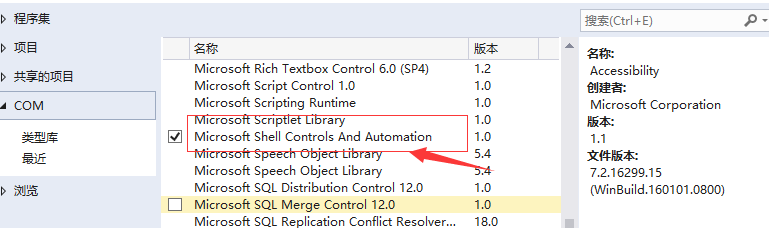
             List<string> arrHeaders = new List<string>();

             List<Tuple<int, string, string>> attributes = new List<Tuple<int, string, string>>();

             Shell32.Shell shell = new Shell32.Shell();

             var strFileName = Path.Combine(AppDomain.CurrentDomain.BaseDirectory, "需求文档_迭代版_036.docx");

             Shell32.Folder objFolder = shell.NameSpace(System.IO.Path.GetDirectoryName(strFileName));

             Shell32.FolderItem folderItem = objFolder.ParseName(System.IO.Path.GetFileName(strFileName));

             for (int i = ; i < short.MaxValue; i++)

             {

                 string header = objFolder.GetDetailsOf(null, i);

                 if (String.IsNullOrEmpty(header))

                     break;

                 arrHeaders.Add(header);

             }

             // The attributes list below will contain a tuple with attribute index, name and value

             // Once you know the index of the attribute you want to get,

             // you can get it directly without looping, like this:

             var Authors = objFolder.GetDetailsOf(folderItem, );

             for (int i = ; i < arrHeaders.Count; i++)

             {

                 var attrName = arrHeaders[i];

                 var attrValue = objFolder.GetDetailsOf(folderItem, i);

                 var attrIdx = i;

                 attributes.Add(new Tuple<int, string, string>(attrIdx, attrName, attrValue));

                 Debug.WriteLine("{0}\t{1}: {2}", i, attrName, attrValue);

             }

             Console.ReadLine();
参考资料:
https://stackoverflow.com/questions/37869388/how-to-read-extended-file-properties-file-metadata
https://stackoverflow.com/questions/220097/read-write-extended-file-properties-c/2096315#2096315
https://stackoverflow.com/questions/24081665/windows-api-code-pack-where-is-it
https://www.codeproject.com/Articles/5036/ID3-Tag-Reader-Using-Shell-Functions
Windows API Code Pack 1.1.zip
https://github.com/jamie-pate/KeepSync/blob/master/contrib/Windows%20API%20Code%20Pack%201.1.zip
C# 获取文件扩展信息-应用名称/作者等的更多相关文章
- Web 在线文件管理器学习笔记与总结(11)获取文件夹信息 (12)返回上一级操作
(11)获取文件夹信息 文件夹没有修改操作. index.php: <?php require 'dir.func.php'; require 'file.func.php'; require ...
- PHP获取文件扩展名的多种方法
PHP获取文件扩展名的N种方法. 第1种方法: function get_extension($file) { substr(strrchr($file, '.'), 1): } 第2种方法: fun ...
- python获取文件扩展名的方法(转)
主要介绍了python获取文件扩展名的方法,涉及Python针对文件路径的相关操作技巧.具体实现方法如下: 1 2 3 4 import os.path def file_extension(path ...
- python获取文件扩展名的方法
主要介绍了python获取文件扩展名的方法,涉及Python针对文件路径的相关操作技巧 import os.path def file_extension(path): ] print file_ex ...
- 如何去掉drwxr-xr-x@中的@符号Linux文件扩展信息
如何去掉drwxr-xr-x@中的@符号Linux文件扩展信息ls -lart drwxrwxrwx@ 10 rlanffy staff 340B 3 6 2015 files-rwxrwxrwx@ ...
- Powershell 获取文件版本信息
获取文件版本信息,通过FileVersionInfo::GetVersioninfo(file) 来获取信息 function Check-DdpstoreFileVersion{ $Ddpstore ...
- PHP中获取文件扩展名的N种方法
PHP中获取文件扩展名的N种方法 从网上收罗的,基本上就以下这几种方式: 第1种方法:function get_extension($file){substr(strrchr($file, '.'), ...
- os.path.join合并 os.path.dirname返回上一级目录 os.path.exists(path) os.stat('path/filename')获取文件/目录信息
import os str1 = "grsdgfd" str2 = "wddf" str3 = "gddgs" # print(str1 + ...
- PHP获取文件扩展名五种以上的方法和注释
在PHP面试中或者考试中会有很大几率碰到写出五种获取文件扩展名的方法,下面是我自己总结的一些方法 $file = ‘需要进行获取扩展名的文件.php’; //第一种,根据.拆分,获取最后一个元素的值f ...
随机推荐
- Arm Qt编译Qt例程出错 GLES3/gl3.h: No such file or directory 解决方法
工作环境 PC:Ubuntu18.04QtCreator: 4.8.2交叉编译环境:野火imxull6开发板提供的 5-编译工具链->qt交叉编译工具 在之前博客配置成功的交叉编译环境,编译Qt ...
- Github 上 36 个最实用的 Vue 开源库
任何一个开发者,都是十分喜欢使用开源软件包的.因为它使开发工作变得更快速.高效.容易.如果没有开源软件包,开发工作将变得疲惫不堪,不断的重复造轮子! 下面整理了 Github 上 36 个实用的 Vu ...
- C++(四十九) — set、multiset 容器的基本操作
1.set的基础知识 set的特性是:所有元素都会根据元素的键值自动排序,set的元素不像map那样可以同时拥有实值(value)和键值(key),set元素的键值就是实值,实值就是键值.set不允 ...
- 一个线上JVM的CPU资源占用过高问题的排查
原文:https://www.iteye.com/blog/tyrion-2293369 上午线上某应用的一台JVM的CPU占比突然飙高到192%,并且一直下不来,导致监控一直告警,好久没处理这种问题 ...
- 使用scrapy框架爬取全书网书籍信息。
爬取的内容:书籍名称,作者名称,书籍简介,全书网5041页,写入mysql数据库和.txt文件 1,创建scrapy项目 scrapy startproject numberone 2,创建爬虫主程序 ...
- Docker 基本操作(附 redis、nginx部署)
下载安装 Docker 也有一个月了.中间看过几次也没有深入的了解研究.就只是拉取了两个镜像简单的看了看. 昨天因一个项目中需要用到 Redis ,因为是 Windows 系统,看了下安装包比较老了有 ...
- hive 初始化数据库报错
安装hive,初始化数据库的时候报错 schematool -dbType mysql -initSchema Metastore Connection Driver : com.mysql.cj.j ...
- Intellij IDEA 与 Gitlab 实现代码上传与下载
整体流程:1.download project2.deposit project structure and set default server3.configure tomcat 2 steps4 ...
- LeetCode 873. Length of Longest Fibonacci Subsequence
原题链接在这里:https://leetcode.com/problems/length-of-longest-fibonacci-subsequence/ 题目: A sequence X_1, X ...
- 详解如何在CentOS7中使用Nginx和PHP7-FPM安装Nextcloud
转载地址:https://www.jb51.net/article/109382.htm 这篇文章主要介绍了详解如何在CentOS7中使用Nginx和PHP7-FPM安装Nextcloud,会通过 N ...