
Anaconda+django写出第一个web app(十一)
今天我们来学习给页面添加一个Sidebar,根据Sidebar跳转到相应的tutorial。
打开views.py,编辑single_slug函数:
def single_slug(request, single_slug):

    categories = [c.category_slug for c in TutorialCategory.objects.all()]

    if single_slug in categories:

        matching_series = TutorialSeries.objects.filter(tutorial_category__category_slug=single_slug)

        series_urls = {}

        for m in matching_series.all():

            part_one = Tutorial.objects.filter(tutorial_series__tutorial_series=m.tutorial_series).earliest('tutorial_published')

            series_urls[m] = part_one.tutorial_slug

        return render(request=request,

            template_name='main/category.html',

            context={'tutorial_series':matching_series, 'part_ones': series_urls})

    tutorials = [t.tutorial_slug for t in Tutorial.objects.all()]

    if single_slug in tutorials:

        this_tutorial = Tutorial.objects.get(tutorial_slug=single_slug)

        tutorials_from_series = Tutorial.objects.filter(tutorial_series__tutorial_series=this_tutorial.tutorial_series).order_by('tutorial_published')

        this_tutorial_idx = list(tutorials_from_series).index(this_tutorial)

        return render(request=request,

            template_name='main/tutorial.html',

            context={'tutorial':this_tutorial, 'sidebar':tutorials_from_series, 'this_tut_idx':this_tutorial_idx})
接下来我们需要编写tutorial.html,来显示相应的内容和Sidebar,Sidebar的写法参考materialize:
{% extends 'main/header.html' %}

{% block content %}

<div class="row">

    <div class="col s12, m8, l8">

    <h3>{{tutorial.tutorial_title}}</h3>

    <p style="font-size: 70%">Published {{tutorial.tutorial_published}}</p>

    {{tutorial.tutorial_content|safe}}

  </div>

  <div class="col s12 m4 l4">

    <ul class="collapsible popout">

        {% for tutorial in sidebar %}

            {% if forloop.counter0 == this_tut_idx %}

                <li class="active">

                    <div class="collapsible-header" style="background-color: #008E72; color: white;">{{tutorial.tutorial_title}}<br>(currently viewing)</div>

                </li>

            {% else %}

                <li>

                    <div class="collapsible-header">{{tutorial.tutorial_title}}</div>

                    <div class="collapsible-body">

                        <p><a href="/{{tutorial.tutorial_slug}}"><button class="btn waves-effect waves-light right-align" style="background-color:green-light; color:white">Go</button></a></p>

                    </div>

                </li>

            {% endif %}

        {% endfor %}

    </ul>

  </div>

</div>

{% endblock %}
我上传了几个Ted视频,效果显示如下,这时点击Sidebar没有反应,我们还需要在header.html中初始化javascript,在最后一行写上:
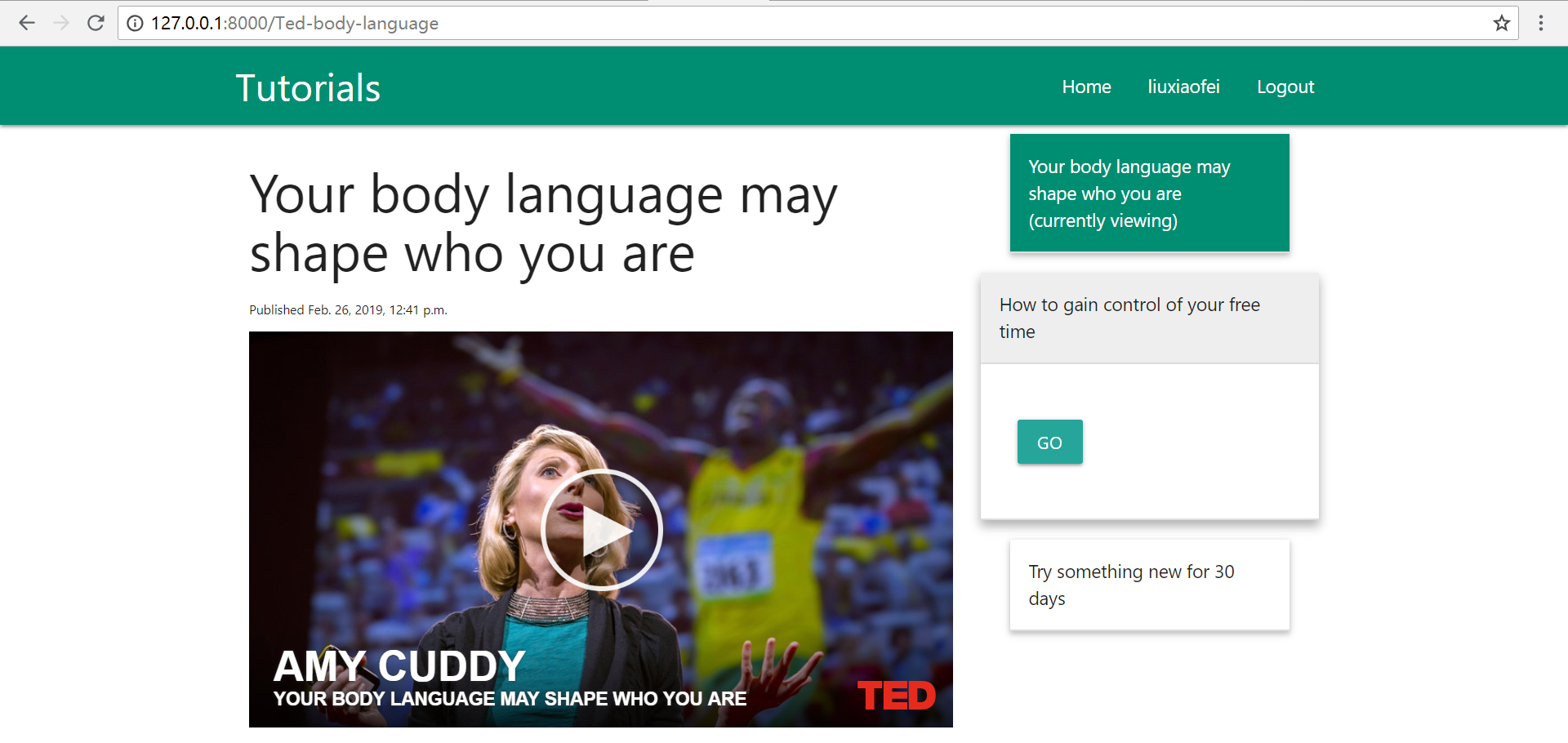
<script>M.AutoInit();</script> ,Sidebar即可正常使用:
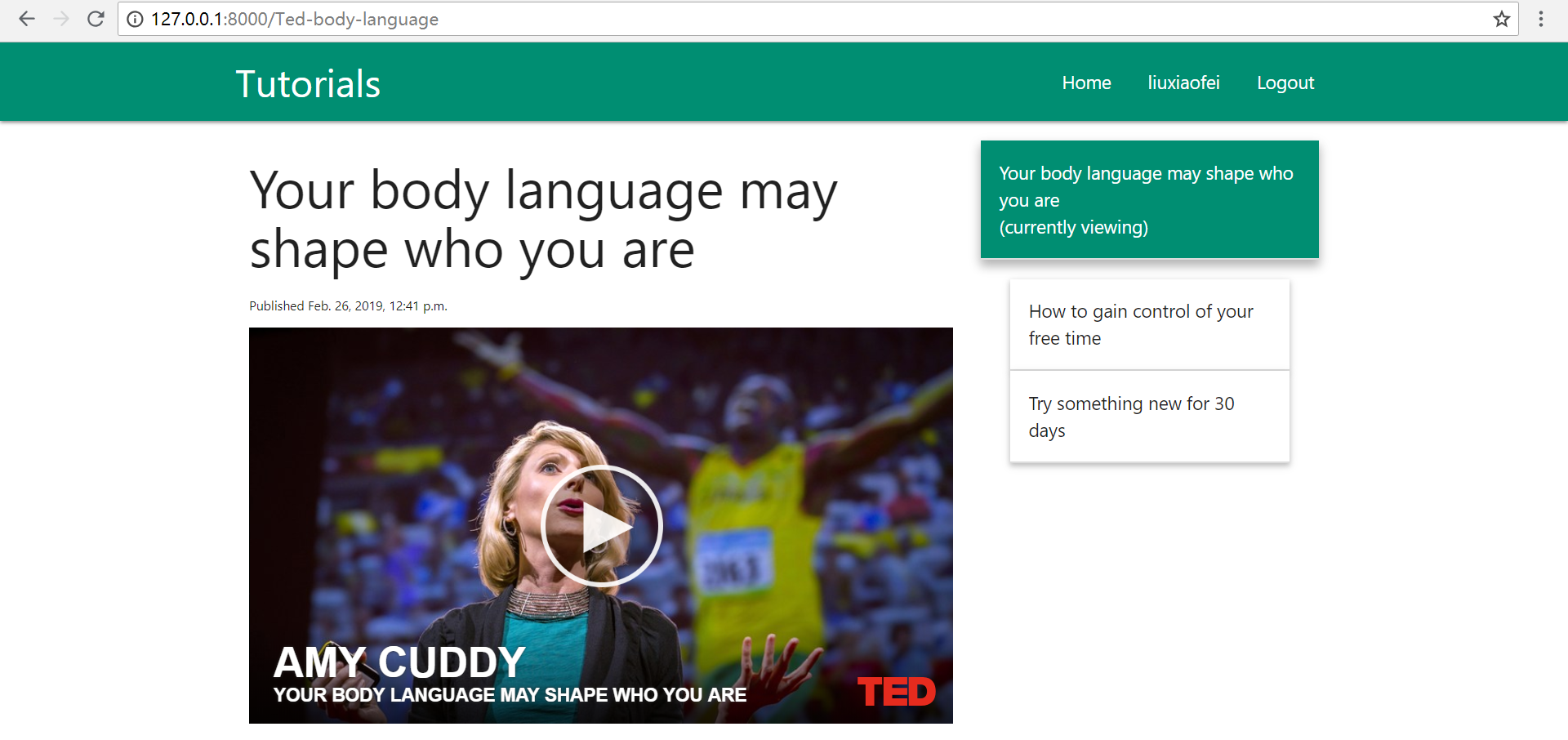
点击想要跳转的tutorial,点击go,即可跳转。
到此为止,我们的第一个app已经建成了,这个web app可以显示目录的类别、系列以及查看每个目录的内容。如果我们想要增加更多的功能,也非常的方便,接下来还需要学习html、数据库、python的知识,来一步步提高,多查阅帮助文档和看看喜欢的网站,然后想想如何实现,亲自动手操作一遍。
目前为止使用的都是python默认的数据库sqlite3,下一节继续对这个网站学习如何把sqlite数据库转化为mysql数据库。
参考链接:
[1] https://materializecss.com/collapsible.html
[2] https://pythonprogramming.net/dynamic-sidebar-django-tutorial/
Anaconda+django写出第一个web app(十一)的更多相关文章
- Anaconda+django写出第一个web app(一)
在安装好Anaconda和django之后,我们就可以开始创建自己的第一个Web app,那么首先创建一个空文件夹,之后创建的文件都在这个文件夹内. 启动命令行进入此文件夹内,可以先通过如下命令查看一 ...
- Anaconda+django写出第一个web app(十)
今天继续学习外键的使用. 当我们有了category.series和很多tutorials时,我们查看某个tutorial,可能需要这样的路径http://127.0.0.1:8000/categor ...
- Anaconda+django写出第一个web app(九)
今天来学习外键的使用,用外键来连接数据库中的两个表. 当我们的tutorials非常多的时候,目前的显示方式就会使得页面非常凌乱.我们可以考虑把这些教程分为不同的系列,页面只显示标题以及概要等信息,进 ...
- Anaconda+django写出第一个web app(三)
前面我们已经建立了模型Tutorial,也已经可以用Navicat Premium打开数据看查看数据,接下来我们通过建立admin账户来上传数据. 在命令行执行如下命令来创建用户: python ma ...
- Anaconda+django写出第一个web app(二)
今天开始建立App中的第一个Model,命名为Tutorial. Model的定义在main文件夹下的models.py中通过类进行,我们希望Tutorial这个model包含三个属性:标题.内容和发 ...
- Anaconda+django写出第一个web app(七)
今天来实现如何在页面弹出一些信息,比如注册成功后弹出注册成功的信息.这一点可以通过materialize里的Toasts来实现. django自带的messages可以告诉我们是否注册成功,以及注册失 ...
- Anaconda+django写出第一个web app(六)
今天学习如何写一个注册用户的界面. 上一节的导航栏中我们修改了导航栏右侧的文字为register并将路径设置为/register,内容如下: <li><a href="/r ...
- Anaconda+django写出第一个web app(四)
前面对Models有了一些了解,今天开始进一步了解Views,了解Views如何和Models交互以及了解模板(templates). 打开main文件夹下的views.py,重新编写homepage ...
- Anaconda+django写出第一个web app(八)
今天来实现网站的登入和登出功能. 首先我们需要在urls.py中添加路径,注意此处的路径和在导航栏中设置的文字路径保持一致: from django.urls import path from . i ...
随机推荐
- npm安装时一些错误
1. npm install 提示no such file or directory 缺少package.json 首先初始化, npm init -f 然后安装依赖 npm install form ...
- 配置tomcat虚拟路径
这个问题其实很简单,首先找到你安装的tomcat的路径然后,在Tomcat6.0/conf/Catalina路径下创建localhost文件夹,如果有,就不用创建,然后在该文件夹下创建一个xml文件, ...
- Linux内核分析——第二周学习笔记
20135313吴子怡.北京电子科技学院 chapter 1 知识点梳理 (一)计算机是如何工作的?(总结)——三个法宝 ①存储程序计算机工作模型,计算机系统最最基础性的逻辑结构: ②函数调用堆栈,高 ...
- c# WndProc事件 消息类型
转载:https://www.cnblogs.com/idben/p/3783997.html WM_NULL = 0x0000; WM_CREATE = 0x0001;应用程序创建一个窗口 WM_D ...
- (第二周)读《我是一只IT小小鸟》有感
读了蒋宇东学长的这篇描述他成长经历和生活感悟的博文,我真的收获了很多,有一种“相见恨晚”的感觉.同为航院的学子,我们有太多太多相同的生活学习经历. 我已经是一名大三的学生了,不知不觉中我大学生活的大部 ...
- JDBC的编码步骤
0.前提:拷贝数据库的驱动到构建路径中(classpath) 1.注册驱动 2.获取与数据库的链接 3.创建代表SQL语句的对象 4.执行SQL语句 5.如果是查询语句,需要遍历结果集 6.释放占用的 ...
- UIView 添加闪烁的渐变光
CGRect gradientRect=CGRectMake(- imageView3.bounds.size.width*, * imageView3.bounds.size.width, imag ...
- d3 选择器
一.隔了一段时间没看D3了,好多api又陌生了.武林太大,唯有自强不息. D3 选择器算是学习D3的第一步吧. 跟 学习JQ一样.先熟悉下api,才能够如鱼得水,手到勤来. 二. 选择器 1.选择器 ...
- delphi 登陆窗口的问题 [问题点数:30分,结帖人tianhuo_soft]
http://bbs.csdn.net/topics/200053917 有两个窗口formLogin是登陆窗口,formMain是主窗口我想让formMain显示出来,并且formLogin窗口关闭 ...
- 深入理解Vue的生命周期
谈到Vue的生命周期,相信许多人并不陌生.但大部分人和我一样,只是听过而已,具体用在哪,怎么用,却不知道.我在学习vue一个多礼拜后,感觉现在还停留在初级阶段,对于mounted这个挂载还不是很清楚. ...