
bootstrap 怎么制作好看的表格
bootstrap 怎么制作表格
bootstrap 制作表格带有图文形式。主要知识点有以下几点
- 第一点肯定是写出一个普通的表格,这一点可以去菜鸟复制它的案例。添加tr和td就可以了
- 在表格放入图片加上class="img-circle" 变成圆形,自己写个css设置图片统一大小。图片高度50px,这时要设置行高也为50px。要不然文字不能垂直对齐,由于优先级问题,我们选择器不能直接选着tr标签,要不然没有作用,可以在父标签创建一个id,用后代选择器去选择。
- 操作下面的修改和删除按钮可以参照菜鸟的案例,要记得把bootstarp的font文件夹引用到自己的项目中。笔和垃圾桶不是图标是字体,要明白这一点,只需要在空的span加上class名称就可以了,他们都是字体图标,每个图标下都有相对应的class类名,我们直接复制类名就,可以了。
- 修改按钮弹出框在bootstarp有个叫模态框的可以把案例复制过来,修改一下h4的标题,和在modal-body的div添加我们的内容就可以了。
- 弹出框的表单可以复制菜鸟的表单案例,案例的输入框col-sm-10占用10列,我们可以修改成col-sm-9占用9列,这样输入框就不会很宽了。
- 我给图片加了个点击事件,当点击某张图片时,弹出框显示放大的图片。这里弹出框仍然可以用模态框,值不够特别注意的是当页面存在两个以上模态框时,要在每个模态框加个div标签,div也不需要写什么属性。然后就是修改模态框的id就是了这里id改成id="myModal2"。自己写的jQuery也是比较简单的,获取当前图片的src,然后赋值给模态框的图片的src。

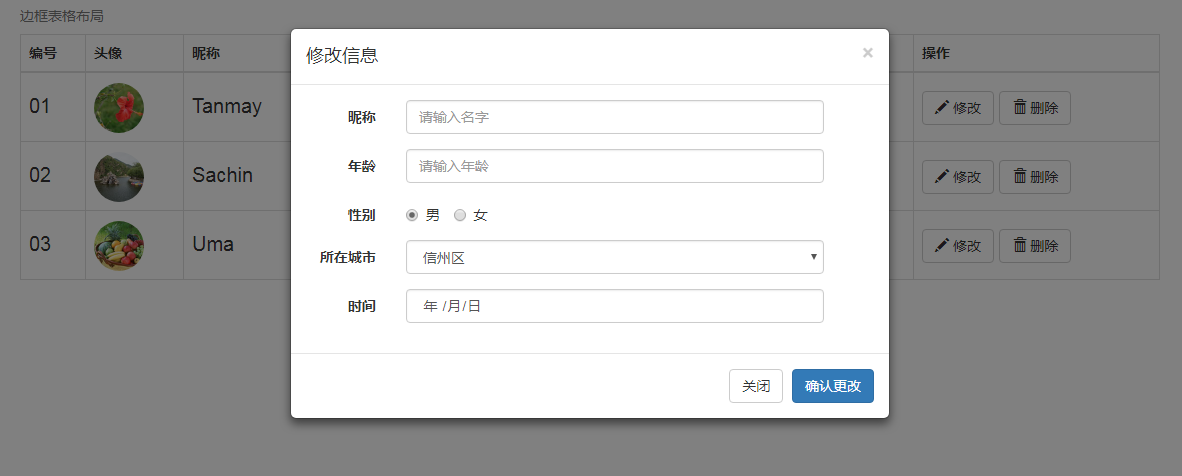
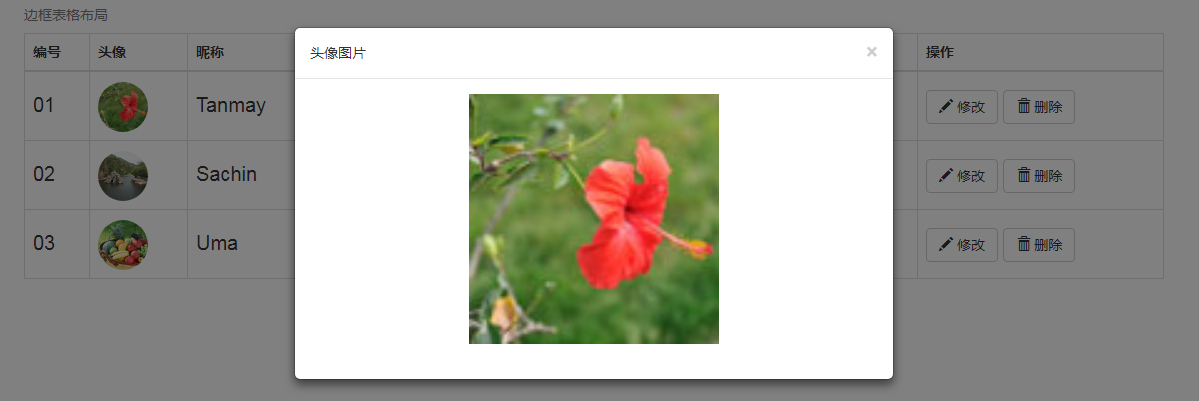
复制代码时自己项目要有自己的bootstarp.css和font文件
<!DOCTYPE html>
<html> <head>
<meta charset="utf-8" />
<title></title>
<link rel="stylesheet" type="text/css" href="css/bootstrap.css" />
<script src="https://cdn.staticfile.org/jquery/2.1.1/jquery.min.js"></script>
<script src="https://cdn.staticfile.org/twitter-bootstrap/3.3.7/js/bootstrap.min.js"></script>
<style type="text/css">
#a td{
line-height: 50px;
font-size: 20px;
}
img{
height: 50px;
}
#a tr:hover{
background:#D4E3E5;
}
</style>
</head> <body> <div class="container" >
<table class="table table-hover table-bordered"> <caption>边框表格布局</caption>
<thead>
<tr>
<th>编号</th>
<th>头像</th>
<th>昵称</th>
<th>年龄</th>
<th>性别</th>
<th>地址</th>
<th>时间</th>
<th>操作</th> </tr>
</thead>
<tbody id="a">
<tr>
<td>01</td>
<td>
<img src="data:images/tou01.jpg" class="img-circle" data-toggle="modal" data-target="#myModal2"> </td>
<td>Tanmay</td>
<td>Bangalore</td>
<td>560001</td>
<td>Bangalore</td>
<td>560001</td>
<td>
<button type="button" class="btn btn-default btn-xm" data-toggle="modal" data-target="#myModal">
<span class="glyphicon glyphicon-pencil"></span> 修改
</button>
<button type="button" class="btn btn-default btn-xm">
<span class="glyphicon glyphicon-trash"></span> 删除
</button>
</td>
</tr>
<tr>
<td>02</td>
<td>
<img src="data:images/tou02.jpg" class="img-circle" data-toggle="modal" data-target="#myModal2"/>
</td>
<td>Sachin</td>
<td>Mumbai</td>
<td>400003</td>
<td>Bangalore</td>
<td>560001</td>
<td>
<button type="button" class="btn btn-default btn-xm" data-toggle="modal" data-target="#myModal">
<span class="glyphicon glyphicon-pencil"></span> 修改
</button>
<button type="button" class="btn btn-default btn-xm">
<span class="glyphicon glyphicon-trash"></span> 删除
</button>
</td>
</tr>
<tr>
<td>03</td>
<td>
<img src="data:images/tou03.jpg" class="img-circle" data-toggle="modal" data-target="#myModal2"/>
</td>
<td>Uma</td>
<td>Pune</td>
<td>411027</td>
<td>Bangalore</td>
<td>Bangalore</td>
<td>
<button type="button" class="btn btn-default btn-xm" data-toggle="modal" data-target="#myModal">
<span class="glyphicon glyphicon-pencil"></span> 修改
</button>
<button type="button" class="btn btn-default btn-xm">
<span class="glyphicon glyphicon-trash"></span> 删除
</button>
</td>
</tr>
</tbody> </table> <!--修改弹出框-->
<div id="">
<div class="modal fade" id="myModal" tabindex="-1" role="dialog" aria-labelledby="myModalLabel" aria-hidden="true">
<div class="modal-dialog">
<div class="modal-content">
<div class="modal-header">
<button type="button" class="close" data-dismiss="modal" aria-hidden="true">
×
</button>
<h4 class="modal-title" id="myModalLabel">
修改信息
</h4>
</div>
<div class="modal-body"> <form class="form-horizontal" role="form">
<div class="form-group">
<label for="firstname" class="col-sm-2 control-label">昵称</label>
<div class="col-sm-9">
<input type="text" class="form-control" id="firstname"
placeholder="请输入名字">
</div>
</div>
<div class="form-group">
<label for="old" class="col-sm-2 control-label">年龄</label>
<div class="col-sm-9">
<input type="number" class="form-control" id="old"
placeholder="请输入年龄">
</div>
</div>
<div class="form-group">
<label class="col-sm-2 control-label">性别</label>
<div class="col-sm-9">
<label class="radio-inline">
<input type="radio" name="optionsRadiosinline" id="optionsRadios3" value="option1" checked> 男
</label>
<label class="radio-inline">
<input type="radio" name="optionsRadiosinline" id="optionsRadios4" value="option2"> 女
</label> </div>
</div>
<div class="form-group">
<label for="city" class="col-sm-2 control-label">所在城市</label>
<div class="col-sm-9">
<select class="form-control">
<option>信州区</option>
<option>高新区</option>
<option>广丰区</option>
<option>婺源县</option>
<option>铅山县</option>
</select> </div>
</div>
<div class="form-group">
<label for="timer" class="col-sm-2 control-label">时间</label>
<div class="col-sm-9">
<input type="date" class="form-control" id="timer"
placeholder="请输入时间">
</div>
</div> </form> </div>
<div class="modal-footer">
<button type="button" class="btn btn-default" data-dismiss="modal">关闭
</button>
<button type="button" class="btn btn-primary">
确认更改
</button>
</div>
</div>
</div> </div>
<!--图片-->
<div id=""> <div class="modal fade" id="myModal2" tabindex="-1" role="dialog" aria-labelledby="myModalLabel" aria-hidden="true">
<div class="modal-dialog">
<div class="modal-content">
<div class="modal-header">
<button type="button" class="close" data-dismiss="modal" aria-hidden="true">×</button>
<h5 class="modal-title" id="myModalLabel">头像图片</h5>
</div>
<div class="modal-body" style="height: 300px;text-align: center;"> <img src="data:images/tou01.jpg" style="height: 250px;" id="touimg"/> </div>
<!--<div class="modal-footer">
<button type="button" class="btn btn-default" data-dismiss="modal">关闭</button>
<button type="button" class="btn btn-primary">提交更改</button>
</div>-->
</div>
</div>
</div>
</div> </div>
<script type="text/javascript">
$("img").click(function(){
var at=$(this).attr("src")
$("#touimg").attr("src",at)
}) </script>
</body> </html>
bootstrap 怎么制作好看的表格的更多相关文章
- 利用Bootstrap框架制作查询页面的界面
UI设计实战篇——利用Bootstrap框架制作查询页面的界面 Bootstrap框架是一个前端UI设计的框架,它提供了统一的UI界面,简化了设计界面UI的过程(缺点是定制了界面,调整的余地不是太 ...
- Bootstrap入门(四)表格
Bootstrap入门(四)表格 <table>标签 首先,引入bootstrap的css文件,然后表格内容放在一个class为table的<table>标签中(class=& ...
- 在Bootstrap开发框架中使用bootstrapTable表格插件和jstree树形列表插件时候,对树列表条件和查询条件的处理
在我Boostrap框架中,很多地方需要使用bootstrapTable表格插件和jstree树形列表插件来共同构建一个比较常见的查询界面,bootstrapTable表格插件主要用来实现数据的分页和 ...
- Bootstrap历练实例:带表格的面板
带表格的面板 为了在面板中创建一个无边框的表格,我们可以在面板中使用 class .table.假设有个 <div> 包含 .panel-body,我们可以向表格的顶部添加额外的边框用来分 ...
- Css制作table细线表格
制作细线表格,我想应该是最基本的css知识了,记录下来巩固下. 推荐: table{ border-collapse:collapse; border: 1px solid #000000; } td ...
- Bootstrap入门(2)表格
Bootstrap入门(四)表格 <table>标签 首先,引入bootstrap的css文件,然后表格内容放在一个class为table的<table>标签中(class=& ...
- 制作的excel表格如何放到微信公众号文章中?
制作的excel表格如何放到微信公众号文章中? 我们都知道创建一个微信公众号,在公众号中发布一些文章是非常简单的,但公众号添加附件下载的功能却被限制,如今可以使用小程序“微附件”进行在公众号中添加附件 ...
- UI设计实战篇——利用Bootstrap框架制作查询页面的界面
Bootstrap框架是一个前端UI设计的框架,它提供了统一的UI界面,简化了设计界面UI的过程(缺点是定制了界面,调整的余地不是太大).尤其是现在的响应时布局(我的理解是页面根据不同的分辨率,采用不 ...
- bootstrap table简洁扁平的表格
使用方法 1.在html页面的head标签中引入Bootstrap库(假如你的项目还没使用)和bootstrap-table.css. <link rel="stylesheet&qu ...
随机推荐
- mysql截取函数常用方法 即mysql 字符串 截取-- - 最后带上java字符串截取规则比较
常用的mysql截取函数有:left(), right(), substring(), substring_index() 下面来一一说明一下: 1.左截取left(str, length) 说明:l ...
- Docker-Bridge Network 01 容器间通信
本小节介绍bridge network模式下,单机上的容器网络拓扑及通信. 1.前言 对于单机上的容器,Docker提供了bridge.host.none三种网络.我们首先介绍经典的bridge模式. ...
- Android应用架构分析
一.res目录: 1.属性:Android必需: 2.作用:存放Android项目的各种资源文件.这些资源会自动生成R.java. 2.1.layout:存放界面布局文件. 2.2.strings.x ...
- SSH、SCP命令及使用说明
SSH篇 1.ssh介绍 SSH是一种网络协议,用于计算机之间的加密登录.如果一个用户从本地计算机,使用SSH协议登录另一台远程计算机,我们就可以认为,这种登录是安全的,即使被中途截获,密码也不会泄露 ...
- asp.net core webapi Session 跨域
在ajax 请求是也要加相应的东西 $.ajax({ url:url, //加上这句话 xhrFields: { withCredentials: true } success:function(re ...
- Python爬取养眼图片
1.准备 各位绅士们,你可能会觉得疫情在家无聊,那么现在我们的Python语言可以满足你们的需求.项目需要的工具(1)Python3(2)requests库requests库可以通过代码pip ins ...
- 【山外笔记-数据库】Memcached详解教程
本文打印版文档下载地址 [山外笔记-数据库]Memcached详解教程-打印版.pdf 一.Memcached数据库概述 1.Memcached简介 (1)Memcached是一个自由开源的,高性能, ...
- 【原创】Linux RCU原理剖析(二)-渐入佳境
背景 Read the fucking source code! --By 鲁迅 A picture is worth a thousand words. --By 高尔基 说明: Kernel版本: ...
- 解决IE升级后必须以管理员运行的问题
很多网友可能都遇到过这样的问题,在ie升级后,无法打开,必须以管理员身份运行.今天我也遇到了这个问题.最终找到了解决办法. 1.Win + R 2.输入 regedit,定位到 HKEY_CURREN ...
- Python软件定时器APScheduler使用【软件定时器,非操作系统定时器,软件可控的定时器】【用途:定时同步数据库和缓存等】【刘新宇】
APScheduler使用 APScheduler (advanceded python scheduler)是一款Python开发的定时任务工具. 文档地址 https://apscheduler. ...