
android中的简单animation(二)push up,push left,cross fade,hyperspace
animation_2.xml:
 <?xml version="1.0" encoding="utf-8"?>

 <LinearLayout xmlns:android="http://schemas.android.com/apk/res/android"

         android:orientation="vertical"

         android:padding="10dip"

         android:layout_width="match_parent"

         android:layout_height="wrap_content">

     <ViewFlipper android:id="@+id/flipper"

         android:layout_width="match_parent"

         android:layout_height="wrap_content"

         android:flipInterval=""

         android:layout_marginBottom="20dip" >

                 <TextView

                         android:layout_width="match_parent"

                         android:layout_height="wrap_content"

                         android:gravity="center_horizontal"

                         android:textSize="26sp"

                         android:text="@string/animation_2_text_1"/>

                 <TextView

                         android:layout_width="match_parent"

                         android:layout_height="wrap_content"

                         android:gravity="center_horizontal"

                         android:textSize="26sp"

                         android:text="@string/animation_2_text_2"/>

                 <TextView

                         android:layout_width="match_parent"

                         android:layout_height="wrap_content"

                         android:gravity="center_horizontal"

                         android:textSize="26sp"

                         android:text="@string/animation_2_text_3"/>

                 <TextView

                         android:layout_width="match_parent"

                         android:layout_height="wrap_content"

                         android:gravity="center_horizontal"

                         android:textSize="26sp"

                         android:text="@string/animation_2_text_4"/>

     </ViewFlipper>

     <TextView

         android:layout_width="match_parent"

         android:layout_height="wrap_content"

         android:layout_marginBottom="5dip"

         android:text="@string/animation_2_instructions"

     />

     <Spinner android:id="@+id/spinner"

         android:layout_width="match_parent"

         android:layout_height="wrap_content"

     />

 </LinearLayout>
push_up_in.xml(100%p表示相对于父控件100%):
 <?xml version="1.0" encoding="utf-8"?>

 <set xmlns:android="http://schemas.android.com/apk/res/android">

     <translate android:fromYDelta="100%p" android:toYDelta="0" android:duration="300"/>

     <alpha android:fromAlpha="0.0" android:toAlpha="1.0" android:duration="300" />

 </set>
push_up_out.xml:
 <?xml version="1.0" encoding="utf-8"?>

 <set xmlns:android="http://schemas.android.com/apk/res/android">

     <translate android:fromYDelta="0" android:toYDelta="-100%p" android:duration="300"/>

     <alpha android:fromAlpha="1.0" android:toAlpha="0.0" android:duration="300" />

 </set>
push_left_in.xml:
 <?xml version="1.0" encoding="utf-8"?>

 <set xmlns:android="http://schemas.android.com/apk/res/android">

     <translate android:fromXDelta="100%p" android:toXDelta="0" android:duration="300"/>

     <alpha android:fromAlpha="0.0" android:toAlpha="1.0" android:duration="300" />

 </set>
push_left_out.xml:
 <?xml version="1.0" encoding="utf-8"?>

 <set xmlns:android="http://schemas.android.com/apk/res/android">

     <translate android:fromXDelta="0" android:toXDelta="-100%p" android:duration="300"/>

     <alpha android:fromAlpha="1.0" android:toAlpha="0.0" android:duration="300" />

 </set>
Animation2.java:
 package com.example.android.apis.view;

 // Need the following import to get access to the app resources, since this

 // class is in a sub-package.

 import com.example.android.apis.R;

 import android.app.Activity;

 import android.os.Bundle;

 import android.view.View;

 import android.view.animation.AnimationUtils;

 import android.widget.AdapterView;

 import android.widget.ArrayAdapter;

 import android.widget.Spinner;

 import android.widget.ViewFlipper;

 public class Animation2 extends Activity implements

         AdapterView.OnItemSelectedListener {

     @Override

     public void onCreate(Bundle savedInstanceState) {

         super.onCreate(savedInstanceState);

         setContentView(R.layout.animation_2);

         mFlipper = ((ViewFlipper) this.findViewById(R.id.flipper));

         mFlipper.startFlipping();

         Spinner s = (Spinner) findViewById(R.id.spinner);

         ArrayAdapter<String> adapter = new ArrayAdapter<String>(this,

                 android.R.layout.simple_spinner_item, mStrings );

         adapter.setDropDownViewResource(android.R.layout.simple_spinner_dropdown_item);

         s.setAdapter(adapter);

         s.setOnItemSelectedListener(this);

     }

     public void onItemSelected(AdapterView<?> parent, View v, int position, long id) {

         switch (position) {

         case 0:

             mFlipper.setInAnimation(AnimationUtils.loadAnimation(this,

                     R.anim.push_up_in));

             mFlipper.setOutAnimation(AnimationUtils.loadAnimation(this,

                     R.anim.push_up_out));

             break;

         case 1:

             mFlipper.setInAnimation(AnimationUtils.loadAnimation(this,

                     R.anim.push_left_in));

             mFlipper.setOutAnimation(AnimationUtils.loadAnimation(this,

                     R.anim.push_left_out));

             break;

         case 2:

             mFlipper.setInAnimation(AnimationUtils.loadAnimation(this,

                     android.R.anim.fade_in));

             mFlipper.setOutAnimation(AnimationUtils.loadAnimation(this,

                     android.R.anim.fade_out));

             break;

         default:

             mFlipper.setInAnimation(AnimationUtils.loadAnimation(this,

                     R.anim.hyperspace_in));                              //hyperspace多维空间

             mFlipper.setOutAnimation(AnimationUtils.loadAnimation(this,

                     R.anim.hyperspace_out));

             break;

         }

     }

     public void onNothingSelected(AdapterView<?> parent) {

     }

     private String[] mStrings = {

             "Push up", "Push left", "Cross fade", "Hyperspace"};

     private ViewFlipper mFlipper;

 }
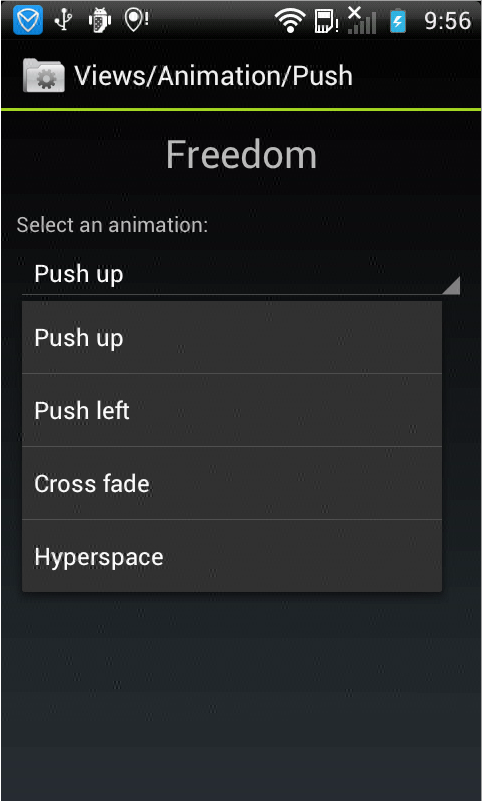
显示效果如下,选择不同的显示方式,文字将会按照显示方式作不同的显示:
android中的简单animation(二)push up,push left,cross fade,hyperspace的更多相关文章
- android中的简单animation(四)3D transition
animation_main_screen.xml: <?xml version="1.0" encoding="utf-8"?> <Fram ...
- android中的简单animation(三)accelerate(加速),decelerate(减速),anticipate,overshoot,bounce
animation_3.xml: <?xml version="1.0" encoding="utf-8"?> <LinearLayout x ...
- android中的简单animation(一)shake
1.shake animation_1.xml: <?xml version="1.0" encoding="utf-8"?> <Linear ...
- Android中xml设置Animation动画效果详解
在 Android 中, Animation 动画效果的实现可以通过两种方式进行实现,一种是 tweened animation 渐变动画,另一种是 frame by frame animation ...
- MVP架构在xamarin android中的简单使用
好几个月没写文章了,使用xamarin android也快接近两年,还有一个月职业生涯就到两个年了,从刚出来啥也不会了,到现在回头看这个项目,真jb操蛋(真辛苦了实施的人了,无数次吐槽怎么这么丑),怪 ...
- android中实现简单的聊天功能
这个例子只是简单的实现了单机版的聊天功能,自己跟自己聊,啦啦~~ 主要还是展示RecyclerView控件的使用吧~ 参考我之前写的文章: android中RecyclerView控件的使用 andr ...
- Gradle在Android中的简单使用
Gradle在Android中简单的使用 还望支持个人博客站:http://www.enjoytoday.cn Android Studio 使用gradle进行工程构建,为了更好的了解整个andro ...
- EventBus在Android中的简单使用
EventBus是一个方便与Android中各组件通信的开源框架,开源地址;https://github.com/greenrobot/EventBus.EventBus功能非常强大 ,今天在做一个功 ...
- Android中Intent具体解释(二)之使用Intent广播事件及Broadcast Receiver简单介绍
通过第一篇的解说,我们已经看到了怎样使用Intent来启动新的应用程序组件,可是实际上他们也能够使用sendBroadcast方法来在组件间匿名的广播消息. 作为一个系统级别的消息传递机制,Inten ...
随机推荐
- Flask - 运行APP
from flask import Flask app = Flask(__name__) @app.route("/") def hello(): return 'Hello, ...
- js keyCode 常用键盘编码
摘自:http://blog.csdn.net/dyllove98/article/details/8728657 keycode 8 = BackSpace BackSpace keycode 9 ...
- Python学习笔记009
不换行 print("Hello,world!",end='')print("Hello,world!",end='')print("Hello,wo ...
- Linux Kernel 5.5 最终删除 SYSCTL 系统调用
导读 Linux Kernel 5.5 最终消除了支持sysctl系统调用的代码,该代码已被弃用了大约十年,目前对任何体系结构的现代系统都没有影响. 长期以来,Linux sysctl系统调用都不建议 ...
- jsp页面展示更加商品的分类,控制商品的显示
我的大概思路是这样的,第一后果获取所有的商品分类 保存在list集合里面,第二从后台获取所有的商品 第三在JSP页面遍历商品分类集合放在页面的左边,然后jsp页面商品详细信息这块,也得先遍历商品分类, ...
- Java-用星号打印菱形
打印如图所示菱形9行9列(提示可以将菱形分成上下两个三角形,分析每行空格数和星号个数的关系) 代码如下: package com.homework.lhh; public class Ex20 { p ...
- ch8 让div居中--使用外边距
假设有一个布局,希望让其中的容器div在屏幕上水平居中,则只需要定义div的宽度,然后将水平外边距设置为auto <body> <div class="wrapper&qu ...
- 设计模式课程 设计模式精讲 9-2 原型模式coding
1 课堂演练 1.1 super.toString 作用 1.2 为什么要使用克隆方法呢 2 代码解析 2.1 代码解析1(使用原型模式之前) 2.2 代码解析2(使用原型模式默认方式(浅克隆)) 2 ...
- 吴裕雄 Bootstrap 前端框架开发——Bootstrap 辅助类:在元素获取焦点时显示(如:键盘操作的用户)
<!DOCTYPE html> <html> <head> <meta charset="utf-8"> <title> ...
- Django3.0中向后不兼容的更改
3.0中向后不兼容的更改 数据库后端API 本节描述了第三方数据库后端中可能需要的更改. 现在的第二个参数DatabaseIntrospection.get_geometry_type()是行描述,而 ...