
UWP 共享文件——接收者
UWP上共享,分为接收者(别人共享数据给你,你接收了,然后在做你的处理)和发送者(你给别人发送数据,就像你的App支持图片共享到微信好友或者朋友圈那样,虽然UWP上的微信并不支持这样子)
很简单(参考Windows on Github\Windows-universal-samples\Samples\ShareTarget)
1、先滚进包清单声明,添加共享目标。再选择你App准备接受的数据格式。
如果你的App只接收图像,就填写一个Bitmap了啦
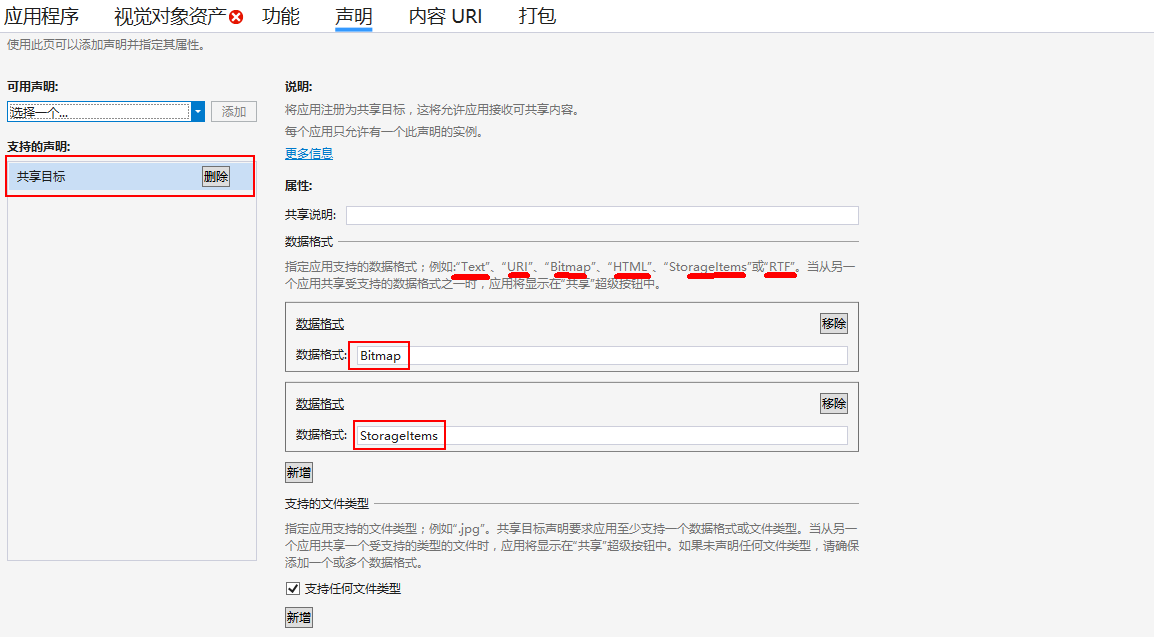
2、然后滚进App.xaml.cs,重写OnShareTargetActivated
一般建议导航到一个ReceivedSharePage页面来处理,并把 ShareOperation 对象作为附加参数传过去,再在页面上接收这个对象实例。
protected override void OnShareTargetActivated(ShareTargetActivatedEventArgs args)

{

var rootFrame = Window.Current.Content as Frame;

if (rootFrame == null)

{

rootFrame = new Frame();

Window.Current.Content = rootFrame;

}

rootFrame.Navigate(typeof(ReceivedSharePage), args.ShareOperation);

Window.Current.Activate();

}
3、在ReceivedSharePage的后台,重写 OnNavigatedTo 方法,可以获取导航时传递的参数。
前台放一个Image,显示数据
正如我第一步设置的,我的App可以接受图像Bitmap和文件StorageItems两种,所以在代码里面都要处理一下子的。
private ShareOperation shareOperation;

private IRandomAccessStreamReference sharedBitmapStreamRef;

private IReadOnlyList<IStorageItem> sharedStorageItems;

protected override async void OnNavigatedTo(NavigationEventArgs e)

{

// It is recommended to only retrieve the ShareOperation object in the activation handler, return as

// quickly as possible, and retrieve all data from the share target asynchronously.

this.shareOperation = (ShareOperation)e.Parameter;

await Task.Factory.StartNew(async () =>

{

// Retrieve the data package content.

// The GetWebLinkAsync(), GetTextAsync(), GetStorageItemsAsync(), etc. APIs will throw if there was an error retrieving the data from the source app.

// In this sample, we just display the error. It is recommended that a share target app handles these in a way appropriate for that particular app.

if (this.shareOperation.Data.Contains(StandardDataFormats.Bitmap))

{

try

{

this.sharedBitmapStreamRef = await this.shareOperation.Data.GetBitmapAsync();

}

catch (Exception ex)

{

textResult.Text = "Failed GetBitmapAsync - " + ex.Message;

}

}

if (this.shareOperation.Data.Contains(StandardDataFormats.StorageItems))

{

try

{

this.sharedStorageItems = await this.shareOperation.Data.GetStorageItemsAsync();

}

catch (Exception ex)

{

textResult.Text = "Failed GetBitmapAsync - " + ex.Message;

}

}

// In this sample, we just display the shared data content.

// Get back to the UI thread using the dispatcher.

await Dispatcher.RunAsync(CoreDispatcherPriority.Normal, async () =>

{

if (this.sharedBitmapStreamRef != null)

{

IRandomAccessStreamWithContentType bitmapStream = await this.sharedBitmapStreamRef.OpenReadAsync();

BitmapImage bitmapImage = new BitmapImage();

bitmapImage.SetSource(bitmapStream);

imgReceived.Source = bitmapImage;

textResult.Text = "Click OK to continue :)";

//写入记忆文件的位置

(Application.Current as App).localSettings.Values["LastFile"] = this.sharedStorageItems[].Path;

}

else if (this.sharedStorageItems != null)

{

try

{

StorageFile file = await StorageFile.GetFileFromPathAsync(this.sharedStorageItems[].Path);

IRandomAccessStreamWithContentType bitmapStream = await file.OpenReadAsync();

BitmapImage bitmapImage = new BitmapImage();

bitmapImage.SetSource(bitmapStream);

imgReceived.Source = bitmapImage;

textResult.Text = "Click OK to continue :)";

//写入记忆文件的位置

(Application.Current as App).localSettings.Values["LastFile"] = this.sharedStorageItems[].Path;

}

catch

{

textResult.Text = "Sorry, your shared content is not a standard image file :(";

}

}

});

});

}
4、在处理完成时,你需要调用 ReportCompleted 方法,这个不能少,因为这个方法会告诉系统,你的程序已经处理完共享数据了,这时候共享面板会关闭。
(Exif里面并没有这么做,而是把数据传给了ImageExifPage页面,用来分析图像数据了)
5、测试
找一个App,可以向外共享数据的,比如系统的图片App,或者微软给的sample/ShareSource App
选择图片
【Attention!!!通过图片App发送出来的数据,并不是Bitmap格式,而是作为文件StorageItems格式发送出去了。。。。。。一开始我老是纳闷,用Bitmap咋收不到图片,mmp。。。。。。用ShareSource App可以有很多种选择啦】
OKKKKKKKKKKKKKKKKKKKKKKKKKKKKKKKKKKKKKKKKKKK!
UWP 共享文件——接收者的更多相关文章
- UWP 共享文件——发送者
这一节,顾名思义,即使你要共享数据给别人,你是数据的提供者.分两步即可1.直接复制代码 protected override void OnNavigatedTo(NavigationEventArg ...
- Win10/UWP新特性—SharedStorageAccessManager 共享文件
首先先给大家推荐一个UWP/Win10开发者群:53078485 里面有很多大婶,还有很多学习资源,欢迎大家来一起讨论Win10开发! 在UWP开发中,微软提供了一个新的特性叫做SharedStor ...
- UWP学习记录12-应用到应用的通信
UWP学习记录12-应用到应用的通信 1.应用间通信 “共享”合约是用户可以在应用之间快速交换数据的一种方式. 例如,用户可能希望使用社交网络应用与其好友共享网页,或者将链接保存在笔记应用中以供日后参 ...
- Win10 UWP开发实现Bing翻译
微软在WP上的发展从原来的Win7到Win8,Win8.1,到现在的Win10 UWP,什么是UWP,UWP即Windows 10 中的Universal Windows Platform简称.即Wi ...
- Win10/UWP新特性—Drag&Drop 拖出元素到其他App
在以前的文章中,写过微软新特性Drag&Drop,当时可能由于处于Win10预览版,使用的VS也是预览版,只实现了从桌面拖拽文件到UWP App中,没能实现从UWP拖拽元素到Desktop A ...
- UWP开源项目 LLQNotifier 页面间通信利器(移植EventBus)
前言 EventBus是一个Android版本的页面间通信库,这个库让页面间的通信变得十分容易且大幅降低了页面之间的耦合.小弟之前玩Android的时候就用得十分顺手,现在玩uwp就觉得应该在这平台也 ...
- UWP 拉勾客户端
前些天, 用 Xamarin.Forms (XF) 将就着写了个拉勾的 UWP 和 Android 的客户端. XF 对 Android 和 IOS 的支持做的很到位, 但是对 UWP 的支持目前仅 ...
- Win10/UWP新特性系列—Launcher实现应用间的通信
UWP中,微软为Windows.System.Launcher启动器新增了很多的功能,以前只能启动App,打开指定扩展名文件,对uri协议的解析,以及当启动的应用没有安装时则会提示前往商店下载等. 如 ...
- Win10/UWP新特性系列-GetPublisherCacheFolder
微软Windows Runtime App拥有很强的安全模型来防止不同App之间的数据获取和共享,也就是我们所说的"沙盒机制",每个App都运行在Windows沙盒中,App之间的 ...
随机推荐
- enum(枚举类型)
可以使用枚举类型声明代表整数常量的符号名称. 通过enum,创建一个新类型,并指定它可以拥有的值.(就像平常用一个整形变量,我们指定它等于0的时候代表什么,1呢,2呢...而通过枚举,就增加了程序的可 ...
- AJAX,PHP,前端简单交互制作输入框效果
PHP数据 <?php // 数据 $arr = array( array("百度", "http://www.baidu.com/"), array(& ...
- Strange fuction
Problem Description Now, here is a fuction: F(x) = 6 * x^7+8*x^6+7*x^3+5*x^2-y*x (0 <= x <=1 ...
- asp.net core webapi文件上传
最近开发一个新项目,使用了asp.net core 2.0,采用webapi开发后台,postgresql为数据库.最先来的问题就是上传文件的问题. POST文件的一些坑 使用默认模板创建webapi ...
- AngularJS学习篇(七)
AngularJS 过滤器 过滤器可以使用一个管道字符(|)添加到表达式和指令中. <!DOCTYPE html> <html> <head> <meta c ...
- Mongoose之 SchemaTypes 数据类型
SchemaTypes 数据类型 SchemaTypes handle definition of path defaults, validation, getters, setters, field ...
- mac链接linux终端,shell脚本发布代码
项目的业务需求:从mac端直接连上linux服务终端,并发布相关的代码 一.使用ssh链接上linux服务端 1.cd ~/.ssh 2.vi config,按照下面的内容配置config文件,然后: ...
- Pandas常用函数入门
一.Pandas Python Data Analysis Library或Pandas是基于NumPy的一种工具,该工具是为了解决数据分析任务而创建的.Pandas纳入了大量库和一些标准的数据模型, ...
- javascript 中遍历数组的简单方法
在Javascript中有自带方便遍历数组的方法(此方法非彼方法不要误会哦): 1 .利用for( index in array ){}; 2.利用 array.forEach( function(e ...
- js滚动加载小插件
本文实例讲述了jquery滚动加载数据的方法.分享给大家供大家参考.具体分析如下: 少废话直接上代码!!!粗暴,直接,干脆 0//lk-2017-05-04 1(function($, win) { ...