
Cookies and Caching Client Identification
w
HTTP The Definitive Guide
11.6.9 Cookies and Caching
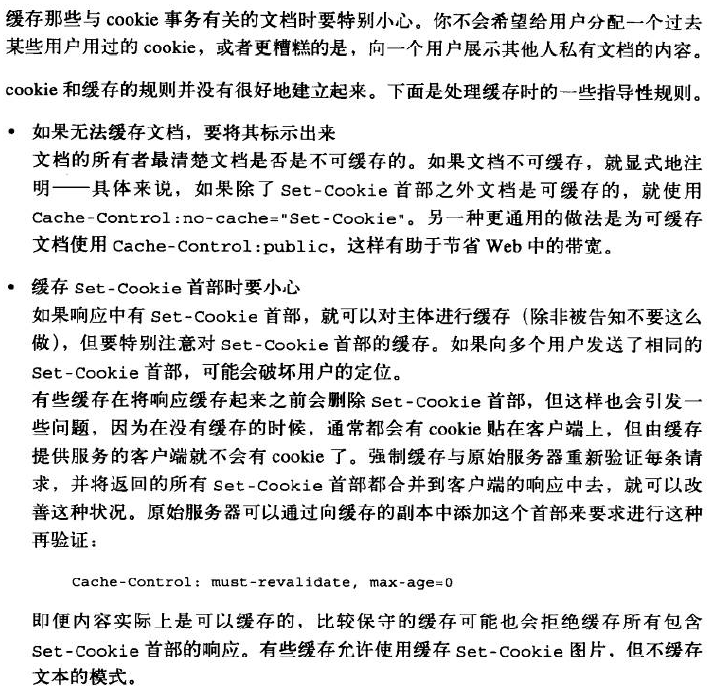
You have to be careful when caching documents that are involved with cookie transactions. You don't
want to assign one user some past user's cookie or, worse, show one user the contents of someone
else's personalized document.
The rules for cookies and caching are not well established. Here are some guiding principles for
dealing with caches:
Mark documents uncacheable if they are
The document owner knows best if a document is uncacheable. Explicitly mark documents
uncacheable if they are—specifically, use Cache-Control: no-cache="Set-Cookie" if the
document is cacheable except for the Set-Cookie header. The other, more general practice of
using Cache-Control: public for documents that are cacheable promotes bandwidth savings in
the Web. Be cautious about caching Set-Cookie headers
If a response has a Set-Cookie header, you can cache the body (unless told otherwise), but
you should be extra cautious about caching the Set-Cookie header. If you send the same Set-
Cookie header to multiple users, you may be defeating user targeting.
Some caches delete the Set-Cookie header before storing a response in the cache, but that also
can cause problems, because clients served from the cache will no longer get cookies slapped
on them that they normally would without the cache. This situation can be improved by
forcing the cache to revalidate every request with the origin server and merging any returned
Set-Cookie headers with the client response. The origin server can dictate such revalidations
by adding this header to the cached copy:
Cache-Control: must-revalidate, max-age=0
More conservative caches may refuse to cache any response that has a Set-Cookie header,
even though the content may actually be cacheable. Some caches allow modes when Set-
Cookied images are cached, but not text.
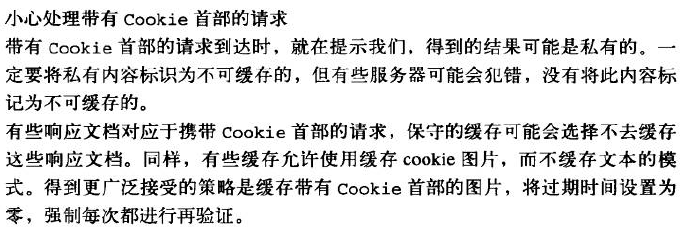
Be cautious about requests with Cookie headers
When a request arrives with a Cookie header, it provides a hint that the resulting content
might be personalized. Personalized content must be flagged uncacheable, but some servers
may erroneously not mark this content as uncacheable.
Conservative caches may choose not to cache any document that comes in response to a
request with a Cookie header. And again, some caches allow modes when Cookied images
are cached, but not text. The more accepted policy is to cache images with Cookie headers,
with the expiration time set to zero, thus forcing a revalidate every time.
Cookies and Caching Client Identification的更多相关文章
- Cookies and Session Tracking Client Identification cookie与会话跟踪 客户端识别
w HTTP The Definitive Guide Cookies can be used to track users as they make multiple transactions to ...
- Technical analysis of client identification mechanisms
http://www.chromium.org/Home/chromium-security/client-identification-mechanisms Chromium > Chro ...
- Cookies Client Identification
HTTP The Definitive Guide Cookies are the best current way to identify users and allow persistent se ...
- Cookies, Security, and Privacy Client Identification
w HTTP The Definitive Guide Cookies themselves are not believed to be a tremendous security risk, be ...
- Fat URLs Client Identification
w在每个URL后面都附加一个用户特有的标识码. HTTP The Definitive Guide Some web sites keep track of user identity by gene ...
- The Personal Touch Client Identification 个性化接触 客户识别
w服务器要知道和谁在交谈. HTTP The Definitive Guide Web servers may talk to thousands of different clients simul ...
- combined with the Referer header, to potentially build an exhaustive data set of user profiles and browsing habits Client Identification
w https://www.zhihu.com/question/35307626 w 0-客户端(附加用户信息)首次请求服务端--->服务端生成session(有唯一性).session_id ...
- Client IP Address Client Identification
HTTP The Definitive Guide Early web pioneers tried using the IP address of the client as a form of i ...
- HTTP Headers Client Identification
用户信息通过HTTP头部承载:不能实现用户唯一性标识. w HTTP The Definitive Guide Table 11-1 shows the seven HTTP request head ...
随机推荐
- bazel-编译多目标
demo2 使用bazel编译多目标示例,一个bianry,一个library. demo2目录树 ── demo2 ├── app │ ├── BUILD │ ├── func.cpp ...
- ubutun:从共享文件夹拷贝文件尽量使用cp命令而不是CTRL+C/V
为了方便,VBOX安装的Ubuntu,并在硬盘上创建了一个与Windows的共享文件夹sharefolder方便在两个系统之间传文件 但是经常发现的问题就是从sharefolder中拷贝文件到ubun ...
- ms17010漏洞复现-2003
先使用Smbtouch模块检测一下是否有漏洞. 然后使用Doublepulsar写一个shellcode到本地. 生成成功后的截图: 再使用EternalRomance植入Doublepulsar后门 ...
- [misc]printf/fprintf/sprintf/snprintf函数
转自:http://blog.csdn.net/To_Be_IT_1/article/details/32179549 需要包含的头文件 #include <stdio.h> int pr ...
- Linux网络编程wait()和waitpid()的讲解
本文讲的是关于wait和waitpid两者的区别与联系.为避免僵尸进程的产生,无论我们什么时候创建子进程时,主进程都需要等待子进程返回,以便对子进程进行清理.为此,我们在服务器程序中添加SIGCHLD ...
- SQL select查询原理--查询语句执行原则<转>
1.单表查询:根据WHERE条件过滤表中的记录,形成中间表(这个中间表对用户是不可见的):然后根据SELECT的选择列选择相应的列进行返回最终结果. 1)简单的单表查询 SELECT 字段 FROM ...
- RabbitMQ之主题(Topic)【译】
在上一节中,我们改进了我们的日志系统,替换使用fanout exchange仅仅能广播消息,使得选择性的接收日志成为可能. 虽然使用direct exchange改进了我们的系统,但是它仍然由他的局限 ...
- 关于Unity中的几何体,材质和FBX模型
一.创建几何体的类型 1: 创建平面 Plane;2: 创建立方体 Cube;3: 创建球体 Sphere;4: 创建胶囊体 Capsule;5: 创建圆柱体 Cylinder;6: 3D文字 3D ...
- Android 绘制圆环
使用画圆弧的方式绘制圆环和进度条,使用sweepGradient进行渐变. 参考链接 http://blog.csdn.net/u011494050/article/details/39251239 ...
- 第二百七十节,Tornado框架-生成验证码图片,以及验证码结合Session验证
Tornado框架-生成验证码图片,以及验证码结合Session验证 第一.生成验证码图片 生成验证码图片需要两个必须模块 1.python自带的random(随机模块) 2.Pillow()图像处 ...