
Cookies Client Identification
HTTP The Definitive Guide
Cookies are the best current way to identify users and allow persistent sessions. They don't suffer
many of the problems of the previous techniques, but they often are used in conjunction with those
techniques for extra value. Cookies were first developed by Netscape but now are supported by all
major browsers.
Because cookies are important, and they define new HTTP headers, we're going to explore them in
more detail than we did the previous techniques. The presence of cookies also impacts caching, and
most caches and browsers disallow caching of any cookied content. The following sections present
more details.

11.6.1 Types of Cookies
You can classify cookies broadly into two types: session cookies and persistent cookies. A session
cookie is a temporary cookie that keeps track of settings and preferences as a user navigates a site. A
session cookie is deleted when the user exits the browser. Persistent cookies can live longer; they are
stored on disk and survive browser exits and computer restarts. Persistent cookies often are used to
retain a configuration profile or login name for a site that a user visits periodically.
The only difference between session cookies and persistent cookies is when they expire. As we will
see later, a cookie is a session cookie if its Discard parameter is set, or if there is no Expires or Max-
Age parameter indicating an extended expiration time.
11.6.2 How Cookies Work
Cookies are like "Hello, My Name Is" stickers stuck onto users by servers. When a user visits a web
site, the web site can read all the stickers attached to the user by that server.
The first time the user visits a web site, the web server doesn't know anything about the user (Figure
11-3a). The web server expects that this same user will return again, so it wants to "slap" a unique
cookie onto the user so it can identify this user in the future. The cookie contains an arbitrary list of
name=value information, and it is attached to the user using the Set-Cookie or Set-Cookie2 HTTP
response (extension) headers.
Cookies can contain any information, but they often contain just a unique identification number,
generated by the server for tracking purposes. For example, in Figure 11-3b, the server slaps onto the
user a cookie that says id="34294". The server can use this number to look up database information
that the server accumulates for its visitors (purchase history, address information, etc.).
However, cookies are not restricted to just ID numbers. Many web servers choose to keep information
directly in the cookies. For example:
Cookie: name="Brian Totty"; phone="555-1212"
The browser remembers the cookie contents sent back from the server in Set-Cookie or Set-Cookie2
headers, storing the set of cookies in a browser cookie database (think of it like a suitcase with stickers
from various countries on it). When the user returns to the same site in the future (Figure 11-3c), the
browser will select those cookies slapped onto the user by that server and pass them back in a Cookie
request header.
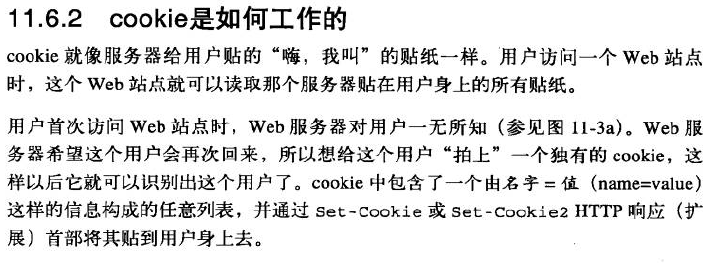
Figure 11-3. Slapping a cookie onto a user
Cookies Client Identification的更多相关文章
- Technical analysis of client identification mechanisms
http://www.chromium.org/Home/chromium-security/client-identification-mechanisms Chromium > Chro ...
- Cookies and Session Tracking Client Identification cookie与会话跟踪 客户端识别
w HTTP The Definitive Guide Cookies can be used to track users as they make multiple transactions to ...
- Cookies, Security, and Privacy Client Identification
w HTTP The Definitive Guide Cookies themselves are not believed to be a tremendous security risk, be ...
- Cookies and Caching Client Identification
w HTTP The Definitive Guide 11.6.9 Cookies and Caching You have to be careful when caching documents ...
- The Personal Touch Client Identification 个性化接触 客户识别
w服务器要知道和谁在交谈. HTTP The Definitive Guide Web servers may talk to thousands of different clients simul ...
- combined with the Referer header, to potentially build an exhaustive data set of user profiles and browsing habits Client Identification
w https://www.zhihu.com/question/35307626 w 0-客户端(附加用户信息)首次请求服务端--->服务端生成session(有唯一性).session_id ...
- Fat URLs Client Identification
w在每个URL后面都附加一个用户特有的标识码. HTTP The Definitive Guide Some web sites keep track of user identity by gene ...
- Client IP Address Client Identification
HTTP The Definitive Guide Early web pioneers tried using the IP address of the client as a form of i ...
- HTTP Headers Client Identification
用户信息通过HTTP头部承载:不能实现用户唯一性标识. w HTTP The Definitive Guide Table 11-1 shows the seven HTTP request head ...
随机推荐
- iPhone4 降级6.12教程 无须SHSH 不装插件 不睡死[转载] by 轻鸢
无shsh降级电脑系统,细节操作等其它影响因素较多,不确保每个人都能成功,楼主发帖前刷机几十次均成功.步骤有些繁琐,按照步骤每一步都正确可保证最后不睡死 注意一下,无SHSH降级都是不完美的,开机需要 ...
- wifi设置
1 编辑/etc/init.d/wifi #!/bin/sh case "$1" in start) echo /sbin/mdev > /proc/sys/kern ...
- Linux安装MediaWiki
1. 编译安装libxml2 # wget http://xmlsoft.org/sources/libxml2-2.6.32.tar.gz # tar zxvf libxml2-2.6.32. ...
- Dirichlet Distribution
Beta分布: 二项式分布(Binomial distribution): 多项式分布: Beta分布: Beta分布是二项式分布的共轭先验(conjugate prior) Dirichlet Di ...
- android system.img 解压和打包
system.img重新编译的时间太长,添加和更改的文件系统内容,往往通过对system.img加压再打包的方式. 参考链接 http://blog.csdn.net/whu_zhangmin/art ...
- 在堆栈中,push为入栈操作,pop为出栈操作
LinkedList提供以下方法:(ArrayList无此类方法) addFirst(); removeFirst(); addLast(); removeLast(); 在堆栈中,push为入栈操作 ...
- poj3301--Texas Trip(最小正方形覆盖)
题目链接:点击打开链接 题目大意:给出n个点的坐标.如今要求一个正方形,全然包围n个点.而且正方形面积最小,求最小的正方形面积. 表示不能理解为什么面积随着角度的变化是一个单峰的函数,等待大牛告诉一下 ...
- 如何在ChemDraw中打出符号π
很多人日常使用ChemDraw是一款非常优秀的化学绘图软件,在其绘制化学结构式或者反应式的过程中,常常需要添加各种符号.比如有的用户会需要输入希腊字符π,但是不知道用什么方法添加.本教程就来给大家介绍 ...
- uva 707(记忆化搜索)
题目链接:http://acm.hust.edu.cn/vjudge/problem/viewProblem.action?id=21261 思路:此题需要记忆化搜索,dp[x][y][t]表示当前状 ...
- CodeForces 558C Amr and Chemistry (位运算,数论,规律,枚举)
Codeforces 558C 题意:给n个数字,对每一个数字能够进行两种操作:num*2与num/2(向下取整),求:让n个数相等最少须要操作多少次. 分析: 计算每一个数的二进制公共前缀. 枚举法 ...