
Android——excise(用线性布局、表格布局、相对布局做发送邮件界面)
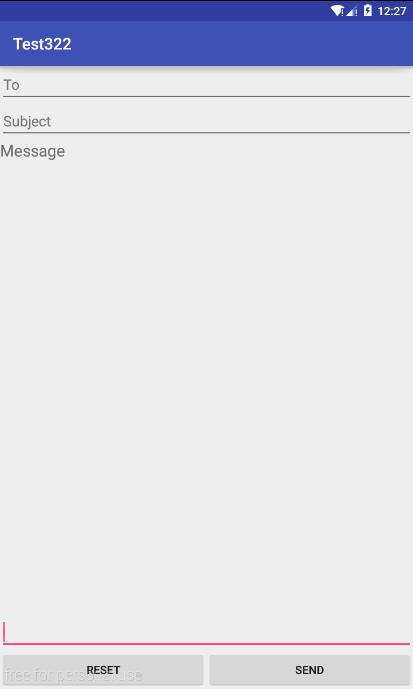
LinearLayout
<?xml version="1.0" encoding="utf-8"?>

<LinearLayout xmlns:android="http://schemas.android.com/apk/res/android"

    android:layout_width="match_parent"

    android:layout_height="match_parent"

    android:orientation="vertical">

        <EditText

            android:layout_width="match_parent"

            android:layout_height="wrap_content"

            android:hint="To"

            />

        <EditText

            android:layout_width="match_parent"

            android:layout_height="wrap_content"

            android:hint="Subject"

            />

        <TextView

            android:layout_width="match_parent"

            android:layout_height="wrap_content"

            android:text="Message"

            android:textSize="20dp"/>

        <EditText

            android:layout_width="match_parent"

            android:layout_height="0dp"

            android:layout_weight="1"

            android:gravity="bottom"

            />

    <LinearLayout

        android:layout_width="match_parent"

        android:layout_height="wrap_content"

        android:orientation="horizontal">

        <Button

            android:layout_width="0dp"

            android:layout_height="wrap_content"

            android:text="Reset"

            android:layout_weight="1"/>

        <Button

            android:layout_width="0dp"

            android:layout_height="wrap_content"

            android:text="Send"

            android:layout_weight="1"

            />

    </LinearLayout>

</LinearLayout>
TableLayout
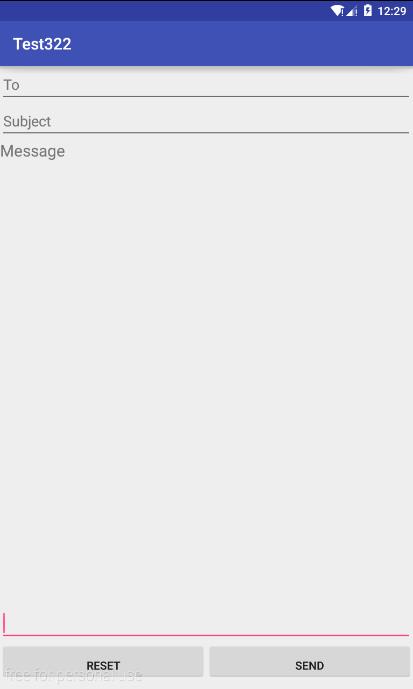
<?xml version="1.0" encoding="utf-8"?>

<TableLayout xmlns:android="http://schemas.android.com/apk/res/android"

    android:layout_width="match_parent"

    android:layout_height="match_parent"

    android:stretchColumns="1,2">

    <TableRow>

        <EditText

            android:layout_width="match_parent"

            android:layout_height="wrap_content"

            android:hint="To"

            android:layout_span="2"/>

    </TableRow>

    <TableRow>

        <EditText

            android:layout_width="match_parent"

            android:layout_height="wrap_content"

            android:hint="Subject"

            android:layout_span="2"/>

    </TableRow>

    <TableRow>

        <TextView

            android:layout_width="match_parent"

            android:layout_height="wrap_content"

            android:hint="Message"

            android:textSize="20dp"/>

    </TableRow>

    <TableRow

        android:layout_marginTop="550dp">

        <EditText

            android:layout_width="match_parent"

            android:layout_height="wrap_content"

            android:layout_span="2"

            />

    </TableRow>

    <TableRow>

        <Button

            android:layout_width="0dp"

            android:layout_height="wrap_content"

            android:paddingBottom="0dp"

            android:text="reset"

            android:layout_weight="1"/>

        <Button

            android:layout_width="0dp"

            android:layout_height="wrap_content"

            android:paddingBottom="0dp"

            android:text="send"

            android:layout_weight="1"/>

    </TableRow>

</TableLayout>
RelativeLayout
<?xml version="1.0" encoding="utf-8"?>

<RelativeLayout xmlns:android="http://schemas.android.com/apk/res/android"

    android:layout_width="match_parent"

    android:layout_height="match_parent">

    <EditText

        android:layout_width="match_parent"

        android:layout_height="wrap_content"

        android:hint="To"

        android:id="@+id/to"/>

    <EditText

        android:layout_width="match_parent"

        android:layout_height="wrap_content"

        android:hint="Subject"

        android:layout_below="@id/to"

        android:id="@+id/sub"

        />

    <TextView

        android:layout_width="match_parent"

        android:layout_height="wrap_content"

        android:hint="Message"

        android:textSize="20dp"

        android:layout_below="@id/sub"

        />

    <Button

        android:layout_width="190dp"

        android:layout_height="wrap_content"

        android:text="send"

        android:layout_alignParentBottom="true"

        android:layout_alignParentRight="true"

        android:id="@+id/sen"

       />

    <Button

        android:layout_width="190dp"

        android:layout_height="wrap_content"

        android:text="reset"

        android:layout_alignParentBottom="true"

        android:layout_alignParentLeft="true"

        />

    <EditText

        android:layout_width="match_parent"

        android:layout_height="wrap_content"

        android:layout_above="@id/sen"

        />

</RelativeLayout>

Android——excise(用线性布局、表格布局、相对布局做发送邮件界面)的更多相关文章
- Android -- UI布局管理,相对布局,线性布局,表格布局,绝对布局,帧布局
1. 相对布局 <RelativeLayout xmlns:android="http://schemas.android.com/apk/res/android" xmln ...
- Android精通:View与ViewGroup,LinearLayout线性布局,RelativeLayout相对布局,ListView列表组件
UI的描述 对于Android应用程序中,所有用户界面元素都是由View和ViewGroup对象构建的.View是绘制在屏幕上能与用户进行交互的一个对象.而对于ViewGroup来说,则是一个用于存放 ...
- 【Android开发学习笔记之一】5大布局方式详解
Android中常用的5大布局方式有以下几种: 线性布局(LinearLayout):按照垂直或者水平方向布局的组件. 帧布局(FrameLayout):组件从屏幕左上方布局组件. 表格布局(Tabl ...
- Android初级教程理论知识(第二章布局&读写文件)
常见布局 相对布局 RelativeLayout 组件默认左对齐.顶部对齐 设置组件在指定组件的右边 android:layout_toRightOf="@id/tv1" 设置在指 ...
- android开发_ViewGroup(组视图)-- 五大布局
view组--ViewGroup(组视图) ViewGroup的作用:在view中添加子控件.ViewGroup的5个子类,就是五大布局: (1) LinearLayout 线性布局(常用) (2) ...
- 学习android开发之路(一)页面布局
Android页面布局 1.Android页面布局一共分为6种: LinearLayout(线性布局).RelativeLayout(相对布局).TableLayout(表格布局).FrameLayo ...
- Android精通:TableLayout布局,GridLayout网格布局,FrameLayout帧布局,AbsoluteLayout绝对布局,RelativeLayout相对布局
在Android中提供了几个常用布局: LinearLayout线性布局 RelativeLayout相对布局 FrameLayout帧布局 AbsoluteLayout绝对布局 TableLayou ...
- Android布局_布局概述和LinearLayout布局
一.布局概述: 布局为UI提供了一个可视化的结构,比如对于一个activity或者app widget的UI,你可以用两种方式声明布局: 在XML中声明UI元素 在运行时实例化布局元素(在java代码 ...
- 第24讲 UI_布局 之帧布局 表格布局 绝对布局
第24讲 UI_布局 之帧布局 表格布局 绝对布局 3. FrameLayout(帧布局) 帧布局是从屏幕的左上角(0,0)坐标开始布局,多个组件层叠排序,后一个组件总会将前一个组件所覆盖,除非最后一 ...
随机推荐
- 关于C#程序优化的五十种方法
关于C#程序优化的五十种方法 这篇文章主要介绍了C#程序优化的五十个需要注意的地方,使用c#开发的朋友可以看下 一.用属性代替可访问的字段 1..NET数据绑定只支持数据绑定,使用属性可以获 ...
- nGrinder二次开发之监控机器性能数据
转载:https://blog.csdn.net/neven7/article/details/53909256 1.背景 做性能测试时,统计性能数据分为被压系统的数据和被压系统所在机器的数据,被压系 ...
- (C++)浅谈using namespace std
1.<iostream>和<iostream.h> 在你的编译器include文件夹里面可以看到,二者是两个文件,里面的代码是不一样的. 后缀为.h的头文件c++标准已经明确提 ...
- Cocos2d-x 2.x 升级为 3.x 常见变化纪录
1.去CC 之前2.0的CC**,把CC都去掉,主要的元素都是保留的 2.0 CCSprite CCCallFunc CCNode .. 3.0 Sprite CallFunc Node .. 2. ...
- Ubuntu 14.04安装语言包后无法选择汉语问题解决
如需转载请标明出处:http://blog.csdn.net/itas109 QQ技术交流群:129518033 安装完语言包后.尽管里面有了汉语.可是是灰色的.例如以下图所看到的: watermar ...
- 在第一段ionic示例的基础上增加底部导航
demo2.html <!DOCTYPE html> <html ng-app="app"> <head> <meta charset=& ...
- 算法笔记_131:出现次数超过一半的数(Java)
目录 1 问题描述 2 解决方案 2.1 每次删除两个不同的数 2.2 记录两个值 1 问题描述 数组中有一个数出现的次数超过了数组长度的一半,请找出这个数. 2 解决方案 2.1 每次删除两个不 ...
- JavaScript数组方法说明
JavaScript的数组方法有: http://www.w3school.com.cn/jsref/jsref_obj_array.asp 其中:concat.join和slice方法都不会修改原数 ...
- knockoutjs -- all built-in buildings
所有可用的binding值 文字和显示:visible, text, html, css, style, attr 流程控制:foreach, if, ifnot, with form字段:click ...
- MyEclipse连接sqlserver2008具体流程
参照这里: 图形连接 http://wenku.baidu.com/view/f50838086c85ec3a87c2c53a.html 还有查看的是这个: 2. 重新用Window验证方式登陆 ...