
Android——excise(用线性布局、表格布局、相对布局做发送邮件界面)
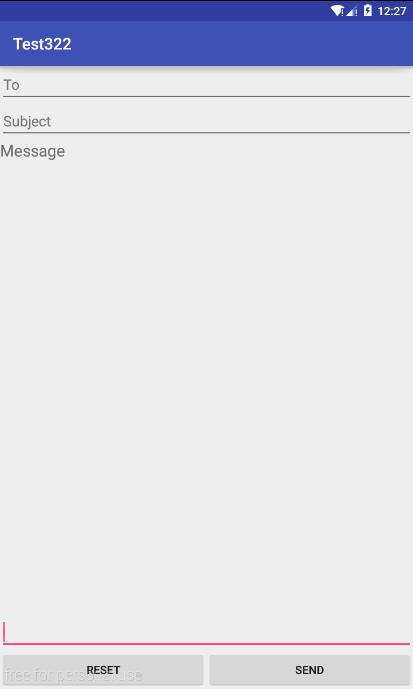
LinearLayout
<?xml version="1.0" encoding="utf-8"?>

<LinearLayout xmlns:android="http://schemas.android.com/apk/res/android"

    android:layout_width="match_parent"

    android:layout_height="match_parent"

    android:orientation="vertical">

        <EditText

            android:layout_width="match_parent"

            android:layout_height="wrap_content"

            android:hint="To"

            />

        <EditText

            android:layout_width="match_parent"

            android:layout_height="wrap_content"

            android:hint="Subject"

            />

        <TextView

            android:layout_width="match_parent"

            android:layout_height="wrap_content"

            android:text="Message"

            android:textSize="20dp"/>

        <EditText

            android:layout_width="match_parent"

            android:layout_height="0dp"

            android:layout_weight="1"

            android:gravity="bottom"

            />

    <LinearLayout

        android:layout_width="match_parent"

        android:layout_height="wrap_content"

        android:orientation="horizontal">

        <Button

            android:layout_width="0dp"

            android:layout_height="wrap_content"

            android:text="Reset"

            android:layout_weight="1"/>

        <Button

            android:layout_width="0dp"

            android:layout_height="wrap_content"

            android:text="Send"

            android:layout_weight="1"

            />

    </LinearLayout>

</LinearLayout>
TableLayout
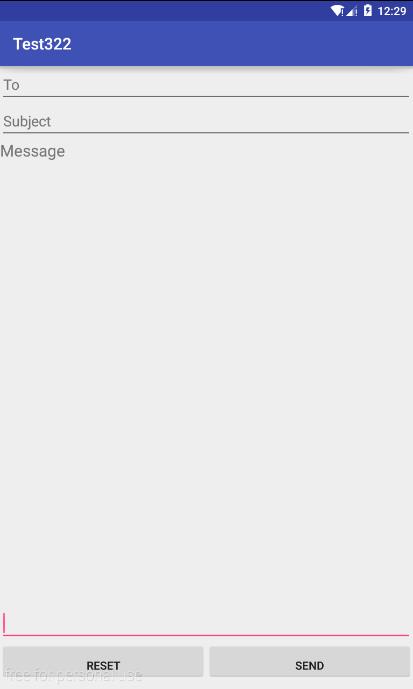
<?xml version="1.0" encoding="utf-8"?>

<TableLayout xmlns:android="http://schemas.android.com/apk/res/android"

    android:layout_width="match_parent"

    android:layout_height="match_parent"

    android:stretchColumns="1,2">

    <TableRow>

        <EditText

            android:layout_width="match_parent"

            android:layout_height="wrap_content"

            android:hint="To"

            android:layout_span="2"/>

    </TableRow>

    <TableRow>

        <EditText

            android:layout_width="match_parent"

            android:layout_height="wrap_content"

            android:hint="Subject"

            android:layout_span="2"/>

    </TableRow>

    <TableRow>

        <TextView

            android:layout_width="match_parent"

            android:layout_height="wrap_content"

            android:hint="Message"

            android:textSize="20dp"/>

    </TableRow>

    <TableRow

        android:layout_marginTop="550dp">

        <EditText

            android:layout_width="match_parent"

            android:layout_height="wrap_content"

            android:layout_span="2"

            />

    </TableRow>

    <TableRow>

        <Button

            android:layout_width="0dp"

            android:layout_height="wrap_content"

            android:paddingBottom="0dp"

            android:text="reset"

            android:layout_weight="1"/>

        <Button

            android:layout_width="0dp"

            android:layout_height="wrap_content"

            android:paddingBottom="0dp"

            android:text="send"

            android:layout_weight="1"/>

    </TableRow>

</TableLayout>
RelativeLayout
<?xml version="1.0" encoding="utf-8"?>

<RelativeLayout xmlns:android="http://schemas.android.com/apk/res/android"

    android:layout_width="match_parent"

    android:layout_height="match_parent">

    <EditText

        android:layout_width="match_parent"

        android:layout_height="wrap_content"

        android:hint="To"

        android:id="@+id/to"/>

    <EditText

        android:layout_width="match_parent"

        android:layout_height="wrap_content"

        android:hint="Subject"

        android:layout_below="@id/to"

        android:id="@+id/sub"

        />

    <TextView

        android:layout_width="match_parent"

        android:layout_height="wrap_content"

        android:hint="Message"

        android:textSize="20dp"

        android:layout_below="@id/sub"

        />

    <Button

        android:layout_width="190dp"

        android:layout_height="wrap_content"

        android:text="send"

        android:layout_alignParentBottom="true"

        android:layout_alignParentRight="true"

        android:id="@+id/sen"

       />

    <Button

        android:layout_width="190dp"

        android:layout_height="wrap_content"

        android:text="reset"

        android:layout_alignParentBottom="true"

        android:layout_alignParentLeft="true"

        />

    <EditText

        android:layout_width="match_parent"

        android:layout_height="wrap_content"

        android:layout_above="@id/sen"

        />

</RelativeLayout>

Android——excise(用线性布局、表格布局、相对布局做发送邮件界面)的更多相关文章
- Android -- UI布局管理,相对布局,线性布局,表格布局,绝对布局,帧布局
1. 相对布局 <RelativeLayout xmlns:android="http://schemas.android.com/apk/res/android" xmln ...
- Android精通:View与ViewGroup,LinearLayout线性布局,RelativeLayout相对布局,ListView列表组件
UI的描述 对于Android应用程序中,所有用户界面元素都是由View和ViewGroup对象构建的.View是绘制在屏幕上能与用户进行交互的一个对象.而对于ViewGroup来说,则是一个用于存放 ...
- 【Android开发学习笔记之一】5大布局方式详解
Android中常用的5大布局方式有以下几种: 线性布局(LinearLayout):按照垂直或者水平方向布局的组件. 帧布局(FrameLayout):组件从屏幕左上方布局组件. 表格布局(Tabl ...
- Android初级教程理论知识(第二章布局&读写文件)
常见布局 相对布局 RelativeLayout 组件默认左对齐.顶部对齐 设置组件在指定组件的右边 android:layout_toRightOf="@id/tv1" 设置在指 ...
- android开发_ViewGroup(组视图)-- 五大布局
view组--ViewGroup(组视图) ViewGroup的作用:在view中添加子控件.ViewGroup的5个子类,就是五大布局: (1) LinearLayout 线性布局(常用) (2) ...
- 学习android开发之路(一)页面布局
Android页面布局 1.Android页面布局一共分为6种: LinearLayout(线性布局).RelativeLayout(相对布局).TableLayout(表格布局).FrameLayo ...
- Android精通:TableLayout布局,GridLayout网格布局,FrameLayout帧布局,AbsoluteLayout绝对布局,RelativeLayout相对布局
在Android中提供了几个常用布局: LinearLayout线性布局 RelativeLayout相对布局 FrameLayout帧布局 AbsoluteLayout绝对布局 TableLayou ...
- Android布局_布局概述和LinearLayout布局
一.布局概述: 布局为UI提供了一个可视化的结构,比如对于一个activity或者app widget的UI,你可以用两种方式声明布局: 在XML中声明UI元素 在运行时实例化布局元素(在java代码 ...
- 第24讲 UI_布局 之帧布局 表格布局 绝对布局
第24讲 UI_布局 之帧布局 表格布局 绝对布局 3. FrameLayout(帧布局) 帧布局是从屏幕的左上角(0,0)坐标开始布局,多个组件层叠排序,后一个组件总会将前一个组件所覆盖,除非最后一 ...
随机推荐
- Python 谷歌翻译
#coding=utf-8 import re import urllib import urllib2 url_google = 'http://translate.google.cn' reg_t ...
- Yii学习笔记之二(使用gii生成一个简单的样例)
1. 数据库准备 (1) 首先我们建一数据库 yii2test 并建立一张表例如以下: DROP TABLE IF EXISTS `posts`; CREATE TABLE `posts` ( `po ...
- windows linux 下安装mysql 报1045 等错误
曾经在windows 下安装mysql 没怎么出现过问题.而在linux下安装的时候出现了一些问题,昨天在windows 安装的时候也出现了1045 错误.就个人经历来看这个问题就是 root用户pa ...
- filter中的dispatcher解析
两种include方式 我自己写了一个original.jsp,另外有一个includedPage.jsp,我想在original.jsp中把includedPage.jsp引进来有两种方式: 1.& ...
- jquery 图片自动切换
<!DOCTYPE html PUBLIC "-//W3C//DTD XHTML 1.0 Transitional//EN" "http://www.w3.org/ ...
- Python 更新set
更新set 由于set存储的是一组不重复的无序元素,因此,更新set主要做两件事: 一是把新的元素添加到set中,二是把已有元素从set中删除. 添加元素时,用set的add()方法: weekday ...
- ant design pro(二)布局
一.概述 参看地址:https://pro.ant.design/docs/layout-cn 其实在上述地址ant-design上已经有详细介绍,本文知识简述概要. 页面整体布局是一个产品最外层的框 ...
- Python 调试:step into/step out/step over 的区别
Python 调试:step into/step out/step over 的区别: 首先在PyCharm 程序中设置 “ 断点 ”,后点击右上角的Debug 按钮进入调试程序状态: step in ...
- Android 8款开源游戏引擎
1.Angle (2D Java) Angle是一款专为Android平台设计的,敏捷且适合快速开发的2D游戏引擎,基于OpenGLES技术开发.该引擎全部用Java代码编写,并且可以根据自己 ...
- SQLSERVER中的timestamp 和 C#中的byte[] 转换
项目中由于需求设计,数据库中需要一个timestamp时间戳类型的字段来作为区别数据添加和修改的标识.由于timestamp在SQL SERVER 2005数据库中,不可为空的timestamp类型在 ...