
vue-router路由嵌套的使用
vue-router路由嵌套的使用,以及子路由中设置默认路由:
项目结构:
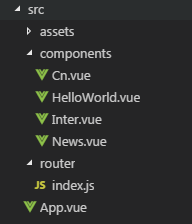
在/src/App.vue文件中:
<template>

  <div id="app">

    <router-link to="/">首页</router-link>

    <router-link to="/news">新闻</router-link>

    <router-view/>

  </div>

</template>

<script>

export default {

  name: 'App'

}

</script>

<style>

</style>
在HellowWorld.vue文件中:
<template>

  <div class="hello">

    hello

  </div>

</template>

<script>

export default {

  beforeRouteEnter (to, from, next) {

    console.log('/ beforeRouteEnter');

    next();

  },

  beforeRouteLeave (to, from, next) {

    console.log('/ beforeRouteLeave');

    next();

  },

  name: 'HelloWorld',

  data () {

    return {

      msg: 'Welcome to Your Vue.js App'

    }

  }

}

</script>

<!-- Add "scoped" attribute to limit CSS to this component only -->

<style scoped>

</style>
在News.vue文件中:
<template>

    <div class="news">

        <router-link to="/news/cn">国内新闻</router-link>

        <router-link to="/news/inter">国际新闻</router-link>

        <router-view></router-view>

    </div>

</template>

<script>

export default {

}

</script>

<style>

   .news{

       margin:30px auto;

       width:300px;

   }

</style>
在Cn.vue文件中:
<template>

    <div class="cn">

        国内新闻

    </div>

</template>

<script>

export default {

}

</script>

<style>

</style>
在Inter.vue文件中:
<template>

    <div class="inter">

        inter国际

    </div>

</template>

<script>

export default {

}

</script>

<style>

</style>
在/router/index.js文件中,使用路由嵌套:
import Vue from 'vue'

import Router from 'vue-router'

Vue.use(Router)

export default new Router({

  routes: [

    {

      path: '/',

      name: 'HelloWorld',

      component: ()=>import(/* webpackChunkName 'home' */'@/components/HelloWorld'),

      beforeRouteEnter (to, from, next) {

        console.log('router / beforeRouteEnter');

        next();

      },

      beforeRouteLeave (to, from, next) {

        console.log('router / beforeRouteLeave');

        next();

      },

      beforeEnter: (to, from, next) => {

        console.log('router / beforeEnter');

        next();

      }

    },

    {

      path: '/news',

      name: 'News',

      component: ()=>import(/* webpackChunkName 'News' */'@/components/News'),

      children:[

        {

          path:'cn',

          name: 'cn',

          component: ()=>import(/* webpackChunkName 'cn' */'@/components/Cn'),

        },

        {

          path:'inter',

          name: 'inter',

          component: ()=>import(/* webpackChunkName 'inter' */'@/components/Inter'),

        },

        {path: '/news', redirect: 'cn'},

      ]

    },

  ]

})
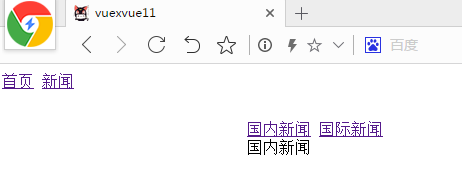
效果如下:
vue-router路由嵌套的使用的更多相关文章
- 前端MVC Vue2学习总结(八)——Vue Router路由、Vuex状态管理、Element-UI
一.Vue Router路由 二.Vuex状态管理 三.Element-UI Element-UI是饿了么前端团队推出的一款基于Vue.js 2.0 的桌面端UI框架,手机端有对应框架是 Mint U ...
- vue学习路由嵌套
1. 路由嵌套和参数传递 传参的两种形式: a.查询字符串:login?name=tom&pwd=123 {{$route.query}} ------ <li><route ...
- Vue系列:Vue Router 路由梳理
Vue Router 是 Vue.js 官方的路由管理器.它和 Vue.js 的核心深度集成,让构建单页面应用变得易如反掌.包含的功能有: 嵌套的路由/视图表 模块化的.基于组件的路由配置 路由参数. ...
- 04 Vue Router路由管理器
路由的基本概念与原理 Vue Router Vue Router (官网: https://router.vuejs.org/zh/)是Vue.js 官方的路由管理器. 它和vue.js的核心深度集成 ...
- Vue Router路由管理器介绍
参考博客:https://www.cnblogs.com/avon/p/5943008.html 安装介绍:Vue Router 版本说明 对于 TypeScript 用户来说,vue-router@ ...
- vue.js路由嵌套
<!DOCTYPE html> <html> <head> <title></title> <meta charset="u ...
- Vue Router 路由守卫:完整的导航解析流程
完整的导航解析流程 1 导航被触发. 2 在失活的组件里调用离开守卫. 3 调用全局的 beforeEach 守卫. 4 在重用的组件里调用 beforeRouteUpdate 守卫 (2.2+). ...
- Vue Router路由守卫妙用:异步获取数据成功后再进行路由跳转并传递数据,失败则不进行跳转
问题引入 试想这样一个业务场景: 在用户输入数据,点击提交按钮后,这时发起了ajax请求,如果请求成功, 则跳转到详情页面并展示详情数据,失败则不跳转到详情页面,只是在当前页面给出错误消息. 难点所在 ...
- vue 多级路由嵌套后打开页面是空白
在多层路由嵌套时,一级子目录必须有一个页面并且添加一具<router-view>,否则路由跳转页面为空,没有任何显示 来自为知笔记(Wiz)
- Vue Router 路由实现原理
一.概念 通过改变 URL,在不重新请求页面的情况下,更新页面视图. 二.实现方式 更新视图但不重新请求页面,是前端路由原理的核心之一,目前在浏览器环境中这一功能的实现主要有2种方式: 1.Hash ...
随机推荐
- spring BeanFactory加载xml配置文件示例
项目目录结构如下: HelloWorld.java package com.thief.demo; public class HelloWorld { public void sayHello() { ...
- mybatis 视频总结
[说明]mabatis卡住了,理解的不深,配置文件的格式太多看不懂(除了连接数据库的部分),听说还可以和log4j集成,怎么个方法 一:今日完成 1)一些语言细节和操作细节 比如在servlet里面操 ...
- linux下查找指定时间内修改过的或新建的文件
1.简单命令 # find -type f \( -newermt '2017-04-19 00:00' -a -not -newermt '2017-04-27 23:59' \) 2.简单实现(参 ...
- AFN多文件进度下载
AFN参考资料 http://www.jianshu.com/p/c36159094e24 http://blog.cnbang.net/tech/2320/http://blog.cnbang.ne ...
- iOS启动页加载广告
1.定义全局成员变量 @interface AppDelegate () @property (strong, nonatomic) UIImageView *adImageView; @proper ...
- bash: /home/aprilpeng/.bashrc: Permission denied
bash: /home/aprilpeng/.bashrc: Permission denied 出现这样的权限问题,一般是在切换用户的时候,用户没有该目录的权限 可以$chown -R git:us ...
- Data Structure Array: Find the two numbers with odd occurrences in an unsorted array
http://www.geeksforgeeks.org/find-the-two-numbers-with-odd-occurences-in-an-unsorted-array/ #include ...
- dev系列之gridview
gridview新增一行就激活编辑,及显示闪动的光标 gridView1.ShowEditor(); 隐藏Gridview表头上面的panel this.gridView1.OptionsView.S ...
- Linux 中 bashrc 中的 rc 是什么意思
刚刚配置 .bashrc 文件时,突然想,这里面的 rc 是什么意思? 使用了这么长时间,这个都不知道,这是醉了.Google 之,还真有不少人探究过,哈哈. 这个 ubuntu 中文论坛里,有人回答 ...
- ubuntu 部署的mysql无法远程链接
允许远程用户登录访问mysql的方法 从任何主机上使用root用户,密码:youpassword(你的root密码)连接到mysql服务器: # mysql -u root -proot mysql& ...