
吴裕雄--天生自然 R语言数据可视化绘图(1)
par(ask=TRUE)

opar <- par(no.readonly=TRUE) # make a copy of current settings

attach(mtcars) # be sure to execute this line

plot(wt, mpg)

abline(lm(mpg~wt))

title("Regression of MPG on Weight")

# Input data for drug example

dose  <- c(20, 30, 40, 45, 60)

drugA <- c(16, 20, 27, 40, 60)

drugB <- c(15, 18, 25, 31, 40)

plot(dose, drugA, type="b")

opar <- par(no.readonly=TRUE) # make a copy of current settings

par(lty=2, pch=17)            # change line type and symbol

plot(dose, drugA, type="b")   # generate a plot

par(opar)                     # restore the original settings

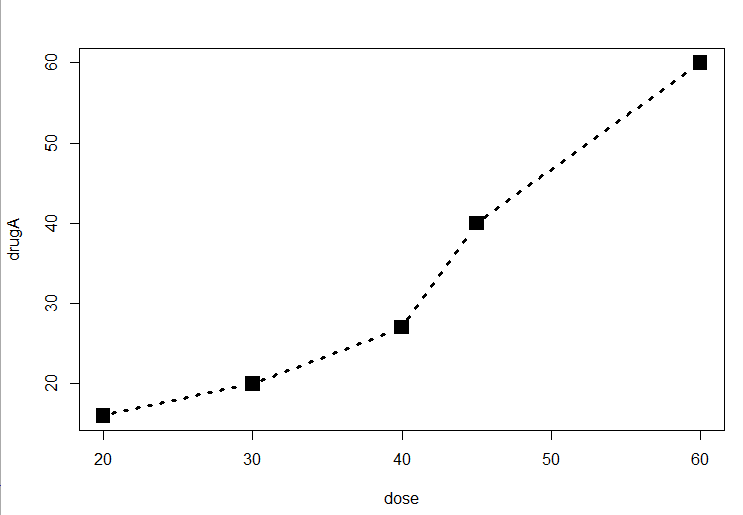
plot(dose, drugA, type="b", lty=3, lwd=3, pch=15, cex=2)

# choosing colors

library(RColorBrewer)

n <- 7

mycolors <- brewer.pal(n, "Set1")

barplot(rep(1,n), col=mycolors)

n <- 10

mycolors <- rainbow(n)

pie(rep(1, n), labels=mycolors, col=mycolors)

mygrays <- gray(0:n/n)

pie(rep(1, n), labels=mygrays, col=mygrays)

dose <- c(20, 30, 40, 45, 60)

drugA <- c(16, 20, 27, 40, 60)

drugB <- c(15, 18, 25, 31, 40)

opar <- par(no.readonly=TRUE)

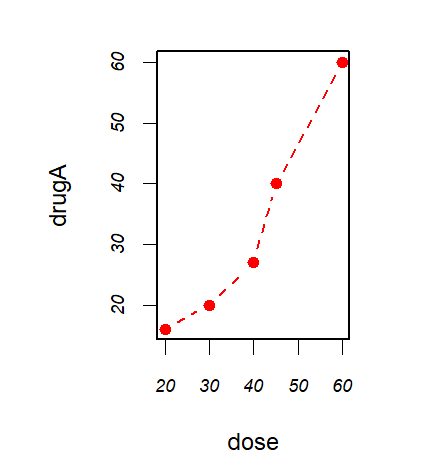
par(pin=c(2, 3))

par(lwd=2, cex=1.5)

par(cex.axis=.75, font.axis=3)

plot(dose, drugA, type="b", pch=19, lty=2, col="red")

plot(dose, drugB, type="b", pch=23, lty=6, col="blue", bg="green")

par(opar)
# Adding text, lines, and symbols

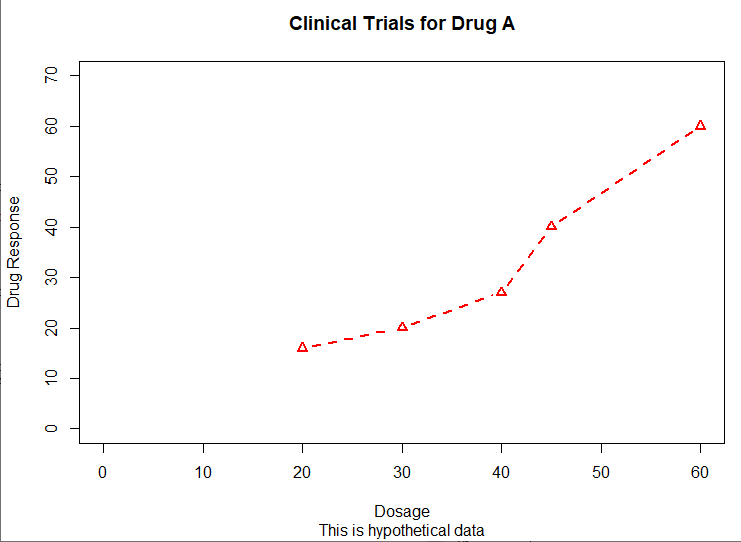
plot(dose, drugA, type="b",

     col="red", lty=2, pch=2, lwd=2,

     main="Clinical Trials for Drug A",

     sub="This is hypothetical data",

     xlab="Dosage", ylab="Drug Response",

     xlim=c(0, 60), ylim=c(0, 70))
x <- c(1:10)

y <- x

z <- 10/x

opar <- par(no.readonly=TRUE)

par(mar=c(5, 4, 4, 8) + 0.1)

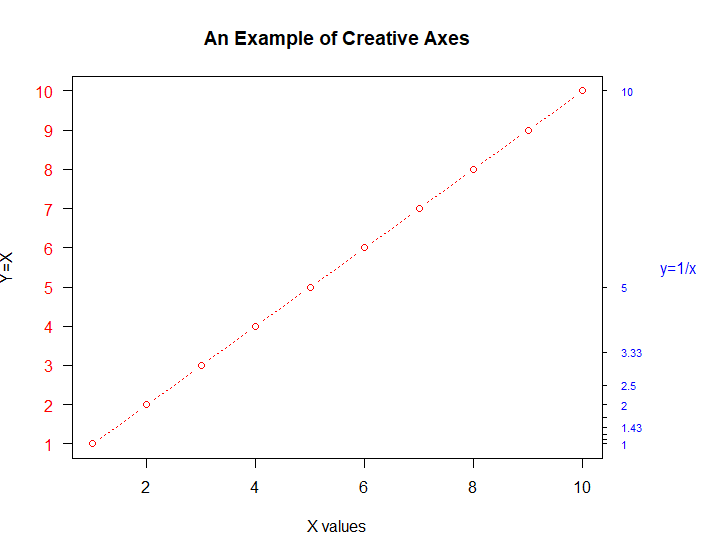
plot(x, y, type="b",

     pch=21, col="red",

     yaxt="n", lty=3, ann=FALSE)

lines(x, z, type="b", pch=22, col="blue", lty=2)

axis(2, at=x, labels=x, col.axis="red", las=2)

axis(4, at=z, labels=round(z, digits=2),

     col.axis="blue", las=2, cex.axis=0.7, tck=-.01)

mtext("y=1/x", side=4, line=3, cex.lab=1, las=2, col="blue")

title("An Example of Creative Axes",

      xlab="X values",

      ylab="Y=X")

par(opar)
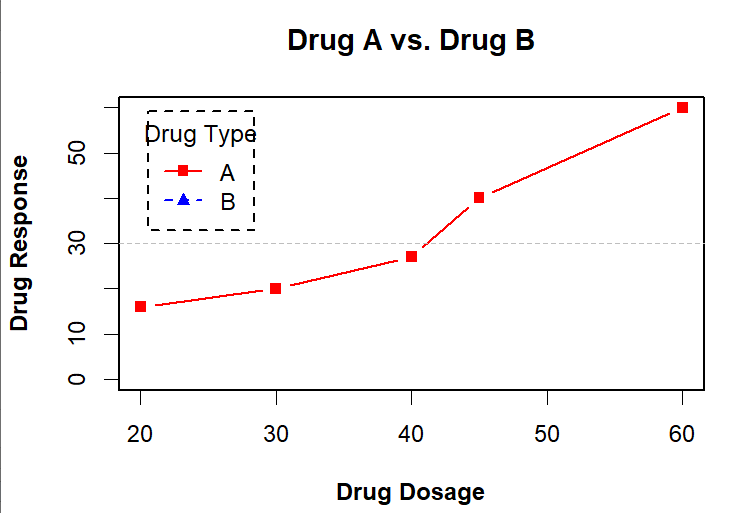
dose <- c(20, 30, 40, 45, 60)

drugA <- c(16, 20, 27, 40, 60)

drugB <- c(15, 18, 25, 31, 40)

opar <- par(no.readonly=TRUE)

par(lwd=2, cex=1.5, font.lab=2)

plot(dose, drugA, type="b",

     pch=15, lty=1, col="red", ylim=c(0, 60),

     main="Drug A vs. Drug B",

     xlab="Drug Dosage", ylab="Drug Response")

lines(dose, drugB, type="b",

      pch=17, lty=2, col="blue")

abline(h=c(30), lwd=1.5, lty=2, col="gray")

library(Hmisc)

minor.tick(nx=3, ny=3, tick.ratio=0.5)

legend("topleft", inset=.05, title="Drug Type", c("A","B"),

       lty=c(1, 2), pch=c(15, 17), col=c("red", "blue"))

par(opar)
attach(mtcars)

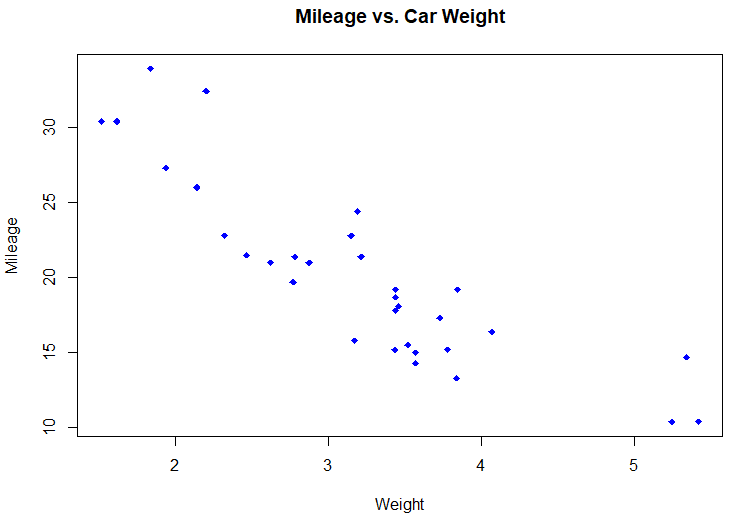
plot(wt, mpg,

     main="Mileage vs. Car Weight",

     xlab="Weight", ylab="Mileage",

     pch=18, col="blue")

text(wt, mpg,

     row.names(mtcars),

     cex=0.6, pos=4, col="red")

detach(mtcars)
# View font families

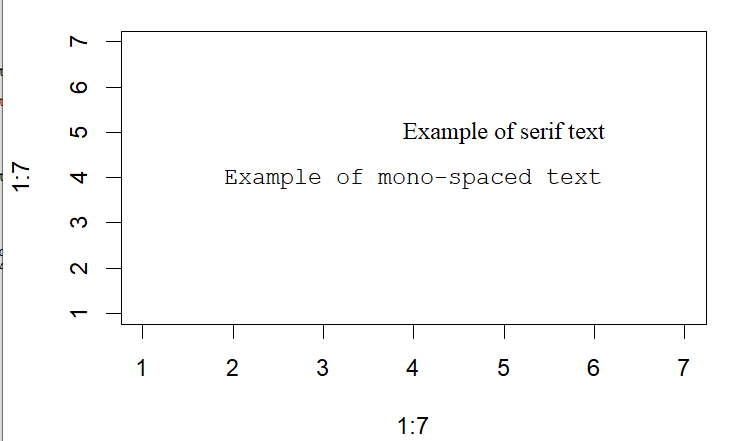
opar <- par(no.readonly=TRUE)

par(cex=1.5)

plot(1:7,1:7,type="n")

text(3,3,"Example of default text")

text(4,4,family="mono","Example of mono-spaced text")

text(5,5,family="serif","Example of serif text")

par(opar)
# Combining graphs

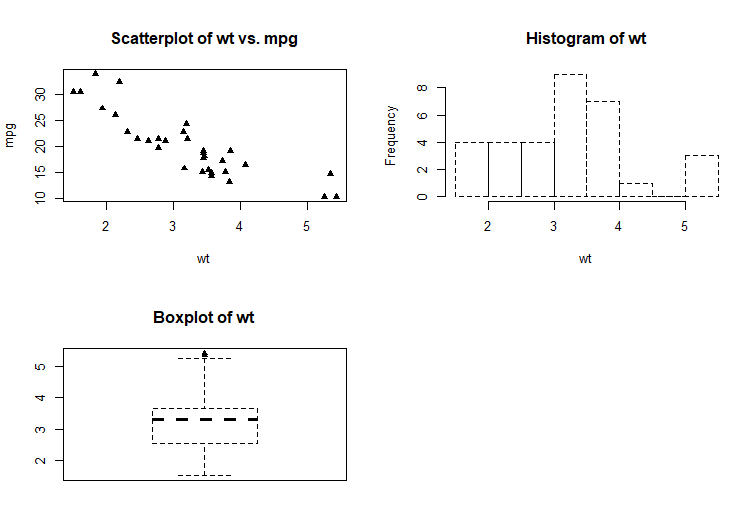
attach(mtcars)

opar <- par(no.readonly=TRUE)

par(mfrow=c(2,2))

plot(wt,mpg, main="Scatterplot of wt vs. mpg")

plot(wt,disp, main="Scatterplot of wt vs. disp")

hist(wt, main="Histogram of wt")

boxplot(wt, main="Boxplot of wt")

par(opar)

detach(mtcars)
attach(mtcars)

opar <- par(no.readonly=TRUE)

par(mfrow=c(3,1))

hist(wt)

hist(mpg)

hist(disp)

par(opar)

detach(mtcars)

attach(mtcars)

layout(matrix(c(1,1,2,3), 2, 2, byrow = TRUE))

hist(wt)

hist(mpg)

hist(disp)

detach(mtcars)

attach(mtcars)

layout(matrix(c(1, 1, 2, 3), 2, 2, byrow = TRUE),

       widths=c(3, 1), heights=c(1, 2))

hist(wt)

hist(mpg)

hist(disp)

detach(mtcars)

# Listing 3.4 - Fine placement of figures in a graph

opar <- par(no.readonly=TRUE)

par(fig=c(0, 0.8, 0, 0.8))

plot(mtcars$mpg, mtcars$wt,

     xlab="Miles Per Gallon",

     ylab="Car Weight")

par(fig=c(0, 0.8, 0.55, 1), new=TRUE)

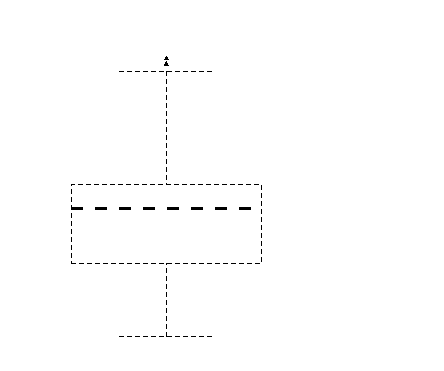
boxplot(mtcars$mpg, horizontal=TRUE, axes=FALSE)

par(fig=c(0.65, 1, 0, 0.8), new=TRUE)

boxplot(mtcars$wt, axes=FALSE)

mtext("Enhanced Scatterplot", side=3, outer=TRUE, line=-3)

par(opar)
吴裕雄--天生自然 R语言数据可视化绘图(1)的更多相关文章
- 吴裕雄--天生自然 R语言数据可视化绘图(3)
par(ask=TRUE) opar <- par(no.readonly=TRUE) # record current settings # Listing 11.1 - A scatter ...
- 吴裕雄--天生自然 R语言数据可视化绘图(4)
par(ask=TRUE) # Basic scatterplot library(ggplot2) ggplot(data=mtcars, aes(x=wt, y=mpg)) + geom_poin ...
- 吴裕雄--天生自然 R语言数据可视化绘图(2)
par(ask=TRUE) opar <- par(no.readonly=TRUE) # save original parameter settings library(vcd) count ...
- 吴裕雄--天生自然 R语言开发学习:R语言的安装与配置
下载R语言和开发工具RStudio安装包 先安装R
- 吴裕雄--天生自然 R语言开发学习:数据集和数据结构
数据集的概念 数据集通常是由数据构成的一个矩形数组,行表示观测,列表示变量.表2-1提供了一个假想的病例数据集. 不同的行业对于数据集的行和列叫法不同.统计学家称它们为观测(observation)和 ...
- 吴裕雄--天生自然 R语言开发学习:导入数据
2.3.6 导入 SPSS 数据 IBM SPSS数据集可以通过foreign包中的函数read.spss()导入到R中,也可以使用Hmisc 包中的spss.get()函数.函数spss.get() ...
- 吴裕雄--天生自然 R语言开发学习:处理缺失数据的高级方法(续一)
#-----------------------------------# # R in Action (2nd ed): Chapter 18 # # Advanced methods for mi ...
- 吴裕雄--天生自然 R语言开发学习:R语言的简单介绍和使用
假设我们正在研究生理发育问 题,并收集了10名婴儿在出生后一年内的月龄和体重数据(见表1-).我们感兴趣的是体重的分 布及体重和月龄的关系. 可以使用函数c()以向量的形式输入月龄和体重数据,此函 数 ...
- 吴裕雄--天生自然 R语言开发学习:使用键盘、带分隔符的文本文件输入数据
R可从键盘.文本文件.Microsoft Excel和Access.流行的统计软件.特殊格 式的文件.多种关系型数据库管理系统.专业数据库.网站和在线服务中导入数据. 使用键盘了.有两种常见的方式:用 ...
随机推荐
- Git详解之基础使用
前言 读完本章你就能上手使用 Git 了.本章将介绍几个最基本的,也是最常用的 Git 命令,以后绝大多数时间里用到的也就是这几个命令.读完本章,你就能初始化一个新的代码仓库,做一些适当配置:开始或停 ...
- PAT (Advanced Level) Practice 1001-1005
PAT (Advanced Level) Practice 1001-1005 PAT 计算机程序设计能力考试 甲级 练习题 题库:PTA拼题A官网 背景 这是浙大背景的一个计算机考试 刷刷题练练手 ...
- 7.场景5:使用Linux桥的VRRP(L3HA)的高可用性
此场景描述了使用ML2插件和Linux网桥的OpenStack网络服务的高可用性实现. 他的高可用性实施例增强了这样的场景:具有Linux网桥架构的传统使用了keepalived的虚拟路由器冗余协议( ...
- Dubbo学习系列之十七(微服务Soul网关)
论起微服务,哪能不谈网关,老将有Zuul,后继有Gateway,但这些都和SpringCloud关系密切,其他网关如Kong,因Lua原因,玩起来略不顺手.这不,就来了个Soul,我顺便拿来整进了我在 ...
- 视觉slam十四讲ch6曲线拟合 代码注释(笔记版)
// ceres 版本 1 #include <opencv2/core/core.hpp> #include <ceres/ceres.h> #include <chr ...
- Rust学习笔记一 数据类型
写在前面 我也不是什么特别厉害的大牛,学历也很低,只是对一些新语言比较感兴趣,接触过的语言不算多也不算少,大部分也都浅尝辄止,所以理解上可能会有一些偏差. 自学了Java.Kotlin.Python. ...
- Kafka常用topic操作命令汇总
offset topic consumer-group consumer producer producer-golang topic 工具 https://cwiki.apache.org/conf ...
- num09---建造者模式
建造者模式: 核心思想:将产品 和 产品建造过程解耦
- EIP
EIP中的值就是CPU下次要执行的地址 jmp 直接修改eip的值 1.jmp imm=mov eip,imm 2.jmp r 3.jmp m call 直接修改eip的值,并把当前指令的下一行地址存 ...
- Yandex Big Data Essentials Week1 Unix Command Line Interface File Content exploration
cat displays the contents of a file at the command line copies or apppend text file into a document ...