
python爬取豌豆荚中的详细信息并存储到SQL Server中
买了本书《精通Python网络爬虫》,看完了第6章,我感觉我好像可以干点什么;学的不多,其中的笔记我放到了GitHub上:https://github.com/NSGUF/PythonLeaning/blob/master/examle-urllib.py,因为我用的python3.0,所以,在爬取数据的时候只用到了一个包:urllib。该博文的源码:https://github.com/NSGUF/PythonLeaning/blob/master/APPInfo.py
思路:首先,如果进入了豌豆荚的首页可以看到,其图如图1,主要是分为安卓软件和安卓游戏,所以只需得到这里面所有的链接即可,如影音播放,系统工具等;
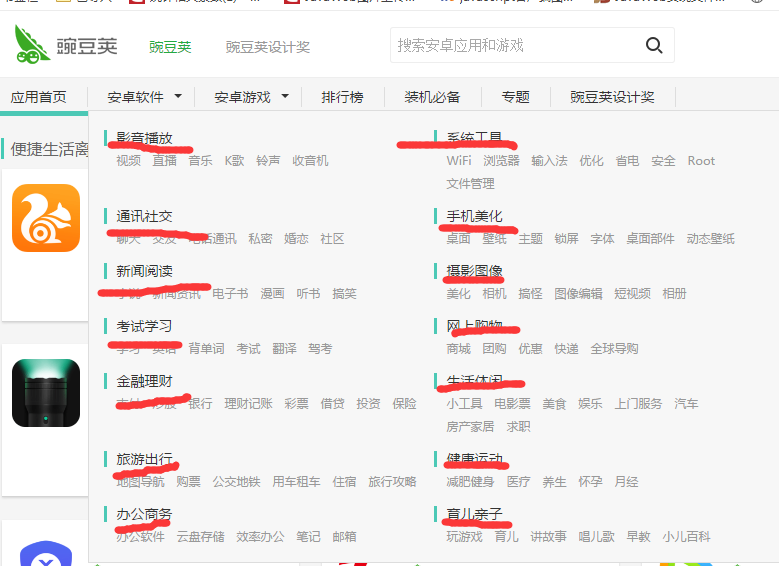
图1
当点击随意一个链接时,显示图2,如图可见,该页面会显示每个软件的基本信息,并且会链接到其详细信息上,这时,如果能获取到详细信息的链接就能得到所需的基本信息了;
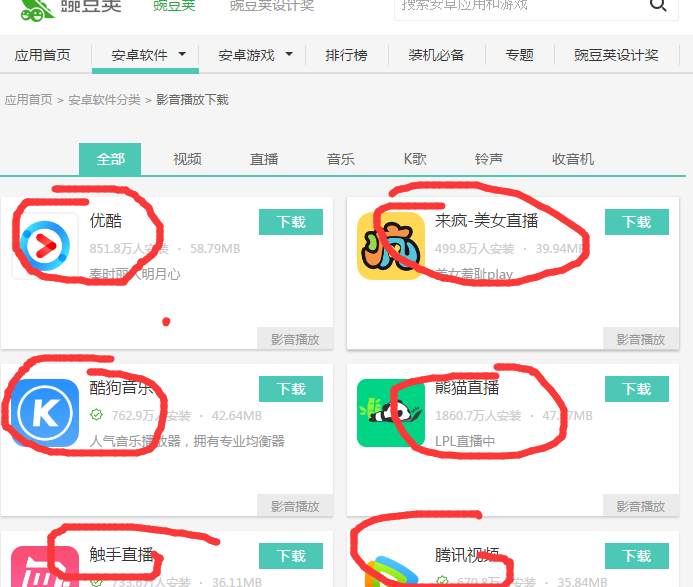
图2
由于该网站是分页的,所以必须得到页数,由图可见,每个页面的最大都是42,而具体却没有到42,所以后面会显示图4.没有更多内容了所以,可以循环42次;
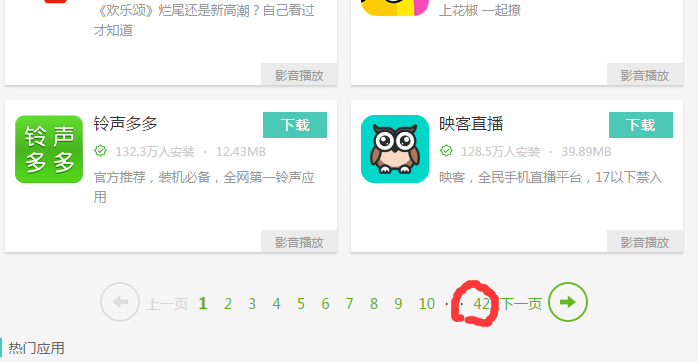
图3
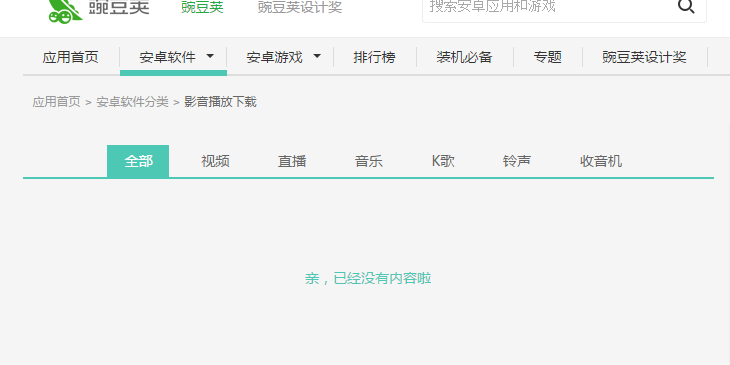
图4
综上所述:可得获取图1中画下划线的链接,同样包括安卓游戏中的该链接
def getAllLinks(url):#获取首页链接的所有子链接

    html1=str(urllib.request.urlopen(url).read())

    pat='<a class="cate-link" href="(http://.+?")>'

    allLink=re.compile(pat).findall(html1)

    allLinks=[]

    for link in allLink:

        allLinks.append(link.split('"')[0])

    return allLinks
获取图2中圈起来的链接,因为其有页码,所以得加上页码
def getAllDescLinks(url,page):#获取子链接中所有app指向的链接

    url=url+'/'+str(page)

    print(url)

    html1=str(urllib.request.urlopen(url).read().decode('utf-8'))

    pat2='<ul id="j-tag-list" class="app-box clearfix">[\s\S]*<div class="pagination">'

    allLink=str(re.compile(pat2).findall(html1)).strip('\n').replace(' ','').replace('\\n','').replace('\\t','')

    allLink=allLink.split('<divclass="icon-wrap"><ahref="')

    allLinks=[]

    for i in range(1,len(allLink)):

        allLinks.append(allLink[i].split('"><imgsrc')[0])

    allLinks=list(set(allLinks))

    return allLinks
获取详细信息中的信息:
def getAppName(html):#获取app名字
pat='<span class="title" itemprop="name">[\s\S]*</span>'
string=str(re.compile(pat).findall(html))
name=''
if string!='[]':
name=string.split('>')[1].split('<')[0]
return name
def getDownNumber(html):#下载次数
pat='<i itemprop="interactionCount"[\s\S]*</i>'
string=str(re.compile(pat).findall(html))
num=''
if string!='[]':
num=string.split('>')[1].split('<')[0]
return num
def getScore(html):#评分
pat='<span class="item love">[\s\S]*<i>[\s\S]*好评率</b>'
string=str(re.compile(pat).findall(html))
score=''
if string!='[]':
score=string.split('i')[2].split('>')[1].split('<')[0]
return score
def getIconLink(html):#app中icom的图片链接
pat='<div class="app-icon"[\s\S]*</div>'
image=str(re.compile(pat).findall(html))
img=''
if image!='[]':
img='http://'+str(image).split('http://')[1].split('.png')[0]+'.png'
return img
def getVersion(html):#版本
pat='版本</dt>[\s\S]*<dt>要求'
version=str(re.compile(pat).findall(html))
if version!='[]':
version=version.split(' ')[1].split('</dd>')[0]
return version
def getSize(html):#大小
pat='大小</dt>[\s\S]*<dt>分类'
size=str(re.compile(pat).findall(html))
if size!='[]':
size=size.split('<dd>')[1].split('<meta')[0].strip('\n').replace(' ','').replace('\\n','')#strip删除本身的换行,删除中文的空格,删除\n字符
return size def getImages(html):#所有截屏的链接
pat='<div data-length="5" class="overview">[\s\S]*</div>'
images1=str(re.compile(pat).findall(html))
pat1='http://[\s\S]*.jpg'
images=[]
images1=str(re.compile(pat1).findall(images1))
if images1!='[]':
images1=images1.split('http://')
for i in range(1,len(images1)):
images.append(images1[i].split('.jpg')[0]+'.jpg')
return images
def getAbstract(html):#简介
pat='<div data-originheight="100" class="con" itemprop="description">[\s\S]*<div class="change-info">'
abstract=str(re.compile(pat).findall(html))
if abstract=='[]':
pat='<div data-originheight="100" class="con" itemprop="description">[\s\S]*<div class="all-version">'
abstract=str(re.compile(pat).findall(html))
if abstract!='[]':
abstract=abstract.split('description">')[1].split('</div>')[0].replace('<br>','').replace('<br />','')#strip删除本身的换行,删除中文的空格,删除\n字符
return abstract
def getUpdateTime(html):#更新时间
pat='<time id="baidu_time" itemprop="datePublished"[\s\S]*</time>'
updateTime=str(re.compile(pat).findall(html))
if updateTime!='[]':
updateTime=updateTime.split('>')[1].split('<')[0]
return updateTime
def getUpdateCon(html):#更新内容
pat='<div class="change-info">[\s\S]*<div class="all-version">'
update=str(re.compile(pat).findall(html))
if update!='[]':
update=update.split('"con">')[1].split('</div>')[0].replace('<br>','').replace('<br />','')#strip删除本身的换行,删除中文的空格,删除\n字符
return update
def getCompany(html):#开发公司
pat='<span class="dev-sites" itemprop="name">[\s\S]*</span>'
com=str(re.compile(pat).findall(html))
if com!='[]':
com=com.split('"name">')[1].split('<')[0]#strip删除本身的换行,删除中文的空格,删除\n字符
return com
def getClass(html):#所属分类
pat='<dd class="tag-box">[\s\S]*<dt>TAG</dt>'
classfy1=str(re.compile(pat).findall(html))
classfy=[]
if classfy1!='[]':
classfy1=classfy1.split('appTag">')
for i in range(1,len(classfy1)):
classfy.append(classfy1[i].split('<')[0])
return classfy
def getTag(html):#标有的Tag
pat='<div class="side-tags clearfix">[\s\S]*<dt>更新</dt>'
tag1=str(re.compile(pat).findall(html))
tag=[]
if tag1!='[]':
tag1=tag1.strip('\n').replace(' ','').replace('\\n','').split('</a>')
for i in range(0,len(tag1)-1):
tag.append(tag1[i].replace('<divclass="side-tagsclearfix">','').replace('<divclass="tag-box">','').replace('</div>','').split('>')[1])
return tag
def getDownLink(html):#下载链接
pat='<div class="qr-info">[\s\S]*<div class="num-list">'
link=str(re.compile(pat).findall(html))
if link!='[]':
link=link.split('href="http://')[1].split('" rel="nofollow"')[0]
return link
def getComment(html):#评论内容(只包含10条,因为网页只显示有限)
pat='<ul class="comments-list">[\s\S]*<div class="hot-tags">'
comm=str(re.compile(pat).findall(html))
comms=''
eval_descs=[]
if comm!='[]':
comms=comm.strip('\n').replace(' ','').replace('\\n','').split('<liclass="normal-li">')
for i in range(1,len(comms)-1):
userName=comms[i].split('name">')[1].split('<')[0]
time=comms[i].split('</span><span>')[1].split('<')[0]
evalDesc=comms[i].split('content"><span>')[1].split('<')[0]
eval_desc={'userName':userName,'time':time,'evalDesc':evalDesc}
eval_descs.append(eval_desc)
# comm=comm.split('href="http://')[1].split('" rel="nofollow"')[0]
return eval_descs
将信息插入SQL数据库,这里注意execute后面用的占位符是?,之前我看了很多其他的资料,用的是%s,报错了,最无语的是报错居然还乱码了。
def insertAllInfo(name,num,icon,score,appversion,size,images,abstract,updateTime,updateCon,com,classfy,tag,downLink,comm):#插入SQL数据库

    import pyodbc

    conn = pyodbc.connect('DRIVER={SQL Server};SERVER=127.0.0.1,1433;DATABASE=Test;UID=sa;PWD=123')

    #连接之后需要先建立cursor:

    cursor = conn.cursor()

    try:

        cursor = conn.cursor()

        cursor.execute('insert into tb_wandoujia(name,num,icon,score,appversion,size,images,abstract,updateTime,updateCon,com,classfy,tag,downLink,comm) values(?,?,?,?,?,?,?,?,?,?,?,?,?,?,?)',(name,num,icon,score,appversion,size,images,abstract,updateTime,updateCon,com,classfy,tag,downLink,comm))

        conn.commit()# 不执行不能插入数据

        print('成功')

    except Exception as e:

        print(str(e))

    finally:

        conn.close()
数据库创建代码如下:
create database Test

CREATE TABLE [dbo].[tb_wandoujia](

    [Id] [int] IDENTITY(1,1) NOT NULL,

    [name] [varchar](100) NULL,

    [num] [varchar](100) NULL,

    [icon] [varchar](200) NULL,

    [score] [varchar](10) NULL,

    [appversion] [varchar](20) NULL,

    [size] [varchar](20) NULL,

    [images] [varchar](2000) NULL,

    [abstract] [varchar](2000) NULL,

    [updateTime] [varchar](20) NULL,

    [updateCon] [varchar](2000) NULL,

    [com] [varchar](50) NULL,

    [classfy] [varchar](200) NULL,

    [tag] [varchar](300) NULL,

    [downLink] [varchar](200) NULL,

    [comm] [varchar](5000) NULL,

PRIMARY KEY CLUSTERED

(

    [Id] ASC

)WITH (PAD_INDEX  = OFF, STATISTICS_NORECOMPUTE  = OFF, IGNORE_DUP_KEY = OFF, ALLOW_ROW_LOCKS  = ON, ALLOW_PAGE_LOCKS  = ON) ON [PRIMARY]

) ON [PRIMARY]

GO

SET ANSI_PADDING OFF

GO
调用获取所有信息、打印并插入数据库:
def getAllInfo(url):#获取所有信息

    html1=str(urllib.request.urlopen(url).read().decode('utf-8'))

    name=getAppName(html1)

    print('名称:',name)

    if name=='':

        return

    num=str(getDownNumber(html1))

    print('下载次数:',num)

    icon=str(getIconLink(html1))

    print('log链接:',icon)

    score=str(getScore(html1))

    print('评分:',score)

    version=str(getVersion(html1))

    print('版本:',version)

    size=str(getSize(html1))

    print('大小:',size)

    images=str(getImages(html1))

    print('截图:',images)

    abstract=str(getAbstract(html1))

    print("简介:",abstract)

    updateTime=str(getUpdateTime(html1))

    print('更新时间:',updateTime)

    updateCon=str(getUpdateCon(html1))

    print('更新内容:',updateCon)

    com=str(getCompany(html1))

    print('公司:',com)

    classfy=str(getClass(html1))

    print('分类:',classfy)

    tag=str(getTag(html1))

    print('Tag:',tag)

    downLink=str(getDownLink(html1))

    print('下载链接:',downLink)

    comm=str(getComment(html1))

    print('评价:',comm)

    if name!='':

        insertAllInfo(name,num,icon,score,version,size,images,abstract,updateTime,updateCon,com,classfy,tag,downLink,comm)
最后,循环调用,获取全部的信息:
for link in getAllLinks(url):

    print(link)

    for i in range(1,42):#由于豌豆荚给的最大是42页,所以这里用42,反正如果没有42,也会很快

        print(i)

        for descLink in getAllDescLinks(link,i):

            print(descLink)

            getAllInfo(descLink)
最后打印的结果如下图:
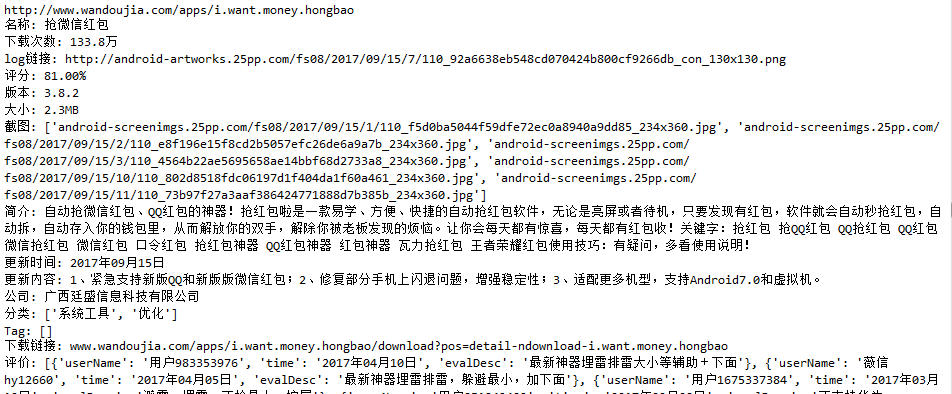
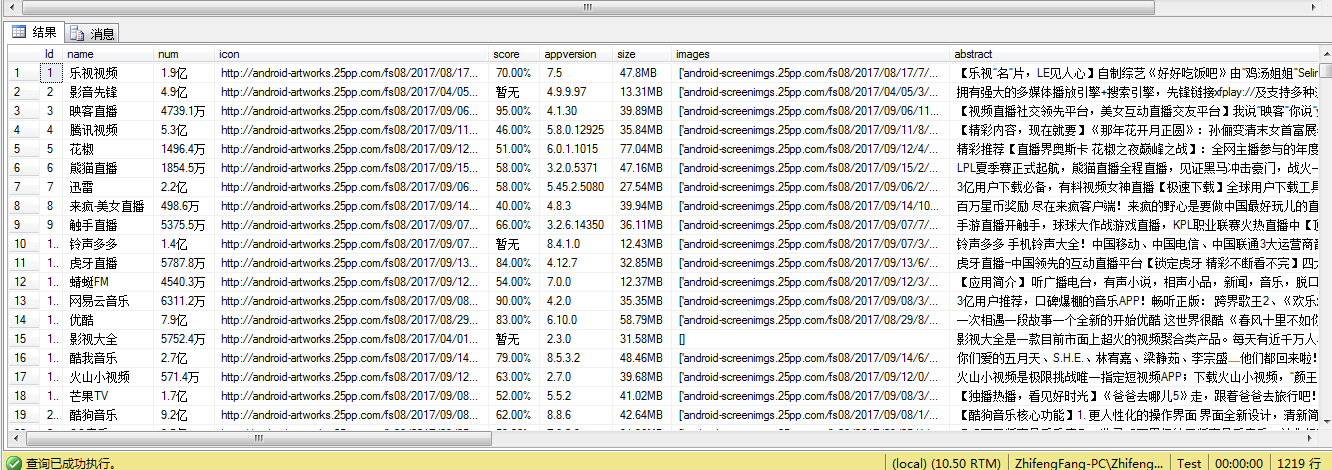
存储到sql数据库的图片如下:
python爬取豌豆荚中的详细信息并存储到SQL Server中的更多相关文章
- 使用python爬取MedSci上的期刊信息
使用python爬取medsci上的期刊信息,通过设定条件,然后获取相应的期刊的的影响因子排名,期刊名称,英文全称和影响因子.主要过程如下: 首先,通过分析网站http://www.medsci.cn ...
- python爬取当当网的书籍信息并保存到csv文件
python爬取当当网的书籍信息并保存到csv文件 依赖的库: requests #用来获取页面内容 BeautifulSoup #opython3不能安装BeautifulSoup,但可以安装Bea ...
- 零基础爬虫----python爬取豆瓣电影top250的信息(转)
今天利用xpath写了一个小爬虫,比较适合一些爬虫新手来学习.话不多说,开始今天的正题,我会利用一个案例来介绍下xpath如何对网页进行解析的,以及如何对信息进行提取的. python环境:pytho ...
- 用 Python 爬取网易严选妹子内衣信息,探究妹纸们的偏好
网易商品评论爬取 分析网页 评论分析 进入到网易精选官网,搜索“文胸”后,先随便点进一个商品. 在商品页面,打开 Chrome 的控制台,切换至 Network 页,再把商品页Python入门到精通学 ...
- python爬取智联招聘职位信息(多进程)
测试了下,采用单进程爬取5000条数据大概需要22分钟,速度太慢了点.我们把脚本改进下,采用多进程. 首先获取所有要爬取的URL,在这里不建议使用集合,字典或列表的数据类型来保存这些URL,因为数据量 ...
- python爬取智联招聘职位信息(单进程)
我们先通过百度搜索智联招聘,进入智联招聘官网,一看,傻眼了,需要登录才能查看招聘信息 没办法,用账号登录进去,登录后的网页如下: 输入职位名称点击搜索,显示如下网页: 把这个URL:https://s ...
- python爬取所有微信好友的信息
''' 爬取所有T信好友的信息 ''' import itchat from pandas import DataFrame itchat.login() friends=itchat.get_fri ...
- <scrapy爬虫>爬取猫眼电影top100详细信息
1.创建scrapy项目 dos窗口输入: scrapy startproject maoyan cd maoyan 2.编写item.py文件(相当于编写模板,需要爬取的数据在这里定义) # -*- ...
- Python 爬取美女图片,分目录多级存储
最近有个需求:下载https://mm.meiji2.com/网站的图片. 所以简单研究了一下爬虫. 在此整理一下结果,一为自己记录,二给后人一些方向. 爬取结果如图: 整体研究周期 2-3 天, ...
随机推荐
- XP环境安装request包报错:离线安装packages: certifi urllib3 idna chardet
分别下载 request certifi urllib3 idna chardet 安装包 数据包下载地址:https://pypi.org/ 解压到python安装目录 使用cmd命令进入..\py ...
- TP5.0:引入view视图中公共的模版文件
1.实例:如后台admin模块,公用一个header.html和footer.hml 2.目录结构: 3.视图页面的使用方式: <!--添加header页面数据-->{include fi ...
- May 29th 2017 Week 22nd Monday
I figure life is a gift and I don't intend on wasting it. 我觉得生命是一份礼物,我不想浪费它. It seems that I didn't ...
- ZT 头文件包含其实是一想很烦琐的工作 第一个原则应该是,如果可以不包含头文件
当出现访问类的函数或者需要确定类大小的时候,才需要用头文件(使用其类定义) http://blog.csdn.net/clever101/article/details/4751717 看到这个 ...
- python 提取字符串中的数字组成新的字符串
方法一 # 有一个字符串text = "aAsmr3idd4bgs7Dlsf9eAF" # 请将text字符串中的数字取出,并输出成一个新的字符串 import re text = ...
- bzoj1264 [AHOI2006]基因匹配
Description 基因匹配(match) 卡卡昨天晚上做梦梦见他和可可来到了另外一个星球,这个星球上生物的DNA序列由无数种碱基排列而成(地球上只有4种),而更奇怪的是,组成DNA序列的每一种碱 ...
- (第七场)A Minimum Cost Perfect Matching 【位运算】
题目链接:https://www.nowcoder.com/acm/contest/145/A A.Minimum Cost Perfect Matching You have a complete ...
- MYSQL5.7.15安装步骤
下载完成之后双击安装: 接下来一路next (出现的问题) 在我第一次安装myslq过程中,上图中的mysql server failed ,这是因为电脑环境需要升级一个插件,Visual C++ 2 ...
- spring异常+自定义以及使用
1.首先自定义异常 DataException: package com.wbg.maven1128.exception; public class DataException extends Exc ...
- Android学习笔记_34_自定义窗口标题
1.建好项目之后在它的layout文件夹下创建一个title.xml文件,作为自定义窗口标题的文件. <?xml version="1.0" encoding="u ...