
Linux-RedHat7.2 安装.net core2.0
1、添加dotnet产品Feed
sudo rpm --import https://packages.microsoft.com/keys/microsoft.asc

sudo sh -c 'echo -e "[packages-microsoft-com-prod]\nname=packages-microsoft-com-prod \nbaseurl=https://packages.microsoft.com/yumrepos/microsoft-rhel7.3-prod\nenabled=1\ngpgcheck=1\ngpgkey=https://packages.microsoft.com/keys/microsoft.asc" > /etc/yum.repos.d/dotnetdev.repo'
2、安装.NET Core SDK 2.0
sudo yum update

sudo yum install libunwind libicu

sudo yum install dotnet-sdk-2.0.0
3、查看安装状态
dotnet --info
4、新建一个console项目,运行
dotnet new console -o myApp

cd myApp

dotnet run
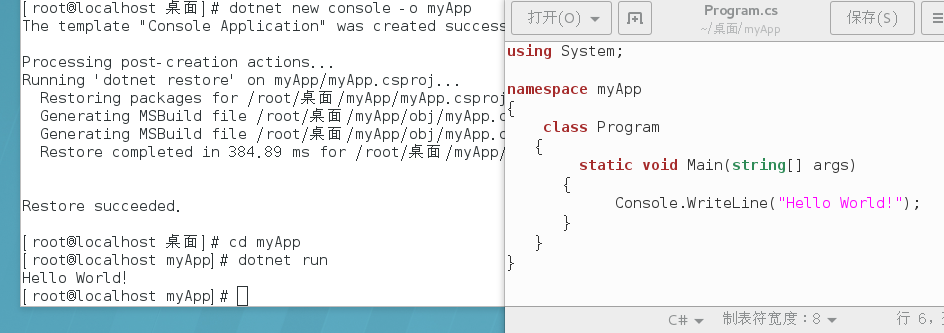
5、新建一个mvc项目、发布 、开机运行
新建:
cd ..
dotnet new mvc -o mymvc
修改Startup.cs 文件,nginx反向代理使用。
using System;

using System.Collections.Generic;

using System.Linq;

using System.Threading.Tasks;

using Microsoft.AspNetCore.Builder;

using Microsoft.AspNetCore.Hosting;

using Microsoft.Extensions.Configuration;

using Microsoft.Extensions.DependencyInjection;

//添加引用

using Microsoft.AspNetCore.HttpOverrides;

namespace mymvc

{

    public class Startup

    {

        public Startup(IConfiguration configuration)

        {

            Configuration = configuration;

        }

        public IConfiguration Configuration { get; }

        // This method gets called by the runtime. Use this method to add services to the container.

        public void ConfigureServices(IServiceCollection services)

        {

            services.AddMvc();

        }

        // This method gets called by the runtime. Use this method to configure the HTTP request pipeline.

        public void Configure(IApplicationBuilder app, IHostingEnvironment env)

        {

            if (env.IsDevelopment())

            {

                app.UseDeveloperExceptionPage();

            }

            else

            {

                app.UseExceptionHandler("/Home/Error");

            }

            app.UseStaticFiles();

            app.UseMvc(routes =>

            {

                routes.MapRoute(

                    name: "default",

                    template: "{controller=Home}/{action=Index}/{id?}");

            });

            //添加下面的代码

            app.UseForwardedHeaders(new ForwardedHeadersOptions

            {

                ForwardedHeaders = ForwardedHeaders.XForwardedFor | ForwardedHeaders.XForwardedProto

            });

            app.UseAuthentication();

        }

    }

}
发布
cd mymvc

dotnet publish -c Release
运行
cd bin/Release/netcoreapp2.0/publish

dotnet mymvc.dll
开机运行(/root 为实际文件目录)
vim /etc/systemd/system/kestrel-mymvc.service

-- 内容如下:

[Unit]

Description=Example .NET Web MVC Application running on Centos7

[Service]

WorkingDirectory=/root/mymvc

ExecStart=/usr/bin/dotnet /root/mymvc/bin/Release/netcoreapp2.0/publish/mymvc.dll

Restart=always

RestartSec=  # Restart service after  seconds if dotnet service crashes

SyslogIdentifier=dotnet-example

User=root

Environment=ASPNETCORE_ENVIRONMENT=Production

[Install]

WantedBy=multi-user.target
--启动

systemctl enable kestrel-mymvc.service

systemctl start kestrel-mymvc.service

systemctl status kestrel-mymvc.service

--修改,重启

systemctl daemon-reload

systemctl restart kestrel-mymvc.service

Linux-RedHat7.2 安装.net core2.0的更多相关文章
- redhat7.4安装vertica-9.1.0教程
资源: 官网地址安装包1: https://my.vertica.com/dashboard/ 官网地址安装包2: http://www.verticachina.com/?cat=73 我的vert ...
- 【Linux】Ubuntu安装Mysql 8.0
1.下载Mysql的安装配置,http://dev.mysql.com/downloads/repo/apt/ 2.执行配置配置文件 sudo dpkg -i mysql-apt-config_0.* ...
- ubuntu linux 1604 编译安装tesseract-ocr 4.0
主要参考官方的编译,梳理一下整个流程 Linux The build instructions for Linux also apply to other UNIX like operating sy ...
- Linux CentOS6.5安装Nginx1.8.0
一. 安装nginx 1. 准备1.8.0安装包 nginx-1.8.0.tar.gz 2. 安装第三方依赖 yum install gcc-c++ yum install -y pcre pcre- ...
- 0级搭建类002-Oracle Linux 8.x安装(OEL 8.0) 公开
项目文档引子系列是根据项目原型,制作的测试实验文档,目的是为了提升项目过程中的实际动手能力,打造精品文档AskScuti. 项目文档引子系列目前不对外发布,仅作为博客记录.如学员在实际工作过程中需提前 ...
- [Linux] 非root安装GCC9.1.0
说明 一般Linux系统自带或公共的GCC版本都很低,如目前我们的服务器版本的GCC还停留在gcc-4.9.3,而官网已到达9.2版本(下载http://ftp.gnu.org/gnu/gcc/) , ...
- Linux CentOS 7 安装mongoDB(4.0.6)
在官网下载安装包: https://www.mongodb.com/download-center/community 或者通过wget下载 wget https://fastdl.mongodb.o ...
- linux源码安装php7.2.0
1. 源码包下载地址 2. 解压php压缩包 tar –zxvf php-7.2.0.tar.gz 3. 进入解压后的 cd php7.2.0 4.安装php需要的扩展 yum install lib ...
- Linux CentOS上安装 MySQL 8.0.16
前言: 因为我需要在我新安装的Linux CentOS系统服务器中安装和配置MySQL服务器,然而对于我们这种Linux使用小白而言在Linux系统中下载,解压,配置MySQL等一系列的操作还是有些耗 ...
随机推荐
- bootstrap-Glyphicons 字体图标
使用的方法: 1 引入 font-awesome.css文件 2 fonts文件夹 Bootstrap 假定所有的图标字体文件全部位于 ../fonts/ 目录内(可以在font-awesome.c ...
- HDU5213(容斥定理+莫队算法)
传送门 题意 给出n个数和幸运数k,m次询问,每次询问[l1,r1]和[l2,r2]有多少对数满足x+y=k,x∈[l1,r1],y∈[l2,r2] 分析 看到m只有3e4,可以考虑\(m\sqrt{ ...
- BFS+PRIM
转载请注明出处:優YoU http://user.qzone.qq.com/289065406/blog/1299324104 在一个y行 x列的迷宫中,有可行走的通路空格' ',不可行走的墙'#', ...
- redis启停
1 查看服务器上启动的redis服务 开了两个redis单机服务,监听在两个端口. 开了一个集群,监听在6个端口. [root@localhost bin]# ps aux | grep redis ...
- Jmeter之添加响应断言,bean shell post processor
一直在想运用jmeter来实现接口自动化测试,但是每次每个接口执行完,需要肉眼去看一看,执行的结果对不对,总结了两种办法, 一.将每个请求的响应结果,导出到文件 选中请求右键-->添加后置处理器 ...
- Hdu 5451 Best Solver (2015 ACM/ICPC Asia Regional Shenyang Online) 暴力找循环节 + 递推
题目链接: Hdu 5451 Best Solver 题目描述: 对于,给出x和mod,求y向下取整后取余mod的值为多少? 解题思路: x的取值为[1, 232],看到这个指数,我的心情是异常崩 ...
- Voting CodeForces - 749C
有点意思的题 Voting CodeForces - 749C 题意:有n个人投票,每次按照第1个人~第n个人的顺序发言,如果到某个人发言时他已经被禁止发言就跳过,每个人发言时可以禁止另一个人发言或什 ...
- Linux文件和目录的777、755、644权限解释
Linux文件和目录的权限 1.文件权限 在linux系统中,文件或目录的权限可以分为3种: r:4 读 w:2 写 x:1 执行(运行)-:对应数值0 数字 4 .2 和 1表示读.写.执行权限 ...
- 使用PreparedStatement接口
- vue-resource emulateJSON的作用
如果Web服务器无法处理编码为application/json的请求,你可以启用emulateJSON选项. 启用该选项后,请求会以application/x-www-form-urlencoded作 ...