
WinForm ListBox 控件用法
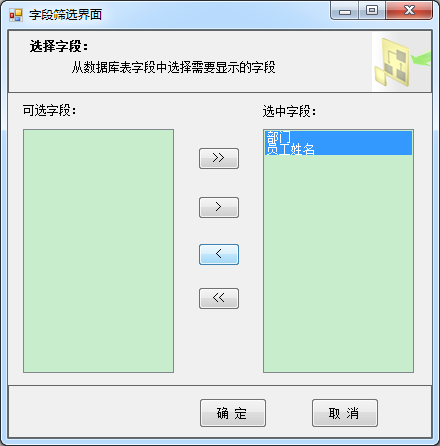
下面演示如何利用列表控件 ListBox 实现多选与移动选项:
using IMS.WinFormClient.UserControls;

using System;

using System.Collections.Generic;

using System.Windows.Forms;

namespace IMS.WinFormClient

{

    public partial class ListBoxForm : Form

    {

        UCReport _uCReport = null; // parentForm

        public ListBoxForm(UCReport uCReport, List<KeyValuePair<string, string>> selectedPairs, List<KeyValuePair<string, string>> unselectedPairs)

        {

            InitializeComponent();

            _uCReport = uCReport;

            if (selectedPairs != null)

            {

                foreach (var field in selectedPairs)

                {

                    this.listBox2.Items.Add(field.Key);

                }

            }

            if (unselectedPairs != null)

            {

                foreach (var field in unselectedPairs)

                {

                    this.listBox1.Items.Add(field.Key);

                }

            }

        }

        //全部移动:左->右

        private void button1_Click(object sender, EventArgs e)

        {

            foreach (object o in listBox1.Items)

            {

                listBox2.Items.Add(o);

            }

            listBox1.Items.Clear();

        }

        //只移动选中项:左->右

        private void button2_Click(object sender, EventArgs e)

        {

            if (this.listBox1.SelectedItems.Count > )

            {

                object[] items = new object[this.listBox1.SelectedItems.Count];

                this.listBox1.SelectedItems.CopyTo(items, );

                foreach (var item in items)

                {

                    string selectedItem = item.ToString();

                    //判断是否添加到listbox1

                    if (!this.listBox2.Items.Contains(selectedItem))

                    {

                        //添加人员到listbox2中

                        this.listBox2.Items.Add(selectedItem);

                        //移除listbox1中

                        this.listBox1.Items.Remove(selectedItem);

                    }

                }

            }

        }

        //只移动选中项:右->左

        private void button3_Click(object sender, EventArgs e)

        {

            if (this.listBox2.SelectedItems.Count > )

            {

                object[] items = new object[this.listBox2.SelectedItems.Count];

                this.listBox2.SelectedItems.CopyTo(items, );

                foreach (var item in items)

                {

                    string selectedItem = item.ToString();

                    //判断是否添加到listbox1

                    if (!this.listBox1.Items.Contains(selectedItem))

                    {

                        //添加人员到listbox1中

                        this.listBox1.Items.Add(selectedItem);

                        //移除listbox2中

                        this.listBox2.Items.Remove(selectedItem);

                    }

                }

            }

        }

        //全部移动:右->左

        private void button4_Click(object sender, EventArgs e)

        {

            foreach (object o in listBox2.Items)

            {

                listBox1.Items.Add(o);

            }

            listBox2.Items.Clear();

        }

        private void btnCancel_Click(object sender, EventArgs e)

        {

            this.Close();

        }

        private void btnOk_Click(object sender, EventArgs e)

        {

            List<string> selectedFieldsList = new List<string>();

            if (this.listBox2.Items.Count > )

            {

                foreach (var item in this.listBox2.Items)

                {

                    selectedFieldsList.Add(item.ToString());

                }

            }

            else

            {

                MessageBox.Show("请至少选择一项");

                return;

            }

            List<string> unselectedFieldsList = new List<string>();

            if (this.listBox1.Items.Count > )

            {

                foreach (var item in this.listBox1.Items)

                {

                    unselectedFieldsList.Add(item.ToString());

                }

            }

            // 通知父窗体更新需要显示的字段

            _uCReport.CustomFeildsEvent(selectedFieldsList, unselectedFieldsList);

            this.Close();

        }

    }

}
运行结果:
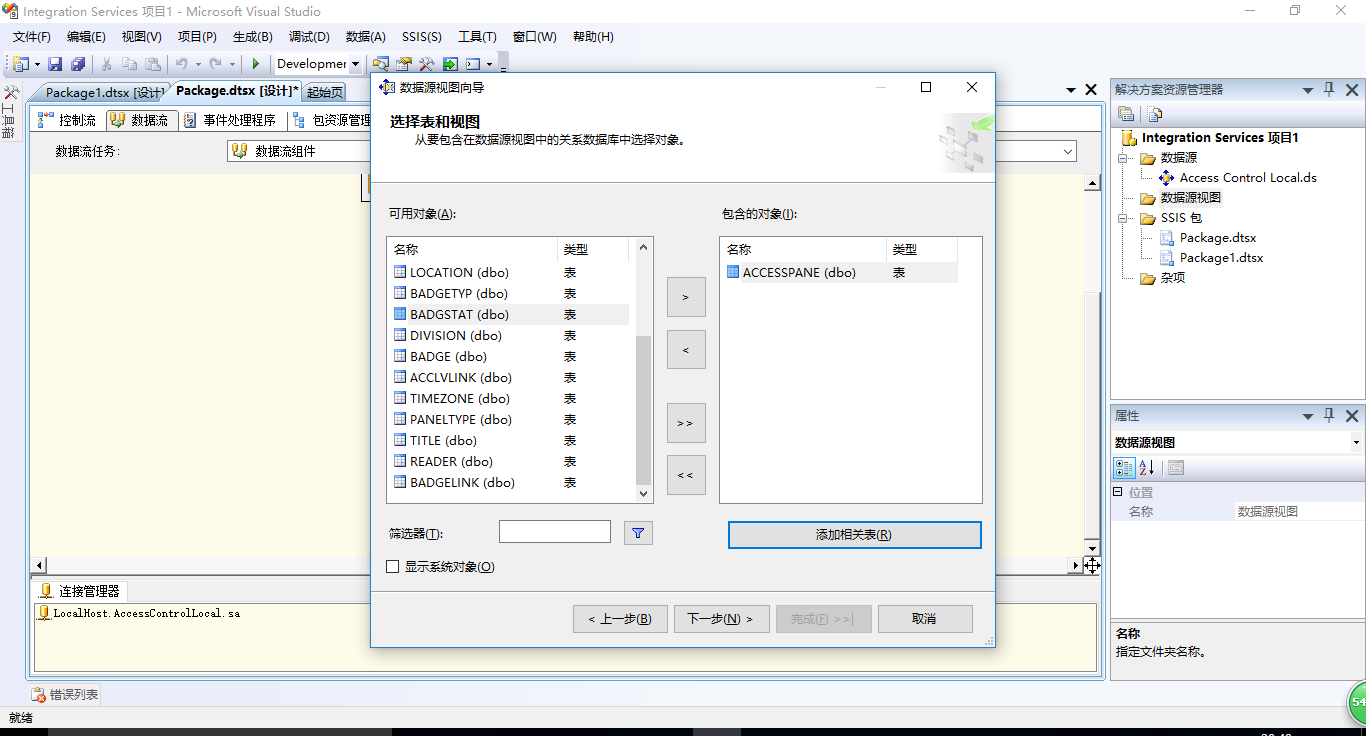
更全面的功能可以参考微软的 SQL Server Business Inteligence 的 Integration Services 项目下的选择界面:
(打开vs->新建Integration Services项目->添加数据源视图->选择3个下一个即可看到以下界面)
WinForm ListBox 控件用法的更多相关文章
- asp.net Listbox控件用法
2008-02-18 19:56 来源: 作者: ListBox(列表框)控件可以显示一组项目的列表,用户可以根据需要从中选择一个或多个选项.列表框可以为用户提供所有选项的列表.虽然也可设置列表框为多 ...
- C# LIstbox 解决WinForm下ListBox控件“设置DataSource属性后无法修改项集合”的问题
解决WinForm下ListBox控件“设置DataSource属性后无法修改项集合”的问题 分类: winform2008-05-24 02:33 2592人阅读 评论(11) 收藏 举报 winf ...
- 解决WinForm下ListBox控件“设置DataSource属性后无法修改项集合”
解决WinForm下ListBox控件“设置DataSource属性后无法修改项集合” 最近更新: 2013-2-15 587 很少写WinForm程序第一次使用ListBox控件就遇到了比 ...
- WinForm将一个窗体的值传到另一个窗体的listbox控件,C#
做arcgisengine二次开发,读取当前图层文件的字段值,别名,类型. 读取文件是在有地图图层的窗体(假设为Form1),由于窗体有限,所以想把读取的数据在另一个窗体(假设为Form2)显示出来 ...
- winform窗体控件(全)
回顾跟补充下除了昨天那常用6个其他的winform窗体控件作用 1:Button:按钮 (1)AutoSize:如果是True的情况下,内容将会撑开:False的话会另起一行 (2)Enabled: ...
- WinForm 公共控件
一.窗体属性: 1.AcceptButton - 窗体的“接受”按钮.如果设置该属性,每次用户按“Enter”键都相当于“单击”了该按钮. 需要设置哪个键,就在后面选择. 2.CancelButton ...
- listbox控件使用
1. 属性列表: SelectionMode 组件中条目的选择类型,即多选(Multiple).单选(Single) Rows 列表框中显示总共多少行 Sel ...
- winform基础控件总结
转自:http://www.cnblogs.com/top5/archive/2010/04/29/1724039.html 基础 - 常用控件 C# WinForm开发系列 - CheckBox/B ...
- ComboxBox控件、checklistbox控件和listbox控件的组合开发
第一步:先创建一个WinForm窗体应用程序,按照下图所示的进行布局. 第二步:为ComboxBox控件.checklistbox控件和listbox控件和button控件设置属性 第三步:在代码中的 ...
随机推荐
- msp430入门学习11
msp430的定时器--看门狗 msp430入门学习
- Thinkphp5.0 的使用模型Model更新数据
Thinkphp5.0 的使用模型Model更新数据 (1)使用update()方法进行更新数据 一.where条件写在更新数据中 (这种情况更新的数据,必须含主键) $res = User::upd ...
- CentOS7使用mount命令来挂载CDROM
https://blog.csdn.net/testcs_dn/article/details/41448557
- TCP/IP学习笔记(5)------IP选路
静态IP选路 一个简单的路由表 选路是IP层最重要的一个功能之一.前面的部分已经简单的讲过路由器是通过何种规则来根据IP数据包的IP地址来选择路由.这里就不重复了.首先来看看一个简单的系统路由表. D ...
- P1547 Out of Hay 洛谷
https://www.luogu.org/problem/show?pid=1547 题目背景 奶牛爱干草 题目描述 Bessie 计划调查N (2 <= N <= 2,000)个农场的 ...
- 记 SpringBoot1.* 转 Springoot2.0 遇到的问题
1.拦截器问题 到2.0之后在配置文件中写 static-path-pattern: /static/** 已经不起作用(2.0需要在方法中配置) SpringBoot1.*写法 @Configura ...
- 选择器的使用(target选择器)
<!DOCTYPE html><html xmlns="http://www.w3.org/1999/xhtml"><head><meta ...
- 怎样删除Tomcat下已经部署的项目
lz说的是把web项目部署到tomcat之中,要把它删除..很简单,找到webapps文件(tomcat的根目录)下把它删除即可.. 2.Tomcat 6.0\webapps\项目名 只要在把这个目录 ...
- 通过android XML 创建图形,降低对美工的依赖
在开发中总会须要自己定义各种View的样式,假设总是依赖美工作图弄出须要的UI样式图片(比方:一个button要选中和默认两张图片),不但时间上会浪费.往往也会有适配问题. 尽管能够通过.9图来解决一 ...
- COCOS学习笔记--即时动作ActionInstant
Cocos引擎中的动作类的关系图例如以下: 能够看出,Action是继承自Ref类的,之前我的博客中也有讲过,Ref类是cocos2dx全部类的基类.动作类(Action)是全部动作的基类.它通过cr ...