
fab 菜单实现之前传-钟表表盘
个人很喜欢谷歌的material design,很喜欢但是没有动手弄过,今天想动手操作一下Floating Action Button菜单,网上有很多种:圆形、扇形、射线、直线等。我想在一个例子中用到这几种展现形式,触发按钮在不同的位置,菜单用不同的方式展示……
基于这种需求,开始着手准备,此时遇到一个问题,就是计算弹出按钮的位置,开始的时候也没有多想就开始一个一个的计算位置了,在计算的过程中发现有的坐标是一样的(这里采用弹出四个菜单),在计算对应的圆形、扇形、半圆形菜单的位置时感觉还好是有一定规律的,画了几个图之后发现这不就是钟表上12个数字的位置吗???哎!!!所以才有了这一篇前传,先弄一个表盘。
在用css画一个表盘的时候,也遇到了一些问题,因为中心原点和12个数字都是用的div,他们都是有大小的(这里记作:中心圆半径为28px,即div的宽高都是28px;数字圆的半径为20px,即div的宽高都是20px)。开始的时候,以中心圆圆心为圆心,已某一值为半径(暂记作100px)画圆,之后12个数字的div的圆心都在前面的圆上。以这种方式,来计算相对位置,即12个数字圆的left和top,很麻烦,因为存在着坐标平移……后来一想为什么不能将两个坐标系的中心重合,之后再去计算位置简单多了(不存在坐标平移)。实现方式就是12个数字圆放在一个div中,这个div的高度和宽度都是0,位置放在中心圆的圆心位置,单个数字圆的实现方式类似……
方式定了之后就是具体的位置计算了,这里用的是三角函数,因为这里没有使用js,要想在css中实现三角函数就只能less或者其他了(就是用过他,他的没有研究,据说scss没有内置,还得自己写……),上一张图,说明一下12个数字圆对应在坐标系中的位置,该用什么度数计算三角函数值:
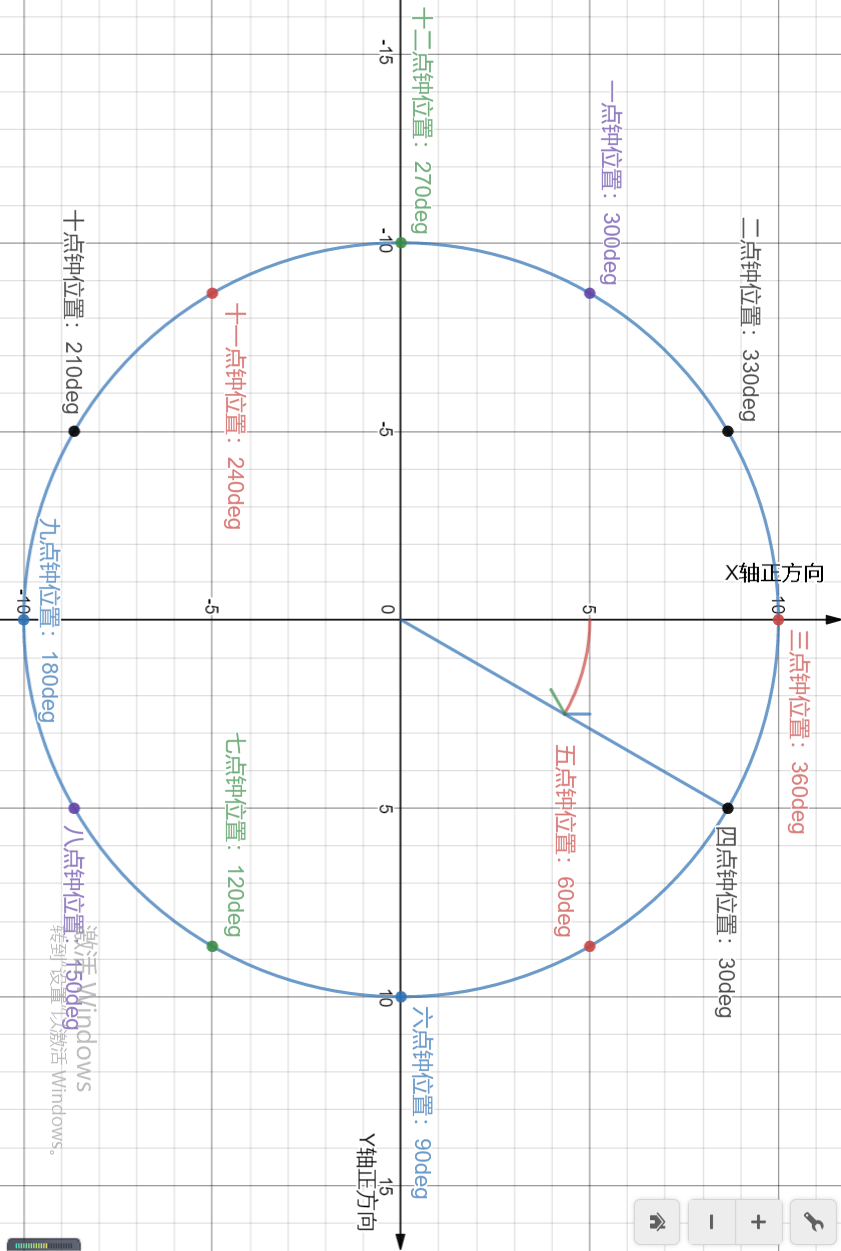
三点钟方向算是0度,四点钟为30度,顺时针旋转,依此类推……画这个图太费劲了,关键是不知道哪里有这样的工具,这里是在一个在线网站上画的,画完之后是可以分享的,分享一下链接地址:https://www.desmos.com/calculator/a9sdt0or3s
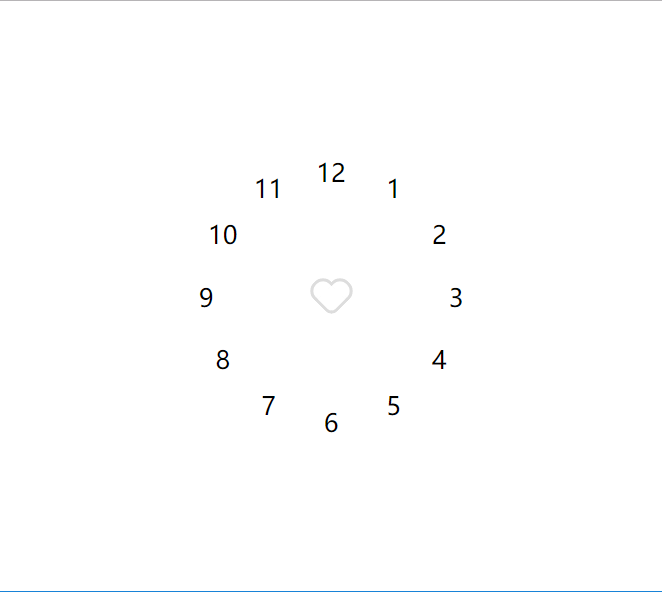
下面贴一下代码:
<!DOCTYPE html>

<html lang="en">

<head>

    <meta charset="UTF-8">

    <meta name="viewport" content="width=device-width, initial-scale=1.0">

    <meta http-equiv="X-UA-Compatible" content="ie=edge">

    <title>fab 菜单实现之前传-钟表表盘</title>

    <link rel="stylesheet" href="./index.css">

</head>

<body>

    <div class="page-container">

        <div class="fab-menu-container">

            <div class="fab-trigger"><i class="icon icon-heart"></i></div>

            <div class="fab-action-container">

                <div class="action">

                    <div class="action-content">1</div>

                </div>

                <div class="action">

                    <div class="action-content">2</div>

                </div>

                <div class="action">

                    <div class="action-content">3</div>

                </div>

                <div class="action">

                    <div class="action-content">4</div>

                </div>

                <div class="action">

                    <div class="action-content">5</div>

                </div>

                <div class="action">

                    <div class="action-content">6</div>

                </div>

                <div class="action">

                    <div class="action-content">7</div>

                </div>

                <div class="action">

                    <div class="action-content">8</div>

                </div>

                <div class="action">

                    <div class="action-content">9</div>

                </div>

                <div class="action">

                    <div class="action-content">10</div>

                </div>

                <div class="action">

                    <div class="action-content">11</div>

                </div>

                <div class="action">

                    <div class="action-content">12</div>

                </div>

            </div>

        </div>

    </div>

</body>

</html>
html代码
// 1、 纯CSS图标 ********开始********

// 图标通用样式

.icon {

    display: inline-block;

    vertical-align: middle;

    position: relative;

    font-style: normal;

    color: #ddd;

    text-align: left;

    text-indent: -9999px;

    direction: ltr;

}

.icon::after,

.icon::before {

    content: '';

    pointer-events: none;

}

// 加号图标

.icon-plus {

    width: 30px;

    height: 30px;

}

.icon-plus::before {

    width: 20px;

    height: 2px;

    position: absolute;

    left: 50%;

    top: 50%;

    transform: translate(-50%, -50%);

    box-shadow: inset 0 0 0 32px;

}

.icon-plus::after {

    height: 20px;

    width: 2px;

    position: absolute;

    left: 50%;

    top: 50%;

    transform: translate(-50%, -50%);

    box-shadow: inset 0 0 0 32px;

}

// 心型图标

.icon-heart {

    width: 20px;

    height: 20px;

    border-top-color: transparent;

    border-left-color: transparent;

    transform: rotate(45deg);

    border-radius: 7px 0;

    margin: 9px 7px 5px;

    border-bottom: 2px solid;

    border-right: 2px solid;

}

.icon-heart::before {

    width: 12px;

    height: 20px;

    position: absolute;

    left: -10px;

    bottom: -2px;

    border-radius: 20px 0 0 20px;

    border: 2px solid;

    border-right: none;

}

.icon-heart::after {

    width: 20px;

    height: 12px;

    right: -2px;

    top: -10px;

    border-radius: 20px 20px 0 0;

    position: absolute;

    border: 2px solid;

    border-bottom: none;

}

// 纯CSS图标 ********结束********

@fabTriggerRadius: 28px;

@fabActionRadius: 20px;

@distanceBetweenCircleCenter: 100px;

@fabActionCounter: 12;

*,

*::after,

*::before {

    box-sizing: border-box;

}

html,

body {

    height: 100%;

    width: 100%;

    margin:;

    overflow: hidden;

}

.page-container {

    height: 100%;

    width: 100%;

    display: flex;

    align-items: center;

    justify-content: center;

}

.fab-menu-container {

    width: 2 * @fabTriggerRadius;

    height: 2 * @fabTriggerRadius;

    position: fixed;

    >.fab-trigger {

        height: 100%;

        width: 100%;

        //background-color: #06C;

        color: #FFF;

        //box-shadow: 0 2px 5px 0 rgba(0, 0, 0, 0.11);

        display: flex;

        align-items: center;

        justify-content: center;

    }

    >.fab-action-container {

        height:;

        width:;

        // background-color: red;

        position: absolute;

        top: @fabTriggerRadius;

        left: @fabTriggerRadius;

        >.action {

            height:;

            width:;

            position: absolute;

            .for(@i) when (@i <=@fabActionCounter) {

                &:nth-child(@{i}) {

                    left: @distanceBetweenCircleCenter * cos((@i - 3)*30deg);

                    top: @distanceBetweenCircleCenter * sin((@i - 3)*30deg);

                }

                .for((@i + 1));

            }

            .for(1);

            >.action-content {

                width: 2 * @fabActionRadius;

                height: 2 * @fabActionRadius;

                position: absolute;

                top: -@fabActionRadius;

                left: -@fabActionRadius;

                display: flex;

                align-items: center;

                justify-content: center;

                // background-color: red;

            }

        }

    }

}
less代码
演示地址:钟表表盘
至此,这篇文章就结束了。这里在记录几个网址:
1、35 Cool Floating Action Button Animations
以下为纯CSS图标:
5、https://codepen.io/stiffi/pen/ysbCd
6、https://codepen.io/tidusxujun/pen/GgNxxP
7、https://codepen.io/airpwn/pen/hgdBc
fab 菜单实现之前传-钟表表盘的更多相关文章
- fab 菜单实现—圆形、半圆、扇形、直线、射线
前段时间记录一下fab 菜单实现之前传-钟表表盘,今天终于弄正文了. 本文基于上篇文章的布局方式和位置计算,并参考35 Cool Floating Action Button Animations(h ...
- 解决android4.0系统中菜单(Menu)添加Icon无效问题
本文转载自: http://blog.csdn.net/stevenhu_223/article/details/9705173 在Android4.0系统中,创建菜单Menu,通过setIcon方法 ...
- JS组件系列——基于Bootstrap Ace模板的菜单Tab页效果优化
前言:之前发表过一篇 JS组件系列——基于Bootstrap Ace模板的菜单和Tab页效果分享(你值得拥有) ,收到很多园友的反馈,当然也包括很多诟病,因为上篇只是将功能实现了,很多细节都没有处理 ...
- 11 OptionsMenu 菜单
OptionsMenu 选项菜单(系统菜单 ) OptionsMenu:系统级别菜单 菜单的使用步骤: 1. res里的menu里添加布局 在布局里写菜单项 2. 在逻辑代码中使用OnCreateOp ...
- 递归处理vue菜单数据
结构不多说,bean的封装很简单,直接上核心代码吧,自己根据需要把不要的属性自己过滤掉: public List<MenuBo> getMenuByUserId(Long user_id, ...
- 32.QT-制作最强电压电阻表盘,可以自定义阴影效果,渐变颜色,图标,文字标签等-附带demo程序
由于上位机需要绘制电压电阻表盘,如下图所示: 后来,在网上找阿找,还是没找到满意的,索性自己来画控件算了,由于第一次画控件,所以花了我2天时间,才画好 效果图如下: 上图的所有颜色(包括滑动的渐变/单 ...
- Vue2 实现树形菜单(多级菜单)功能模块
结构示意图 ├── index.html ├── main.js ├── router │ └── index.js # 路由配置文件 ├── components # 组件目录 │ ├── App. ...
- Android开发之选项菜单(optinosMenu)
android一共有三种形式的菜单: 1.选项菜单(optinosMenu) 2.上下文菜单(ContextMenu) ...
- DWZ SSH2 菜单树--使用Struts2 标签(iterator/set/if 组合使用)
最近在研究DWZ框架,然后要写一个菜单树,后台我使用了SSH2,然后想把菜单通过后台传过来的对象展示出来. 但是,发现应用样式的时候,如果子菜单在子循环中为空的话,会多出一对空标签“<ul> ...
随机推荐
- 腾讯云centos服务器不能登录的解决过程
在腾讯云上申请了一个centos服务器,最基础的配置,1 核 1 GB 1 Mbps,50G硬盘,主要用来测试程序,练手用.在上面配置了一个mysql数据库,一直使用都没什么问题. 1 问题描述 过了 ...
- Java语言编程 - 搭建Java开发环境
2.1 JDK.JRE和JVM关系 要弄清楚JDK.JRE和JVM这三者之间的关系,先看如下图,有个感性的认识: JDK:Java Development ToolKit(Java开发工具包).JDK ...
- mysql实现主从备份
mysql 主从备份的原理: 主服务器在做数据库操作的时候将所有的操作通过日志记录在binlog里面,有专门的文件存放.如localhost-bin.000003,这种,从服务器 和主服务配置好关系后 ...
- 【递归打卡2】求两个有序数组的第K小数
[题目] 给定两个有序数组arr1和arr2,已知两个数组的长度分别为 m1 和 m2,求两个数组中的第 K 小数.要求时间复杂度O(log(m1 + m2)). [举例] 例如 arr1 = [1, ...
- 从源码解读线程(Thread)和线程池(ThreadPoolExecutor)的状态
线程是比进程更加轻量级的调度执行单位,理解线程是理解并发编程的不可或缺的一部分:而生产过程中不可能永远使用裸线程,需要线程池技术,线程池是管理和调度线程的资源池.因为前不久遇到了一个关于线程状态的问题 ...
- office365的开发者训练营,免费,在微软广州举办
本活动在微软官网的地址: https://www.microsoft.com/china/events/detail_1707 先上活动内容: Office 365每月有超过1亿的商业活跃用户 ...
- 还在用AIDL吗?试试EasyMessenger吧
EasyMessenger 直达Github项目地址 一款用于Android平台的基于Binder的进程间通信库,采用annotationProcessor生成IPC通信需要的代码.EasyMesse ...
- 通过 mysqlbinlog 和 grep 命令定位binlog文件中指定操作
1.binlog日志基本知识 MySQL的二进制日志binlog可以说是MySQL最重要的日志,它记录了所有的DDL和DML语句(除了数据查询语句select),以事件形式记录,还包含语句所执行的消耗 ...
- 使用d3.v5实现条形图
效果图: 条形图: 目录结构: <!DOCTYPE html> <html lang="en"> <head> <meta charset ...
- Postman 安装
前言 安装前的准备: 1.Chrome 浏览器的扩展插件来进行的安装,并非单独应用程序. 2.电脑上已经安装了 Chrome 浏览器 3.本文章适用操作系统 window7 一,非官方安装 个人不建 ...