
[LeetCode] 225. Implement Stack using Queues_Easy tag: Design
Implement the following operations of a stack using queues.
- push(x) -- Push element x onto stack.
- pop() -- Removes the element on top of the stack.
- top() -- Get the top element.
- empty() -- Return whether the stack is empty.
Example:
MyStack stack = new MyStack();

stack.push(1);

stack.push(2);

stack.top();   // returns 2

stack.pop();   // returns 2

stack.empty(); // returns false
Notes:
- You must use only standard operations of a queue -- which means only
push to back,peek/pop from front,size, andis emptyoperations are valid. - Depending on your language, queue may not be supported natively. You may simulate a queue by using a list or deque (double-ended queue), as long as you use only standard operations of a queue.
- You may assume that all operations are valid (for example, no pop or top operations will be called on an empty stack).
利用如下图所示的方式, 每次push的时候将queue里面的值都放到x的后面即可.
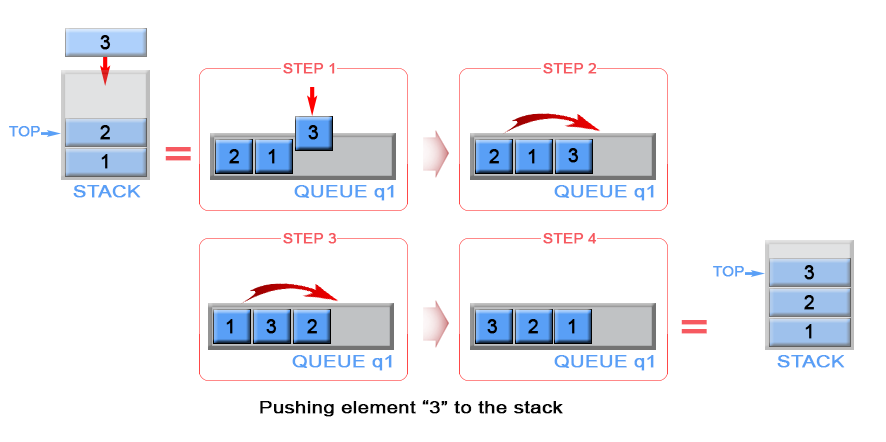
Push: O(n), others : O(1)
Code
class MyStack(object):

    def __init__(self):

        """

        Initialize your data structure here.

        """

        self.q = collections.deque()

    def push(self, x):

        """

        Push element x onto stack.

        :type x: int

        :rtype: void

        """

        size = len(self.q)

        self.q.append(x)

        while size:

            self.q.append(self.q.popleft())

            size -= 1

    def pop(self):

        """

        Removes the element on top of the stack and returns that element.

        :rtype: int

        """

        return self.q.popleft()

    def top(self):

        """

        Get the top element.

        :rtype: int

        """

        return self.q[0]

    def empty(self):

        """

        Returns whether the stack is empty.

        :rtype: bool

        """

        return not self.q

# Your MyStack object will be instantiated and called as such:

# obj = MyStack()

# obj.push(x)

# param_2 = obj.pop()

# param_3 = obj.top()

# param_4 = obj.empty()
[LeetCode] 225. Implement Stack using Queues_Easy tag: Design的更多相关文章
- LeetCode 225 Implement Stack using Queues(用队列来实现栈)(*)
翻译 用队列来实现栈的例如以下操作. push(x) -- 将元素x加入进栈 pop() -- 从栈顶移除元素 top() -- 返回栈顶元素 empty() -- 返回栈是否为空 注意: 你必须使用 ...
- [LeetCode] 225. Implement Stack using Queues 用队列来实现栈
Implement the following operations of a stack using queues. push(x) -- Push element x onto stack. po ...
- Java for LeetCode 225 Implement Stack using Queues
Implement the following operations of a stack using queues. push(x) -- Push element x onto stack. po ...
- (easy)LeetCode 225.Implement Stack using Queues
Implement the following operations of a stack using queues. push(x) -- Push element x onto stack. po ...
- Leetcode 225 Implement Stack using Queues
Implement the following operations of a stack using queues. push(x) -- Push element x onto stack. po ...
- Java [Leetcode 225]Implement Stack using Queues
题目描述: Implement the following operations of a stack using queues. push(x) -- Push element x onto sta ...
- [LeetCode] 232. Implement Queue using Stacks_Easy tag: Design
Implement the following operations of a queue using stacks. push(x) -- Push element x to the back of ...
- Leetcode 225 Implement Stack using Queues STL
用两个队列去实现栈,这里我使用了队列数组q[2],在所有的过程中保证一个队列是空的 push时插入到空的队列中,然后将队列中的元素移到另一个队列中 pop时从不空的队列中pop() peek时从不空的 ...
- LeetCode 225 Implement Stack using Queues 用队列实现栈
1.两个队列实现,始终保持一个队列为空即可 class MyStack { public: /** Initialize your data structure here. */ MyStack() ...
随机推荐
- Esper学习之一:Esper介绍
CEP即Complex Event Process,中文意思就是“复杂事件处理”.听起来好像很复杂,实际上就是基于事件流进行数据处理,把要分析的数据抽象成事件,然后将数据发送到CEP引擎,引擎就会根据 ...
- laravel with 渴求式加载指定字段
在使用 Laravel 的关联查询中,我们经常使用 with 方法来避免 N+1 查询,但是 with 会将目标关联的所有字段全部查询出来,对于有强迫症的我们来说,当然是不允许的. 这时候我们可以使用 ...
- linux下php的一些问题
一.Loaded Configuration File none Configuration File (php.ini) Path /data/service/php/etc 在etc目录下有ph ...
- python编码问题总结
最近利用python抓取一些网上的数据,遇到了编码的问题.非常头痛,总结一下用到的解决方案. linux中vim下查看文件编码的命令 set fileencoding python中一个强力的编码检测 ...
- STM8S 低功耗(1)
STM8S的低功耗模式有4种. 关系如下. 本次使用的停机(HALT) 使用了内部定时器,外部中断,LED指示是否进入低功耗. 在while循环中设置如下 ) { if(!IR_IN) // 外部中断 ...
- linux系统中关于shell变量$*与$@的区别
在我们初学linux系统shell时,可能会感觉$@与$*没什么区别,如下面shell脚本: #!/bin/bash# name:a.sh # echo 'this script $* is: '$* ...
- Linux渗透之反弹Shell
前言 当我们在渗透Linux主机时,反弹一个交互的shell是非常有必要的.在搜索引擎上搜索关键字“Linux 反弹shell”,会出现一大堆相关文章,但是其内容不但雷同,而且都仅仅是告诉我们执行这个 ...
- ElasticSearch 简单入门
英文原文:Getting Started with ElasticSearch 原文链接:http://www.oschina.net/translate/elasticsearch-getting- ...
- java的HashSet 原理
概括:HashSet 以HashMap为基础,判断HashSet 中元素是否存在和重复,先把该元素经过hashcode()等方法计算之后得到的值作为key值, 然后比较该key值是否存在和重复(把该元 ...
- SAP全球企业官孙小群的生活智慧
转自:http://www.programmer.com.cn/15373/ 一下为程序员杂志对孙小群(Xiaoqun Clever)的采访. 最早接触计算机是在高中,那时发现通过一个小小的Basic ...