
android中Fragment的使用
android中的Fragment跟网页中的iframe很像,用于在界面上嵌入局部动态内容,我的描述可能不准确,只是我的理解吧
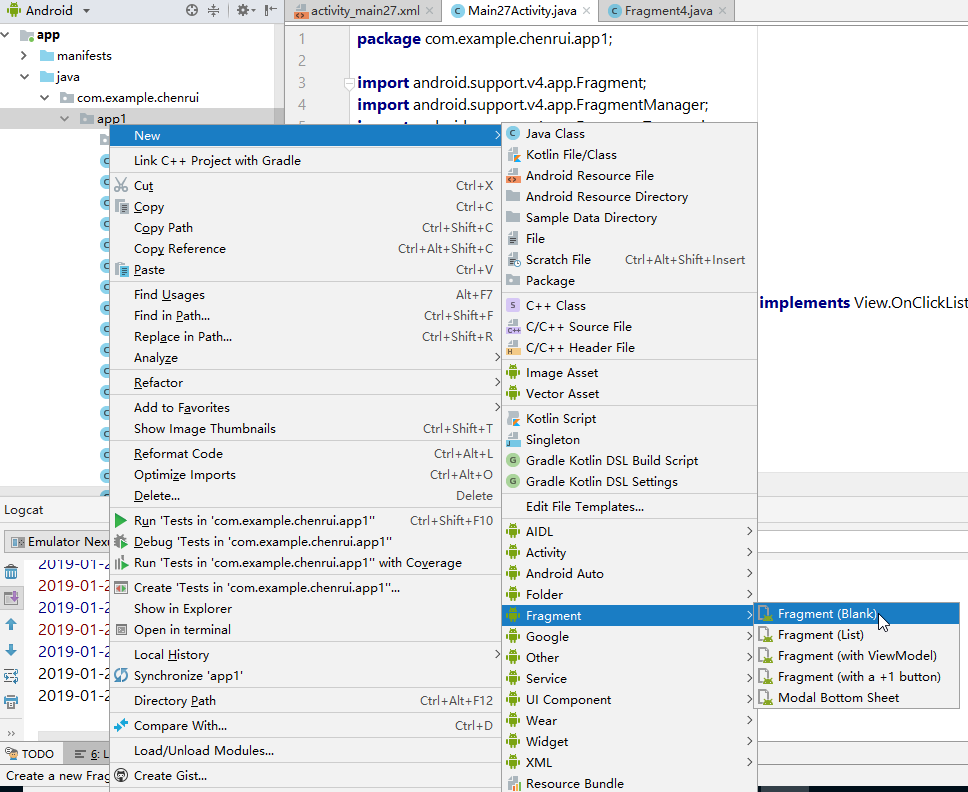
创建Fragment很简单,在Android Studio中是这么创建的:
简单使用的话,下面的两个勾都可以不用勾选:
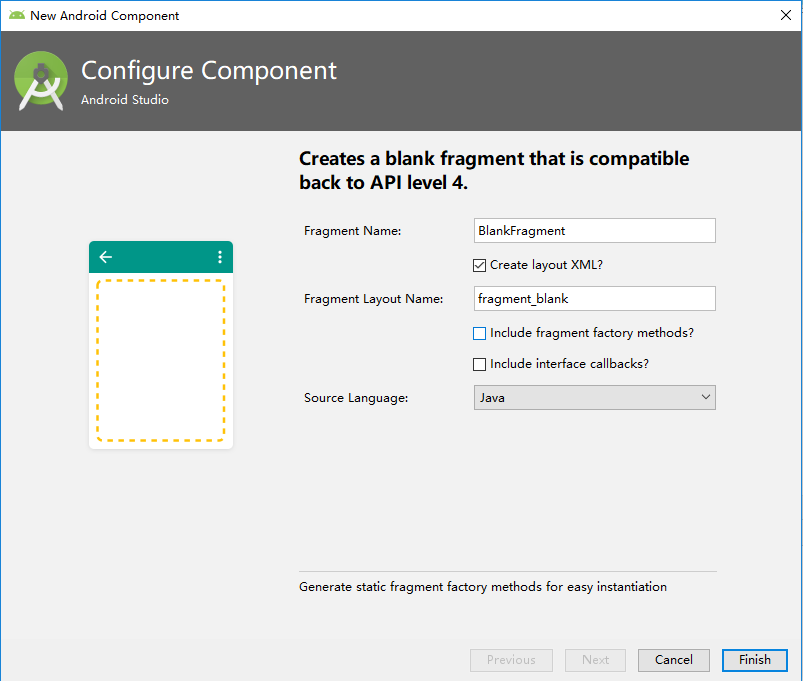
这里我创建了三个最简单的Fragment,代码就不粘了,每个Fragment里面可以放上最简单的TextView,显示一些文字信息等
然后我创建一个主Activity,我在主Activity上放三个按钮,点击对应的按钮,实现动态加载之前创建的Fragment
activity_main.xml:
<?xml version="1.0" encoding="utf-8"?>

<android.support.constraint.ConstraintLayout xmlns:android="http://schemas.android.com/apk/res/android"

    xmlns:app="http://schemas.android.com/apk/res-auto"

    xmlns:tools="http://schemas.android.com/tools"

    android:layout_width="match_parent"

    android:layout_height="match_parent"

    tools:context=".MainActivity">

    <LinearLayout

        android:layout_width="0dp"

        android:layout_height="match_parent"

        android:background="@android:color/holo_orange_light"

        android:gravity="center_vertical"

        android:orientation="vertical"

        app:layout_constraintStart_toStartOf="parent"

        app:layout_constraintWidth_percent="0.5">

        <Button

            android:id="@+id/button1"

            android:layout_width="match_parent"

            android:layout_height="wrap_content"

            android:text="Button1" />

        <Button

            android:id="@+id/button2"

            android:layout_width="match_parent"

            android:layout_height="wrap_content"

            android:text="Button2" />

        <Button

            android:id="@+id/button3"

            android:layout_width="match_parent"

            android:layout_height="wrap_content"

            android:text="Button3" />

        <TextView

            android:id="@+id/textView1"

            android:layout_width="match_parent"

            android:layout_height="wrap_content"

            android:text="TextView"

            android:textSize="30dp" />

    </LinearLayout>

    <FrameLayout

        android:id="@+id/rightFrame"

        android:layout_width="0dp"

        android:layout_height="match_parent"

        android:background="@android:color/holo_blue_light"

        app:layout_constraintEnd_toEndOf="parent"

        app:layout_constraintWidth_percent="0.5">

    </FrameLayout>

</android.support.constraint.ConstraintLayout>
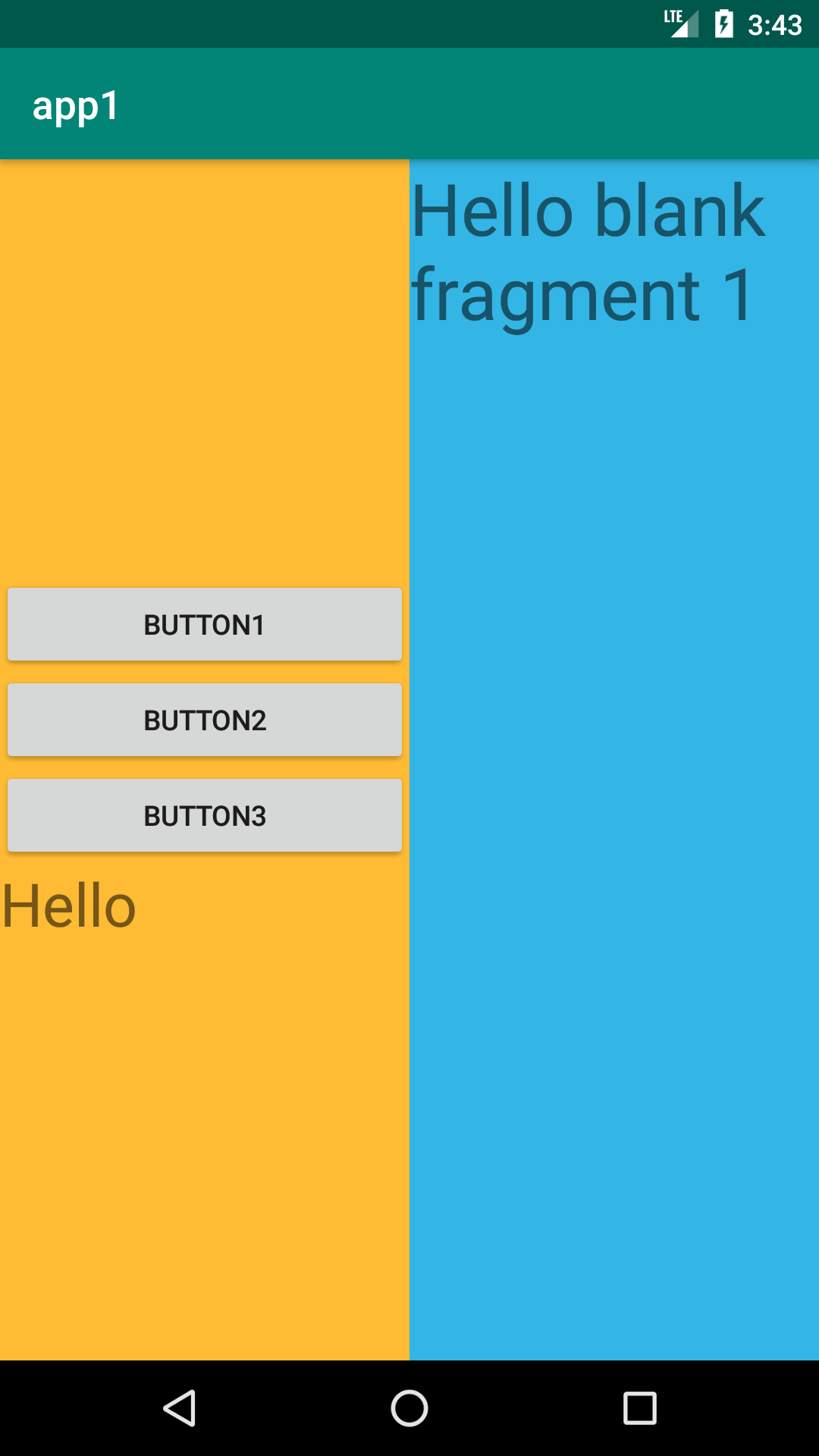
这个界面最外层是一个ConstraintLayout布局,里面放了一个上下结构的LinearLayout用于放按钮,还放了一个FrameLayout,用于动态加载我们之前创建的Fragment。
LinearLayout和FrameLayout我设置成各占屏幕的一半显示
下面是Activity类的代码
MainActivity.java:
 package com.example.chenrui.app1;

 import android.support.v4.app.Fragment;

 import android.support.v4.app.FragmentManager;

 import android.support.v4.app.FragmentTransaction;

 import android.support.v7.app.AppCompatActivity;

 import android.os.Bundle;

 import android.view.View;

 import android.widget.Button;

 import android.widget.TextView;

 import android.widget.Toast;

 public class MainActivity extends AppCompatActivity implements View.OnClickListener {

     @Override

     protected void onCreate(Bundle savedInstanceState) {

         super.onCreate(savedInstanceState);

         setContentView(R.layout.activity_main);

         Button button = findViewById(R.id.button1);

         button.setOnClickListener(this);

         button = findViewById(R.id.button2);

         button.setOnClickListener(this);

         button = findViewById(R.id.button3);

         button.setOnClickListener(this);

     }

     @Override

     public void onClick(View v) {

         switch (v.getId()) {

             case R.id.button24:

                 repalceFragment(new Fragment1());

                 break;

             case R.id.button25:

                 repalceFragment(new Fragment2());

                 break;

             case R.id.button26:

                 repalceFragment(new Fragment3());

                 break;

         }

     }

     public void repalceFragment(Fragment fragment) {

         FragmentManager fragmentManager = getSupportFragmentManager();

         FragmentTransaction transaction = fragmentManager.beginTransaction();

         transaction.replace(R.id.rightFrame,fragment);

         transaction.addToBackStack(null);

         transaction.commit();

     }

 }
上面的代码中,从第45到51行,我们把动态加载Fragment的代码放在一个方法中。点击对应的按钮,加载对应的Fragment。
第49行代码的意思是切换Fragment后会记住历史,按返回键会返回到上一个加载的Fragment
执行的效果:
在主Activity中,怎么操作Fragment中的内容呢,在主Activity中可以这么写:
Fragment fragment = getSupportFragmentManager().findFragmentById(R.id.rightFrame);

TextView textView = fragment.getView().findViewById(R.id.textView2);

textView.setText("大家好");
上面的代码通过getSupportFragmentManager().findFragmentById(R.id.rightFrame)获取到Fragment对象
textView2是Fragment的控件
反过来,在Fragment中怎么操作主Activity中的内容呢,在Fragment中要这么写:
TextView textView = getActivity().findViewById(R.id.textView1);

textView.setText("Hello");
上面的代码通过getActivity()方法获取到主Activity
textView1是主Activity的控件
android中Fragment的使用的更多相关文章
- Android中Fragment和ViewPager那点事儿(仿微信APP)
在之前的博文<Android中使用ViewPager实现屏幕页面切换和引导页效果实现>和<Android中Fragment的两种创建方式>以及<Android中Fragm ...
- Android中Fragment与Activity之间的交互(两种实现方式)
(未给Fragment的布局设置BackGound) 之前关于Android中Fragment的概念以及创建方式,我专门写了一篇博文<Android中Fragment的两种创建方式>,就如 ...
- Android 中Fragment使用
Android 中Fragment使用 public class MainActivity extends Activity { public static String[] array = { &q ...
- Android中Fragment的两种创建方式
fragment是Activity中用户界面的一个行为或者是一部分.你可以在一个单独的Activity上把多个Fragment组合成为一个多区域的UI,并且可以在多个Activity中再使用.你可以认 ...
- Android中fragment之间和Activity的传值、切换
功能介绍:通过一个activity下方的三个按钮,分别是发送消息(sendButton).聊天记录(chatButton).常用语(commonButton).当单击按钮是,来切换上方的fragmen ...
- Android中Fragment生命周期和基本用法
1.基本概念 1. Fragment是什么? Fragment是可以让你的app纵享丝滑的设计,如果你的app想在现在基础上性能大幅度提高,并且占用内存降低,同样的界面Activity占用内存比Fra ...
- Android中Fragment+ViewPager的配合使用
官方推荐 ViewPager与Fragment一起使用,可以更加方便的管理每个Page的生命周期,这里有标准的适配器实现用于ViewPager和Fragment,涵盖最常见的用例.FragmentPa ...
- Android中Fragment的简单介绍
Android是在Android 3.0 (API level 11)引入了Fragment的,中文翻译是片段或者成为碎片(个人理解),可以把Fragment当成Activity中的模块,这个模块有自 ...
- 关于Android中Fragment静态和动态加载的方法
一.静态加载 1.首先创建一个layout布局fragment.xml,里面放要显示和操作的控件 2.创建一个layout布局main1.xml,用来实现页面的跳转(跳转为要实现静态加载的界面) 3. ...
随机推荐
- Java知识回顾 (3)运算符
位运算符 Java定义了位运算符,应用于整数类型(int),长整型(long),短整型(short),字符型(char),和字节型(byte)等类型. 位运算符作用在所有的位上,并且按位运算.假设a ...
- Odoo(OpenERP)应用实践:代发货管理
原文地址:http://blog.csdn.net/wangnan537/article/details/47091857 有些分销商,在买家下单后才向供应商采购产品,并由供应商直接发货给客户.这种模 ...
- eclipse 中 import sun.misc.BASE64Decoder; 报错
from://http://blog.sina.com.cn/s/blog_48964b120101ahrf.html 在android做3DES加密功能时 eclipse 中 import sun. ...
- android 读取 raw 中的文件。
file.getParentFile().mkdir(); file.createNewFile(); InputStream inputStream = context.getResources() ...
- Sharepoint 开启发布功能的PowerShell
前言 最近,需要一段开启SharePoint站点发布功能的PowerShell命令,因为很多站点批量开启,去网站集功能和网站功能里分别点很麻烦,就搜了这样的命令,如果有需要的可以看一看. $siteU ...
- mongodb如何设置主键自增
function getNextSequence(name){ var ret = db.counters.findAndModify({ query: { _id: name}, update:{ ...
- http和https的区别与联系
超文本传输协议HTTP协议被用于在Web浏览器和网站服务器之间传递信息,HTTP协议以明文方式发送内容,不提供任何方式的数据加密,如果攻击者截取了Web浏览器和网站服务器之间的传输报文,就可以直接读懂 ...
- 开源项目PullToRefresh详解(三)——PullToRefreshScrollView
和前几篇文章一样,这里还是先设置布局文件,然后找到这个控件.只不过这里要简单很多. 1.布局文件 <?xml version="1.0" encoding="utf ...
- npm速度过慢的解决方案
因为npm连接的数据源网站太慢,可以使用淘宝提供的npm数据源, npm config set registry https://registry.npm.taobao.org 使用NPM(Node. ...
- [转]CENTOS LINUX安装并使用NFS共享文件
FROM :http://www.qiansw.com/centos-linux-nfs.html NFS是linux常用的一种文件分享工具. 下面介绍安装及使用方法. CentOS 5.5 yum ...