
【Azure Developer】Python 读取 json文件及过滤出需要的结果
问题描述
首先,有名为 campsites.json 的JSON数据文件,数据格式为
{

    "type": "FeatureCollection",

    "name": "DOC_Campsites",

    "crs": {        "type": "name",        "properties": {            "name": "urn:ogc:def:crs:OGC:1.3:CRS84"        }    },

    "features": [

        {

            "type": "Feature",

            "properties": {

                "OBJECTID": 54996,

                "name": "Rarangi Campsite",

                "place": "Blenheim area",

                "region": "Marlborough",

                "introduction": "Camp next to the beach. Fish, walk, picnic, or simply sit and enjoy the roar of the waves.",

                "campsiteCategory": "Standard",

                "status": "OPEN",

                "numberOfPoweredSites": 0,

                "numberOfUnpoweredSites": 55,

                "bookable": "No",

                "free": null,

                "facilities": "Water supply",

                "activities": null,

                "dogsAllowed": "Dogs with a DOC permit only",

                "landscape": "Coastal",

                "access": "Campervan, Car, Caravan",

                "hasAlerts": "Refer to DOC website for current alerts",

                "introductionThumbnail": "https://www.doc.govt.nz/thumbs/large/link/1b698c516b714b63b30de03203738e17.jpg",

                "staticLink": "https://www.doc.govt.nz/link/f5c4e8776bee486aaa1ae8ebdc1e48f8.aspx",

                "locationString": "Located in Blenheim area",

                "x": 1687530,

                "y": 5417097,

                "assetId": 100030520,

                "dateLoadedToGIS": "2021-05-28T04:15:08Z",

                "GlobalID": "{C02F0A50-9316-459A-ADD9-93518E6677EA}"

            },

            "geometry": {"type": "Point","coordinates": [174.04700047400002,-41.39289982899993]}

        }
, ... ...

    ]

}
全部的campsites.json文件内容下载地址:https://files.cnblogs.com/files/lulight/campsites.json?t=1655124060
修改下面的 server3.py 文件,以达到目标:当用户在浏览器中输入带有区域名称(例如 http://localhost:8080/Marlborough)的 URL 时,这个python服务器应该查询 region=Marlborough 的区域中的 Campsite category 类别为“Great Walk”的 Name + staticLink 数据在页面中
server3.py 文件内容:
#Author: Sunil Lal

#This is a simple HTTP server which listens on port 8080, accepts connection request, and processes the client request

#in sepearte threads. It implements basic service functions (methods) which generate HTTP response to service the HTTP requests.

#Currently there are 3 service functions; default, welcome and getFile. The process function maps the requet URL pattern to the service function.

#When the requested resource in the URL is empty, the default function is called which currently invokes the welcome function.

#The welcome service function responds with a simple HTTP response: "Welcome to my homepage".

#The getFile service function fetches the requested html or img file and generates an HTTP response containing the file contents and appropriate headers.

#To extend this server's functionality, define your service function(s), and map it to suitable URL pattern in the process function.

#This web server runs on python v3

#Usage: execute this program, open your browser (preferably chrome) and type http://servername:8080

#e.g. if server.py and broswer are running on the same machine, then use http://localhost:8080

from socket import *

import _thread

serverSocket = socket(AF_INET, SOCK_STREAM)

serverPort = 8080

serverSocket.setsockopt(SOL_SOCKET, SO_REUSEADDR, 1)

serverSocket.bind(("", serverPort))

serverSocket.listen(5)

print('The server is running')

# Server should be up and running and listening to the incoming connections

#Extract the given header value from the HTTP request message

def getHeader(message, header):

    if message.find(header) > -1:

        value = message.split(header)[1].split()[0]

    else:

        value = None

    return value

#service function to fetch the requested file, and send the contents back to the client in a HTTP response.

def getFile(filename):

    try:

        # open and read the file contents. This becomes the body of the HTTP response

        f = open(filename, "rb")

        body = f.read()

        header = ("HTTP/1.1 200 OK\r\n\r\n").encode()

    except IOError:

        # Send HTTP response message for resource not found

        header = "HTTP/1.1 404 Not Found\r\n\r\n".encode()

        body = "<html><head></head><body><h1>404 Not Found</h1></body></html>\r\n".encode()

    return header, body

#service function to generate HTTP response with a simple welcome message

def welcome(message):

    header = "HTTP/1.1 200 OK\r\n\r\n".encode()

    body = ("<html><head></head><body><h1>Welcome to my homepage</h1></body></html>\r\n").encode()

    return header, body

#default service function

def default(message):

    header, body = welcome(message)

    return header, body

#We process client request here. The requested resource in the URL is mapped to a service function which generates the HTTP reponse

#that is eventually returned to the client.

def process(connectionSocket) :

    # Receives the request message from the client

    message = connectionSocket.recv(1024).decode()

    if len(message) > 1:

        # Extract the path of the requested object from the message

        # Because the extracted path of the HTTP request includes

        # a character '/', we read the path from the second character

        resource = message.split()[1][1:]

        #map requested resource (contained in the URL) to specific function which generates HTTP response

        if resource == "":

            responseHeader, responseBody = default(message)

        elif resource == "welcome":

            responseHeader,responseBody = welcome(message)

        else:

            responseHeader,responseBody = getFile(resource)

    # Send the HTTP response header line to the connection socket

    connectionSocket.send(responseHeader)

    # Send the content of the HTTP body (e.g. requested file) to the connection socket

    connectionSocket.send(responseBody)

    # Close the client connection socket

    connectionSocket.close()

#Main web server loop. It simply accepts TCP connections, and get the request processed in seperate threads.

while True:

    # Set up a new connection from the client

    connectionSocket, addr = serverSocket.accept()

    #Clients timeout after 60 seconds of inactivity and must reconnect.

    connectionSocket.settimeout(60)

    # start new thread to handle incoming request

    _thread.start_new_thread(process,(connectionSocket,))
问题解答
在server3.py 文件中,实现了默认Default,welcome 和 getFile 方法,当访问URL为 http://localhost:8080 时,调用default方法,输出 Welcome to my homepage 信息。同理,当访问URL为 http://localhost:8080/welcome 时,调用welcome方法,同样输出 Welcome to my homepage 信息。 而 getFile 方法,则是读取指定的文件,输出文件内容。所以,本题最重要的代码部分为 getFile方法实现。
当用户在浏览器中输入带有区域名称(例如 http://localhost:8080/Marlborough)的 URL 时,这个python服务器应该查询 region=Marlborough 的区域中的 Campsite category 类别为“Great Walk”的 Name + staticLink 数据在页面中
第一步:引入 JSON 包
import json
第二步:定义 region 和 campsiteCategory的过滤条件 condition1 和 condition2,以及指定filename为 campsites.json (因为这里只是完成题目,所以硬编码在代码中)
        filename = "campsites.json"

        condition1 = "Marlborough"

        condition2 = "Basic"  # "Great Walk"
第三步:开始使用Json.load文件中的数据,把内容转换为 dict对象,然后根据 JSON格式,读取 features 列表,通过for 循环来一条一条的判断 condtion1 和 condition 2,满足条件,通过html拼接为一个Table
def getFile(regionname):

    try:

        filename = "campsites.json"

        condition1 = "Marlborough"

        condition2 = "Basic"  # "Great Walk"

        # open and read the file contents. This becomes the body of the HTTP response

        f = open(filename, "rb")

        jdata = json.load(f)

        # 查询region=Marlborough的区域中的Campsite category类别为“Great Walk”的Name , site总数并返回

        # region=Marlborough

        ## campsiteCategory =="Great Walk";

        #         print(jdata['name']);

        #         print(jdata['features'][1]['properties']['region'])

        #         print(type(jdata['features'][1]))

        outputTable = ""

        index = 0

        for fs in jdata['features']:

            if fs['properties']['region'] == condition1 and fs['properties']['campsiteCategory'] == condition2:

                outputTable += "<tr><td>" + \

                    fs['properties']['name']+"</td><td>" + \

                    fs['properties']['staticLink']+"</td></tr>"

                # print(fs['properties']['campsiteCategory'])

                index += 1

        body = ("<html><head></head><body><h1>Welcome to my homepage</h1><br><h2>Total row is " +

                str(index)+"</h2><br><table>"+outputTable+"</table></body></html>\r\n").encode()

        header = ("HTTP/1.1 200 OK\r\n\r\n").encode()

    except IOError:

        # Send HTTP response message for resource not found

        header = "HTTP/1.1 404 Not Found\r\n\r\n".encode()

        body = "<html><head></head><body><h1>404 Not Found</h1></body></html>\r\n".encode()

    return header, body
第四步:运行 python server3.py, 检验结果
> python server3.py
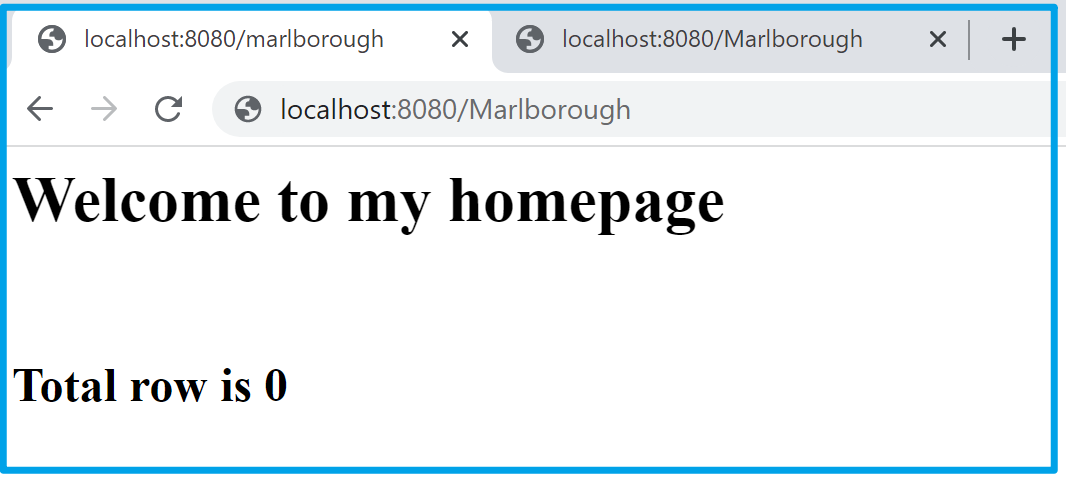
因为 campsites.json 数据源中,没有同时满足 region =="Marlborough" 和 campsiteCategory =="Great Walk" 的数据。
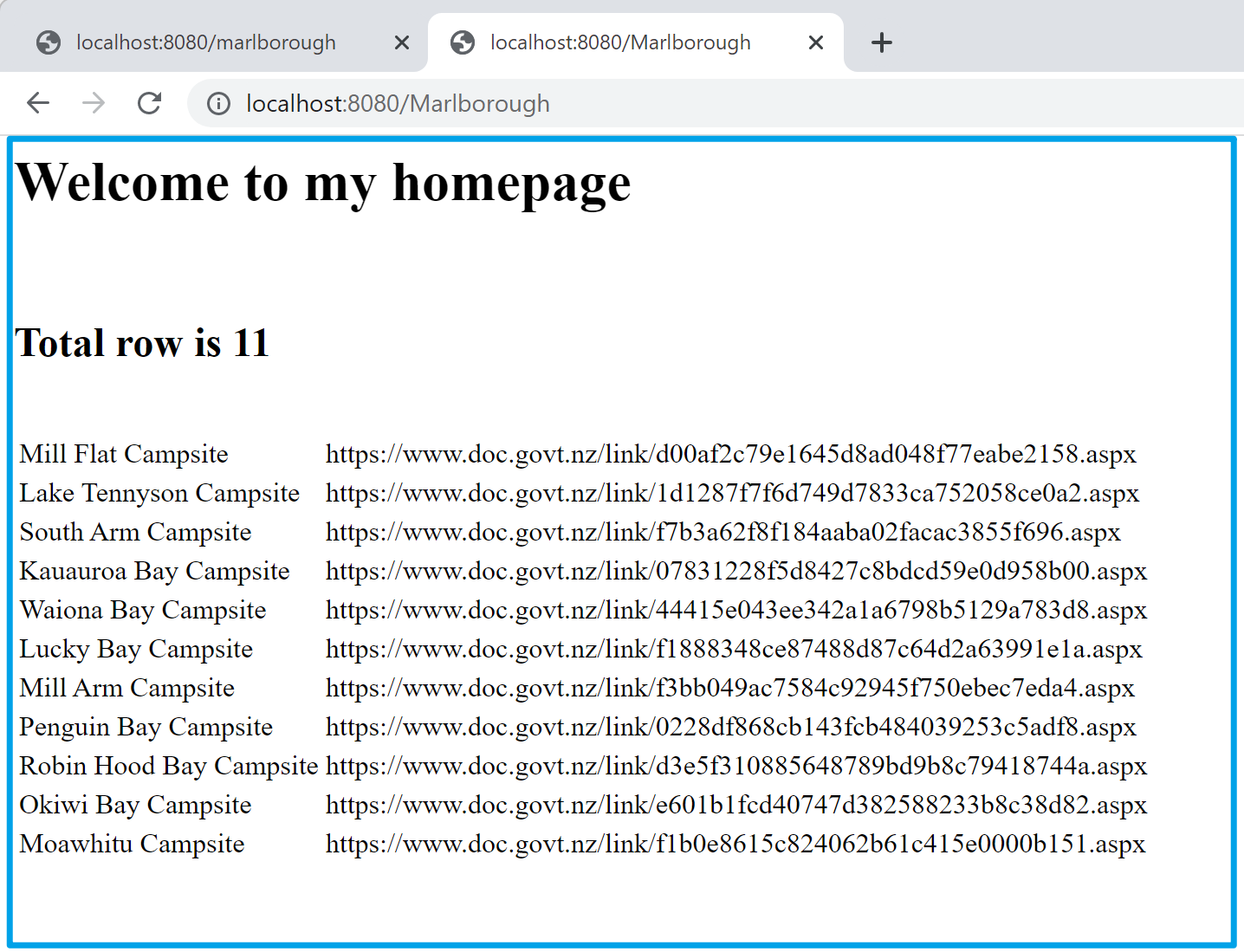
所以为了展示页面效果,修改了过滤条件为:
def getFile(regionname):

    try:

        filename = "campsites.json"

        condition1 = regionname; # "Marlborough"

        condition2 = "Basic"  # "Great Walk"
再次测试的效果如下:
【END】
附录:完整的Server3.py 代码
# Author: Sunil Lal

# This is a simple HTTP server which listens on port 8080, accepts connection request, and processes the client request

# in sepearte threads. It implements basic service functions (methods) which generate HTTP response to service the HTTP requests.

# Currently there are 3 service functions; default, welcome and getFile. The process function maps the requet URL pattern to the service function.

# When the requested resource in the URL is empty, the default function is called which currently invokes the welcome function.

# The welcome service function responds with a simple HTTP response: "Welcome to my homepage".

# The getFile service function fetches the requested html or img file and generates an HTTP response containing the file contents and appropriate headers.

# To extend this server's functionality, define your service function(s), and map it to suitable URL pattern in the process function.

# This web server runs on python v3

# Usage: execute this program, open your browser (preferably chrome) and type http://servername:8080

# e.g. if server.py and broswer are running on the same machine, then use http://localhost:8080

from socket import *

import _thread

import json

serverSocket = socket(AF_INET, SOCK_STREAM)

serverPort = 8080

serverSocket.setsockopt(SOL_SOCKET, SO_REUSEADDR, 1)

serverSocket.bind(("", serverPort))

serverSocket.listen(5)

print('The server is running')

# Server should be up and running and listening to the incoming connections

# Extract the given header value from the HTTP request message

def getHeader(message, header):

    if message.find(header) > -1:

        value = message.split(header)[1].split()[0]

    else:

        value = None

    return value

# service function to fetch the requested file, and send the contents back to the client in a HTTP response.

def getFile(regionname):

    try:

        filename = "campsites.json"

        condition1 = regionname; # "Marlborough"

        condition2 = "Basic"  # "Great Walk"

        # open and read the file contents. This becomes the body of the HTTP response

        f = open(filename, "rb")

        #body = f.read()

        jdata = json.load(f)

        # 查询region=Marlborough的区域中的Campsite category类别为“Great Walk”的Name , site总数并返回

        # region=Marlborough

        ## campsiteCategory =="Great Walk";

        #         print(jdata['name']);

        #         print(jdata['crs']);

        #         print(jdata['features'][1]['properties']['region'])

        #         print(jdata['features'][1]['properties']['campsiteCategory'])

        #         print(type(jdata['features'][1]))

        outputTable = ""

        index = 0

        for fs in jdata['features']:

            if fs['properties']['region'] == condition1 and fs['properties']['campsiteCategory'] == condition2:

                outputTable += "<tr><td>" + \

                    fs['properties']['name']+"</td><td>" + \

                    fs['properties']['staticLink']+"</td></tr>"

                # print(index)

                # print(fs['properties']['region'])

                # print(fs['properties']['campsiteCategory'])

                index += 1

        #d = filter(lambda x:x.index)

        #print(outputTable)

        body = ("<html><head></head><body><h1>Welcome to my homepage</h1><br><h2>Total row is " +

                str(index)+"</h2><br><table>"+outputTable+"</table></body></html>\r\n").encode()

        header = ("HTTP/1.1 200 OK\r\n\r\n").encode()

    except IOError:

        # Send HTTP response message for resource not found

        header = "HTTP/1.1 404 Not Found\r\n\r\n".encode()

        body = "<html><head></head><body><h1>404 Not Found</h1></body></html>\r\n".encode()

    return header, body

# service function to generate HTTP response with a simple welcome message

def welcome(message):

    header = "HTTP/1.1 200 OK\r\n\r\n".encode()

    body = ("<html><head></head><body><h1>Welcome to my homepage</h1></body></html>\r\n").encode()

    return header, body

# default service function

def default(message):

    header, body = welcome(message)

    return header, body

# We process client request here. The requested resource in the URL is mapped to a service function which generates the HTTP reponse

# that is eventually returned to the client.

def process(connectionSocket):

    # Receives the request message from the client

    message = connectionSocket.recv(1024).decode()

    if len(message) > 1:

        # Extract the path of the requested object from the message

        # Because the extracted path of the HTTP request includes

        # a character '/', we read the path from the second character

        resource = message.split()[1][1:]

        # map requested resource (contained in the URL) to specific function which generates HTTP response

        if resource == "":

            responseHeader, responseBody = default(message)

        elif resource == "welcome":

            responseHeader, responseBody = welcome(message)

        else:

            responseHeader, responseBody = getFile(resource)

    # Send the HTTP response header line to the connection socket

    connectionSocket.send(responseHeader)

    # Send the content of the HTTP body (e.g. requested file) to the connection socket

    connectionSocket.send(responseBody)

    # Close the client connection socket

    connectionSocket.close()

# Main web server loop. It simply accepts TCP connections, and get the request processed in seperate threads.

while True:

    # Set up a new connection from the client

    connectionSocket, addr = serverSocket.accept()

    # Clients timeout after 60 seconds of inactivity and must reconnect.

    connectionSocket.settimeout(60)

    # start new thread to handle incoming request

    _thread.start_new_thread(process, (connectionSocket,))
参考资料
...
【Azure Developer】Python 读取 json文件及过滤出需要的结果的更多相关文章
- python读取json文件
比如下图json数据,场景需要读取出wxid这项数据,然后传给后面的函数去使用 具体的脚本为 import json f =open('d:\\1024.json',encoding='utf-8') ...
- python读取json文件制作股票价格走势
- Python 读取json文件
创建json文件: { "fontFamily": "微软雅黑", "fontSize": 12, "BaseSettings&q ...
- python读取json文件并解析
# -*- coding: utf-8 -*- import os import json import sys reload(sys) sys.setdefaultencoding('utf-8') ...
- 【JSON】Python读取JSON文件报错json.decoder.JSONDecodeError的问题
报错 json.decoder.JSONDecodeError: Expecting property name enclosed in double quotes: line * column * ...
- 接口自动化(三)--读取json文件中的数据
上篇讲到实际的请求数据放置在json文件内,这一部分记述一下python读取json文件的实现. 代码如下(代码做了简化,根据需要调优:可做一些容错处理): 1 import json 2 3 cla ...
- Python json 读取 json 文件并转为 dict
Python json 读取 json 文件并转为 dict 在 D 盘 新建 test.json: { "test": "测试\n换行", "dic ...
- python中读取json文件报错,TypeError:the Json object must be str, bytes or bytearray,not ‘TextIOWrapper’
利用python中的json读取json文件时,因为错误使用了相应的方法导致报错:TypeError:the Json object must be str, bytes or bytearray,n ...
- Python实现读取json文件到excel表
一.需求 1.'score.json' 文件内容: { "1":["小花",99,100,98.5], "2":["小王" ...
- python学习笔记十六:读取JSON文件
读取JSON文件可以用JSON库,示例代码: #coding:utf-8 import json with open("msg.json") as jsonfile: json_d ...
随机推荐
- 神通奥斯卡数据库是否兼容Oracle, 以及参数修改的办法
1. 最近公司要适配神通数据库, 但是因为一些功能异常.参数可能存在风险. 为了减少问题, 想着简单描述一下这些的处理. 开发和客户给的默认参数建议 1. 不选择 兼容oracle模式 2. 字符集选 ...
- pycharm提交代码到gitee
1.在pycharm中下载gitee插件,打开pycharm进入settings页面,查看当前页面version control下是否 有gitee,要是没有点击plugins,在搜索框中搜索gite ...
- 【JS 逆向百例】某空气质量监测平台无限 debugger 以及数据动态加密
关注微信公众号:K哥爬虫,持续分享爬虫进阶.JS/安卓逆向等技术干货! 声明 本文章中所有内容仅供学习交流,抓包内容.敏感网址.数据接口均已做脱敏处理,严禁用于商业用途和非法用途,否则由此产生的一切后 ...
- Gin 框架之jwt 介绍与基本使用
目录 一.JWT 介绍 二.JWT认证与session认证的区别 2.1 基于session认证流程图 2.2 基于jwt认证流程图 三. JWT 的构成 3.1 header : 头部 3.2 pa ...
- Gin 应用多实例部署session问题、session参数与刷新
目录 一.Gin Session 存储的实现方案 二.memstore:基于内存的实现 2.1 基本使用 2.2 关键参数 三.使用redis:多实例部署 3.1 使用redis优势 3.2 基本使用 ...
- 9.4 Windows驱动开发:内核PE结构VA与FOA转换
本章将继续探索内核中解析PE文件的相关内容,PE文件中FOA与VA,RVA之间的转换也是很重要的,所谓的FOA是文件中的地址,VA则是内存装入后的虚拟地址,RVA是内存基址与当前地址的相对偏移,本章还 ...
- SpringBoot分布式任务中间件开发 附视频讲解 (手把手教你开发和使用中间件)
作者:小傅哥 博客:https://bugstack.cn 沉淀.分享.成长,让自己和他人都能有所收获! 分布式任务DcsSchedule中间件,Github地址:https://github.com ...
- iOS转场之present与dismiss的使用
present的使用方式 present只能是A present B , B present C , C present D这样的链式弹出. 不能A present B , A present C , ...
- 零基础入门学习Java之多线程
多线程 话不多说,看代码 1.什么是多线程 众所周知CPU单线程的东西,也就是说在同一时间内程序只能去做一件事情,但很多时候比如说多人买票.龟兔赛跑.游戏开发等都需要在同一时间内完成多个东西,因此就有 ...
- 十八张图带你入门实时监控系统HertzBeat
我们经常讲:研发人员有两只眼睛,一只是监控平台,另一只是日志平台.在对性能和高可用讲究的场景里,监控平台的重要性再怎么强调也不过分. 这篇文章,我们聊聊开源实时监控告警系统 HertzBeat 赫兹跳 ...