
Androlid入门之文件系统操作(三)文件读写
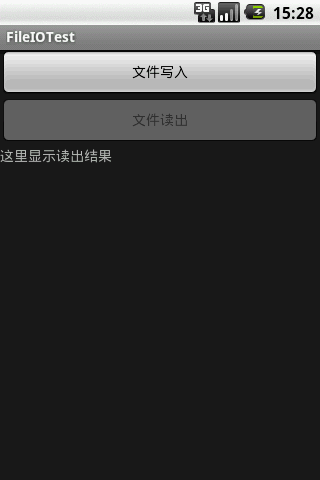
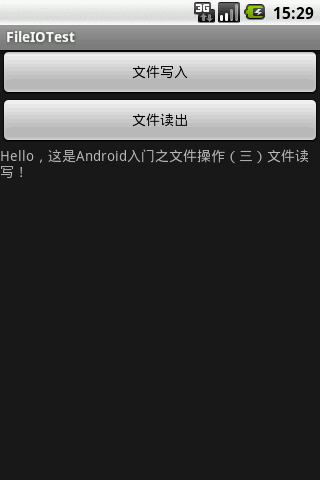
- import java.io.*;
- import android.app.Activity;
- import android.os.Bundle;
- import android.view.View;
- import android.view.View.OnClickListener;
- import android.widget.*;
- public class FileIOTest extends Activity {
- private LinearLayout mainView=null;
- private Button writeButton=null;
- private Button readButton=null;
- private TextView tv=null;
- public void onCreate(Bundle savedInstanceState) {
- super.onCreate(savedInstanceState);
- writeButton=new Button(this);
- writeButton.setText("文件写入");
- writeButton.setOnClickListener(new OnClickListener(){
- public void onClick(View v) {
- fileWrite();
- }
- });
- readButton=new Button(this);
- readButton.setEnabled(false);
- readButton.setText("文件读出");
- readButton.setOnClickListener(new OnClickListener(){
- public void onClick(View v) {
- fileRead();
- }
- });
- tv=new TextView(this);
- tv.setText("这里显示读出结果");
- mainView=new LinearLayout(this);
- mainView.setOrientation(LinearLayout.VERTICAL);
- mainView.addView(writeButton);
- mainView.addView(readButton);
- mainView.addView(tv);
- setContentView(mainView);
- }
- /*文件写*/
- void fileWrite(){
- //File file=this.getFilesDir();//打开私有目录
- File file=new File("/sdcard");
- String path=file.getAbsolutePath();//获取路径
- String name="mydata1.dat";//新建文件名
- File filex=new File(path,name);
- //如果文件不存在,则创建一个文件
- if(!filex.exists()){
- try {
- filex.createNewFile();
- } catch (IOException e) {
- e.printStackTrace();
- }
- }
- //获取文件输出流
- FileOutputStream fos=null;
- try {
- fos=new FileOutputStream(filex);
- byte buf[]="Hello,这是Android入门之文件操作(三)文件读写!".getBytes();
- //上面涉及到字符串转字符,为了保证编码正常,建议采用下面的方法
- //ByteArrayOutputStream baos=new ByteArrayOutputStream();
- //DataOutputStream dos=new DataOutputStream(baos);
- //try {dos.writeUTF("XXXXXXXXXXXXXXXXX");catch (IOException e1) {e1.printStackTrace();}
- //byte[] buf=baos.toByteArray();
- try {
- fos.write(buf);//全面覆盖式的写,如果要添加或者修改,得把原来的先读出来再做处理
- fos.close();
- } catch (IOException e) {
- e.printStackTrace();
- }
- } catch (FileNotFoundException e) {
- e.printStackTrace();
- }
- readButton.setEnabled(true);
- }
- /*文写读*/
- void fileRead(){
- //File file=this.getFilesDir();//打开私有目录
- File file=new File("/sdcard");
- String path=file.getAbsolutePath();//获取路径
- String name="mydata1.dat";//新建文件名
- File filex=new File(path,name);
- //
- try {
- FileInputStream fis=new FileInputStream(filex);
- byte buf[]=new byte[1024];
- try {
- int len=fis.read(buf);
- fis.close();
- } catch (IOException e) {
- e.printStackTrace();
- }
- //显示读取结果
- tv.setText(new String(buf));
- //上面涉及字符转字符串,为了保证编码正常,建议采用下面的方法
- //ByteArrayInputStream bais=new ByteArrayInputStream(buf);
- //DataInputStream dis=new DataInputStream(bais);
- //try {tv.setText(dis.readUTF());} catch (IOException e) {e.printStackTrace();}
- } catch (FileNotFoundException e) {
- e.printStackTrace();
- }
- }
- }
Androlid入门之文件系统操作(三)文件读写的更多相关文章
- Android入门之文件系统操作(一)简单的文件浏览器 (转)
Android入门之文件系统操作(一)简单的文件浏览器 (转) import java.io.File; import java.util.*; import android.app.A ...
- Android入门之文件系统操作
Android入门之文件系统操作(二)文件操作相关指令 (转) (一)获取总根 File[] fileList=File.listRoots(); //返回fileList.length为1 // ...
- QSettings配置读写-win注册表操作-ini文件读写
版权声明:若无来源注明,Techie亮博客文章均为原创. 转载请以链接形式标明本文标题和地址: 本文标题:QSettings配置读写-win注册表操作-ini文件读写 本文地址:http:// ...
- ActionScript 3.0入门:Hello World、文件读写、数据存储(SharedObject)、与JS互调
近期项目中可能要用到Flash存取数据,并与JS互调,所以就看了一下ActionScript 3.0,现把学习结果分享一下,希望对新手有帮助. 目录 ActionScript 3.0简介 Hello ...
- [转]ActionScript 3.0入门:Hello World、文件读写、数据存储(SharedObject)、与JS互调
本文转自:http://www.cnblogs.com/artwl/p/3396330.html 近期项目中可能要用到Flash存取数据,并与JS互调,所以就看了一下ActionScript 3.0, ...
- python基础操作_文件读写操作
#文件读写# r只能读不能写,且文件必须存在,w只能写不能读,a只能写不能读# w+是写读模式,清空原文件内容# r+是读写模式,没有清空原文件内容,# 只要有r,文件必须存在,只要有w,都会清空原文 ...
- Android入门之文件系统操作(二)文件操作相关指令
(一)获取总根 File[] fileList=File.listRoots(); //返回fileList.length为1 //fileList.getAbsolutePath()为"/ ...
- Android入门之文件系统操作(一)简单的文件浏览器
版权声明:本文为博主原创文章,未经博主允许不得转载. import java.io.File; import java.util.*; import android.app.Activit ...
- .net对文件的操作之文件读写
读写文件的步骤一般需要5步: 创建文件流 创建读写器 执行读或写的操作 关闭读写器 关闭文件流 需要引用:System.IO这个命名空间 代码演示: string path = @"F:\a ...
随机推荐
- 使用Kettle增量抽取MongoDB数据实践
需求: 增量抽取MongoDB数据并加载到MSSQL 由于不能使用关系型数据库的自定义SQL, 所以主要遇到的问题有: 增量时间的查询和参数控制 ETL的批次信息和调用参数的写入 第一个问题的解决如下 ...
- JS高级——Function
Function构造函数 可以用来新建函数对象 1.一个参数都不传的情况创建的就是一个空的函数 2.只传一个参数的情况这个参数就是函数体 3.传多个参数的情况,最后一个参数为函数体,前面的参数都是该函 ...
- CSS——dispaly、overflow、visibility、opacity
隐藏盒子: 1.overflow:hidden; 隐藏盒子超出的部分. 2.display: none; 隐藏盒子,而且不占位置.(用的最 ...
- CSS——属性选择器
属性选择器:通过对标签中属性的选择,控制标签. <!DOCTYPE html> <html> <head> <style> div[class*=&qu ...
- html——特殊字符
- ASP.NET MVC 二维码生成(ThoughtWorks.QRCode)
原文地址http://www.cnblogs.com/jys509/p/4592539.html
- [Windows Server 2008] 查看ASP详细错误信息方法
★ 欢迎来到[护卫神·V课堂],网站地址:http://v.huweishen.com ★ 护卫神·V课堂是护卫神旗下专业提供服务器教学视频的网站,每周更新视频. ★ 本节我们将带领大家:查看IIS下 ...
- 在Windows下安装Elasticsearch5.0
1.准备工作 安装和配置Java环境 2.下载 地址:https://www.elastic.co/downloads/elasticsearch 老版本:https://www.elastic.co ...
- 【VHDL】组合逻辑电路和时序逻辑电路的区别
简单的说,组合电路,没有时钟:时序电路,有时钟. ↓ 也就是说,组合逻辑电路没有记忆功能,而时序电路具有记忆功能. ↓ 在VHDL语言中,不完整条件语句对他们二者的影响分别是什么?组合逻辑中可能生成锁 ...
- 【sqli-labs】 less57 GET -Challenge -Union -14 queries allowed -Variation4 (GET型 挑战 联合查询 只允许14次查询 变化4)
双引号闭合 http://192.168.136.128/sqli-labs-master/Less-57/?id=1"%23 和less56一样查数据