
SpringCloud 分布式配置中心
SpringCloud 分布式配置中心
服务端
创建工程并完善结构
国际惯例,把maven工程创建完善
pom.xml
<?xml version="1.0" encoding="UTF-8"?>

<project xmlns="http://maven.apache.org/POM/4.0.0" xmlns:xsi="http://www.w3.org/2001/XMLSchema-instance"

         xsi:schemaLocation="http://maven.apache.org/POM/4.0.0 http://maven.apache.org/xsd/maven-4.0.0.xsd">

    <modelVersion>4.0.0</modelVersion>

    <parent>

        <groupId>com.outlook.liufei32</groupId>

        <artifactId>spring-cloud-dependencies</artifactId>

        <version>1.0.0-SNAPSHOT</version>

        <relativePath>../spring-cloud-dependencies/pom.xml</relativePath>

    </parent>

    <artifactId>spring-cloud-config</artifactId>

    <packaging>jar</packaging>

    <name>spring-cloud-config</name>

    <url></url>

    <inceptionYear>2019-Now</inceptionYear>

    <dependencies>

        <!-- Spring Boot Begin -->

        <dependency>

            <groupId>org.springframework.boot</groupId>

            <artifactId>spring-boot-starter-web</artifactId>

        </dependency>

        <dependency>

            <groupId>org.springframework.boot</groupId>

            <artifactId>spring-boot-starter-tomcat</artifactId>

        </dependency>

        <dependency>

            <groupId>org.springframework.boot</groupId>

            <artifactId>spring-boot-starter-actuator</artifactId>

        </dependency>

        <dependency>

            <groupId>org.springframework.boot</groupId>

            <artifactId>spring-boot-starter-test</artifactId>

            <scope>test</scope>

        </dependency>

        <!-- Spring Boot End -->

        <!-- Spring Cloud Begin -->

        <dependency>

            <groupId>org.springframework.cloud</groupId>

            <artifactId>spring-cloud-config-server</artifactId>

        </dependency>

        <dependency>

            <groupId>org.springframework.cloud</groupId>

            <artifactId>spring-cloud-starter-netflix-eureka-server</artifactId>

        </dependency>

        <!-- Spring Cloud End -->

    </dependencies>

    <build>

        <plugins>

            <plugin>

                <groupId>org.springframework.boot</groupId>

                <artifactId>spring-boot-maven-plugin</artifactId>

                <configuration>

                    <mainClass>com.outlook.liufei32.spring.cloud.config.ConfigApplication</mainClass>

                </configuration>

            </plugin>

        </plugins>

    </build>

</project>
application.yml
spring:

  application:

    name: spring-cloud-config

  cloud:

    config:

      label: master

      server:

        git:

          uri: https://github.com/Swagger-Ranger/spring-cloud-config   #仓库地址

          search-paths: respo                                          #仓库目录

          username: Swagger-Ranger

          password: lwx425876github

server:

  port: 8888    #注意这里的端口8888是默认的不能改,如果要修改端口则在相同目录下新建bootstrap.yml 设置端口server.port=PORT

eureka:

  client:

    serviceUrl:

      defaultZone: http://localhost:8761/eureka/
配置说明:
- spring.cloud.config.label:配置仓库的分支
- spring.cloud.config.server.git.uri:配置 Git 仓库地址(GitHub、GitLab、码云 ...)
- spring.cloud.config.server.git.search-paths:配置仓库路径(存放配置文件的目录)
- spring.cloud.config.server.git.username:访问 Git 仓库的账号
- spring.cloud.config.server.git.password:访问 Git 仓库的密码
application.yml中配置中心端口8888是默认的不能改,如果要修改端口则在相同目录下新建bootstrap.yml 设置端口server.port=PORT。因为bootstrap.properties/yml是优先于application.properties/yml加载的。
启动类
package com.outlook.liufei32.spring.cloud.config;

import org.springframework.boot.SpringApplication;

import org.springframework.boot.autoconfigure.SpringBootApplication;

import org.springframework.cloud.config.server.EnableConfigServer;

import org.springframework.cloud.netflix.eureka.EnableEurekaClient;

@EnableConfigServer

@EnableEurekaClient

@SpringBootApplication

public class ConfigApplication {

    public static void main( String[] args ) {

        SpringApplication.run(ConfigApplication.class, args);

    }

}
启动查看配置
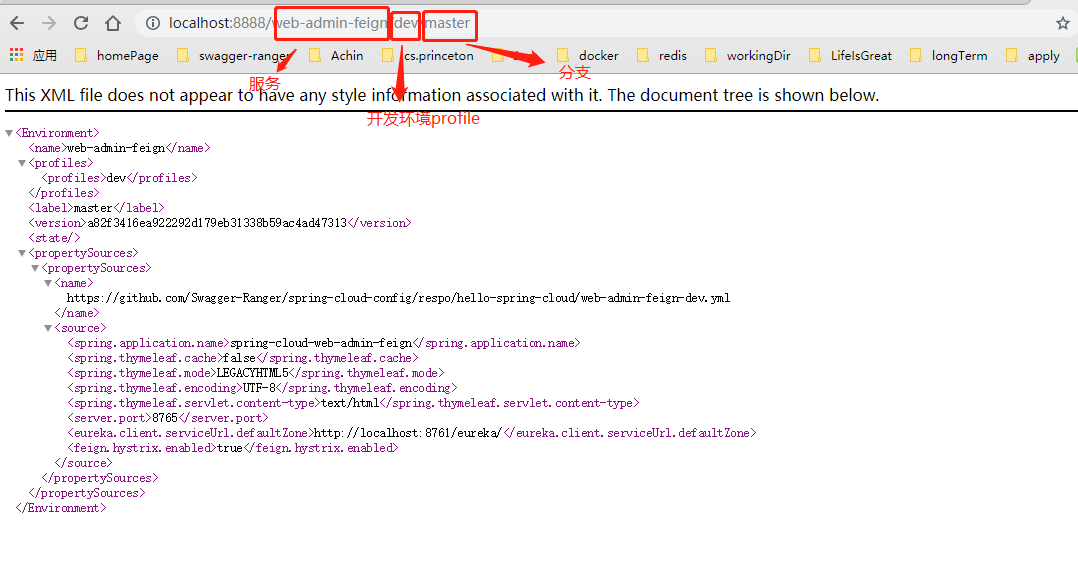
当配置完成,启动模块就能在浏览器中查看到配置文件
客户端
使用分布式配置客户端就是在原来的微服务project里使用云配置,即增加pom.xml依赖,然后将application.yml修改为链接分布式配置中心服务端的配置
pom.xml
<!--增加云配置依赖-->

        <dependency>

            <groupId>org.springframework.cloud</groupId>

            <artifactId>spring-cloud-starter-config</artifactId>

        </dependency>
修改application.yml来使用配置中心的云配置
spring:

  cloud:

    config:

      uri: http://localhost:8888      #配置中心的地址

      name: config-client             #服务名

      label: master                   #分支名

      profile: dev                    #使用哪个配置,就是云配置中文件名结尾后缀
然后启动服务就是使用的云配置
启用profiles
在开发的时候,生产环境和测试环境的一些配置可能会不一样,有时候一些功能也可能会不一样,所以我们可能会在上线的时候手工修改这些配置信息。但是 Spring 中为我们提供了 Profile 这个功能。我们只需要在启动的时候添加一个虚拟机参数,激活自己环境所要用的 Profile 就可以了,也就是在application.yml中使用云配置的参数profile可以直接在项目允许时直接指定,--spring.profiles.active=PROFILE,然后就会去使用在对应的 PROJECTNAME-PROFILE.yml配置
比如:
java -jar spring-cloud-web-admin-feign-1.0.0-SNAPSHOT.jar --spring.profiles.active=prod
具体步骤就是1.使用mvn clean package打包,然后允许指定PROFILE使用指定的配置运行:java -jar spring-cloud-web-admin-feign-1.0.0-SNAPSHOT.jar --spring.profiles.active=prod
本博客为Swagger-Ranger的笔记分享,文章会持续更新
文中源码地址: https://github.com/Swagger-Ranger
欢迎交流指正,如有侵权请联系作者确认删除: liufei32@outlook.com
SpringCloud 分布式配置中心的更多相关文章
- SpringCloud分布式配置中心
一.什么是配置中心 在分布式系统中,由于服务数量巨多,为了方便服务配置文件统一管理,实时更新,所以需要分布式配置中心组件.在Spring Cloud中,有分布式配置中心组件spring cloud c ...
- SpringCloud分布式配置中心Config
统一管理所有配置. 1.微服务下的分布式配置中心 简介:讲解什么是配置中心及使用前后的好处 什么是配置中心: 一句话:统一管理配置, 快速切换各个环境的配置 相关产品: 百度的disconf 地址:h ...
- SpringCloud(6)分布式配置中心Spring Cloud Config
1.Spring Cloud Config 简介 在分布式系统中,由于服务数量巨多,为了方便服务配置文件统一管理,实时更新,所以需要分布式配置中心组件.在Spring Cloud中,有分布式配置中心组 ...
- SpringCloud教程 | 第六篇: 分布式配置中心(Spring Cloud Config)
一.简介 在分布式系统中,由于服务数量巨多,为了方便服务配置文件统一管理,实时更新,所以需要分布式配置中心组件.在Spring Cloud中,有分布式配置中心组件spring cloud config ...
- 史上最简单的SpringCloud教程 | 第六篇: 分布式配置中心(Spring Cloud Config)
一.简介 在分布式系统中,由于服务数量巨多,为了方便服务配置文件统一管理,实时更新,所以需要分布式配置中心组件. 在Spring Cloud中,有分布式配置中心组件spring cloud confi ...
- java框架之SpringCloud(7)-Config分布式配置中心
前言 分布式系统面临的配置问题 微服务意味着要将单体应用中的业务拆分成一个个子服务,每个服务的粒度相对较小,因此系统中标会出现大量的服务.由于每个服务都需要必要的配置信息才能运行,所以一套集中式的.动 ...
- SpringCloud 进阶之分布式配置中心(SpringCloud Config)
1. SpringCloud Config SpringCLoud Config 为微服务架构中的微服务提供集中化的外部配置支持,配置服务器为各个不同微服务应用 的所有环境提供了一个中心化的外部配置; ...
- SpringCloud教程 | 第六篇: 分布式配置中心(Spring Cloud Config)(Finchley版本)
在上一篇文章讲述zuul的时候,已经提到过,使用配置服务来保存各个服务的配置文件.它就是Spring Cloud Config. 一.简介 在分布式系统中,由于服务数量巨多,为了方便服务配置文件统一管 ...
- 【SpringCloud】第六篇: 分布式配置中心(Spring Cloud Config)
前言: 必需学会SpringBoot基础知识 简介: spring cloud 为开发人员提供了快速构建分布式系统的一些工具,包括配置管理.服务发现.断路器.路由.微代理.事件总线.全局锁.决策竞选. ...
随机推荐
- 编写html页面时常见的问题(一)
说到写页面,肯定有很多人在刚接触编写页面这一块时遇到很多细节和兼容性的问题,那么在这里我总结一些经常遇到的小问题.希望能够帮助学习页面搭建的初学者! 虽然说ie6很多公司都已经抛弃,但是个人认为,初学 ...
- Restore Points 制定回退方案
Restore Points 制定回退方案 背景:Flashback Database 和 restore points 都可以提供一个基于时间点的回滚. 理论:1) Normal Restore P ...
- Hive操作笔记
hive库清表,删除数据 insert overwrite table lorry.bigdata select * from lorry.bigdata where 1=0 hive的simple模 ...
- Lagom学习 六 Akka Stream
lagom中的stream 流数据处理是基于akka stream的,异步的处理流数据的.如下看代码: 流式service好处是: A: 并行: hellos.mapAsync(8, name -& ...
- 表单enctype属性
首先知道enctype这个属性管理的是表单的MIME编码.共有三个值可选:1.application/x-www-form-urlencoded2.multipart/form-data3.text/ ...
- iView之清空选择框
Form表单布局的vue组件,已经增加了校验选择框,判断为空的情况下不调用接口. 后来发现,选择了选择框后,清空,再点查询,还是会调接口,看日志发现传了原来清空的值过来,实际上没有清空. 这里增加on ...
- 《Java多线程编程核心技术》读后感(二)
方法内的变量为线程安全 package Second; public class HasSelfPrivateNum { public void addI(String username) { try ...
- day1 java基础回顾- Properties类与配置文件
Properties配置文件说明 Properties类对应.properties文件.文件内容是键值对,键值对之间使用"="或空格隔开.开头是"#"的表示注释 ...
- php查询内存信息
php查询内存信息,是为了更好的查看内存使用情况,更好的优化代码. 查看当前内存使用情况使用:memory_get_usage()函数. 查看内存使用峰值:memory_get_peak_usage( ...
- http://blog.csdn.net/wujunokay/article/details/44783383
最近2周面试了一些人,有一些感触. 有的人工作几年,面向对象有几大特性.各特性之间的区别也不清楚:有的人,问他时,他说,这个简单,只是我不会,这些理论的东西在平时工作中,用的少:有的人,不清楚重载和重 ...