
Flume-Failover Sink Processor 故障转移与 Load balancing Sink 负载均衡
接上一篇:https://www.cnblogs.com/jhxxb/p/11579518.html
使用 Flume1 监控一个端口,其 sink 组中的 sink 分别对接 Flume2 和 Flume3,采用 Failover Sink Processor,实现故障转移的功能。

一、创建配置文件
1.flume-netcat-flume.conf
配置 1 个 netcat source 和 1 个 channel、1 个 sink group(2 个 sink),分别输送给 flumeflume-console1 和 flume-flume-console2。
# Name the components on this agent

a1.sources = r1

a1.channels = c1

a1.sinkgroups = g1

a1.sinks = k1 k2

# Describe/configure the source

a1.sources.r1.type = netcat

a1.sources.r1.bind = 127.0.0.1

a1.sources.r1.port = 4444

# Sink Group

a1.sinkgroups.g1.processor.type = failover

a1.sinkgroups.g1.processor.priority.k1 = 5

a1.sinkgroups.g1.processor.priority.k2 = 10

a1.sinkgroups.g1.processor.maxpenalty = 10000

# Describe the sink

a1.sinks.k1.type = avro

a1.sinks.k1.hostname = h136

a1.sinks.k1.port = 4141

a1.sinks.k2.type = avro

a1.sinks.k2.hostname = h136

a1.sinks.k2.port = 4142

# Describe the channel

a1.channels.c1.type = memory

a1.channels.c1.capacity = 1000

a1.channels.c1.transactionCapacity = 100

# Bind the source and sink to the channel

a1.sources.r1.channels = c1

a1.sinkgroups.g1.sinks = k1 k2

a1.sinks.k1.channel = c1

a1.sinks.k2.channel = c1
2.flume-flume-console1.conf
配置上级 Flume 输出的 Source,输出是到本地控制台。
# Name the components on this agent

a2.sources = r1

a2.sinks = k1

a2.channels = c1

# Describe/configure the source

a2.sources.r1.type = avro

a2.sources.r1.bind = h136

a2.sources.r1.port = 4141

# Describe the sink

a2.sinks.k1.type = logger

# Describe the channel

a2.channels.c1.type = memory

a2.channels.c1.capacity = 1000

a2.channels.c1.transactionCapacity = 100

# Bind the source and sink to the channel

a2.sources.r1.channels = c1

a2.sinks.k1.channel = c1
3.flume-flume-console2.conf
配置上级 Flume 输出的 Source,输出是到本地控制台。
# Name the components on this agent

a3.sources = r1

a3.sinks = k1

a3.channels = c2

# Describe/configure the source

a3.sources.r1.type = avro

a3.sources.r1.bind = h136

a3.sources.r1.port = 4142

# Describe the sink

a3.sinks.k1.type = logger

# Describe the channel

a3.channels.c2.type = memory

a3.channels.c2.capacity = 1000

a3.channels.c2.transactionCapacity = 100

# Bind the source and sink to the channel

a3.sources.r1.channels = c2

a3.sinks.k1.channel = c2
二、测试
1.故障转移
由于 flume-netcat-flume.conf 向另外两个发送数据,即 flume-flume-console1.conf 和 flume-flume-console2.conf 为服务端接收数据,需要在 flume-netcat-flume.conf 之前启动。
cd /opt/apache-flume-1.9.-bin

bin/flume-ng agent --conf conf/ --name a3 --conf-file /tmp/flume-job/group2/flume-flume-console2.conf -Dflume.root.logger=INFO,console

bin/flume-ng agent --conf conf/ --name a2 --conf-file /tmp/flume-job/group2/flume-flume-console1.conf -Dflume.root.logger=INFO,console

bin/flume-ng agent --conf conf/ --name a1 --conf-file /tmp/flume-job/group2/flume-netcat-flume.conf -Dflume.root.logger=INFO,console
启动后,由于 flume-netcat-flume.conf 配置中 console1 的优先级高于 console2,所以会优先连接 console1。
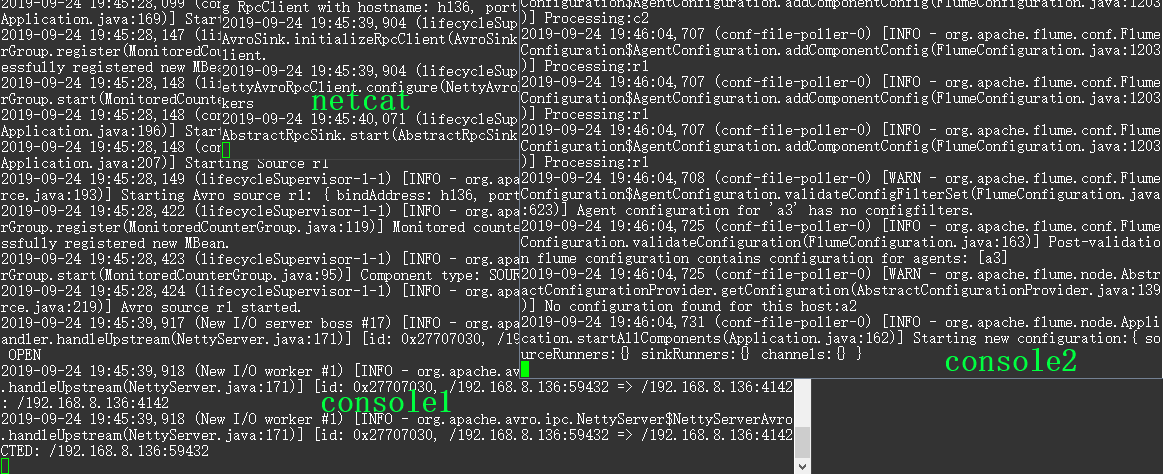
向监控端口发送消息
yum -y install nc

nc 127.0.0.1
可以看到只有 netcat 和 console1 和 会接收到数据,这时把 console1 结束掉,模拟 console1 故障,这时 netcat 会自动去连接 console2,再发送消息就是只有 netcat 和 console2 接收到数据了。
2.负载均衡
使用 Load balancing Sink 完成,和故障转移差不多,只是在连接时不在是只连接 console1,而是在 console1 和 console2 之间切换。
要修改 flume-netcat-flume.conf 的配置
# Name the components on this agent

a1.sources = r1

a1.channels = c1

a1.sinkgroups = g1

a1.sinks = k1 k2

# Describe/configure the source

a1.sources.r1.type = netcat

a1.sources.r1.bind = 127.0.0.1

a1.sources.r1.port = 4444

# Sink Group

a1.sinkgroups.g1.sinks = k1 k2

a1.sinkgroups.g1.processor.type = load_balance

a1.sinkgroups.g1.processor.backoff = true

a1.sinkgroups.g1.processor.selector = random

# Describe the sink

a1.sinks.k1.type = avro

a1.sinks.k1.hostname = h136

a1.sinks.k1.port = 4141

a1.sinks.k2.type = avro

a1.sinks.k2.hostname = h136

a1.sinks.k2.port = 4142

# Describe the channel

a1.channels.c1.type = memory

a1.channels.c1.capacity = 1000

a1.channels.c1.transactionCapacity = 100

# Bind the source and sink to the channel

a1.sources.r1.channels = c1

a1.sinkgroups.g1.sinks = k1 k2

a1.sinks.k1.channel = c1

a1.sinks.k2.channel = c1
测试和故障转移一样,只是在用 nc 发送消息时会随机发送到 console1 和 console2 其中的一个,不在固定。
Flume-Failover Sink Processor 故障转移与 Load balancing Sink 负载均衡的更多相关文章
- LB(Load balance)负载均衡集群--{LVS-[NAT+DR]单实例实验+LVS+keeplived实验} 菜鸟入门级
LB(Load balance)负载均衡集群 LVS-[NAT+DR]单实例实验 LVS+keeplived实验 LVS是Linux Virtual Server的简写,意即Linux虚拟服务器,是一 ...
- Flume配置Load balancing Sink Processor
1 官网内容 2 找一个图来理解一目了然 3 详细配置 配置文件load_source_case.conf 配置数据入口 source到channel 配置了两个sink用来做负载均衡 #配置文件: ...
- 第7章 性能和可靠性模式 Failover Cluster(故障转移群集)
上下文 您已经决定在设计或修改基础结构层时使用群集以提供高度可用的服务. 问题 您应该如何设计一个高度可用的基础结构层,来防止因单台服务器或它所运行的软件出现故障而导致的服务丢失? 影响因素 在设计高 ...
- Sink Prosessor - Flume的可靠性保证:故障转移、负载均衡
Flume的一些组件(如Spooling Directory Source.File Channel)能够保证agent挂掉后不丢失数据. 1.负载均衡 1)Load balancing Sink P ...
- 大数据学习day36-----flume02--------1.avro source和kafka source 2. 拦截器(Interceptor) 3. channel详解 4 sink 5 slector(选择器)6 sink processor
1.avro source和kafka source 1.1 avro source avro source是通过监听一个网络端口来收数据,而且接受的数据必须是使用avro序列化框架序列化后的数据.a ...
- 【Hadoop 分布式部署 十 一: NameNode HA 自动故障转移】
问题描述: 上一篇就是NameNode 的HA 部署完成,但是存在问题,问题是如果 主NameNode的节点宕机了,还是需要人工去使用命令来切换NameNode的Acitve 这样很不方便,所以 ...
- 负载均衡和故障转换(Failover)的连接RAC方法
TAF:Transparent Application Failover,透明的应用切换,即在切换的过程中,用户感知不到.可以实现会话的切换(无法实现事务的切换,即没有提交的事务会回滚),即在不断开连 ...
- failover swarm 故障转移
#故障转移 Failover #当其中一个节点关闭宕机时,其节点中的service会转移到另一个节点上.Swarm会检测到node1发生故障并把此故障节点的状态标记为Down; docker node ...
- 同一域环境下SQLServer DB Failover故障转移配置详解
前 言: 很多情况下,虽然我们的站点.APIService.Redis等已经做成了分布式架构,但是SQLServer依然还是单体结构,当出现网络异常.服务器宕机时便存在极大的风险,这时候我们需要 ...
随机推荐
- vue关于路由容易忽略的点
1.去掉导航里的# 在router.js中 export default new Router{ mode:'history' } 2.指定激活项的class 在router.js中 export d ...
- # 机器学习算法总结-第一天(KNN、决策树)
KNN算法总结 KNN算法的核心思想是如果一个样本在特征空间中的k个最相邻的样本中的大多数属于某一个类别,则该样本也属于这个类别.(监督) k近邻算法(knn)是一种基本的分类与回归的算法,k-mea ...
- 简要了解web安全之sql注入
什么是sql注入? 通俗来讲就是通过 将可执行sql语句作为参数 传入查询sql 中,在sql编译过程中 执行了传入进来的恶意 sql,从而 得到 不应该查到或者不应该执行的sql语句,对网站安全,信 ...
- openresty获取nginx中的变量
在OpenResty中如何引用这些变量呢? 规则很简单, 如$remote_addr, 在OpenResty里面使用就是ngx.var.remote_adddr.
- PAT Basic 1064 朋友数 (20 分)
如果两个整数各位数字的和是一样的,则被称为是“朋友数”,而那个公共的和就是它们的“朋友证号”.例如 123 和 51 就是朋友数,因为 1+2+3 = 5+1 = 6,而 6 就是它们的朋友证号.给定 ...
- CentOs Linux 对于编辑文本内容时无法退出的几个小命令
编辑完保存退出的四种方式 1. Esc+:+wq+回车(w是write,q是quit) 2. Esc+:+x+回车(x=wq) 3. Esc+shift+zz 4. Esc+ZZ(在大写开启下)
- Java NIO 学习笔记一
缓冲区操作 进程执行I/O操作,归结起来就是向操作系统发出请求,它要么把缓存区例的数据排干(写),要么用数据把数据区填满(读).进程使用这一机制处理所有数据进出操作. 进程使用read()系统调用,要 ...
- Event Binding in Angular
https://www.pluralsight.com/guides/angular-event-binding Introduction In this guide, we will explore ...
- python: json模块 --JSON编码和解码
json 源代码: Lib/json/__init__.py json.dump() import json numbers = [1, 2, 3, 4] with open('linshi.py', ...
- 配置NFS共享
NFS(网络文件系统)-------> linux与linux平台 服务器端: 1.安装软件nfs-utils(服务:nfs-server) 2.创建共享目录:mkdir /nfs_dir 3. ...