
Windows Azure Storage (24) 启用Azure Blob日志
《Windows Azure Platform 系列文章目录》
之前有一个业务需求,客户想知道Azure Storage是否有日志功能,可以检查某个Azure Blob文件在某个时间点被删除。
后来问了相关的同事,其实在Azure ARM Portal里面,可以开启诊断功能,监控具体的操作日志。这里写个Blog记录一下。
1.我们登录Azure ARM Portal: https://portal.azure.cn
2.选择某一个存储账户。图略
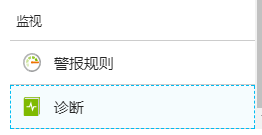
3.在存储账户的属性里,选择监视,诊断。如下图:
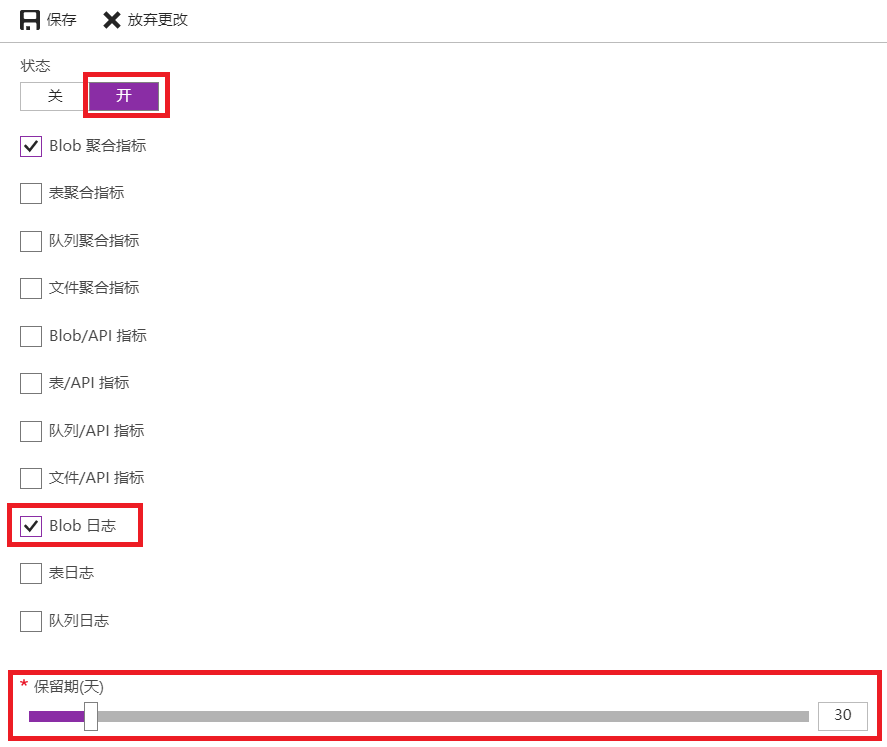
4.我们打开下图的监控。
Blob聚合指标是做Blob访问流量、请求数等的监控
Blob日志是开启Blob访问监控
保留期:表示监控数据的保存时间。
5.开启Blob日志后,我们可以用Azure Storage Explorer来访问日志数据。下载地址:https://go.microsoft.com/fwlink/?LinkId=708343&clcid=0x409
具体使用Azure Storage Explorer我这里就不详细介绍了,具体可以参考:http://www.cnblogs.com/threestone/archive/2012/01/23/2328878.html
6.日志手机需要一段时间,请稍等片刻。
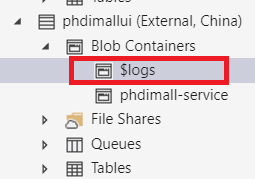
我们就可以在Azure Storage Explorer里面查看到一个Container Name,为$logs。如下图:
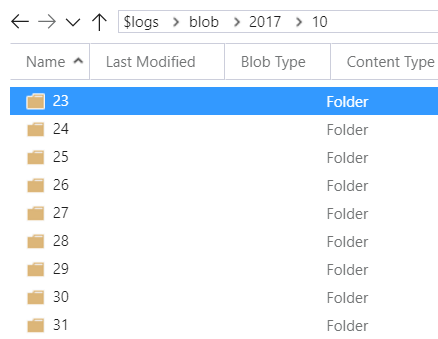
7.这个$log里面的内容,都是以年、月、日、小时 (注意小时为UTC时区,北京时间为UTC+8时区,会相差8小时) 生成文件夹。如下图:
8.我们通过Azure Storage Explorer上传一个文件1.jpg。图略。
9.稍等片刻后,我们就可以看到Blob日志。

10.把上图的log文件下载到本地硬盘。可以查看到相关信息:
1.0;2017-10-31T12:43:12.8084195Z;PutBlob;Success;201;9;8;authenticated;leidemostorage;leidemostorage;blob;"https://leidemostorage.blob.core.chinacloudapi.cn:443/private/1.jpg";"/leidemostorage/private/1.jpg";fc6a062b-001e-0012-3845-52fb99000000;0;114.93.218.188:13156;2017-04-17;683;24912;258;0;24912;"oyiQc2iWAoyADLYdOGNnQA==";"oyiQc2iWAoyADLYdOGNnQA==";""0x8D5205CF3242308"";Tuesday, 31-Oct-17 12:43:13 GMT;;"Microsoft Azure Storage Explorer, 0.9.01, win32, Azure-Storage/2.5.0 (NODE-VERSION v7.9.0; Windows_NT 10.0.15063)";;"0dd86bf0-be39-11e7-914c-392321867fcc"
可以看到上图中,我们通过Azure Storage Explorer上传的1.jpg图片的操作日志被完整记录下来。
11.请注意,如果我们生产环境的Azure Storage,客户端访问量很大的时候,日志文件也会变得非常大。最大的甚至要几百兆。
在如此大量的日志文件中查询相关的信息是比较困难的。
12.另外Azure Storage日志文件有单独的20TB容量。容量和吞吐量都是单独计算的。不会影响Azure Storage的性能。
Windows Azure Storage (24) 启用Azure Blob日志的更多相关文章
- Windows Azure Storage (20) 使用Azure File实现共享文件夹
<Windows Azure Platform 系列文章目录> Update 2016-4-14.在Azure VM配置FTP和IIS,请参考: http://blogs.iis.net/ ...
- Azure Storage用法:使用Blob Storage
Azure Storage 是微软 Azure 云提供的云端存储解决方案,当前支持的存储类型有 Blob.Queue.File 和 Table. 笔者在C# 消息队列-Microsoft Azure ...
- [New Portal]Windows Azure Storage (14) 使用Azure Blob的PutBlock方法,实现文件的分块、离线上传
<Windows Azure Platform 系列文章目录> 相关内容 Windows Azure Platform (二十二) Windows Azure Storage Servic ...
- Windows Azure Storage (23) 计算Azure VHD实际使用容量
<Windows Azure Platform 系列文章目录> 对于A系列和D系列的虚拟机来说,使用的是普通存储. 普通存储的存储资源,是按照每GB每月计费的.Microsoft Azur ...
- Windows Azure Storage (19) 再谈Azure Block Blob和Page Blob
<Windows Azure Platform 系列文章目录> 请读者在参考本文之前,预习相关背景知识:Windows Azure Storage (1) Windows Azure St ...
- Azure Blob Storage 基本用法 -- Azure Storage 之 Blob
Azure Storage 是微软 Azure 云提供的云端存储解决方案,当前支持的存储类型有 Blob.Queue.File 和 Table. 笔者在<Azure Table storage ...
- 【Azure Developer】使用 Python SDK连接Azure Storage Account, 计算Blob大小代码示例
问题描述 在微软云环境中,使用python SDK连接存储账号(Storage Account)需要计算Blob大小?虽然Azure提供了一个专用工具Azure Storage Explorer可以统 ...
- Azure File Storage 基本用法 -- Azure Storage 之 File
Azure Storage 是微软 Azure 云提供的云端存储解决方案,当前支持的存储类型有 Blob.Queue.File 和 Table. 笔者在<Azure Blob Storage 基 ...
- Azure Table storage 基本用法 -- Azure Storage 之 Table
Azure Storage 是微软 Azure 云提供的云端存储解决方案,当前支持的存储类型有 Blob.Queue.File 和 Table,其中的 Table 就是本文的主角 Azure Tabl ...
随机推荐
- 【转】在python3.5安装tkinter
链接:https://www.zhihu.com/question/42162071/answer/95441732 安装tkinter tkinter是由tcl和tk两个部分组成的,所以下载tkin ...
- Python之路,第二十篇:Python入门与基础20
python3 面向对象4 supper 函数 supper(type, obj) 返回绑定超类的实例(要求obj必须为type类型的实例) supper() 返回绑定的超类的实例,等同于(cl ...
- pytorch实现rnn并且对mnist进行分类
1.RNN简介 rnn,相比很多人都已经听腻,但是真正用代码操练起来,其中还是有很多细节值得琢磨. 虽然大家都在说,我还是要强调一次,rnn实际上是处理的是序列问题,与之形成对比的是cnn,cnn不能 ...
- Unity LOD-Level of Detail(多层次细节)用法教程
Unity LOD 多层次细节 本文提供全流程,中文翻译. Chinar 坚持将简单的生活方式,带给世人!(拥有更好的阅读体验 -- 高分辨率用户请根据需求调整网页缩放比例) Chinar -- 心分 ...
- Gym101482 NWERC 2014(队内训练第4场)
-----------------------前面的两场感觉质量不高,就没写题解----------------------------- A .Around the Track pro:给定内多边形 ...
- hello1.java内容简单介绍
双击该Hello.java文件以查看它. 在Hello类,称为管理bean类,提供了getter和setter方法name中的Facelets页面表达式中使用属性.默认情况下,表达式语言引用类名,第一 ...
- Atcoder 1973:こだわり者いろはちゃん / Iroha's Obsession
C - こだわり者いろはちゃん / Iroha's Obsession Time limit : 2sec / Memory limit : 256MB Score : 300 points Prob ...
- java路径
System.out.println(ResourceUtils.getURL("classpath:").getPath());
- yum小结
1.查看系统默认安装的yum# rpm -qa|grep yum2.卸载yum# rpm -e yum-fastestmirror-... yum-metadata-parser-... yum-3. ...
- (18)模型层 -ORM之msql 多表操作(字段的属性)
数据库表的对应关系 1.一对一 #关联字段写在那张表都可以 PS:只要写OneToOneField就会自动加一个id 2.一对多 #关系确立,关联字段写在多的一方 3.多对多 #多对多的关系 ...