
【Azure Developer】使用 Python SDK连接Azure Storage Account, 计算Blob大小代码示例
问题描述
在微软云环境中,使用python SDK连接存储账号(Storage Account)需要计算Blob大小?虽然Azure提供了一个专用工具Azure Storage Explorer可以统计出Blob的大小:
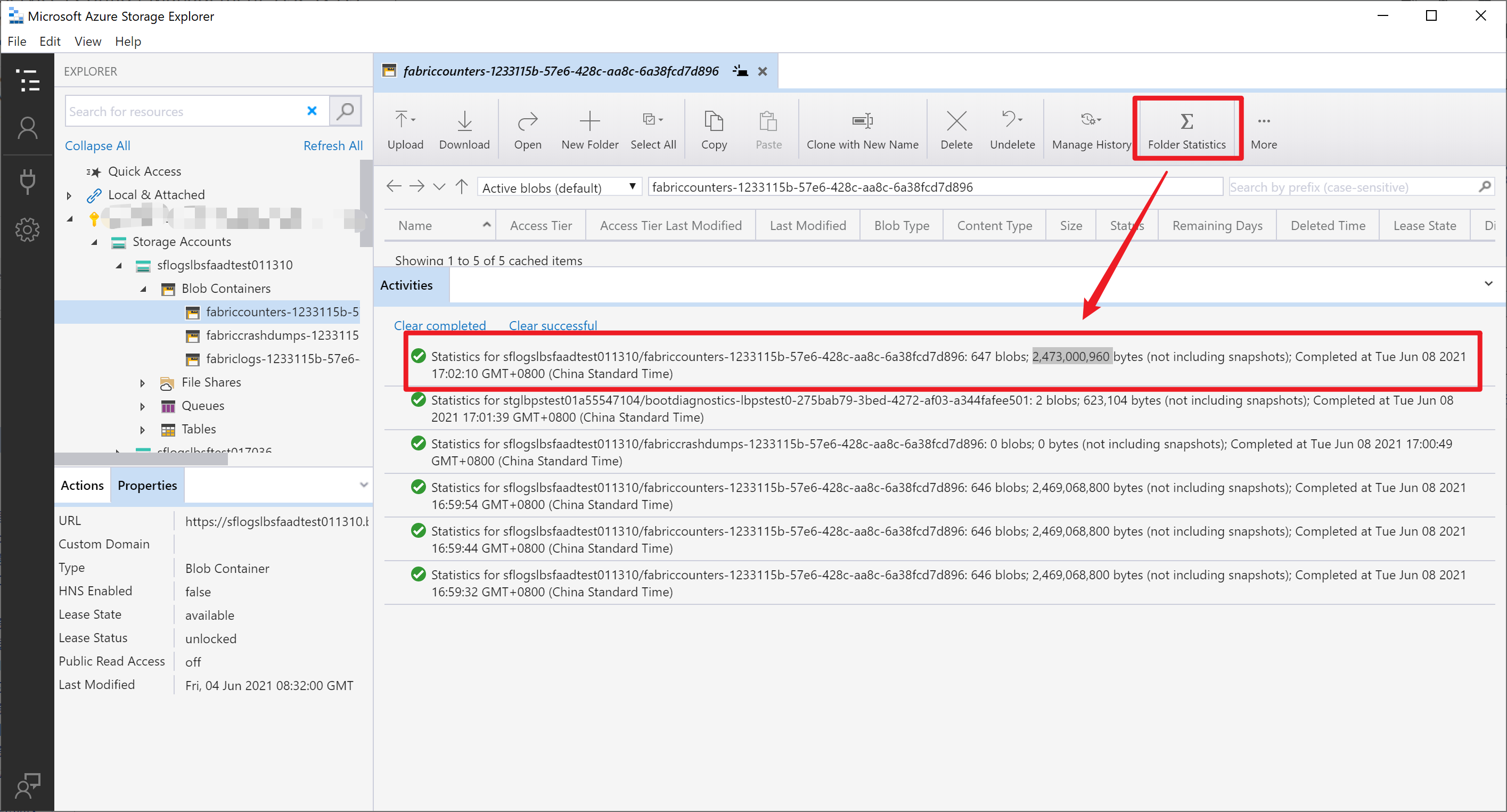
但是它也是只能一个Blob Container一个的统计,如果Container数量巨大,这将是一个繁琐的工作。而作为开发者,应该让代码来帮助完成。下文使用最快上手的Python代码来计算Blob中容量的大小。
完整代码
import os, uuid, datetime, threading

import logging

from azure.storage.blob import BlobServiceClient, BlobClient, ContainerClient, __version__

def calculateBlob(connect_string, count):

    try:

        blob_service_client = BlobServiceClient.from_connection_string(connect_string)

    except Exception as e:

        messages = str(count) + "Connect_String Error, Messages:" + e.args.__str__()

        print(messages)

        logging.info(messages)

    else:

        all_containers = blob_service_client.list_containers()

        for c in all_containers:

            count_name = c.name

            print(count_name)

            if count_name not in blobSize_Total:

                blobSize_Total[count_name] = 0

            if count_name not in blobSize_Daily:

                blobSize_Daily[count_name] = 0

            container_client = blob_service_client.get_container_client(count_name)

            generator = container_client.list_blobs()

            total_size_container = 0

            daily_size_container = 0

            for blob in generator:

                total_size_container += blob.size

                blob_create_time = blob.creation_time.strftime("%Y%m%d")

                if blob_create_time != now_date:

                    continue

                else:

                    # Calculate BlobSize in this month

                    daily_size_container += blob.size

                    # blobSize_Daily[count_name] += blob.size  # /(1024*1024)  # content_length - bytes

            blobSize_Total[count_name] += total_size_container / (1024 * 1024)

            blobSize_Daily[count_name] += daily_size_container / (1024 * 1024)

    return None

if __name__ == '__main__':

    # connect string

    Connection_String_List ="DefaultEndpointsProtocol=https;AccountName=<storagename>;AccountKey=<key>;EndpointSuffix=core.chinacloudapi.cn"

    # for i in Connection_String:

    start = datetime.datetime.now()

    print(start)

    # 定义全局变量 - blobSize_Daily & blobSize_Total

    blobSize_Daily = {}

    blobSize_Total = {}

    now_date = datetime.datetime.now().strftime("%Y%m%d")

    print("开始计算")

    calculateBlob(Connection_String_List, 1)

    print("计算完成")

    print("统计当前新增大小")

    print(blobSize_Daily)

    print("统计Blob总大小")

    print(blobSize_Total)

    end = datetime.datetime.now()

    print(end)
如运行是没有Azure blob模块,可以使用 pip install azure-storage-blob 安装。以上代码运行结果如下:

如果有多个Storage Account,可以考虑加入多线程的方式来运行,在代码中增加一个myThread类,然后在 __main__ 中把 calculateBlob(Connection_String_List, 1) 运行替换为 many_thread(Connection_String_List) 即可。
class myThread(threading.Thread):

    def __init__(self, threadID, name, connection_string):

        threading.Thread.__init__(self)

        self.threadID = threadID

        self.name = name

        self.connection_string = connection_string

    def run(self):

        print("开始线程:" + self.name)

        calculateBlob(self.connection_string, self.threadID)

        print("退出线程:" + self.name)

def many_thread(Connection_String_List):

    threads = []

    for i in range(len(Connection_String_List)):  # 循环创建32个线程

        t = myThread(i, "Thread-" + str(i), Connection_String_List[i])

        threads.append(t)

    for t in threads:  # 循环启动32个线程 - 对应64个storage account

        t.start()

    for t in threads:

        t.join()
遇见问题
在多线程执行时,可能会遇见问题:("Connection broken: ConnectionResetError(10054, 'An existing connection was forcibly closed by the remote host', None, 10054, None)", ConnectionResetError(10054, 'An existing connection was forcibly closed by the remote host', None, 10054, None)),出现此问题大都是由于客户端使用了已经断开的连接导致所导致的。所以一定要仔细调试多线程关闭代码。是否是把还需要运行的线程给关闭了。导致了以上的错误消息。
附录一:多线程计算Blob的完整代码
import os, uuid, datetime, threading

import logging

from azure.storage.blob import BlobServiceClient, BlobClient, ContainerClient, __version__

def calculateBlob(connect_string, count):

    try:

        blob_service_client = BlobServiceClient.from_connection_string(connect_string)

    except Exception as e:

        messages = str(count) + "Connect_String Error, Messages:" + e.args.__str__()

        print(messages)

        logging.info(messages)

    else:

        all_containers = blob_service_client.list_containers()

        for c in all_containers:

            count_name = c.name

            print(count_name)

            if count_name not in blobSize_Total:

                blobSize_Total[count_name] = 0

            if count_name not in blobSize_Daily:

                blobSize_Daily[count_name] = 0

            container_client = blob_service_client.get_container_client(count_name)

            generator = container_client.list_blobs()

            total_size_container = 0

            daily_size_container = 0

            for blob in generator:

                total_size_container += blob.size

                blob_create_time = blob.creation_time.strftime("%Y%m%d")

                if blob_create_time != now_date:

                    continue

                else:

                    # Calculate BlobSize in this month

                    daily_size_container += blob.size

                    # blobSize_Daily[count_name] += blob.size  # /(1024*1024)  # content_length - bytes

            blobSize_Total[count_name] += total_size_container / (1024 * 1024)

            blobSize_Daily[count_name] += daily_size_container / (1024 * 1024)

    return None

class myThread(threading.Thread):

    def __init__(self, threadID, name, connection_string):

        threading.Thread.__init__(self)

        self.threadID = threadID

        self.name = name

        self.connection_string = connection_string

    def run(self):

        print("开始线程:" + self.name)

        calculateBlob(self.connection_string, self.threadID)

        print("退出线程:" + self.name)

def many_thread(Connection_String_List):

    threads = []

    for i in range(len(Connection_String_List)):  # 循环创建32个线程

        t = myThread(i, "Thread-" + str(i), Connection_String_List[i])

        threads.append(t)

    for t in threads:  # 循环启动32个线程 - 对应64个storage account

        t.start()

    for t in threads:

        t.join()

if __name__ == '__main__':

    # connect string

    Connection_String_List =  ['DefaultEndpointsProtocol=https;AccountName=<your storage account 1>;AccountKey=<Key 1>;EndpointSuffix=core.chinacloudapi.cn', 'DefaultEndpointsProtocol=https;AccountName=<your storage account 2>;AccountKey=<Key 2>;EndpointSuffix=core.chinacloudapi.cn']

    # for i in Connection_String:

    start = datetime.datetime.now()

    print(start)

    # 定义全局变量 - blobSize_Daily & blobSize_Total

    blobSize_Daily = {}

    blobSize_Total = {}

    now_date = datetime.datetime.now().strftime("%Y%m%d")

    many_thread(Connection_String_List)

    print("Main Thread End")

    print(blobSize_Daily)

    print(blobSize_Total)

    end = datetime.datetime.now()

    print(end)
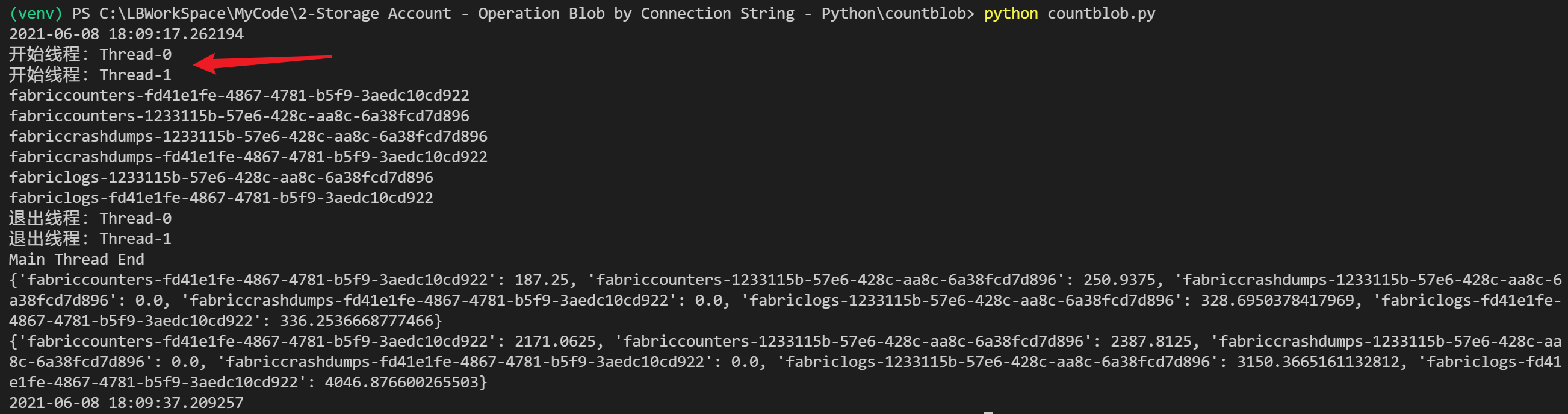
运行效果:
参考资料
快速入门:使用 Python v12 SDK 管理 blob :https://docs.azure.cn/zh-cn/storage/blobs/storage-quickstart-blobs-python
Python 列表(List) : https://www.runoob.com/python/python-lists.html
BlobServiceClient Class : https://docs.microsoft.com/en-us/python/api/azure-storage-blob/azure.storage.blob.blobserviceclient?view=azure-python
【Azure Developer】使用 Python SDK连接Azure Storage Account, 计算Blob大小代码示例的更多相关文章
- 使用Python SDK管理Azure Load Balancer
概述 下面将演示如何使用Python SDK管理中国区Azure Load balancer.关于Azure负载均衡器的详细功能介绍,请参考官方文档. Code Sample import os fr ...
- 【Azure Developer】Python 获取Micrisoft Graph API资源的Access Token, 并调用Microsoft Graph API servicePrincipals接口获取应用ID
问题描述 在Azure开发中,我们时常面临获取Authorization问题,需要使用代码获取到Access Token后,在调用对应的API,如servicePrincipals接口. 如果是直接调 ...
- 【Azure Developer】Python代码通过AAD认证访问微软Azure密钥保管库(Azure Key Vault)中机密信息(Secret)
关键字说明 什么是 Azure Active Directory?Azure Active Directory(Azure AD, AAD) 是 Microsoft 的基于云的标识和访问管理服务,可帮 ...
- 【Azure Developer】调用SDK的runPowerShellScript方法,在Azure VM中执行PowerShell脚本示例
当需要通过代码的方式执行PowerShell脚本时,可以参考以下的示例. Azure SDK中提供了两个方法来执行PowerShell脚本 (SDK Source Code: https://gith ...
- 【Azure Developer】使用Postman获取Azure AD中注册应用程序的授权Token,及为Azure REST API设置Authorization
Azure Active Directory (Azure AD) is Microsoft's cloud-based identity and access management service, ...
- 【Azure Developer】解决Azure Key Vault管理Storage的示例代码在中国区Azure遇见的各种认证/授权问题 - C# Example Code
问题描述 使用Azure密钥保管库(Key Vault)来托管存储账号(Storage Account)密钥的示例中,从Github中下载的示例代码在中国区Azure运行时候会遇见各种认证和授权问题, ...
- 【Azure Developer】【Python 】使用 azure.identity 和 azure.common.credentials 获取Azure AD的Access Token的两种方式
问题描述 使用Python代码,展示如何从Azure AD 中获取目标资源的 Access Token. 如要了解如何从AAD中获取 client id,client secret,tenant id ...
- 【Azure Developer】使用Microsoft Graph API 批量创建用户,先后遇见的三个错误及解决办法
问题描述 在先前的一篇博文中,介绍了如何使用Microsoft Graph API来创建Azure AD用户(博文参考:[Azure Developer]使用Microsoft Graph API 如 ...
- 【Azure 应用服务】Azure Function集成虚拟网络,设置被同在虚拟网络中的Storage Account触发,遇见Function无法触发的问题
一切为了安全,所有的云上资源如支持内网资源访问,则都可以加入虚拟网络 问题描述 使用Azure Function处理Storage Account中Blob 新增,更新,删除等情况.Storage A ...
随机推荐
- MySQL8安装教程及问题解决
目录 1.下载MySQL的zip文件,解压,在根目录(bin所在的目录)下创建my.ini文件 2.管理员模式打开命令提示符(shell或者说小黑窗),按以下命令操作. 3.不过......我这里密码 ...
- C/C++ 构建系统,我用 xmake
XMake 是什么 XMake 是一个基于 Lua 的 现代化 C/C++ 构建系统. 它的语法简洁易上手,对新手友好,即使完全不会 lua 也能够快速入门,并且完全无任何依赖,轻量,跨平台. 同时, ...
- Sublime Text 3.1 3170 / 3176 注册码(附降级与禁止更新方法)
3.1 3176 可用注册码 127.0.0.1 www.sublimetext.com 127.0.0.1 license.sublimehq.com ----- BEGIN LICENSE --- ...
- Windows系统之间文件互传
1)利用Windows自带的文件共享服务 本次试验以Win7为服务器端,win10为客户端 1.确保Win7服务端开启对应的服务及开放相应的端口号 进入命令行界面,输入netstat -an,查看44 ...
- PhotoShop 第一课 功能认识
功能认识 1.基本界面 可以对各工具栏进行编辑,对工具/栏目进行勾选添加和整合并搭建自己的专属操作页面. 2.画布设置 拍照或者画画都需要一个东西来呈现这个东西叫做画布(可以通过导航栏-文件-新建画布 ...
- Scoring System
Build a scoring system , give the score by referee , and entering the score in system , then take o ...
- VMware-viclient-all
VMware-viclient-all https://my.vmware.com/web/vmware/details?productId=491&downloadGroup=ESXI60U ...
- 分布式事务与Seate框架(2)——Seata实践
前言 在上一篇博文(分布式事务与Seate框架(1)--分布式事务理论)中了解了足够的分布式事务的理论知识后,到了实践部分,在工作中虽然用到了Seata,但是自己却并没有完全实践过,所以自己私下花点时 ...
- Django(21)migrate报错的解决方案
前言 在讲解如何解决migrate报错原因前,我们先要了解migrate做了什么事情,migrate:将新生成的迁移脚本.映射到数据库中.创建新的表或者修改表的结构. 问题1:migrate怎么判断哪 ...
- DOM 绑定事件
// 1.获取事件源 var oDiv = document.getElementById('box'); console.log(oDiv); //2.事件 (1)直接绑定匿名函数 oDiv.onc ...