
wpf custom control
最近在做WPF,记录一下自定义控件的制作过程,源码请点击:源码。
1、目标
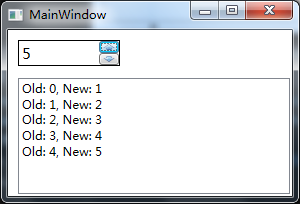
实现一个如图所示的可增减的数字框:
2、先画Template
可以在Generic.xaml中画,也可以用MergedDictionary连接到其他xaml中。
<ResourceDictionary.MergedDictionaries>

    <ResourceDictionary Source="/CustomControls;component/Themes/UpDownNumeric.xaml"/>

</ResourceDictionary.MergedDictionaries>
3、再实现UpDownNumeric
基类选择Control,也可以根据目标就近选择基类(比如ItemsControl、HeaderedContentControl之类的)。想好要暴露哪些属性、事件和命令,比如在这个例子里,只要暴露1个ValueProperty、2个CommandProperty(只贴增的,减类似不重复贴了)、和1个ValueChanged事件即可。
public static readonly DependencyProperty ValueProperty =

    DependencyProperty.Register("Value", typeof(int), typeof(UpDownNumeric),

    new PropertyMetadata(new PropertyChangedCallback(OnValueChanged)));

public static readonly DependencyProperty UpCommandProperty =

    DependencyProperty.Register("UpCommand", typeof(ICommand), typeof(UpDownNumeric));

public static readonly RoutedEvent ValueChangedEvent =

    EventManager.RegisterRoutedEvent("ValueChanged", RoutingStrategy.Bubble,

    typeof(RoutedPropertyChangedEventHandler<int>), typeof(UpDownNumeric));
再把这些属性包装成我们熟悉的.net的属性和事件,基于DelegateCommand实现命令、和触发ValueChanged的事件即可。
4、坑1:如果逻辑里的属性与控件的属性类型不匹配,要实现相应的IValueConverter
在这个例子里, 我把int型的Value绑定到TextBox的Text,int到string不能直接绑定,因此要实现一个Int2StringConverter,并在绑定时指定。否则不会显示值。
<TextBox Text="{TemplateBinding Value, Converter={StaticResource Int2StringConverter}}"/>
5、坑2:Image.Source的Pack Uri路径
这个路径如果没写对,要么编译不通过,要么虽然编译成功但运行的时候显示不出来。这里有几点关键:
5.1、右键图片->属性->生成操作->务必选择“资源”(Resource)
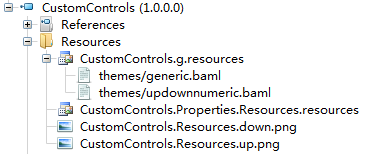
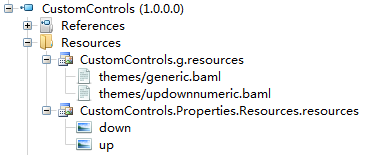
请不要选择“内容”或“嵌入的资源”,也不要将图片添加到“项目资源”中。“复制到输出目录”选择“不复制”。我分别尝试了这几种生成方式,如下:
资源:生成到.g.resources
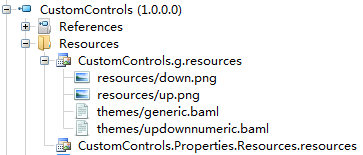
内容:不生成到dll里

嵌入的资源:生成到Resources文件夹中,与.g.resources同级
项目资源:生成到*.Properties.Resources.resources
5.2、Pack Uri路径
网上到处是copy来的一大堆理论,看的晕。我试下来,在vs的Image.Source属性窗口里选,由vs自动生成的路径总是OK的,如下:
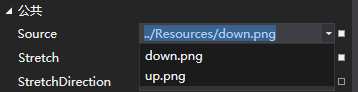
手动输入容易出错。只要生成为“资源”,下面3种写法都是正确的。
绝对路径:pack:///application:,,,/CustomControls;component/Resources/up.png
绝对路径-缩写版:/CustomControls;component/Resources/up.png
相对路径:../Resources/up.png
6、坑3:Template与控件Logic务必分离
这里的分离是指:Logic不应知道具体的控件名,Logic只暴露依赖属性(包括属性+命令),Template负责绑定属性。这种分离的好处是:如果用户不喜欢你的Template,自己再定制一个,只需绑定到同样的属性+命令,即可实现控件的行为。否则用户就无法改写Template了。
6.1、错误的实现方式
private Button upBtn;

public override void OnApplyTemplate(){

  upBtn = (Button)this.Template.FindName("btnUp", this);

  upBtn.Click = btn_Click;

}
这样写,就把Logic和Template绑死了。
6.2、正确的实现方式
//后台定义UpCommandProperty,实现为DelegateCommand或RoutedCommand,前台Template去绑定

public static readonly DependencyProperty UpCommandProperty =

  DependencyProperty.Register("UpCommand", typeof(ICommand), typeof(UpDownNumeric));

<Button Command="{TemplateBinding UpCommand}"/>
wpf custom control的更多相关文章
- ClassLibary和WPF User Control LIbary和WPF Custom Control Libary的异同
说来惭愧,接触WPF这么长时间了,今天在写自定义控件时遇到一个问题:运行界面中并没有显示自定义控件,经调试发现原来没有加载Themes中的Generic.xaml. 可是为什么在其他solution中 ...
- Recommended Practices for WPF Custom Control Developers
I have always found that there isn’t enough documentation about Custom Control development in WPF. M ...
- [WPF] 将普通的Library工程,改造成WPF Custom Control 的Library
1. 添加References PresentationCore PresentationFramework System.Xaml WindowsBase2. 修改AssemblyInfo.xsus ...
- Hosting custom WPF calendar control in AX 2012
原作者: https://community.dynamics.com/ax/b/axilicious/archive/2013/05/20/hosting-custom-wpf-calendar-c ...
- Writing a Reusable Custom Control in WPF
In my previous post, I have already defined how you can inherit from an existing control and define ...
- WPF中的Generic.xaml, theme以及custom control
原文:WPF中的Generic.xaml, theme以及custom control 在Visual Studio中创建自定义控件时,所有控件都将添加到/Themes/Generic.xaml. 最 ...
- .NET Core学习笔记(2)—— WPF使用UWP Custom Control
自.NET Core 3.0开始,某软加入了对WPF的支持.同时对XAML Islands也做了进一步加强.在.NET Core 3.0之前,我们只能在WPF程序中,通过两种方式有限制地使用Stand ...
- Tutorial: WPF User Control for AX2012
原作者: https://community.dynamics.com/ax/b/goshoom/archive/2011/10/06/tutorial-wpf-user-control-for-ax ...
- WinForm中Component Class、User Control及Custom Control的区别和使用建议
reference: http://blog.csdn.net/redstonehe/article/details/1536549 .NET Framework 为您提供了开发和实现新控件的能力.除 ...
随机推荐
- hostapd源代码分析(一):网络接口和BSS的初始化
[转]hostapd源代码分析(一):网络接口和BSS的初始化 原文链接:http://blog.csdn.net/qq_21949217/article/details/46004349 最近在做一 ...
- DOM节点操作
请尊重知识,请尊重原创 更多资料参考请见 http://www.cezuwang.com/listFilm?page=1&areaId=906&filmTypeId=1 一.创建节 ...
- 【linux命令】:查看系统运行状态,命令top 【转载】
原文:http://www.cnblogs.com/ggjucheng/archive/2012/01/08/2316399.html 简介 top命令是Linux下常用的性能分析工具,能够实时显示系 ...
- 对List里的对象元素进行排序
public class Student { private int studentId; private String studentName; private int age; public St ...
- 转!!深入理解 Session 与 Cookie
摘要 Session 与 Cookie 不管是对 Java Web 的初学者还是熟练使用者来说都是一个令人头疼的问题.在初入职场时恐怕很多程序员在面试的时候都被问到过这个问题.其实这个问题回答起来既简 ...
- hiho_1079_离散化
题目 在长度为L的宣传栏上张贴N张海报,将宣传栏分为L个长度为1的单位,海报长度为整数,且高度和宣传栏相同,左右边界和宣传栏单位之间缝隙重合(即海报总是跨越整数个单位).后贴的海报可能会覆盖之前贴的海 ...
- gdb 调试学习
gdb 是unix/linux 系统下的程序调试工具,和IDE(如VS, Eclipse等)的图形化调试工具相比,gdb在断点,跟踪显示方面有着不足,但是它在某些方面比图形化调试工具更加丰富的功能. ...
- TP学习笔记
ThinkPHP采用单一入口模式访问应用,对应用的所有请求都定向到应用的入口文件,系统会从URL参数中解析当前请求的模块.控制器和操作,下面是一个标准的URL访问格式: http://serverNa ...
- 栅栏 CyclicBarrier
java.util.concurrent.CyclicBarrier 类是一种同步机制,它能够对处理一些算法的线程实现同步.换句话讲,它就是一个所有线程必须等待的一个栅栏,直到所有线程都到达这里,然后 ...
- jmeter 实时搜索结果
因为JMeter 2.13你可以得到实时搜索结果发送到后端通过 后端侦听器 使用潜在的任何后端(JDBC.JMS网络服务,Š) 通过提供一个实现类 AbstractBackendListenerCl ...