
[MAUI] 在.NET MAUI中结合Vue实现混合开发
在MAUI微软的官方方案是使用Blazor开发,但是当前市场大多数的Web项目使用Vue,React等技术构建,如果我们没法绕过已经积累的技术,用Blazor重写整个项目并不现实。
Vue是当前流行的web框架, 简单来说是一套模板引擎,利用“模板”和“绑定”两大特性实现web页面mvvm模式开发。利用.NET MAUI框架可以将Vue应用嵌入到Web容器中。可以实现跨平台的混合开发。
例如我在某医疗行业项目中,已经用这个混合开发的方式生成应用,Vue代码不需要做什么改动,就能跨平台运行:
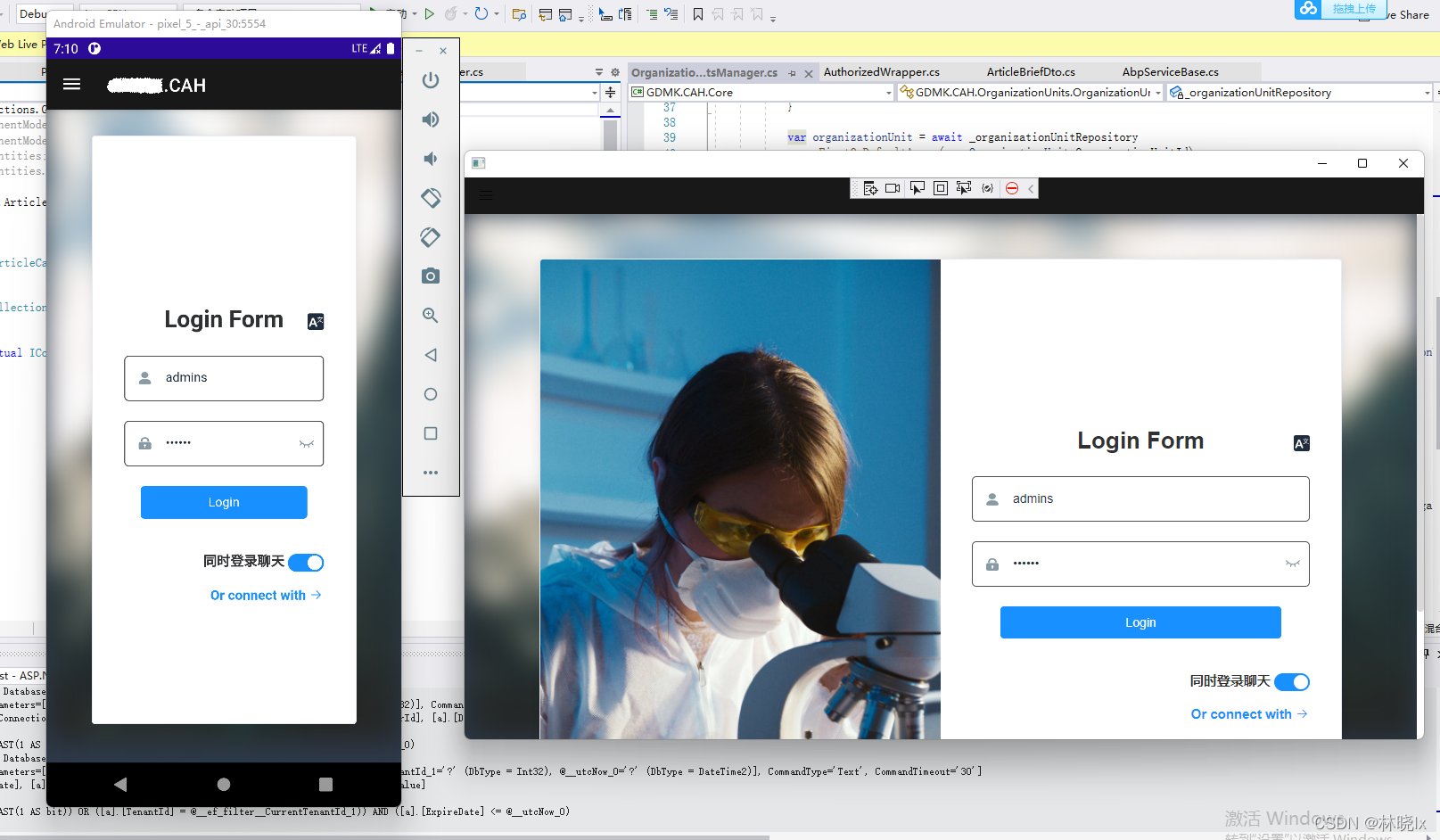

如果你有一套Vue开发的网站,可以根据这篇文章,尝试移值进你的iPhone,Android以及平板电脑等移动设备。
混合开发的核心工作是构建Web与.net 的互操作,我们将利用Blazor引擎的如下功能:
- 资源的统一管理
- js代码的注入
- js调用C#代码
- C#调用js代码
如果你还不了解混合开发的概念,请回看上一章节[MAUI] 混合开发概念_jevonsflash的专栏-CSDN博客 https://blog.csdn.net/jevonsflash/article/details/121835547
整个工作分为MAUI部分,Vue部分和混合改造。
MAUI部分
创建Maui App项目:
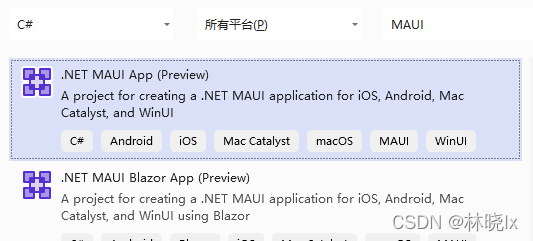
你也可以创建 Maui Blazor App 项目,命名为MatoProject,但是这个模板主要围绕Blazor开发,有的功能我们并不需要,得删很多文件。
创建完成后编辑MatoProject.csproj,在Sdk最末尾加上.Razor,VS会自动安装Microsoft.AspNetCore.Components.WebView.Maui依赖包(注意不要手动Nuget添加这个包,否则程序无法运行)

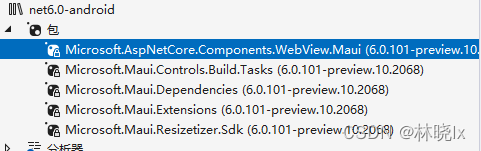
安装完成后在项目目录中创建一个wwwroot文件夹
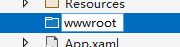
这个文件夹将是混合开发Web部分的根目录,这个名称不能随便定义,我们看看为什么:
打开Microsoft.AspNetCore.Components.WebView.Maui.targets这个文件:
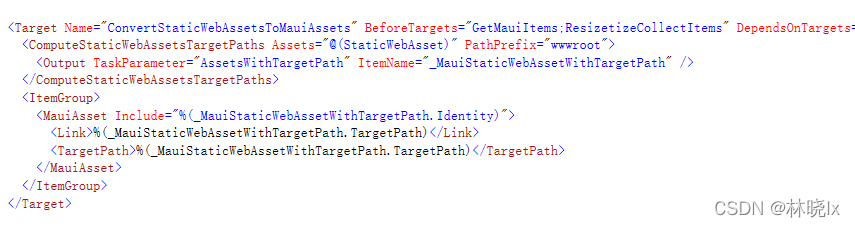
我们可以看到构建项目时,这个库会将wwwroot文件夹里的内容作为Maui资源(MauiAsset)类型设置标签,编译器则会根据MauiAsset标签将这些内容打包进各个平台的资源文件夹,具体的Maui资源类型可以参考这个文章.NET MAUI – Manage App Resources – Developer Thoughts (egvijayanand.in) ,
打开MauiProgram.cs 在builder 中注册BlazorMauiWebView组件,在服务中使用扩展方法AddBlazorWebView()来添加相关Blazor的服务
using Microsoft.Maui;

using Microsoft.Maui.Hosting;

using Microsoft.Maui.Controls.Compatibility;

using Microsoft.Maui.Controls.Hosting;

using Microsoft.AspNetCore.Components.WebView.Maui;

using Microsoft.Extensions.DependencyInjection;

namespace MatoProject

{

	public static class MauiProgram

	{

		public static MauiApp CreateMauiApp()

		{

			var builder = MauiApp.CreateBuilder();

			builder

				.RegisterBlazorMauiWebView()

				.UseMauiApp<App>()

				.ConfigureFonts(fonts =>

				{

					fonts.AddFont("OpenSans-Regular.ttf", "OpenSansRegular");

				});

			builder.Services.AddBlazorWebView();

			return builder.Build();

		}

	}

}
打开MainPage.xaml,编辑原生应用的主页面:
建立BlazorWebView控件铺满屏幕,并设置HostPage为Web部分的主页index.html
<ContentPage xmlns="http://schemas.microsoft.com/dotnet/2021/maui"

             xmlns:x="http://schemas.microsoft.com/winfx/2009/xaml"

             x:Class="MatoProject.MainPage"

             xmlns:b="clr-namespace:Microsoft.AspNetCore.Components.WebView.Maui;assembly=Microsoft.AspNetCore.Components.WebView.Maui"

             BackgroundColor="{DynamicResource SecondaryColor}">

    <Grid>

        <b:BlazorWebView HostPage="wwwroot/index.html">

            <b:BlazorWebView.RootComponents>

                <b:RootComponent Selector="#blazorapp" x:Name="MainWebView" ComponentType="{x:Type local:Index}/>

            </b:BlazorWebView.RootComponents>

        </b:BlazorWebView>

    </Grid>

</ContentPage>
建立_import.razor
@using System.Net.Http

@using Microsoft.AspNetCore.Components.Forms

@using Microsoft.AspNetCore.Components.Routing

@using Microsoft.AspNetCore.Components.Web

@using Microsoft.AspNetCore.Components.Web.Virtualization

@using Microsoft.JSInterop

@using MatoProject
Vue部分
至此我们建立好了原生开发的Web容器,接下来需要处理Vue项目了:
cd到项目目录,使用vue-cli创建一个空白Vue项目:
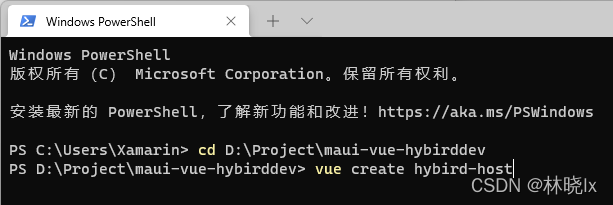
这里可以按照Vue的编程喜好建立,比如我选择了2.0项目,支持Typescript,es6的class命名方式等,最终都要通过webpack打包成静态资源,所以无所谓。
建立src/api/fooService.ts,创建如下的函数:
window['DotNet']对象将是MAUI Blazor中注入的交互操作对象
export async function GetAll(data) {

    var result = null

        await window['DotNet'].invokeMethodAsync('MatoProject', 'GetFoo')

            .then(data => {

                console.log("DotNet method return the value:" + data);

                result = data

            });

    return result

}

export async function Add(data) {

    var result = null

        await window['DotNet'].invokeMethodAsync('MatoProject', 'Add', data)

            .then(data => {

                console.log("DotNet method return the value:" + data);

                result = data

            });

    return result

}
打开Home.vue 编辑:
这是Web的主页面,我们需要三个按钮以及相关函数,测试js与C#的交互操作。
<template>

  <div class="home">

    <img alt="Vue logo" src="../assets/logo.png" />

    <div>

      <h3>foo:</h3>

      <button @click="getFoo">click to get foo</button>

      <br />

      <span>{{ foo }}</span>

    </div>

    <div>

      <h3>bar:</h3>

      <span>{{ bar }}</span>

    </div>

    <div>

      <button @click="add">click here to add</button>

      <span>click count:{{ cnt }}</span>

    </div>

  </div>

</template>
<script lang="ts">

import { Component, Vue } from "vue-property-decorator";

import HelloWorld from "@/components/HelloWorld.vue"; // @ is an alias to /src

import { GetAll, Add } from "@/api/fooService";

@Component({

  components: {

    HelloWorld,

  },

})

export default class Home extends Vue {

  foo: string = "";

  bar: string = "";

  cnt: number = 0;

  async created() {

    window["postBar"] = this.postBar;

  }

  async add() {

    this.cnt = await Add({ a: this.cnt, b: 1 });

  }

  async getFoo() {

    var foo = await GetAll(null);

    this.foo = foo;

  }

  async postBar(data) {

    this.bar = data;

    console.log("DotNet invocked the function with param:" + data);

    return this.bar;

  }

}

</script>
到此已经完成了一个简单的Vue项目
运行打包命令:
PS D:\Project\maui-vue-hybirddev\hybird-host> yarn build
将dist目录中的所有内容复制到wwwroot文件夹下。
混合改造
这是混合开发的重点,改造MAUI项目,以适配Vue
打开wwwroot/index.js重写为:
<!DOCTYPE html>

<html lang="">

<head>

    <meta charset="utf-8">

    <meta http-equiv="X-UA-Compatible" content="IE=edge">

    <meta name="viewport" content="width=device-width,initial-scale=1">

    <link rel="icon" href="favicon.ico">

    <title>hybird-host</title>

    <link href="js/about.dc8b0f2b.js" rel="prefetch">

    <link href="css/app.03043124.css" rel="preload" as="style">

    <link href="js/app.b6b5425b.js" rel="preload" as="script" crossorigin="anonymous">

    <link href="js/chunk-vendors.cf6d8f84.js" rel="preload" as="script" crossorigin="anonymous">

    <link href="css/app.03043124.css" rel="stylesheet">

</head>

<body>

    <div id="blazorapp">Loading...</div>

    <script src="_framework/blazor.webview.js" autostart="false"></script>

</body>

</html>
注意,仅全部重写body部分,不要更改head的link标签内容,仅在js后面加上crossorigin="anonymous" 以解决跨域问题。
建立Index.razor文件:
@using Microsoft.Maui.Controls

@inject IJSRuntime JSRuntime

@implements IDisposable

<noscript><strong>We're sorry but CareAtHome doesn't work properly without JavaScript enabled. Please enable it to continue.</strong></noscript><div id="app"></div>

@code {

    [JSInvokable]

    public static Task<string> GetFoo()

    {

        return Task.FromResult("this is foo call C# method from js");

    }

    [JSInvokable]

    public static Task<int> Add(AddInput addInput)

    {

        return Task.FromResult(addInput.a + addInput.b);

    }

    public async void Post(object o, EventArgs a)

    {

        await JSRuntime.InvokeAsync<string>("postBar", "this is bar call js method from C#");

    }

    protected override async Task OnAfterRenderAsync(bool firstRender)

    {

        ((App.Current as App).MainPage as MainPage).OnPostBar += this.Post;

        try

        {

            if (firstRender)

            {

                await JSRuntime.InvokeAsync<IJSObjectReference>("import", "./js/chunk-vendors.cf6d8f84.js", new { crossorigin = "anonymous" });

                await JSRuntime.InvokeAsync<IJSObjectReference>("import", "./js/app.b6b5425b.js", new { crossorigin = "anonymous" });

            }

        }

        catch (Exception ex)

        {

            Console.WriteLine(ex);

        }

    }

    public void Dispose()

    {

        (Application.Current.MainPage as MainPage).OnPostBar -= this.Post;

    }

}
注意以下这两个语句需要对应打包生成的实际文件名,并且加上跨域标签
await JSRuntime.InvokeAsync<IJSObjectReference>("import", "./js/chunk-vendors.cf6d8f84.js", new { crossorigin = "anonymous" });

await JSRuntime.InvokeAsync<IJSObjectReference>("import", "./js/app.b6b5425b.js", new { crossorigin = "anonymous" });
MainPage.xaml建立一个按钮并且设置触发事件方法:
<Button Text="Post Bar To WebView" HorizontalOptions="Center" VerticalOptions="End" HeightRequest="40" Clicked="PostBar_Clicked"></Button>
CodeBehind:
using System;

using Microsoft.Maui.Controls;

using Microsoft.Maui.Essentials;

namespace MatoProject

{

	public partial class MainPage : ContentPage

	{

        public event EventHandler<EventArgs> OnPostBar;

		int count = 0;

		public MainPage()

		{

			InitializeComponent();

		}

		private async void PostBar_Clicked(object sender, EventArgs args)

		{

			OnPostBar?.Invoke(this, args);

		}

	}

}
至此,所有的代码工作已经完成,在PC上可以选择Windows或者Android模拟器来运行程序
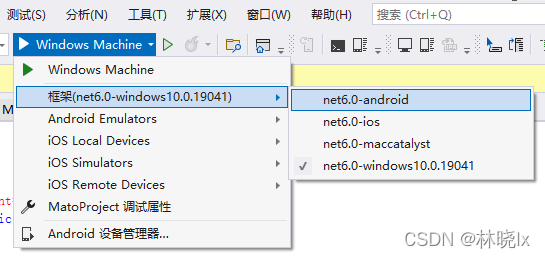
运行效果:
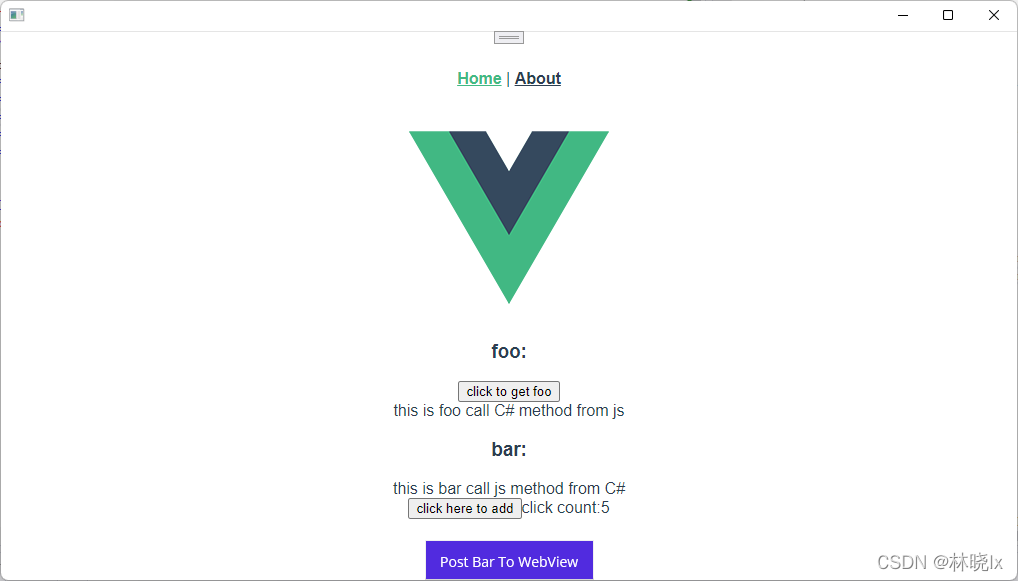
若在windows平台上运行,原生控件使用 Edge WebView2 呈现器加载页面, 按f12会调用原生的调试工具,在这里看到打印
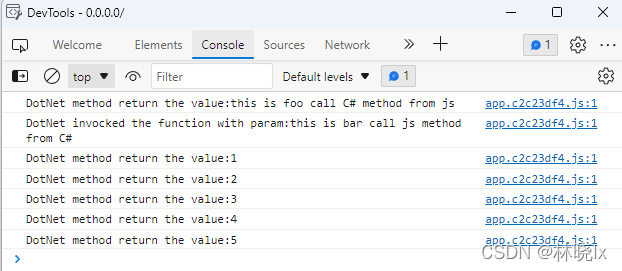
现在,可能有人会问为什么要使用这样的技术架构?明明可能有更好用的混合开发技术Ionic,React Native,Uni-app。首先不可否认这些技术都有他们的特点与优势,但当你拥有一个成熟的Xamarin框架,你可以轻松迁移到MAUI,利用EFCore实现数据持久化或者集成Abp框架来配置依赖注入,全局事件,本地化等移动开发常用的功能(另一篇文章将会教大家如何将Abp移值进MAUI)。Xamarin是一个设备抽象层,提供的WebView也有较好的H5兼容性。
当然主要原因还是在快速开发上,你的代码积累才是宝贵的,更少的修改代码量才是王道,如果你在用React技术栈编写Web代码,也许React Native才是你最佳选择 。没有最优的技术,只有最适合你的技术。
代码仓库:
jevonsflash/maui-vue-hybirddev: maui-vue-hybirddev (github.com)
jevonsflash/maui-vue-hybirddev (gitee.com)
[MAUI] 在.NET MAUI中结合Vue实现混合开发的更多相关文章
- vue app混合开发蓝牙串口连接(报错java.io.IOException: read failed, socket might closed or timeout, read ret: -1;at android.bluetooth.BluetoothSocket.connect at js/BluetoothTool.js:329)
我使用的uni-app <template> <view class="bluetooth"> <!-- 发送数据 --> <view c ...
- webstorm中关于vue的一些问题
在进行vue开发中,我使用了webstorm,但是过程坎坷艰辛,遇到了很多问题,我将问题和解决方案贴上,以作参考. 1.vue项目部署在webstorm中,第一个遇到的问题是,webstorm卡住了, ...
- vue生命周期图示中英文版Vue实例生命周期钩子
vue生命周期图示中英文版Vue实例生命周期钩子知乎上近日有人发起了一个 “react 是不是比 vue 牛皮,为什么?” 的问题,Vue.js 作者尤雨溪12月4日正面回应了该问题.以下是尤雨溪回复 ...
- 在webpack构建的项目中使用vue
一.复习在普通网页中使用vue1.使用script引入vue2.在index中创建 id为app的容器3.通过new vue得到vm实例二.在webpack中尝试使用vue://注意 : 在webpa ...
- 在webpack中配置vue.js
在webpack中配置vue.js 这里有两种在webpack中配置vue.js的方法,如下: 1.在main.js中引入vue的包: index.html: <!DOCTYPE html> ...
- IDEA 中使用 Vue 提示 namespace is not bound
今天在 IDEA 中使用 vue.js 时提示我如下错误信息 解决方法: 把这个校验项目去掉就可以了.
- VUE中toast的使用与开发
在这篇文章中介绍了toast是什么,这篇文章主要介绍toast的开发与使用. 开发 Vuejs很流行,并且官方也给出了路由插件vue-router.数据管理插件vuex,但是我们仅仅停留在了使用的阶段 ...
- webstorn中的vue文件识别es6代码
webstorn中的vue文件识别es6代码 1.webstorm中es6语法报错,解决方法: 打开 Settings => Languages & Frameworks => J ...
- 管中窥Vue
博客文章链接:管中窥Vue Vue和Angular.React.js的相同点和不同点? 与React的相同: 都使用了Virtual DOM 提供了响应式和组件化的视图组件 将注意力集中保持在核心库, ...
随机推荐
- CF935B Fafa and the Gates 题解
Content 一个动点 \(F\) 一开始在平面直角坐标系上原点的位置,随后它会移动 \(n\) 次,每次只能向上走或者向右走 \(1\) 个单位,求经过直线 \(y=x\) 的次数. 数据范围:\ ...
- CF1490D Permutation Transformation 题解
Content 给定一个排列 \(a\),按照以下方法构造一棵树: 选择当前排列中的最大数作为根的编号. 最大数左边的所有数按照上述方法建左子树,若没有数则该节点没有左儿子. 最大数右边的所有数按照上 ...
- Python+Robot Framework实现UDS诊断自动化测试
一.环境搭建 1.概述 由于项目需要进行UDS诊断测试,所以对这方面进行了研究学习,网上很少能查询到相关资料,故记录一下UDS自动化测试开发过程,由于保密原则,案例都是Demo,希望能帮到感兴趣的朋友 ...
- .NET Core基础篇之:白话管道中间件
在.Net Core中,管道往往伴随着请求一起出现.客户端发起Http请求,服务端去响应这个请求,之间的过程都在管道内进行. 举一个生活中比较常见的例子:旅游景区. 我们都知道,有些景区大门离景区很远 ...
- lvm 扩容
总体思路: 逻辑卷要扩容,先扩容对应卷组, 扩容卷组的方式: 添加新的物理卷(磁盘已有分区,扩容后新建分区:或者新加了一块硬盘创建了新的物理卷),vgextend myvg /dev/vdb 扩容,/ ...
- python3实战之字幕vtt与字母srt的相互转换
关于 0.本文将介绍一个字幕格式vtt与srt相互转换的py脚本. 1.代码大部分出自: https://www.cnblogs.com/BigJ/p/vtt_srt.html 2.但是自己针对上面的 ...
- Grids
Grids Time Limit: 10000/5000 MS (Java/Others) Memory Limit: 65535/65535 K (Java/Others)Total Subm ...
- 前端项目 node8升级到node16,代码升级汇总
背景 公司的项目是vue项目,环境是node@8x版本的,最近我创建react hook的项目,发现至少需要node14才支持,打开官网才发现node都已经到16版本了.失策啊,失策.于是直接升级到最 ...
- MMD
目录 概 主要内容 定义 MMD for kernel function classes 一个无偏统计量 MMD test Borgwardt K., Gretton A., Rasch M., Kr ...
- CS5210完全替代AG6202|HDMI转VGA芯片+原理图|替代兼容AG6202
安格AG6202是一个HDMI转VGA不带音频解决方案,用于实现HDMI1.4高分辨率视频转VGA转换器.Capstone CS5210不管在性能上和设计参数上面都是可以完全替代安格AG6202,且 ...