
Sublime Text3时间戳查看转换插件的开发
平常配置表中,经常需要用到时间配置,比如活动开始结束。从可读性上,我们喜欢2017-04-27 17:00:00,从程序角度,我们喜欢用1493283600。前者是包含时区概念的,而后者时区无关,所以一般推荐直接使用数字时间戳格式来配置。
实际配置时,之前一直用MySQL的FROM_UNIXTIME()和UNIX_TIMESTAMP函数,或者使用网页工具进行时间戳查看转换,十分繁琐。
做得多了,就想到为什么不写个插件,直接在编辑器里查看转换好了。参考了网络上的一些示例并查阅了Sublime的相关API,过程如下。
1.依次执行Tools -> Developer -> New Plugin,新建一个插件脚本,命名为timestamp.py
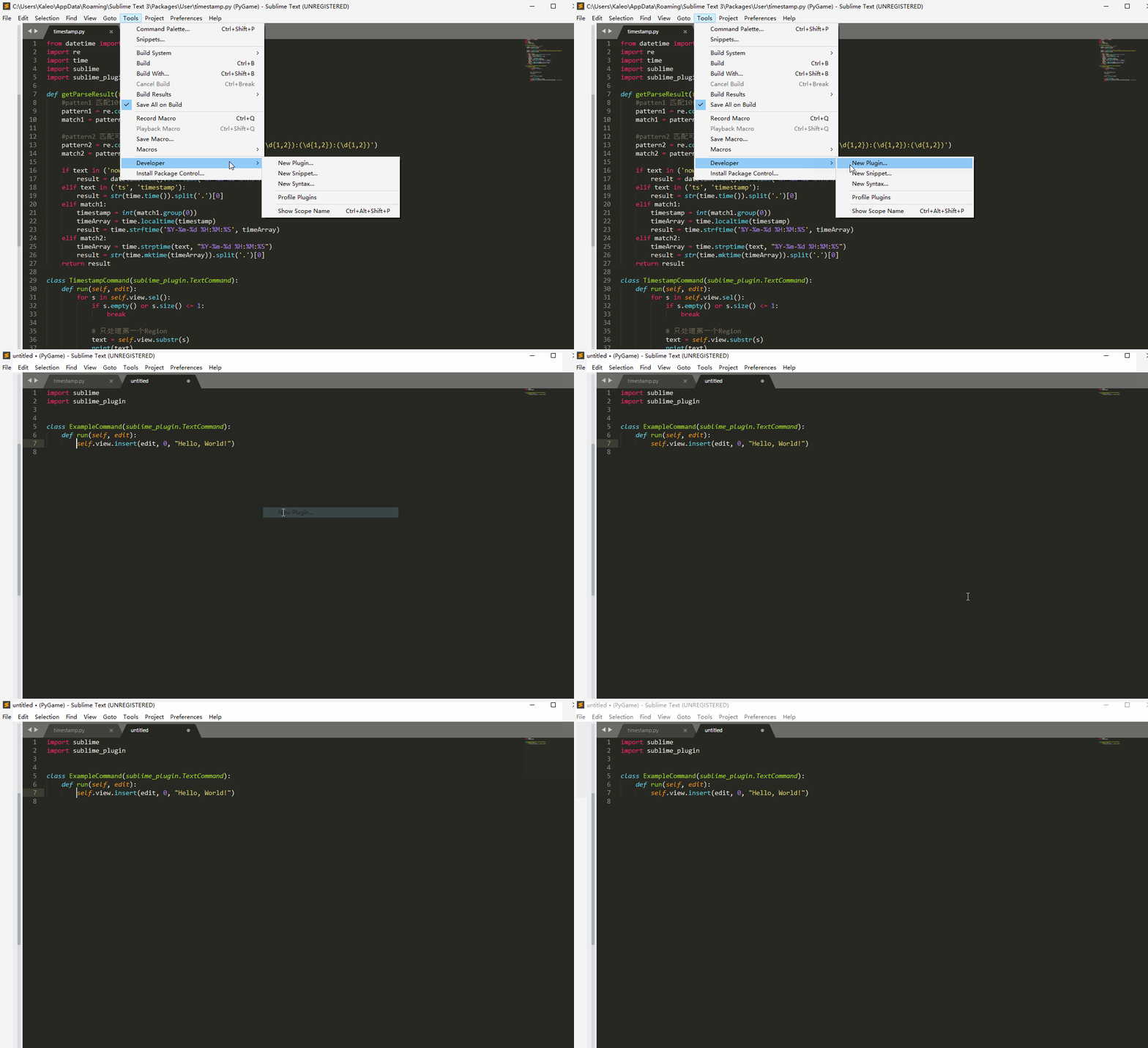
2.添加脚本代码,具体可以看注释:
    from datetime import datetime

    import re

    import time

    import sublime

    import sublime_plugin

    def getParseResult(text):

        #patten1 匹配10位整数时间戳(1493283600)

        pattern1 = re.compile('^\d{10}')

        match1 = pattern1.match(text)

        #pattern2 匹配可读时间格式(2017-04-27 17:00:00)

        pattern2 = re.compile('^(\d{4})-(\d{1,2})-(\d{1,2})\s(\d{1,2}):(\d{1,2}):(\d{1,2})')

        match2 = pattern2.match(text)

        if text in ('now'):

            result = datetime.now().strftime('%Y-%m-%d %H:%M:%S')

        elif text in ('ts', 'timestamp'):

            result = str(time.time()).split('.')[0]

        elif match1:

            timestamp = int(match1.group(0))

            timeArray = time.localtime(timestamp)

            result = time.strftime('%Y-%m-%d %H:%M:%S', timeArray)

        elif match2:

            timeArray = time.strptime(text, "%Y-%m-%d %H:%M:%S")

            result = str(time.mktime(timeArray)).split('.')[0]

        return result

    class TimestampCommand(sublime_plugin.TextCommand):

        def run(self, edit):

            for s in self.view.sel():

                if s.empty() or s.size() <= 1:

                    break

                # 只处理第一个Region

                text = self.view.substr(s)

                print(text)

    			# 得到转换结果

                result = getParseResult(text)

                # 进行文本替换并弹窗显示

                self.view.replace(edit, s, result)

                self.view.show_popup(result, sublime.HIDE_ON_MOUSE_MOVE_AWAY, -1, 600, 600)

                break
3.进行快捷键绑定,依次执行Preferences -> Key Bindings,添加代码{ "keys": ["ctrl+t"], "command": "timestamp"}
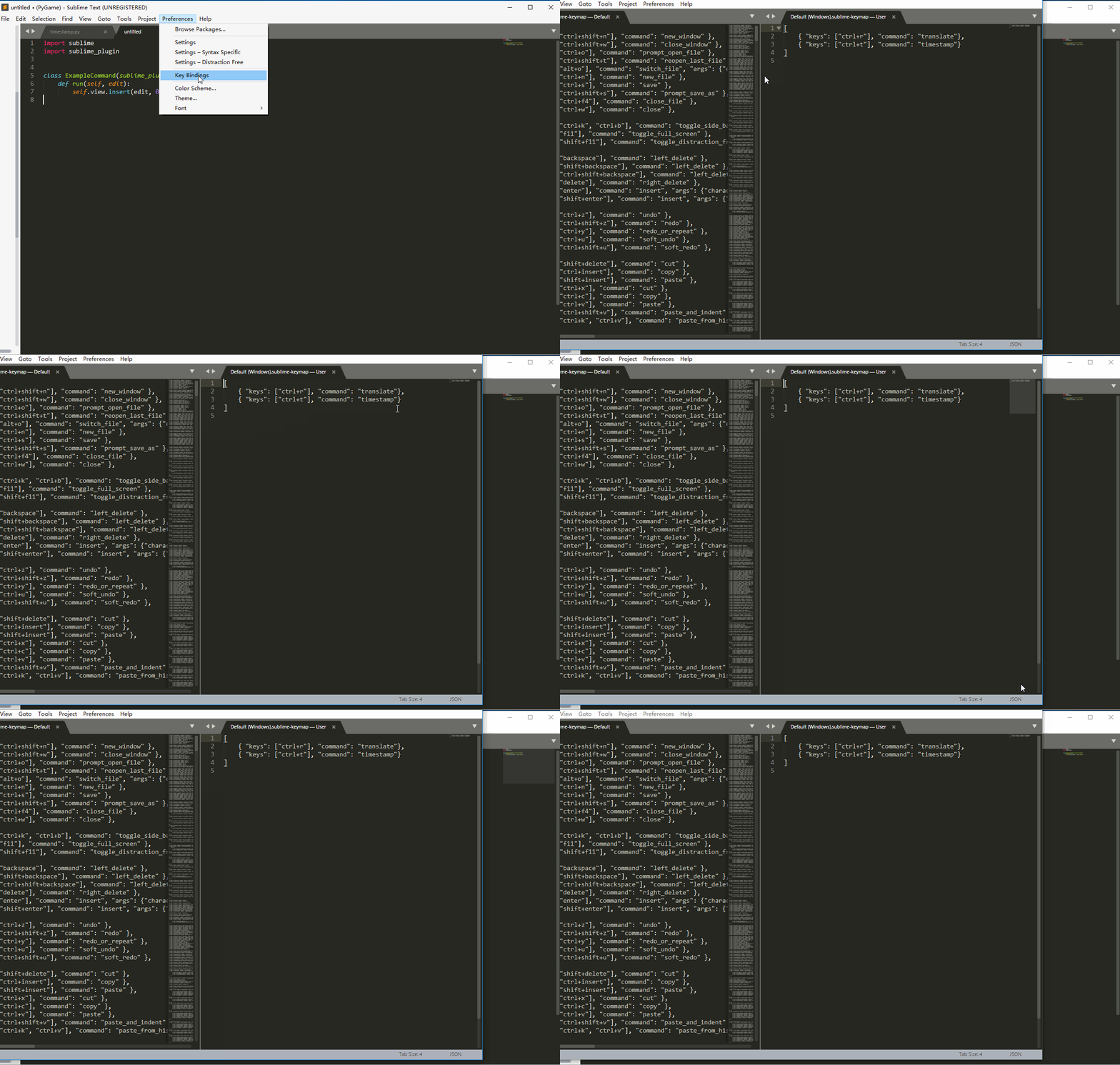
很简单,一个方便查看转换时间戳的插件就写好了。选中文本,按快捷键CTRL+t,效果图:

代码放在了Github,更多欢迎访问个人网站Metazion
Sublime Text3时间戳查看转换插件的开发的更多相关文章
- Sublime Text3下的markdown插件的安装及配置
Sublime Text3下的markdown插件的安装及配置 安装准备--安装Package Control 安装MarkdownEditing 安装Markdown Preview或OmniMar ...
- Sublime Text3快捷键以及常用插件
工若善其事,必先利其器.做为一个web前端开发人员,必须有一个得心应手的编码工具,本人推荐Sublime Text3和WebStorm,但WebStorm太过智能和耗性能了对初学者来说弊大于利,所以我 ...
- sublime text3好用的插件
1.安装package control sublime text3 的安装方法,ctrl+`,调出控制台输入 import urllib.request,os; pf = 'Package Contr ...
- Sublime Text3使用及常用插件
1.安装packages组件: 参考一: https://sublime.wbond.net/installation 参考二: http://blog.csdn.net/superskk6/arti ...
- sublime text3 破解及常用插件
sublime text3 下载 破解 submelime Text > About sublime Text //看是否注册并 查看当前的版本 然后百度或google搜索 'sublime t ...
- sublime text3 安装package control 插件,解决访问被墙的问题
1.在github上下载Package Control的安装包 https://github.com/wbond/sublime_package_control 2.打开sublime存放插件的目录: ...
- Sublime Text3的快捷键和插件
今天重装了一下Sublime Text3,发现了一个不错的网站,关于Sublime Text3的插件安装介绍的很详细,还有右键增强菜单和浏览器打开快捷键的创建.奉上链接 http://www.cnbl ...
- Sublime Text3安装及常用插件安装
为了使用强大好用的代码编辑器来进行selenium3+Python3的自动化测试. 使用Sublime Text 3非常适合. 1.下载安装 首先到http://www.sublimetext.com ...
- mac电脑sublime text3安装pretty json插件
因http://packagecontrol.io/地址被墙无法实现自动安装,导致sublime Text3安装插件非常麻烦,总是出现There Are No Packages Available F ...
随机推荐
- C++中explicit关键字
explicit: 防止隐式转换使用. 隐式转换:不同类型的变量可以互相转换,如将一个整形数值赋值给一个类,ClassXX lei = 4: C++中, 一个参数的构造函数(或者除了第一个参数外其余 ...
- Python系列-python内置函数
abs(x) 返回数字的绝对值,参数可以是整数.也可以是浮点数.如果是复数,则返回它的大小 all(iterable) 对参数中的所有元素进行迭代,如果所有的元素都是True,则返回True,函数等价 ...
- python手动设置递归调用深度
python超出递归深度时会出现异常: RuntimeError: maximum recursion depth exceeded python默认的递归深度是很有限的,大概是900当递归深度超过这 ...
- MySQL 5.7 基于复制线程SQL_Thread加快恢复的尝试
1. MySQL 数据恢复常用办法 MySQL恢复的方法一般有三种: 1. 官方推荐的基于全备+binlog , 通常做法是先恢复最近一次的全备,然后通过mysqlbiinlog --start-po ...
- reportng优化
本来呢,我是看到报告中没有输出@Test的description 的属性,想优化一下,没想到在找reportng的源码的时候,发现一个大神也优化了reportNG,他优化了下面几个内容: 1).测试结 ...
- java中的多态案例
多态性实际上有两种: 1.方法的多态性: 1.1方法重载:相同的方法名,会根据传入的参数的类型和个数不同执行不同的方法 1.2方法覆写:同一个方法名称,会根据子类的不同实现不同的功能 2.对象的多态性 ...
- Django REST framework+Vue 打造生鲜超市(十一)
十二.支付宝沙箱环境配置 12.1.创建应用 进入蚂蚁金服开放平台(https://open.alipay.com/platform/home.htm),登录后进入管理中心-->>应用列表 ...
- org.apache.commons.lang3.tuple.Pair 作为更新参数,XML 中的 Sql 取不到值、报错
项目用的 Mybatis,今天改一个需求,落地实现是批量更新,且只需要根据主键(id)来更新一个字段(name). 于是,没有犹豫,像下面这样设计了数据结构: 既然是批量更新,那外层肯定是 List ...
- css中单位px,em,rem和vh/vw的理解
>px像素(Pixel).相对长度单位.像素px是相对于显示器屏幕分辨率而言的. em是相对长度单位.相对于当前对象内文本的字体尺寸.如当前对行内文本的字体尺寸未被人为设置,则相对于浏览器的默认 ...
- [ZJOI2015]幻想乡战略游戏
Description 傲娇少女幽香正在玩一个非常有趣的战略类游戏,本来这个游戏的地图其实还不算太大,幽香还能管得过来,但是不知道为什么现在的网游厂商把游戏的地图越做越大,以至于幽香一眼根本看不过来, ...