
Cisco AP-Mobility Express基础
Part I 介绍
1.1基本概况
Cisco Mobility Express这个名词出现在Cisco “8”系列的AP上,例如现在的AP1852,AP2802,AP3802等都是Mobility Express AP,该类AP也有“胖/瘦”之分,所谓的胖AP,携带的是ME的镜像,而瘦AP,和其他的AP类似,携带的是Lightweight AP的镜像。这类AP也被叫做COS AP(ClickOS AP、新的系统AP-COS)。
1.2 Mobility Express的特点
ü 可以作为胖AP使用
ü 可以作为Controller使用
ü 可以作为LAP使用
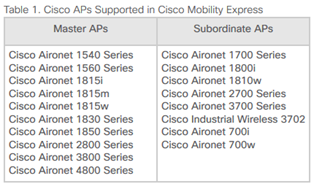
ü 当作为控制器时,较老的LAP不支持(可以参考release note,如下示例为8.8)
注意:不同版本的支持型号有可能不同哦!
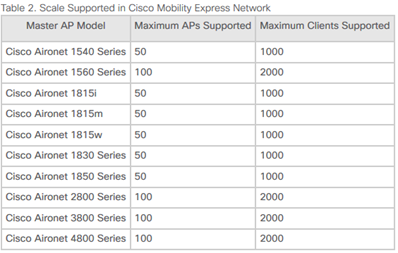
ü 当作为控制器时,只能管理最多100个AP(可以参考release note,如下示例为8.8)
ü 当作为控制器时,需要设置外部TFTP server以提供LAP镜像
1) 下载AP bundle镜像
2) 解压镜像文件到TFTP server根目录
3) 登录到ME AP GUI界面,配置TFTP server
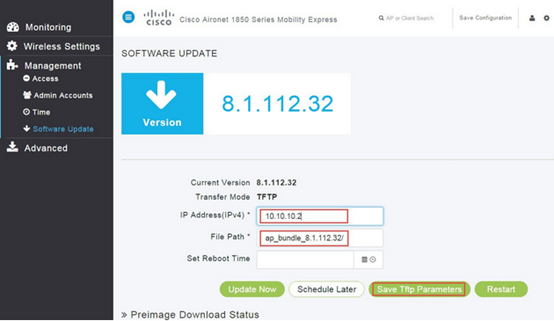
4) 尝试加入的AP会下载对应的镜像,然后加入ME AP。
1.3镜像识别
1.3.1 AP型号判断
AIR-AP2802I-H-K9 & AIR-AP2802I-H-K9C
可以看到它们的命名规则和之前的AP不一样。这里的关键点就是带C和不带C。
K9:就是Controller-Based AP,基于控制器的AP,就代表出厂时是瘦AP的镜像。
K9C:代表的是Configurable,可配置的AP,所以这是基于ME镜像的AP,也可以认为是该系列的胖AP。
1.3.2通过命令查看
我们可以console或者远程登录一个AP的CLI界面,直接输入show version命令,通过show version可以查看到对应的AP的镜像。
老系列的AP:
k9w7:镜像中带该关键字的,表示是胖AP。
k9w8:镜像中带该关键字的,表示是瘦AP。
新系列的AP(COS AP):
通过show version查看到的是如下信息,代表该AP目前是ME镜像,运行的是ME模式,可以参与Primary AP的选举,可以管理其他的LAP(限型号),不能注册到其他WLC。
AP Image Type:MOBILITY EXPRESS IMAGE
AP Configuration:MOBILITY EXPRESS CAPABLE
通过show version查看到如下信息,代表该AP目前是ME镜像,但是允许的是LAP模式,不能参与Primary AP的选举,但是可以作为ME网络中的Subordinate AP,它可以加入到其他的WLC。
AP Image Type:MOBILITY EXPRESS IMAGE
AP Configuration:NOT MOBILITY EXPRESS CAPABLE
如果通过show version命令查看到的是如下信息,代表该AP目前是CAPWAP LAP的镜像。
AP Running Image:8.5.131.0
Primary Boot Image:8.5.131.0
Backup Boot Image:8.2.121.5
Part II 初始化和配置ME AP
2.1初始化操作
2.1.1 通过WEB界面初始化
新启动的ME镜像的AP,当AP启动几分钟后,会出现CiscoAirProvision SSID,此事AP的状态灯是绿、红、琥珀色交替闪烁。连接这个SSID,需要输入密码“password”,获取的网段是192.168.1.0/24,通过在浏览器输入URL mobilityexpress.cisco或者http://192.168.1.1(有时候打开浏览器即可重定向,建议使用Firefox)可以打开web界面开始初始化操作:
2.1.2 通过CLI初始化
命令行的初始化操作和控制器的初始化大体一样,主要有如下操作步骤:
1) 设置控制器的system name、country、date&time、timezone、NTP、MGMT&Mask&GW、DHCP
2) 配置无线网络,SSID、Security、VLAN...
3) 其他高级参数和RF参数的优化
Enabling Controller Provisioning
Configuring management interfacegrep: /mnt/application/xml/clis/clifile: No such file or directory
grep: /mnt/application/xml/clis/clifile: No such file or directory
sh: can't create /mnt/application/xml/clis/clifile: nonexistent directory
As the Mgmt Address is updated, all the DHCP scopes with Central NAT enabled will be disabled and enabled
As the Mgmt Address is updated, all the WLANs associated with central NAT enabled scopes will be enabled and disabled
Enabling mgmt via wireless
Enabling Provisioning SSID
SSID: CiscoAirProvision, Admin Status: 1, Interface Name: management, 802.11 Auth: WPA2-PSK, Wi-Fi Protected Access : Enabled
(Cisco Controller)
Cisco Aironet 1850 Series Mobility Express
Welcome to the Cisco Wizard Configuration Tool
Use the '-' character to backup
Would you like to terminate autoinstall? [yes]: yes
Enter Administrative User Name (24 characters max): test@admin
Enter Administrative Password (3 to 24 characters): *********
Re-enter Administrative Password : *********
blanks, only numbers, illegal characters are not allowed in username.
System Name [Cisco_0a:03:00] (31 characters max): WLC-ME
Enter Country Code list (enter 'help' for a list of countries) [US]: CN
Configure a NTP server now? [YES][no]: no
Configure the system time now? [YES][no]: yes
Enter the date in MM/DD/YY format: 11/09/18
Enter the time in HH:MM:SS format: 10:03:29
Enter timezone location index (enter 'help' for a list of timezones): help
1. (GMT-12:00) International Date Line West 2. (GMT-11:00) Samoa
3. (GMT-10:00) Hawaii 4. (GMT -9:00) Alaska
5. (GMT -8:00) Pacific Time (US and Canada) 6. (GMT -7:00) Mountain Time (US and Canada)
7. (GMT -6:00) Central Time (US and Canada) 8. (GMT -5:00) Eastern Time (US and Canada)
9. (GMT -4:00) Altantic Time (Canada) 10. (GMT -3:00) Buenos Aires (Agentina)
11. (GMT -2:00) Mid-Atlantic 12. (GMT -1:00) Azores
13. (GMT) London, Lisbon, Dublin, Edinburgh 14. (GMT +1:00) Amsterdam, Berlin, Rome, Vienna
15. (GMT +2:00) Jerusalem 16. (GMT +3:00) Baghdad
17. (GMT +4:00) Muscat, Abu Dhabi 18. (GMT +4:30) Kabul
19. (GMT +5:00) Karachi, Islamabad, Tashkent 20. (GMT +5:30) Colombo, Kolkata, Mumbai, New Delhi
21. (GMT +5:45) Katmandu 22. (GMT +6:00) Almaty, Novosibirsk
23. (GMT +6:30) Rangoon 24. (GMT +7:00) Saigon, Hanoi, Bangkok, Jakatar
25. (GMT +8:00) HongKong, Beijing, Chongqing 26. (GMT +9:00) Tokyo, Osaka, Sapporo
27. (GMT +9:30) Darwin 28. (GMT+10:00) Sydney, Melbourne, Canberra
29. (GMT+11:00) Magadan, Solomon Is., New Caledonia 30. (GMT+12:00) Kamchatka, Marshall Is., Fiji
31. (GMT+12:00) Auckland (New Zealand) 32. (GMT+10:30) Adelaide, South Australia
Enter timezone location index (enter 'help' for a list of timezones):
Management Interface IP Address Configuration [STATIC][dhcp]: STATIC
Management Interface IP Address: 192.168.111.3
Management Interface Netmask: 255.255.255.0
Management Interface Default Router: 192.168.111.1
Cleaning up Provisioning SSID
As the Mgmt Address is updated, all the DHCP scopes with Central NAT enabled will be disabled and enabled
As the Mgmt Address is updated, all the WLANs associated with central NAT enabled scopes will be enabled and disabled
Create Management DHCP Scope? [yes][NO]: no
Employee Network Name (SSID)?: Employee
Employee Network Security? [PSK][enterprise]: PSK
Employee PSK Passphrase (8-63 characters)?: ********
Re-enter Employee PSK Passphrase: ********
Enable RF Parameter Optimization? [YES][no]: yes
Client Density [TYPICAL][Low][High]: TYPICAL
Traffic with Voice [NO][Yes]: no
Configuration correct? If yes, system will save it and reset. [yes][NO]: yes
Cleaning up Provisioning SSID
Configuration saved!
Resetting system with new configuration...
.......
2.2 ME AP启动过程
2.2.1 AP启动过程
ME AP的启动过程,分为两个部分,LAP和ME部分。
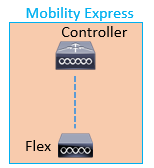
当ME启动的时候,首先启动的是瘦AP,该过程,会尝试检查是否有WLC可以加入,如果有WLC可以加入,会尝试加入到WLC。
当瘦AP的阶段维持大概25秒左右的时候,如果还是没有完成join,会尝试继续启动到ME镜像,ME进行启动完成后,在CLI界面可以看到和控制器的CLI界面一样。

注意:ME的AP内部的LAP无法加入自己的情况。可能是由于ME控制器情况下的国家代码和内部LAP的国家代码不同!
中国的时区为东八区,为GMT+8或者UTC+8,包括的主要地点有:
中国上海、香港、北京、台北、澳门、青岛、成都、天津、拉萨、杭州、重庆等。
马来西亚吉隆坡
新加坡
菲律宾马尼拉
澳大利亚珀斯
朝鲜平壤
......
2.2.2 Master AP选举
1) AP优先级更高的将被选举为Master,可以通过命令去指定当Master Fail时,首选Master(思科建议不配置preferred master)。
(Cisco Controller) >config ap next-preferred-master <Cisco AP>
<Cisco AP> Enter the name of the Cisco AP
查看preferred master:
(Cisco Controller) >show ap next-preferred-master
清除preferred master:
(Cisco Controller) >clear ap next-preferred-master
2) 客户端负载最少的被选为Master
3) 如果没有定义优先级且其他内容都相同,MAC地址最小的AP被选为Master
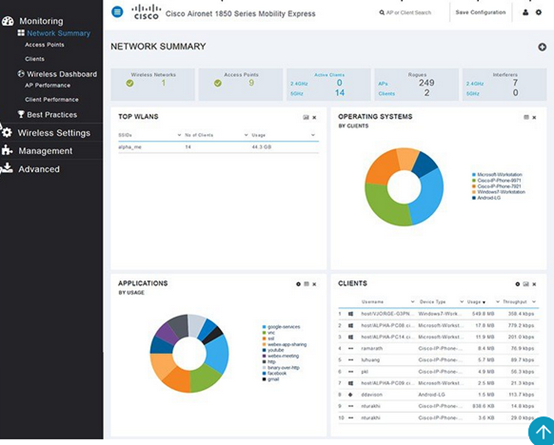
如果登录GUI界面,我们可以看到如下界面:
2.3 ME&LAP转换
2.3.1通过ap-type
当AP启动到ME的时候,需要通过如下的方式调整到CAPWAP的方式。
1) 连接AP console口连接到AP
2) 通过命令apciscoshell登录到进入enable
3) 输入ap-type capwap
之后,CAPWAP模式的AP可以加入WLC。
转换回去:
# ap-type mobility-express
2.3.2镜像转换
ME AP 在LAP 命令行下输入如下命令下载并转换为CAPWAP镜像:
AP#archive download-sw /reload tftp://10.1.1.100/ap1g4-k9w8-tar.153-3.JC.tar
CAPWAP镜像转换ME镜像:
AP#ap-type mobility-express tftp://10.88.7.15/AIR-AP1830-K9-8.2.100.0.tar
Part III 参考信息
https://www.cisco.com/c/en/us/support/wireless/mobility-express/products-release-notes-list.html
Cisco AP-Mobility Express基础的更多相关文章
- 关于Mobility Express转LAP注意事项
在实际的网络环境中,有些时候我们需要将ME模式的AP转换为LAP工作. PS:ME模式是思科8系列的AP可以支持,例如AP1852.AP2802.AP3802等型号.它可以作为控制器使用,同时也可以工 ...
- Mobility Express部署外部镜像服务器
1.当我们部署完ME的时候,发现有一些AP虽然显示已经加入了WLC(ME),但是它其实并没有正常的工作,显示不可用: (Cisco Controller) >show ap su Number ...
- express基础
express框架 const express = require("express"); 引入express框架 var app= express(); 实例化 相当于构造函 ...
- cisco ap客户端无规律掉线
设备 cisco air-ct2504-50-k9 cisco air-ap1832I-H-k9 首先根据这个帖子 https://community.cisco.com/t5/other-wirel ...
- cisco 路由器的操作系统基础命令集
路由器和交换机里都有操作系统,cisco的操作系统叫ios. 怪不得路由器贵,原来也是带操作系统的机器啊,以前真是小白. ios里的几种模式 1,>:用户模式:啥也干不了. 2,#:特权模式:用 ...
- 路由与交换,cisco路由器配置,基础知识点(一)
基础知识点 1.路由器与交换机端口初始化区别 路由器的所有接口默认都是关闭的 交换机的所有接口默认都是打开的 2.路由器 fastEthernet 端口 fastEthernet 0/0 第一个0代表 ...
- express基础项目创建
https://www.cnblogs.com/zhentaoo/p/6392248.html
- Express基础单词
访问请求对象(request)或(req) 响应对象(response)或(res) 中间件(middleware) http的请求方法(method) 服务器的路径(path) 路由匹配时的函数(c ...
- 路由与交换,cisco路由器配置,基础知识点(二)
1.进退用户/特权/全局模式 (1)从用户模式进入特权模式 enable (2)从特权模式进入全局配置模式 configure terminal (3)从其他模式回到特权模式 end (4)从特权模式 ...
随机推荐
- SpringBoot获取http请求参数的方法
SpringBoot获取http请求参数的方法 原文:https://www.cnblogs.com/zhanglijun/p/9403483.html 有七种Java后台获取前端传来参数的方法,稍微 ...
- 关于Vector3.forward和Transform.forward
在Unity中有两个forward,一个是Transform.forward一个是Vector3.forward. 对于Vector3来说,它只是缩写.没有其它任何含义. Vector3.forwar ...
- django项目日志
接口中,写一条日志: 日志工具文件如下:
- VS2017编写c/c++汇编函数并调用
首先在VS里面创建个空项目,然后添加汇编文件 .asm, 右键asm文件属性 --- 常规,改成下图的设置 , 从生成中排除改为否, 项类型改为自定义生成工具 然后点确定. 再次右键asm文 ...
- 题解【Codeforces1186A】 Vus the Cossack and a Contest
这题是入门难度的题目吧-- 根据题意可以得出,只有当\(m\)和\(k\)都大于等于\(n\)时,\(Vus\)才可以实现他的计划. 因此,我们不难得出以下\(AC\)代码: #include < ...
- NUMPY的学习之路(2)——索引,合并,分割,赋值
一.索引 1.1numpy数组的转置 A=np.arange(3,15).reshape(3,4) print(A) print(A[2][0]) print(A[2,1]) print(A[2,:] ...
- 433B.Kuriyama Mirai's Stones
Kuriyama Mirai has killed many monsters and got many (namely n) stones. She numbers the stones from ...
- python代码在linux终端中执行报错:Unable to init server: Could not connect: Connection refused
python代码在linux终端中执行时报错: Unable to init server: Could not connect: Connection refused Unable to init ...
- 原生JS实现旋转木马轮播图特效
大概是这个样子: 首先来简单布局一下(emm...随便弄一下吧,反正主要是用js来整的) <!DOCTYPE html> <html lang="en"> ...
- iOS-image图片旋转方向
https://blog.csdn.net/qq_36557133/article/details/85760469 最近在做项目的时候发现资源包内的图片的方向不对,但也不想让UI切一个新图,所以需要 ...