
SpringBoot安全管理--(三)整合shiro
简介:
Apache Shiro 是一一个开源的轻量级的Java安全框架,它提供身份验证、授权、密码管理以及会话管理等功能。
相对于Spring Security, Shiro框架更加直观、易用,同时也能提供健壮的安全性。在传统的SSM框架中,手动整合Shiro的配置步骤还是比较多的,针对Spring Boot, Shiro 官方提供了shiro-spring-boot-web-starter 用来简化Shiro 在Spring Boot 中的配置。
pom.xml
<dependency>

            <groupId>org.apache.shiro</groupId>

            <artifactId>shiro-spring-boot-web-starter</artifactId>  //已经依赖spring-boot-web-starter

            <version>1.4.0</version>

        </dependency>

        <dependency>

            <groupId>org.springframework.boot</groupId>

            <artifactId>spring-boot-starter-thymeleaf</artifactId>

        </dependency>

        <dependency>

            <groupId>com.github.theborakompanioni</groupId>

            <artifactId>thymeleaf-extras-shiro</artifactId>

            <version>2.0.0</version>

        </dependency>
application.properties
#开启shiro
shiro.enabled=true

#开启shiro web
shiro.web.enabled=true

#登陆地址,默认/login.jsp
shiro.loginUrl=/login

#登陆成功地址
shiro.successUrl=/index

#未获授权跳转地址
shiro.unauthorizedUrl=/unauthorized

#是否允许通过url进行会话跟踪,默认true
shiro.sessionManager.sessionIdUrlRewritingEnabled=true

#是否允许通过Cookie实现会话跟踪
shiro.sessionManager.sessionIdCookieEnabled=true
配置shiro
@Configuration

public class ShiroConfig {

    @Bean

    public Realm realm() {//添加用户

        TextConfigurationRealm realm = new TextConfigurationRealm();

        realm.setUserDefinitions("sang=123,user\n admin=123,admin"); //添加用户名+密码+角色

        realm.setRoleDefinitions("admin=read,write\n user=read");  //添加权限

        return realm;

    }


@Bean  #添加过滤规则
public ShiroFilterChainDefinition shiroFilterChainDefinition() {

        DefaultShiroFilterChainDefinition chainDefinition =

                new DefaultShiroFilterChainDefinition();

        chainDefinition.addPathDefinition("/login", "anon");    //可以匿名访问

        chainDefinition.addPathDefinition("/doLogin", "anon"); //同上

        chainDefinition.addPathDefinition("/logout", "logout"); //注销登陆

        chainDefinition.addPathDefinition("/**", "authc");      //其余请求都需要认证后擦可以访问

        return chainDefinition;

    }

    @Bean

    public ShiroDialect shiroDialect() {  //可以在Thymeleaf中使用shiro标签

        return new ShiroDialect();

    }

}
controller:
@Controller

public class UserController {
  @GetMapping("/hello")
  public String hello() {
      return "hello shiro!";
  }
    @PostMapping("/doLogin")

    public String doLogin(String username, String password, Model model) {

        UsernamePasswordToken token =

                new UsernamePasswordToken(username, password);

        Subject subject = SecurityUtils.getSubject();

        try {

            subject.login(token);      //登陆

        } catch (AuthenticationException e) {

            model.addAttribute("error", "用户名或密码输入错误!");

            return "login";

        }

        return "redirect:/index";

    }


    @RequiresRoles("admin")    //admin角色

    @GetMapping("/admin")

    public String admin() {

        return "admin";

    }


    @RequiresRoles(value = {"admin","user"},logical = Logical.OR)    //admin或者user任意一个都可以

    @GetMapping("/user")

    public String user() {

        return "user";

    }

}
对于不需要角色就可以访问的页面
@Configuration

public class WebMvcConfig implements WebMvcConfigurer{

    @Override

    public void addViewControllers(ViewControllerRegistry registry) {

        registry.addViewController("/login").setViewName("login");

        registry.addViewController("/index").setViewName("index");

        registry.addViewController("/unauthorized").setViewName("unauthorized");

    }

}
全局异常处理:
@ControllerAdvice

public class ExceptionController {

    @ExceptionHandler(AuthorizationException.class)

    public ModelAndView error(AuthorizationException e) {

        ModelAndView mv = new ModelAndView("unauthorized");

        mv.addObject("error", e.getMessage());

        return mv;

    }

}
新建5个页面:
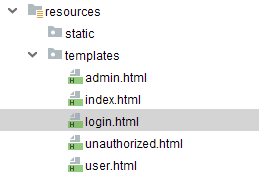
admin.html
<!DOCTYPE html>

<html lang="en">

<head>

    <meta charset="UTF-8">

    <title>Title</title>

</head>

<body>

<h1>管理员页面</h1>

</body>

</html>
index.html
<!DOCTYPE html>

<html lang="en" xmlns:shiro="http://www.pollix.at/thymeleaf/shiro">

<head>

    <meta charset="UTF-8">

    <title>Title</title>

</head>

<body>

<h3>Hello, <shiro:principal/></h3>

<h3><a href="/logout">注销登录</a></h3>

<h3><a shiro:hasRole="admin" href="/admin">管理员页面</a></h3>

<h3><a shiro:hasAnyRoles="admin,user" href="/user">普通用户页面</a></h3>

</body>

</html>
login.html
<!DOCTYPE html>

<html lang="en" xmlns:th="http://www.thymeleaf.org">

<head>

    <meta charset="UTF-8">

    <title>Title</title>

</head>

<body>

<div>

    <form action="/doLogin" method="post">

        <input type="text" name="username"><br>

        <input type="password" name="password"><br>

        <div th:text="${error}"></div>

        <input type="submit" value="登录">

    </form>

</div>

</body>

</html>
unauthorized.html
<!DOCTYPE html>

<html lang="en" xmlns:th="http://www.thymeleaf.org">

<head>

    <meta charset="UTF-8">

    <title>Title</title>

</head>

<body>

<div>

    <h3>未获授权,非法访问</h3>

    <h3 th:text="${error}"></h3>

</div>

</body>

</html>
user.html
<!DOCTYPE html>

<html lang="en">

<head>

    <meta charset="UTF-8">

    <title>Title</title>

</head>

<body>

<h1>普通用户页面</h1>

</body>

</html>
访问http://localhost:8080/login

由于上面的shiro配置,可以匿名访问
输入我们在shiro配置的2用户
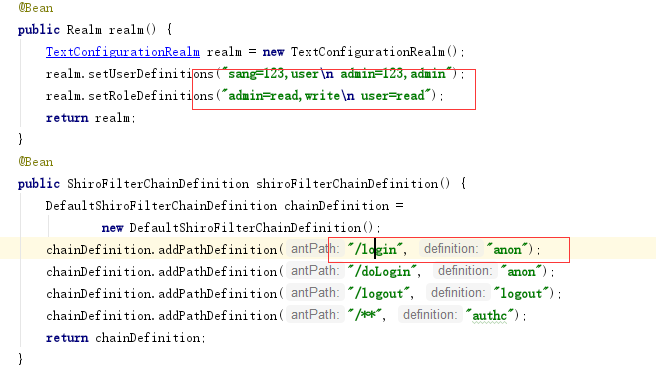
sang/123
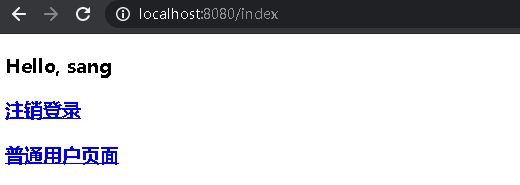
admin/123

不同角色,权限不一样,页面也不一样
SpringBoot安全管理--(三)整合shiro的更多相关文章
- SpringBoot 优雅的整合 Shiro
Apache Shiro是一个功能强大且易于使用的Java安全框架,可执行身份验证,授权,加密和会话管理.借助Shiro易于理解的API,您可以快速轻松地保护任何应用程序 - 从最小的移动应用程序到最 ...
- 在 springboot 中如何整合 shiro 应用 ?
Shiro是Apache下的一个开源项目,我们称之为Apache Shiro. 它是一个很易用与Java项目的的安全框架,提供了认证.授权.加密.会话管理,与spring Security 一样都是 ...
- SpringBoot学习:整合shiro(身份认证和权限认证),使用EhCache缓存
项目下载地址:http://download.csdn.NET/detail/aqsunkai/9805821 (一)在pom.xml中添加依赖: <properties> <shi ...
- SpringBoot学习:整合shiro自动登录功能(rememberMe记住我功能)
首先在shiro配置类中注入rememberMe管理器 /** * cookie对象; * rememberMeCookie()方法是设置Cookie的生成模版,比如cookie的name,cooki ...
- SpringBoot学习:整合shiro(rememberMe记住我后自动登录session失效解决办法)
项目下载地址:http://download.csdn.NET/detail/aqsunkai/9805821 定义一个拦截器,判断用户是通过记住我登录时,查询数据库后台自动登录,同时把用户放入ses ...
- SpringBoot学习:整合shiro(验证码功能和登录次数限制功能)
项目下载地址:http://download.csdn.NET/detail/aqsunkai/9805821 (一)验证码 首先login.jsp里增加了获取验证码图片的标签: <body s ...
- SpringBoot学习:整合shiro(rememberMe记住我功能)
项目下载地址:http://download.csdn.NET/detail/aqsunkai/9805821 首先在shiro配置类中注入rememberMe管理器 /** * cookie对象; ...
- SpringBoot整合Shiro (二)
Apache Shiro是一个强大且易用的Java安全框架,执行身份验证.授权.密码学和会话管理.相比较Spring Security,shiro有小巧.简单.易上手等的优点.所以很多框架都在使用sh ...
- SpringBoot整合Shiro 三:整合Mybatis
搭建环境见: SpringBoot整合Shiro 一:搭建环境 shiro配置类见: SpringBoot整合Shiro 二:Shiro配置类 整合Mybatis 添加Maven依赖 mysql.dr ...
随机推荐
- C#反射与特性(四):实例化类型
目录 1,实例化类型 1.1 Activator.CreateInstance() 1.2 ConstructorInfo.Invoke() 2,实例化委托 3,实例化泛型类型 3.1 实例化泛型 3 ...
- mysql5.7的基本使用
mysql的基本使用:最简单的增删改查 (建议用类似记事本的东西写代码,错了容易改) 以下就是这篇文章的代码 一,增和查 CREATE DATABASE one; 新建了一个名为one的数据库 S ...
- 3d动态文字的绘制
在这里介绍一种3D文字的一种动态效果,可以说这是一种伪3D创建的一种3D的视觉效果 简单的讲解一下:大家或多或少都会听说过素描这种绘画手法,其实这种手法就是巧妙的利用了.阴影给人们带来的立体的视觉冲击 ...
- docker扫盲,面试连这都不会就等着挂吧!
现在很多公司项目部署都是采用K8S docker容器方式,出门面试被问的概率极大,如果被面试官问docker相关知识点直接懵逼,那么基本就是被pass了,除非其他方面技术过硬.所以这种相对前沿的技术, ...
- oracle问题之死锁 (一)
[前言] 遇到 oracle 异常 和 解决实践 系列文章 整理分享 杂症一.oracle死锁 一.症状: 执行SQL或程序时,程序没有响应或SQL执行一直处于执行状态,没有成功,也没有报错. 二.病 ...
- 惠普电脑win10关闭自动调节亮度
自动调节亮度真的太烦人了,突然从亮的画面变暗,又从暗的亮度变量,眼睛受不了.但是试了很多种方法都不行. 方法 第一种: 有一些电脑是有在设置--->显示界面--->有一个 关闭自动调节 按 ...
- vuede axios文件下载
this.loading = true; this.$http({ baseURL: CLOUD_BASE_SERVER_URL, url: '/audit/auditRun/ex ...
- JVM源码分析之警惕存在内存泄漏风险的FinalReference(增强版)
概述 JAVA对象引用体系除了强引用之外,出于对性能.可扩展性等方面考虑还特地实现了四种其他引用:SoftReference.WeakReference.PhantomReference.FinalR ...
- 视觉slam十四讲第七章课后习题7
版权声明:本文为博主原创文章,转载请注明出处:http://www.cnblogs.com/newneul/p/8544369.html 7.题目要求:在ICP程序中,将空间点也作为优化变量考虑进来 ...
- 七、Application类
前言:每个运行的WPF应用程序都由System.Windows.Application类的一个实例来表示.程序集资源(assemblyre sources)的每个资源是一块可嵌入到编译过得应用程序中的 ...