
UIApplication
1、UIApplication 是 iPhone 应用程序的开始并且负责初始化并显示 UIWindow,并负责加载应用程序的第一个 UIView 到 UIWindow 窗体中。
UIApplication 的另一个任务是帮助管理应用程序的生命周期,而 UIApplication 通过一个名字为 UIApplicationDelegate 的代理类来履行这个任务。
尽管 UIApplication 会负责接收事件,而 UIApplicationDelegate 则决定应用程序如何去响应这些事件,UIApplicationDelegate 可以处理的事件包括应用程序的生命周期事件(比如程序启动和关闭)、系统事件(比如来电、记事项警 告)。
Application 是一个单例对象
iOS程序创建的第一个对象就是UIApplication对象
通过[UIApplication sharedApplication]可以获得这个单例对象


2、默认创建一个single模板时,系统自动创建了一个UIApplication的对象

这里的nil其实是@"UIApplication",在UIApplicationMain中,同时又设置了application的代理:@"AppDelegate"
 // argc:系统传入参数的个数

 // argv:系统传入参数的值的列表

 // principalClassName:传入主要的类名

 // 第四个参数表示:给应用程序"application"指定一个代理对象

 return UIApplicationMain(argc, argv, @"UIApplication", @"AppDelegate");
应用程序启动之后,先创建Application,再创建它的代理AppDelegate,之后创建UIwindow,再创建控制器,创建控制器的view,然后将控制器的view添加到UIWindow上。
3.UIApplication常用属性:
1-applicationIconBadgeNumber设置应用图标右上角的提示数字
- (void)touchesBegan:(NSSet<UITouch *> *)touches withEvent:(UIEvent *)event{

    UIApplication *app = [UIApplication sharedApplication];

    /**

     iOS8.0之后通知消息要进行注册

     set to 0 to hide. default is 0. In iOS 8.0 and later, your application must register for user notifications using -[UIApplication registerUserNotificationSettings:] before being able to set the icon badge.

     */

    if ([UIDevice currentDevice].systemVersion.floatValue >= 8.0){

        //注册

        UIUserNotificationSettings *setting = [UIUserNotificationSettings settingsForTypes:UIUserNotificationTypeBadge categories:nil];

        [app registerUserNotificationSettings:setting];

    }

    app.applicationIconBadgeNumber = ;

}

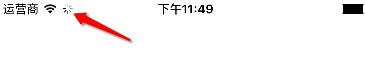
2-设置应用联网状态
@property(nonatomic,getter=isNetworkActivityIndicatorVisible) BOOL networkActivityIndicatorVisible __TVOS_PROHIBITED; // showing network spinning gear in status bar. default is NO
- (void)touchesBegan:(NSSet<UITouch *> *)touches withEvent:(UIEvent *)event{

    UIApplication *app = [UIApplication sharedApplication];

    app.networkActivityIndicatorVisible = YES;

}
4、常用方法
打开URL
- (BOOL)openURL:(NSURL*)url NS_EXTENSION_UNAVAILABLE_IOS("");
- (void)touchesBegan:(NSSet<UITouch *> *)touches withEvent:(UIEvent *)event{

    UIApplication *app = [UIApplication sharedApplication];

    NSURL *url = [NSURL URLWithString:@"http://www.baidu.com"];

    [app openURL:url];

}

UIApplication的更多相关文章
- UIApplication和OpenUrl的基于使用方法
UIApplication实用方法 前言: 本文介绍的方法每一个人在项目都应用过,只是有的时候容易忘记每次都要去百度.因为有些方法在整个项目中可能就只会写一次,基于此我只是做个笔记. 1. 每一个应用 ...
- 【转】iOS UIApplication详解
1.状态栏UIStateBar的设置是在UIApplication里面设置的,它包含4中风格 2. - (void)beginIgnoringInteractionEvents; (void)endI ...
- iOS UIApplication sharedapplication用法
应用中打开其他应用 我们来讨论一下,在iOS开发中,如何实现从app1打开app2. 基本的思路就是,可以为app2定义一个URL,在app1中通过打开这个URL来打开app2,在此过程中,可以传送一 ...
- 【iOS [[UIApplication sharedApplication] delegate]】运用
之前想要拿到app的窗口,我们通常的写法是: [UIApplication sharedApplication].keyWindow 这种写法之前一直也觉得是正确的,没什么问题,而且网上大多数的博客或 ...
- iOS之UIApplication详解
UIApplication对象特点: 特点1: UIApplication对象是应用程序的象征,一个UIApplication对象就代表一个应用程序,而且是单例的.(用来封装整个应用程序的一个对象, ...
- 关于UIApplication单例传值
由于UIApplication的是一个系统级别的单例,那么就能够省去自己创建单例的方法,将需要需要的类对象,在UIApplication单例内声明一个,通过点语法来实现单个 需要调用的实现单例模式的类 ...
- 1.0 UIApplication对象
本文并非最终版本,如有更新或更正会第一时间置顶,联系方式详见文末 如果觉得本文内容过长,请前往本人 “简书” UIApplication对象特点: 特点1: UIApplication对象是应用程 ...
- 【原】iOS学习之UIApplication及其代理
1. 什么是UIApplication UIApplication 对象是应用程序的象征,不能手动创建,不能 alloc init,一个应用程序只允许 一个 . 每个应用都有自己的 UIApplica ...
- info.plist、pch和四大对象(UIApplication、UIApplicationDelegate、UIWindow、UIViewController)
本文目录 1.程序配置文件info.plist,全局头文件pch 2.应用程序对象UIApplication介绍 3.UIApplicationDelegate介绍,程序启动过程 4.UIWindow ...
随机推荐
- [skill] C++ delete VS delete []
delete 用来删除 new 返回的对象. 先调用对象的析构,然后释放指针指向的内存. delete[] 用来删除 new [] 返回的对象. 先调用数组中每一个对象的析构,然后释放指针指向的内存.
- css background-size 属性 兼容ie8 ie7 方案
<!-- background-size-polyfill v0.2.0 | (c) 2012-2013 Louis-Rémi Babé | MIT License --> <PUB ...
- 网络服务器之HTTPS服务
import ssl, socket, time if __name__ == "__main__": context = ssl.SSLContext(ssl.PROTOCOL_ ...
- Error of "Please Check for Sufficient Write File Permissions"
The error message “Please check for sufficient write file permissions” is generated by the Web-based ...
- WP8.1 C#代码 添加/获取Grid.ColumnDefinitions/RowDefinitions
WP8.1: ColumnDefinitions和RowDefinitions的道理是相同的,语法顺序是一样的,只不过是将ColumnDefinitions换成RowDefinitions而已 获取并 ...
- PHP:php知识小解
一.什么是PHP? PHP 是一种创建动态交互性站点的服务器端脚本语言.PHP 能够生成动态页面内容.PHP 能够创建.打开.读取.写入.删除以及关闭服务器上的文件.PHP 能够接收表单数据并处理.P ...
- java中一些定时器的使用
一:简单说明 ScheduleExecutorService接口中有四个重要的方法,其中scheduleAtFixedRate和scheduleWithFixedDelay在实现定时程序时比较方便. ...
- swift language
API reference Swift UIKit Swift 菜鸟教程 Great Installed Visual Studio Code, I found I cannot open it fr ...
- leetcode 204
题目描述: Description: Count the number of prime numbers less than a non-negative number, n. 解法一: 遍历从1-n ...
- 点餐系统Sprint2总结
Sprint1结束后休息了两天,就开始准备Sprint2.一开始就知道数据库的连接对我们来说都是大难题. 虽然使用sqlite3,与android连接起来比较容易,但还是不容忽视.为期10天,和Spr ...