
linux中Centos7搭建lnmp环境
1、安装yum
yum update
2、安装nginx源:
yum localinstall http://nginx.org/packages/centos/7/noarch/RPMS/nginx-release-centos-7-0.el7.ngx.noarch.rpm
yum repolist enabled | grep "nginx*"
安装nginx
yum -y install nginx
启动nginx
systemctl start nginx
设置开机自启动
systemctl enable nginx.service
3、检查开机自启动是否设置成功
systemctl list-dependencies | grep nginx
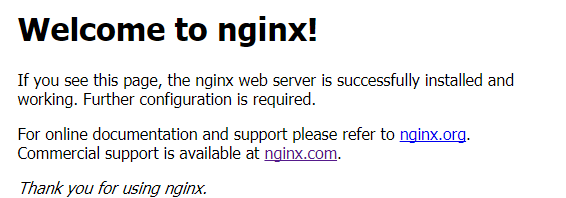
4、浏览器中输入公网ip,检测是否安装成功
出现如下则成功
5、安装mysql
安装mysql源
yum -y localinstall http://dev.mysql.com/get/mysql57-community-release-el7-7.noarch.rpm
yum repolist enabled | grep "mysql.*-community.*"
安装mysql
yum -y install mysql-community-server install mysql-community-devel
启动mysql
systemctl mysqld start
检查mysql启动是否正常
sytemctl mysqld status 或者 ps -ef | grep mysql
设置mysqld服务开机自启动
systemctl enable mysqld.service
检查mysqld开机自启动是否设置成功
systemctl list-dependencies | grep mysqld
mysql5.7以后的争强了安全机制, 所以使用yum安装,启动会系统会自动生成一个随机的密码,修改mysql密码
查看mysql的随机密码
grep 'temporary password' /var/log/mysqld.log
使用查询得到的随机密码在终端登录
mysql -u root -p 更改密码(mysql文档规定,密码必须包括大小写字母数字加特殊符号>8位) 根据获取的随机密码登录
ALTER USER 'root'@'localhost' IDENTIFIED BY 'Yourpassword';修改密码
退出mysql客户端,用刚才修改的密码登录确保密码修改成功 exit;
使用新密码登录
6、安装php
安装php源
rpm -Uvh https://dl.fedoraproject.org/pub/epel/epel-release-latest-7.noarch.rpm
rpm -Uvh https://mirror.webtatic.com/yum/el7/webtatic-release.rpm
安装php扩展源(这是php7.1的安装其他版本直接把7.1直接改成7.2)
yum repolist enabled | grep "webtatic*"
yum -y install php71w php71w-fpm
yum -y install php71w-mbstring php71w-common php71w-gd php71w-mcrypt
yum -y install php71w-mysql php71w-xml php71w-cli php71w-devel
yum -y install php71w-pecl-memcached php71w-pecl-redis php71w-opcache
验证php7.1.x和扩展是否安装成功
php -m
验证php是否安装成功
php -v 会出现php的班本信息
7、配置nginx文件
新建.conf后缀的文件文件目录在/etc/nginx/conf.d/下面 复制下面内容放进去
server {
listen 80;
server_name danshufenxiang.com;
root /home/www; #自定义站点位置这是你的站点根目录
index index.php index.html index.htm;
location / {
}
error_page 500 502 503 504 /50x.html;
location = /50x.html {
root /usr/share/nginx/html;
}
location ~ \.php$ {
fastcgi_pass 127.0.0.1:9000;
fastcgi_index index.php;
fastcgi_param SCRIPT_FILENAME $document_root$fastcgi_script_name;
include fastcgi_params;
}
}
linux中Centos7搭建lnmp环境的更多相关文章
- CentOS7——搭建LNMP环境(WordPress案例)
CentOS7--搭建LNMP环境(WordPress案例) LNMP组成介绍 LNMP(Linux-Nginx-MySQL-PHP)网站架构是目前国际流行的Web框架,该框架包括:Linux操作系统 ...
- [Linux] deepin15.8搭建LNMP环境
LAMP和LNMP LAMP==Linux+Apache+Mysql+PHP LNMP==Linux+Nginx+Mysql+PHP 安装nginx sudo apt install nginx 安装 ...
- Centos7 搭建lnmp环境 (centos7+nginx+MySQL5.7.9+PHP7)
阿里云一台服务器出现问题! 我估计是一键安装包环境的原因,所以打算重新搭建下环境! 首先,当然是先做好快照!安全第一! 对系统盘做更换系统操作,装上纯净版的centos. 装好后,进入系统 一.挂载数 ...
- CentOS7搭建LNMP环境
以前写的过时了,重新发一篇新的. 安装PHP 下载官网:https://www.php.net/downloads.php 为了方便,我存了现成的 百度网盘:https://pan.baidu.com ...
- Vmware搭建LNMP环境(Centos7+Nginx+Mysql+PHP7.1.8)
参考:1.Linux学习之CentOS(一)----在VMware虚拟机中安装CentOS 7(图文教程) 2.Centos7搭建LNMP环境 3.MySQL5.7修改默认root密码 4.CentO ...
- centos7 yum搭建lnmp环境及配置wordpress超详细教程
yum安装lnmp环境是最方便,最快捷的一种方法.源码编译安装需要花费大量的人类时间,当然源码编译可以个性化配置一些其它功能.目前来说,yum安装基本满足我们搭建web服务器的需求. 本文是我根据近期 ...
- WIN10 vagrant和virtualbox虚拟机和一键搭建lnmp环境配置thinkphp虚拟主机
版本:win10系统 virtualbox:5.1.26 vagrant :1.9.7 centos 7.0 xshell/git 首先下载好对应版本的软件 配置vagrant和virtualbox ...
- Yum搭建LNMP环境(动、静、库分离)(week4_day5)--技术流ken
前言 本篇博客使用yum来搭建lnmp环境,将采用动态,静态以及数据库分开安装的方式即nginx,php,mysql.会被分开安装在不同的服务器之上,搭建出来一套lnmp环境,并部署wordpress ...
- docker搭建lnmp环境(问题,资料,命令)
入门参考 http://www.runoob.com/docker/docker-install-nginx.html 十大常用命令玩转docker 1. #从官网拉取镜像 docker pull & ...
随机推荐
- LOJ 2587 「APIO2018」铁人两项——圆方树
题目:https://loj.ac/problem/2587 先写了 47 分暴力. 对于 n<=50 的部分, n3 枚举三个点,把图的圆方树建出来,合法条件是 c 是 s -> f 路 ...
- HanLP中的人名识别分析详解
在看源码之前,先看几遍论文<基于角色标注的中国人名自动识别研究> 关于命名识别的一些问题,可参考下列一些issue: u u名字识别的问题 #387 u u机构名识别错误 u u关于层叠H ...
- Delphi:窗体的扩展样式GWL_EXSTYLE用于SetWindowLong
SetWindowLong(Handle, GWL_EXSTYLE, GetWindowLong(Handle, GWL_EXSTYLE) or WS_EX_TRANSPARENT or WS_EX_ ...
- oracle中delete、truncate、drop的区别
oracle中delete.truncate.drop的区别 标签: deleteoracletable存储 2012-05-23 15:12 7674人阅读 评论(0) 收藏 举报 分类: ora ...
- centos su命令
有很多指令都只可以用 root 身份去执行,因此我们需要成为 root 用户.要这样做,我们可以使用 su 指令(更替用户).su 指令有下列格式: su - <user>或su < ...
- MySQL 单条记录长度最大65535
今天设计表结构,加了几个字段,结果报错了 Ligne trop grande. Le taille maximale d'une ligne, sauf les BLOBs, est 65535... ...
- Flask--异常处理
异常处理: abort(404)-捕获HTTP抛出的统一状态码 @app.errorhandler-捕获全局异常错误码,捕获异常错误 @app.route("/demo4") de ...
- [蓝桥杯]ALGO-81.算法训练_动态数组使用
从键盘读入n个整数,使用动态数组存储所读入的整数,并计算它们的和与平均值分别输出.要求尽可能使用函数实现程序代码.平均值为小数的只保留其整数部分. 样例输入: 样例输出: 样例输入: 样例输出: 题目 ...
- 【linux】之常用命令-杂项
查看端口:lsof -i :80 二.内存大小[root@xbidc ~]# cat /proc/meminfo |grep MemTotalMemTotal: 1034612 kB[root@xbi ...
- java浅析final关键字
谈到final关键字,想必很多人都不陌生,在使用匿名内部类的时候可能会经常用到final关键字.另外,Java中的String类就是一个final类,那么今天我们就来了解final这个关键字的用法. ...