
ERP渠道文档管理(二十四)
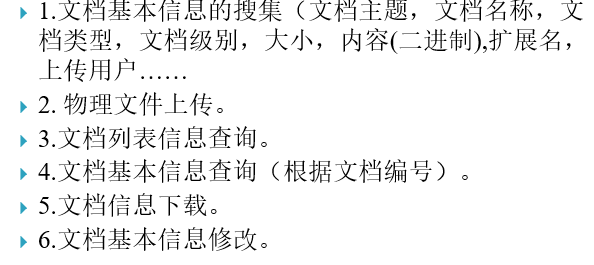
基本需求:
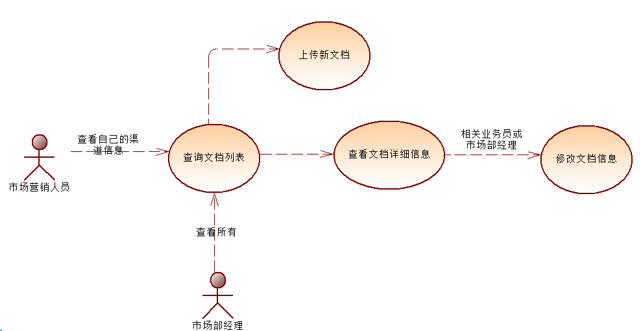
用例图:
存储过程:
CREATE PROCEDURE [dbo].[BioErpCrmChannelDocument_ADD]

@DocumentID int,

@ChannelID int

 AS

	INSERT INTO [BioErpCrmChannelDocument](

	[DocumentID],[ChannelID]

	)VALUES(

	@DocumentID,@ChannelID

	)
CREATE PROCEDURE BioErpCrmChannelDocument_Update

@ChannelDocumentID int,

@DocumentID int,

@ChannelID int,

@DeleteState bit

 AS

	UPDATE [BioErpCrmChannelDocument] SET

	[DocumentID] = @DocumentID,[ChannelID] = @ChannelID,[DeleteState] = @DeleteState

	WHERE ChannelDocumentID=@ChannelDocumentID
	CREATE VIEW dbo.View_CRMChannelDocumentInfo

	AS

	SELECT     dbo.BioErpCrmManageChannel.ChannelName, dbo.UserManager.UserName, dbo.BioCrmCorrelationDocument.DocumentID, dbo.BioCrmCorrelationDocument.Subject,

						  dbo.BioCrmCorrelationDocument.Name, dbo.BioCrmCorrelationDocument.Type, dbo.BioCrmCorrelationDocument.DocumentLevel,

						  dbo.BioCrmCorrelationDocument.DocumentSize, dbo.BioCrmCorrelationDocument.ExetendName, dbo.BioCrmCorrelationDocument.[Content],

						  dbo.BioCrmCorrelationDocument.UserID, dbo.BioCrmCorrelationDocument.UploadTime, dbo.BioCrmCorrelationDocument.Remark,

						  dbo.BioErpCrmChannelDocument.DeleteState, dbo.BioErpCrmChannelDocument.ChannelDocumentID, dbo.BioErpCrmChannelDocument.ChannelID

	FROM         dbo.BioErpCrmChannelDocument INNER JOIN

						  dbo.BioCrmCorrelationDocument ON dbo.BioErpCrmChannelDocument.DocumentID = dbo.BioCrmCorrelationDocument.DocumentID INNER JOIN

						  dbo.UserManager ON dbo.BioCrmCorrelationDocument.UserID = dbo.UserManager.UserId INNER JOIN

						  dbo.BioErpCrmManageChannel ON dbo.BioErpCrmChannelDocument.ChannelID = dbo.BioErpCrmManageChannel.ChannelID
BLL代码:
 public  class ChannelDocumentBLL

    {

      /// <summary>

      /// 文档信息添加

      /// </summary>

      /// <param name="document">文档对象</param>

      /// <returns>int</returns>

      public int BioErpCrmChannelDocumentAdd(BioErpCrmChannelDocument document)

      {

          SqlParameter[] pars = new SqlParameter[]{

          new SqlParameter("@DocumentID",document.DocumentID),

          new SqlParameter("@ChannelID",document.ChannelID)

         };

          return DataBaseHelper.ExcuteSqlReturnInt("BioErpCrmChannelDocument_ADD", CommandType.StoredProcedure, pars);

      }

      /// <summary>

      /// 修改文档对象

      /// </summary>

      /// <param name="document">文档对象</param>

      /// <returns>int</returns>

      public int BioErpCrmChannelDocumentUpdate(BioErpCrmChannelDocument document)

      {

          SqlParameter[] pars = new SqlParameter[]{

          new SqlParameter("@ChannelDocumentID",document.ChannelDocumentID),

          new SqlParameter("@DocumentID",document.DocumentID),

          new SqlParameter("@ChannelID",document.ChannelID),

          new SqlParameter("@DeleteState",document.DeleteState)

         };

          return DataBaseHelper.ExcuteSqlReturnInt("BioErpCrmChannelDocument_Update", CommandType.StoredProcedure, pars);

      }

      /// <summary>

      /// 根据ID查询文档的详细信息

      /// </summary>

      /// <param name="id"></param>

      /// <returns></returns>

      public ViewCRMChannelDocumentInfo getChannelDocumentViewByDocumentID(string id)

      {

        SqlDataReader reader=  CommTool.SqlComm.GetDataReaderByCondition("View_CRMChannelDocumentInfo", "*", " DocumentID=" + id);

        ViewCRMChannelDocumentInfo  view= null;

        if (reader.Read())

        {

            view = new ViewCRMChannelDocumentInfo()

            {

                UserName = reader["UserName"].ToString(),

                ChannelName = reader["ChannelName"].ToString(),

                DocumentID = int.Parse(reader["DocumentID"].ToString()),

                UserID = int.Parse(reader["UserID"].ToString()),

                UploadTime = Convert.ToDateTime(reader["UploadTime"].ToString()),

                Type = reader["Type"].ToString(),

                Subject = reader["Subject"].ToString(),

                Remark = reader["Remark"].ToString(),

                Name = reader["Name"].ToString(),

                ExetendName = reader["ExetendName"].ToString(),

                DocumentSize = long.Parse(reader["DocumentSize"].ToString()),

                DocumentLevel = reader["DocumentLevel"].ToString()

            };

        }

        reader.Close();

        return view;

      }

    }
前端代码:
<%@ Page Language="C#" AutoEventWireup="true" CodeBehind="ChannelDocumentAdd.aspx.cs" Inherits="BioErpWeb.CRMSystem.CrmChannelDocument.ChannelDocumentAdd"  %>

<!DOCTYPE html PUBLIC "-//W3C//DTD XHTML 1.0 Transitional//EN" "http://www.w3.org/TR/xhtml1/DTD/xhtml1-transitional.dtd">

<html xmlns="http://www.w3.org/1999/xhtml">

<head runat="server">

    <title></title>

    <link href="../../Styles/ERPBaseStyle.css" rel="stylesheet" type="text/css" />

    <link href="../../Styles/CalenderStyle.css" rel="stylesheet" type="text/css" />

    <script src="../../JS/ChannelChoose.js" type="text/javascript"></script>

    <script src="../../Scripts/jquery-1.4.1.min.js" type="text/javascript"></script>

    <script src="../../Scripts/jquery.validate.js" type="text/javascript"></script>

    <script src="../../Scripts/ValidateMessage_ZW.js" type="text/javascript"></script>

    <script type="text/javascript">

        $(document).ready(function () {

            $("#form1").validate();

        });

    </script>

</head>

<body>

    <form id="form1" runat="server">

    <div>

     <table class="maintable">

      <tr>

       <td colspan="2" class="titlebar"><span>渠道文档信息上传</span></td>

      </tr>

       <tr>

           <td>主题</td><td><asp:TextBox ID="txtsubJect" runat="server" CssClass="required"></asp:TextBox></td>

       </tr>

      <tr>

            <td>

                文档等级</td>

          <td>

              <asp:DropDownList ID="ddlLevel" runat="server">

                  <asp:ListItem Selected="True">一般文件</asp:ListItem>

                  <asp:ListItem>重要文件</asp:ListItem>

                  <asp:ListItem>非常重要文件</asp:ListItem>

                  <asp:ListItem>特别重要</asp:ListItem>

              </asp:DropDownList>

          </td>

      </tr>

        <tr>

            <td>

                文档选择</td>

          <td>

              <asp:FileUpload ID="FileUpload1" runat="server" />

          </td>

      </tr>

          <tr>

            <td>

                所属渠道

          </td>

          <td >

              <asp:TextBox ID="txtSuperChannelID" runat="server"></asp:TextBox><input type="button" value="选择" style=" width:100px;" onclick="showChannel()" />

          </td>

      </tr>

          <tr>

            <td>

                说明</td>

          <td >

              <asp:TextBox ID="txtRemark" TextMode="MultiLine" Rows="5" runat="server"

                  Width="380px"></asp:TextBox>

          </td>

      </tr>

         <tr>

             <td colspan="2" class="bottomtd">

                 <asp:Button ID="btnSubmit" runat="server" Text="文档信息上传"

                     onclick="btnSubmit_Click" />

                 <asp:Button ID="btnReturn" runat="server" Text="返回列表" UseSubmitBehavior="false" onclick="btnReturn_Click"

                     />

             </td>

         </tr>

     </table>

        <br />

    </div>

    </form>

</body>

</html>
后端代码:
  public partial class ChannelDocumentAdd : System.Web.UI.Page

    {

        protected void Page_Load(object sender, EventArgs e)

        {

            Session["Userid"] = "29";

            if (!IsPostBack)

            {

            }

        }

        protected void btnSubmit_Click(object sender, EventArgs e)

        {

            BioCrmCorrelationDocument document = new BioCrmCorrelationDocument();

            document.Subject = this.txtsubJect.Text;

            document.Name = DateTime.Now.ToString("yyyyMMddhhmmss") + this.FileUpload1.FileName;

            document.UserID = int.Parse(Session["Userid"].ToString());

            document.Remark = this.txtRemark.Text;

            document.DocumentLevel = this.ddlLevel.SelectedValue;

            document.Content = this.FileUpload1.FileBytes;

            document.DocumentSize = this.FileUpload1.FileContent.Length;

            document.Type = this.FileUpload1.PostedFile.ContentType;

            document.ExetendName = System.IO.Path.GetExtension(this.FileUpload1.FileName);

            //物理文件上传

            string filepath = Server.MapPath(@"\Files\CRMChannelFiles\");

            Comm.FileUpLoad(this.FileUpload1, filepath, document.Name);

            BioCrmCorrelationDocumentBLL documentbll = new BioCrmCorrelationDocumentBLL();

            //文档信息添加 包括文件上传(转换为二进制数组后上传)

            int documentid = documentbll.BioCrmCorrelationDocumentAdd(document);

            if (documentid != 0)

            {

                BioErpCrmChannelDocument channeldocument = new BioErpCrmChannelDocument();

                channeldocument.ChannelID = int.Parse(this.txtSuperChannelID.Text.ToString());

                channeldocument.DocumentID = documentid;

                ChannelDocumentBLL channelbll = new ChannelDocumentBLL();

               int count=  channelbll.BioErpCrmChannelDocumentAdd(channeldocument);

               if (count != 0)

               {

                   ClientScript.RegisterStartupScript(this.GetType(), "test", "alert('添加成功')", true);

               }

               else

               {

                   SqlComm.DeleteTableByCondition("BioCrmCorrelationDocument", " DocumentID=" + documentid);

                   ClientScript.RegisterStartupScript(this.GetType(), "test", "alert('添加失败')", true);

               }

            }

        }

    }
渠道文档管理显示界面:
<%@ Page Language="C#" AutoEventWireup="true" CodeBehind="ChannelDocumentListShow.aspx.cs" Inherits="BioErpWeb.CRMSystem.CrmChannelDocument.ChannelDocumentListShow" %>

<%@ Register assembly="AspNetPager" namespace="Wuqi.Webdiyer" tagprefix="webdiyer" %>

<%@ Register src="../../UserControl/CRMChannelMenuBar.ascx" tagname="CRMMenuBar" tagprefix="uc1" %>

<!DOCTYPE html PUBLIC "-//W3C//DTD XHTML 1.0 Transitional//EN" "http://www.w3.org/TR/xhtml1/DTD/xhtml1-transitional.dtd">

<html xmlns="http://www.w3.org/1999/xhtml">

<head runat="server">

    <title></title>

    <link href="../../Styles/ERPBaseStyle.css" rel="stylesheet" type="text/css" />

    <link href="../../Styles/AspNetPagerStyle.css" rel="stylesheet" type="text/css" />

    <link href="../../Scripts/jquery-ui-1.7.custom.css" rel="stylesheet" type="text/css" />

    <script src="../../Scripts/jquery-1.4.1.js" type="text/javascript"></script>

    <script src="../../Scripts/jquery-ui-1.7.custom.min.js" type="text/javascript"></script>

    <style type="text/css">

    td{ text-align:center;}

    .tdsearch{ line-height:30px;}

    .menubar{ background:url(../Web/images/block_hd_bg.png); height:25px; width:100%;}

    .menubar ul{ margin:0px; padding:0px; list-style:none;}

    .menubar ul li{ display:inline; line-height:25px;}

    .menubar ul li a{display:inline-block;  text-align:center; width:100px; color:#0066CC; text-decoration:none;}

    </style>

    <script type="text/javascript">

        $().ready(function () {

            $("#txtDate").datepicker({dateFormat:'yy-mm-dd'});

        });

    </script>

</head>

<body>

    <form id="form1" runat="server">

    <div>

        <uc1:CRMMenuBar ID="CRMMenuBar1" runat="server" />

    </div>

    <div>

         <table class="maintable" style=" width:900px;">

             <tr>

                 <td colspan="5" class="titlebar">

                     <span>渠道文档管理</span>

                 </td>

             </tr>

             <tr>

                 <td class="tdsearch">

                     <asp:Label ID="Label1" runat="server" Text="文档主题:"></asp:Label>

                     <asp:TextBox ID="txtName" runat="server"></asp:TextBox>

                 </td>

                 <td class="tdsearch">

                     <asp:Label ID="Label2" runat="server" Text="渠道名:"></asp:Label>

                      <asp:TextBox ID="txtCName" runat="server"></asp:TextBox>

              </td>

                 <td class="tdsearch">

                     <asp:Label ID="Label3" runat="server" Text="上传时间:"></asp:Label>

                     <asp:TextBox ID="txtDate" runat="server"></asp:TextBox>

                 </td>

                 <td class="tdsearch">

                     <asp:ImageButton ID="imgbutnSearch" Width="60" Height="22" runat="server"

                         ImageUrl="~/Web/images/Btnsearch.gif" onclick="imgbutnSearch_Click" />

                     <asp:ImageButton ID="imgbtnNew" runat="server"  Width="60" Height="22"

                         ImageUrl="~/Web/images/btnadd.gif" onclick="imgbtnNew_Click"/>

                 </td>

             </tr>

             <tr>

                 <td colspan="5" class="bottomtd">

                     <asp:GridView ID="GridView1" Width="100%"  runat="server"  AutoGenerateColumns="False" DataKeyNames="DocumentID">

                         <Columns>

                             <asp:TemplateField HeaderText="文档主题" HeaderStyle-HorizontalAlign="Center">

                                 <ItemTemplate>

                                     <asp:Label ID="Label4" runat="server" Text='<%# Eval("Subject") %>'></asp:Label>

                                 </ItemTemplate>

                                 <HeaderStyle HorizontalAlign="Center"></HeaderStyle>

                                 <ItemStyle HorizontalAlign="Center" />

                             </asp:TemplateField>

                             <asp:TemplateField HeaderText="文档名" HeaderStyle-HorizontalAlign="Center">

                                 <ItemTemplate>

                                     <asp:Label ID="Label5" runat="server" Text='<%# Eval("Name") %>'></asp:Label>

                                 </ItemTemplate>

                                 <HeaderStyle HorizontalAlign="Center"></HeaderStyle>

                                 <ItemStyle HorizontalAlign="Center" />

                             </asp:TemplateField>

                             <asp:TemplateField HeaderText="所属渠道" HeaderStyle-HorizontalAlign="Center">

                                 <ItemTemplate>

                                     <asp:Label ID="Label6" runat="server" Text='<%# Eval("ChannelName") %>'></asp:Label>

                                 </ItemTemplate>

                                 <HeaderStyle HorizontalAlign="Center"></HeaderStyle>

                                 <ItemStyle HorizontalAlign="Center" />

                             </asp:TemplateField>

                             <asp:TemplateField HeaderText="文件级别" HeaderStyle-HorizontalAlign="Center">

                                 <ItemTemplate>

                                     <asp:Label ID="Label7" runat="server" Text='<%# Eval("DocumentLevel") %>'></asp:Label>

                                 </ItemTemplate>

                                 <HeaderStyle HorizontalAlign="Center"></HeaderStyle>

                                 <ItemStyle HorizontalAlign="Center" />

                             </asp:TemplateField>

                             <asp:TemplateField HeaderText="上传时间" HeaderStyle-HorizontalAlign="Center">

                                 <ItemTemplate>

                                     <asp:Label ID="Label9" runat="server" Text='<%# Convert.ToDateTime( Eval("UploadTime")).ToString("yyyy-MM-dd") %>'></asp:Label>

                                 </ItemTemplate>

                                 <HeaderStyle HorizontalAlign="Center"></HeaderStyle>

                                 <ItemStyle HorizontalAlign="Center" />

                             </asp:TemplateField>

                         <asp:TemplateField HeaderText="上传用户" HeaderStyle-HorizontalAlign="Center">

                                 <ItemTemplate>

                                     <asp:Label ID="Label9" runat="server" Text='<%# Eval("UserName") %>'></asp:Label>

                                 </ItemTemplate>

                                 <HeaderStyle HorizontalAlign="Center"></HeaderStyle>

                                 <ItemStyle HorizontalAlign="Center" />

                             </asp:TemplateField>

                             <asp:HyperLinkField DataNavigateUrlFields="DocumentID"

                                 DataNavigateUrlFormatString="DocumentEditAndDown.aspx?ID={0}" HeaderText="操作"

                                 Text="下载/编辑">

                             <HeaderStyle HorizontalAlign="Center" />

                             <ItemStyle HorizontalAlign="Center" />

                             </asp:HyperLinkField>

                         </Columns>

                     </asp:GridView>

                 </td>

             </tr>

             <tr>

              <td  colspan="5">

                  <webdiyer:AspNetPager ID="AspNetPager1" runat="server"   CssClass="paginator" CurrentPageButtonClass="cpb"

                      onpagechanged="AspNetPager1_PageChanged">

                  </webdiyer:AspNetPager>

                 </td>

             </tr>

     </table>

    </div>

    </form>

</body>

</html>
后端代码:
 public partial class ChannelDocumentListShow : System.Web.UI.Page

    {

        public static int pageindex = 0;

        public static int pagesize = 10;

        public static string condition = "";

        protected void Page_Load(object sender, EventArgs e)

        {

            Session["Userid"] = "29";

            if (Session["Userid"] == null)

            {

              Response.Redirect(@"..\Web\UserLogin.aspx");

              return;

            }

           if (!IsPostBack)

            {

               getallPageList();

            }

        }

        /// <summary>

        /// 查询所有联系人信息

        /// </summary>

        private void getallPageList()

        {

            string id = Session["Userid"].ToString();

            condition += " and UserID=" + id;

            if (UserLogin.user.RoleId == 6) //市场部经理

            {

                condition  += " or UserID !=" + id;

            }

            this.AspNetPager1.RecordCount = SqlComm.getDataCountByCondition("dbo.View_CRMChannelDocumentInfo", condition);

            this.AspNetPager1.PageSize = pagesize;

            this.GridView1.DataSource = SqlComm.getDataByPageIndex("dbo.View_CRMChannelDocumentInfo", "*", "DocumentID", condition, pageindex, pagesize);

            this.GridView1.DataBind();

        }

        protected void AspNetPager1_PageChanged(object sender, EventArgs e)

        {

            pageindex = this.AspNetPager1.CurrentPageIndex - 1;

            getallPageList();

        }

        protected void imgbutnSearch_Click(object sender, ImageClickEventArgs e)

        {

            pageindex = 0;

            condition = "";

            if (txtName.Text.Trim() != null && this.txtName.Text.Trim().Length != 0)

            {

                condition = condition + " and Subject like '" + txtName.Text + "%'";

            }

            if (this.txtCName.Text.Trim() != null && this.txtCName.Text.Trim().Length != 0)

            {

                condition = condition + " and ChannelName like '" + txtCName.Text + "%'";

            }

            if (this.txtDate.Text.Trim() != null && this.txtDate.Text.Trim().Length!=0)

            {

                condition = condition + " and (UploadTime >= '" + this.txtDate.Text + "' AND UploadTime< '" + Convert.ToDateTime(this.txtDate.Text).AddDays(1) + "')";

            }

            getallPageList();

        }

        protected void btnNew_Click(object sender, EventArgs e)

        {

        }

        protected void imgbtnNew_Click(object sender, ImageClickEventArgs e)

        {

            Server.Transfer("ChannelDocumentAdd.aspx");

        }

    }
ERP渠道文档管理(二十四)的更多相关文章
- React文档(二十四)高阶组件
高阶组件(HOC)是React里的高级技术为了应对重用组件的逻辑.HOCs本质上不是React API的一部分.它是从React的组合性质中显露出来的模式. 具体来说,一个高阶组件就是一个获取一个组件 ...
- ERP渠道文档详细和修改(二十五)
前端代码: <%@ Page Language="C#" AutoEventWireup="true" CodeBehind="ChannelD ...
- 『.NET Core CLI工具文档』(十四)dotnet-install 脚本参考
说明:本文是个人翻译文章,由于个人水平有限,有不对的地方请大家帮忙更正. 原文:dotnet-install scripts reference 翻译:dotnet-install 脚本参考 名称 d ...
- React文档(二十二)context
React中,通过React组件可以很容易地追踪数据流.当你关注一个组件,你可以发现哪一个props被传递了,这样使得你的应用很容被推断. 在一些情况下,你想要传递数据通过组件树而不需要去手动在每一层 ...
- React文档(二十)不使用JSX
JSX并不是使用React的一个强制需求.当你不需要在你的构造环境里设置编译那么不使用JSX会很方便. 每一个JSX元素只是调用React.createElement(componnet, props ...
- Elastic Stack 笔记(四)Elasticsearch5.6 索引及文档管理
博客地址:http://www.moonxy.com 一.前言 在 Elasticsearch 中,对文档进行索引等操作时,既可以通过 RESTful 接口进行操作,也可以通过 Java 也可以通过 ...
- VMware vSphere 服务器虚拟化之二十四 桌面虚拟化之手动池管理物理机
VMware vSphere 服务器虚拟化之二十四 桌面虚拟化之手动池管理物理机 VMwareView手动池可以管理物理计算机 说明: 环境基于实验二十三 1.准备一台Windows 7的物理计算机名 ...
- 四十三.MongoDB副本集 MongoDB文档管理
一.部署MongoDB副本集 1.1 启用副本集配置并指定集群名称 rs1 1.2 定义集群成员列表 部署好机器51,52,53:51上配置 bind_ip=192.168.4.51(要改) port ...
- 如何基于WPF写一款数据库文档管理工具(二)
系列目录 基于WPF重复造轮子,写一款数据库文档管理工具(一) 本篇重点 上次发表了基于WPF重复造轮子,写一款数据库文档管理工具(一) 得到不少人支持,文章一度上到了博客园推荐表首页,看来大家对这个 ...
随机推荐
- jQuery最新CDN调用地址 更新(201902)
收集最新的jQuery地址,直接调用. 关于如何选择什么版本: https://www.cnblogs.com/osfipin/p/6211468.html 下面是收集的最新版本: 官方//code. ...
- Python学习--------------Atm+购物车系统
一.程序需求 模拟实现一个ATM + 购物商城程序: 1.额度 15000或自定义 2.实现购物商城,买东西加入 购物车,调用信用卡接口结账 3.可以提现,手续费5% 4.每月22号出账单,每月10号 ...
- 牛客网暑期ACM多校训练营(第一场)J Different Integers
链接:https://www.nowcoder.com/acm/contest/139/J 题意: 给你[l,r]问[1,l],[r,n]中有多少个不同的数. 思路: 可以参考上一篇博客:https: ...
- 【题解】Luogu P2047 社交网络总结 (Floyd算法,最短路计数)
题目描述 在社交网络(social network)的研究中,我们常常使用图论概念去解释一些社会现象.不妨看这样的一个问题.在一个社交圈子里有n个人,人与人之间有不同程度的关系.我 们将这个关系网络对 ...
- 洛谷 P1457 城堡 The Castle 解题报告
P1457 城堡 The Castle 题目描述 我们憨厚的USACO主人公农夫约翰(Farmer John)以无法想象的运气,在他生日那天收到了一份特别的礼物:一张"幸运爱尔兰" ...
- sql知识收集
在SQL Server里面有top关键字可以很方便的取出前N条记录,但是Oracle里面却没有top的使用,类似实现取出前N条记录的简单方法如下: 方法1:利用ROW_NUMBER函数 取出前5条记录 ...
- EasyUI 格式化列
以下实例格式化在 easyui DataGrid 里的列数据,并使用自定义列的 formatter,如果价格小于 20 就将文本变为红色. 为了格式化一个数据网格(DataGrid)列,我们需要设置 ...
- 各种蕴含算法思想的DP - 3
内容中包含 base64string 图片造成字符过多,拒绝显示
- python 基础数据类型之list
python 基础数据类型之list: 1.列表的创建 list1 = ['hello', 'world', 1997, 2000] list2 = [1, 2, 3, 4, 5 ] list3 = ...
- [整理]IIS 6.0 下部署 Asp.net MVC Web Api 后 HTTP PUT and DELETE 请求失败
http://guodong.me/?p=1560 ASP.NET MVC 4 has a new feature called WebAPI which makes it much easier t ...