
HBase 学习之路(十一)—— Spring/Spring Boot + Mybatis + Phoenix 整合
一、前言
使用Spring+Mybatis操作Phoenix和操作其他的关系型数据库(如Mysql,Oracle)在配置上是基本相同的,下面会分别给出Spring/Spring Boot 整合步骤,完整代码见本仓库:
二、Spring + Mybatis + Phoenix
2.1 项目结构
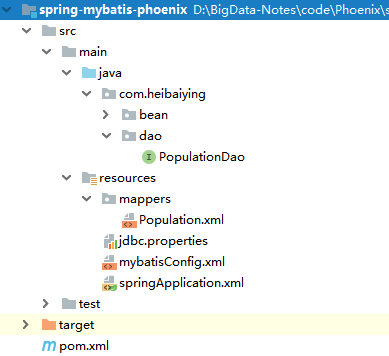
2.2 主要依赖
除了Spring相关依赖外,还需要导入phoenix-core和对应的Mybatis依赖包
<!--mybatis 依赖包-->
<dependency>
    <groupId>org.mybatis</groupId>
    <artifactId>mybatis-spring</artifactId>
    <version>1.3.2</version>
</dependency>
<dependency>
    <groupId>org.mybatis</groupId>
    <artifactId>mybatis</artifactId>
    <version>3.4.6</version>
</dependency>
<!--phoenix core-->
<dependency>
    <groupId>org.apache.phoenix</groupId>
    <artifactId>phoenix-core</artifactId>
    <version>4.14.0-cdh5.14.2</version>
</dependency>
2.3 数据库配置文件
在数据库配置文件 jdbc.properties 中配置数据库驱动和zookeeper地址
# 数据库驱动
phoenix.driverClassName=org.apache.phoenix.jdbc.PhoenixDriver
# zookeeper地址
phoenix.url=jdbc:phoenix:192.168.0.105:2181
2.4 配置数据源和会话工厂
<?xml version="1.0" encoding="UTF-8"?>
<beans xmlns="http://www.springframework.org/schema/beans"
       xmlns:xsi="http://www.w3.org/2001/XMLSchema-instance"
       xmlns:context="http://www.springframework.org/schema/context" xmlns:tx="http://www.springframework.org/schema/tx"
       xsi:schemaLocation="http://www.springframework.org/schema/beans http://www.springframework.org/schema/beans/spring-beans.xsd
        http://www.springframework.org/schema/context http://www.springframework.org/schema/context/spring-context-4.1.xsd http://www.springframework.org/schema/tx http://www.springframework.org/schema/tx/spring-tx.xsd">

    <!-- 开启注解包扫描-->
    <context:component-scan base-package="com.heibaiying.*"/>

    <!--指定配置文件的位置-->
    <context:property-placeholder location="classpath:jdbc.properties"/>

    <!--配置数据源-->
    <bean id="dataSource" class="org.springframework.jdbc.datasource.DriverManagerDataSource">
        <!--Phoenix配置-->
        <property name="driverClassName" value="${phoenix.driverClassName}"/>
        <property name="url" value="${phoenix.url}"/>
    </bean>

    <!--配置 mybatis 会话工厂 -->
    <bean id="sqlSessionFactory" class="org.mybatis.spring.SqlSessionFactoryBean">
        <property name="dataSource" ref="dataSource"/>
        <!--指定mapper文件所在的位置-->
        <property name="mapperLocations" value="classpath*:/mappers/**/*.xml"/>
        <property name="configLocation" value="classpath:mybatisConfig.xml"/>
    </bean>

    <!--扫描注册接口 -->
    <!--作用:从接口的基础包开始递归搜索,并将它们注册为 MapperFactoryBean(只有至少一种方法的接口才会被注册;, 具体类将被忽略)-->
    <bean class="org.mybatis.spring.mapper.MapperScannerConfigurer">
        <!--指定会话工厂 -->
        <property name="sqlSessionFactoryBeanName" value="sqlSessionFactory"/>
        <!-- 指定mybatis接口所在的包 -->
        <property name="basePackage" value="com.heibaiying.dao"/>
    </bean>

</beans>
2.5 Mybtais参数配置
新建mybtais配置文件,按照需求配置额外参数, 更多settings配置项可以参考官方文档
<?xml version="1.0" encoding="UTF-8" ?>
<!DOCTYPE configuration
        PUBLIC "-//mybatis.org//DTD Config 3.0//EN"
        "http://mybatis.org/dtd/mybatis-3-config.dtd">

<!-- mybatis 配置文件 -->
<configuration>
    <settings>
        <!-- 开启驼峰命名 -->
        <setting name="mapUnderscoreToCamelCase" value="true"/>
        <!-- 打印查询sql -->
        <setting name="logImpl" value="STDOUT_LOGGING"/>
    </settings>
</configuration>
2.6 查询接口
public interface PopulationDao {

    List<USPopulation> queryAll();

    void save(USPopulation USPopulation);

    USPopulation queryByStateAndCity(@Param("state") String state, @Param("city") String city);

    void deleteByStateAndCity(@Param("state") String state, @Param("city") String city);
}
<!DOCTYPE mapper
        PUBLIC "-//mybatis.org//DTD Mapper 3.0//EN"
        "http://mybatis.org/dtd/mybatis-3-mapper.dtd">

<mapper namespace="com.heibaiying.dao.PopulationDao">

    <select id="queryAll" resultType="com.heibaiying.bean.USPopulation">
        SELECT * FROM us_population
    </select>

    <insert id="save">
        UPSERT INTO us_population VALUES( #{state}, #{city}, #{population} )
    </insert>

    <select id="queryByStateAndCity" resultType="com.heibaiying.bean.USPopulation">
        SELECT * FROM us_population WHERE state=#{state} AND city = #{city}
    </select>

    <delete id="deleteByStateAndCity">
        DELETE FROM us_population WHERE state=#{state} AND city = #{city}
    </delete>

</mapper>
2.7 单元测试
@RunWith(SpringRunner.class)
@ContextConfiguration({"classpath:springApplication.xml"})
public class PopulationDaoTest {

    @Autowired
    private PopulationDao populationDao;

    @Test
    public void queryAll() {
        List<USPopulation> USPopulationList = populationDao.queryAll();
        if (USPopulationList != null) {
            for (USPopulation USPopulation : USPopulationList) {
                System.out.println(USPopulation.getCity() + " " + USPopulation.getPopulation());
            }
        }
    }

    @Test
    public void save() {
        populationDao.save(new USPopulation("TX", "Dallas", 66666));
        USPopulation usPopulation = populationDao.queryByStateAndCity("TX", "Dallas");
        System.out.println(usPopulation);
    }

    @Test
    public void update() {
        populationDao.save(new USPopulation("TX", "Dallas", 99999));
        USPopulation usPopulation = populationDao.queryByStateAndCity("TX", "Dallas");
        System.out.println(usPopulation);
    }

    @Test
    public void delete() {
        populationDao.deleteByStateAndCity("TX", "Dallas");
        USPopulation usPopulation = populationDao.queryByStateAndCity("TX", "Dallas");
        System.out.println(usPopulation);
    }
}
三、SpringBoot + Mybatis + Phoenix
3.1 项目结构
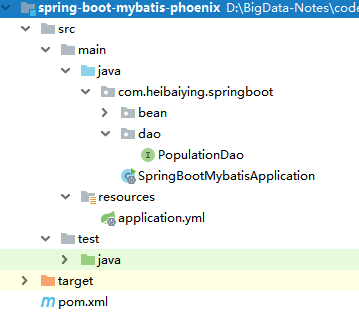
3.2 主要依赖
<!--spring 1.5 x 以上版本对应 mybatis 1.3.x (1.3.1)
        关于更多spring-boot 与 mybatis 的版本对应可以参见 <a href="http://www.mybatis.org/spring-boot-starter/mybatis-spring-boot-autoconfigure/">-->
<dependency>
    <groupId>org.mybatis.spring.boot</groupId>
    <artifactId>mybatis-spring-boot-starter</artifactId>
    <version>1.3.2</version>
</dependency>
<!--phoenix core-->
<dependency>
    <groupId>org.apache.phoenix</groupId>
    <artifactId>phoenix-core</artifactId>
    <version>4.14.0-cdh5.14.2</version>
</dependency>
<dependency>
spring boot 与 mybatis 版本的对应关系:
| MyBatis-Spring-Boot-Starter 版本 | MyBatis-Spring 版本 | Spring Boot 版本 |
|---|---|---|
| 1.3.x (1.3.1) | 1.3 or higher | 1.5 or higher |
| 1.2.x (1.2.1) | 1.3 or higher | 1.4 or higher |
| 1.1.x (1.1.1) | 1.3 or higher | 1.3 or higher |
| 1.0.x (1.0.2) | 1.2 or higher | 1.3 or higher |
3.3 配置数据源
在application.yml 中配置数据源,spring boot 2.x 版本默认采用Hikari作为数据库连接池,Hikari是目前java平台性能最好的连接池,性能好于druid。
spring:
  datasource:
    #zookeeper地址
    url: jdbc:phoenix:192.168.0.105:2181
    driver-class-name: org.apache.phoenix.jdbc.PhoenixDriver

    # 如果不想配置对数据库连接池做特殊配置的话,以下关于连接池的配置就不是必须的
    # spring-boot 2.X 默认采用高性能的 Hikari 作为连接池 更多配置可以参考 https://github.com/brettwooldridge/HikariCP#configuration-knobs-baby
    type: com.zaxxer.hikari.HikariDataSource
    hikari:
      # 池中维护的最小空闲连接数
      minimum-idle: 10
      # 池中最大连接数,包括闲置和使用中的连接
      maximum-pool-size: 20
      # 此属性控制从池返回的连接的默认自动提交行为。默认为true
      auto-commit: true
      # 允许最长空闲时间
      idle-timeout: 30000
      # 此属性表示连接池的用户定义名称,主要显示在日志记录和JMX管理控制台中,以标识池和池配置。 默认值:自动生成
      pool-name: custom-hikari
      #此属性控制池中连接的最长生命周期,值0表示无限生命周期,默认1800000即30分钟
      max-lifetime: 1800000
      # 数据库连接超时时间,默认30秒,即30000
      connection-timeout: 30000
      # 连接测试sql 这个地方需要根据数据库方言差异而配置 例如 oracle 就应该写成  select 1 from dual
      connection-test-query: SELECT 1

# mybatis 相关配置
mybatis:
  configuration:
    # 是否打印sql语句 调试的时候可以开启
    log-impl: org.apache.ibatis.logging.stdout.StdOutImpl
3.4 新建查询接口
上面Spring+Mybatis我们使用了XML的方式来写SQL,为了体现Mybatis支持多种方式,这里使用注解的方式来写SQL。
@Mapper
public interface PopulationDao {

    @Select("SELECT * from us_population")
    List<USPopulation> queryAll();

    @Insert("UPSERT INTO us_population VALUES( #{state}, #{city}, #{population} )")
    void save(USPopulation USPopulation);

    @Select("SELECT * FROM us_population WHERE state=#{state} AND city = #{city}")
    USPopulation queryByStateAndCity(String state, String city);

    @Delete("DELETE FROM us_population WHERE state=#{state} AND city = #{city}")
    void deleteByStateAndCity(String state, String city);
}
3.5 单元测试
@RunWith(SpringRunner.class)
@SpringBootTest
public class PopulationTest {

    @Autowired
    private PopulationDao populationDao;

    @Test
    public void queryAll() {
        List<USPopulation> USPopulationList = populationDao.queryAll();
        if (USPopulationList != null) {
            for (USPopulation USPopulation : USPopulationList) {
                System.out.println(USPopulation.getCity() + " " + USPopulation.getPopulation());
            }
        }
    }

    @Test
    public void save() {
        populationDao.save(new USPopulation("TX", "Dallas", 66666));
        USPopulation usPopulation = populationDao.queryByStateAndCity("TX", "Dallas");
        System.out.println(usPopulation);
    }

    @Test
    public void update() {
        populationDao.save(new USPopulation("TX", "Dallas", 99999));
        USPopulation usPopulation = populationDao.queryByStateAndCity("TX", "Dallas");
        System.out.println(usPopulation);
    }

    @Test
    public void delete() {
        populationDao.deleteByStateAndCity("TX", "Dallas");
        USPopulation usPopulation = populationDao.queryByStateAndCity("TX", "Dallas");
        System.out.println(usPopulation);
    }

}
附:建表语句
上面单元测试涉及到的测试表的建表语句如下:
CREATE TABLE IF NOT EXISTS us_population (
      state CHAR(2) NOT NULL,
      city VARCHAR NOT NULL,
      population BIGINT
      CONSTRAINT my_pk PRIMARY KEY (state, city));

-- 测试数据
UPSERT INTO us_population VALUES('NY','New York',8143197);
UPSERT INTO us_population VALUES('CA','Los Angeles',3844829);
UPSERT INTO us_population VALUES('IL','Chicago',2842518);
UPSERT INTO us_population VALUES('TX','Houston',2016582);
UPSERT INTO us_population VALUES('PA','Philadelphia',1463281);
UPSERT INTO us_population VALUES('AZ','Phoenix',1461575);
UPSERT INTO us_population VALUES('TX','San Antonio',1256509);
UPSERT INTO us_population VALUES('CA','San Diego',1255540);
UPSERT INTO us_population VALUES('CA','San Jose',912332);
更多大数据系列文章可以参见个人 GitHub 开源项目: 程序员大数据入门指南
HBase 学习之路(十一)—— Spring/Spring Boot + Mybatis + Phoenix 整合的更多相关文章
- HBase 系列(十一)—— Spring/Spring Boot + Mybatis + Phoenix 整合
一.前言 使用 Spring+Mybatis 操作 Phoenix 和操作其他的关系型数据库(如 Mysql,Oracle)在配置上是基本相同的,下面会分别给出 Spring/Spring Boot ...
- HBase 学习之路(十)—— HBase的SQL中间层 Phoenix
一.Phoenix简介 Phoenix是HBase的开源SQL中间层,它允许你使用标准JDBC的方式来操作HBase上的数据.在Phoenix之前,如果你要访问HBase,只能调用它的Java API ...
- spring、spring mvc、mybatis框架整合基本知识
学习了一个多月的框架知识了,这两天很想将它整合一下.网上看了很多整合案例,基本都是基于Eclipse的,但现在外面公司基本都在用Intellij IDEA了,所以结合所学知识,自己做了个总结,有不足之 ...
- 入门大数据---Spring+Mybatis+Phoenix整合
一.前言 使用 Spring+Mybatis 操作 Phoenix 和操作其他的关系型数据库(如 Mysql,Oracle)在配置上是基本相同的,下面会分别给出 Spring/Spring Boot ...
- HBase学习之路 (十一)HBase的协过滤器
协处理器—Coprocessor 1. 起源 Hbase 作为列族数据库最经常被人诟病的特性包括:无法轻易建立“二级索引”,难以执 行求和.计数.排序等操作.比如,在旧版本的(<0.92)Hba ...
- HBase 学习之路(八)——HBase协处理器
一.简述 在使用HBase时,如果你的数据量达到了数十亿行或数百万列,此时能否在查询中返回大量数据将受制于网络的带宽,即便网络状况允许,但是客户端的计算处理也未必能够满足要求.在这种情况下,协处理器( ...
- HBase 学习之路(一)—— HBase简介
一.Hadoop的局限 HBase是一个构建在Hadoop文件系统之上的面向列的数据库管理系统. 要想明白为什么产生HBase,就需要先了解一下Hadoop存在的限制?Hadoop可以通过HDFS来存 ...
- zigbee学习之路(十一):看门狗
一.前言 今天,我们要通过实验学习和认识一下看门狗的使用,看门狗是为了防止防止程序跑飞的,通过不断的喂狗,使看门狗能持续监管程序的运行状态,当程序跑飞时,能及时把程序拽回来. 二.原理与分析 在CPU ...
- HBase学习之路 (二)HBase集群安装
前提 1.HBase 依赖于 HDFS 做底层的数据存储 2.HBase 依赖于 MapReduce 做数据计算 3.HBase 依赖于 ZooKeeper 做服务协调 4.HBase源码是java编 ...
随机推荐
- twemproxy接收流程探索——剖析twemproxy代码正编
本文旨在帮助大家探索出twemproxy接收流程的代码逻辑框架,有些具体的实现需要我们在未来抽空去探索或者大家自行探索.在这篇文章开始前,大家要做好一个小小的心理准备,由于twemproxy代码是一份 ...
- WPF 同一窗口内的多线程/多进程 UI(使用 SetParent 嵌入另一个窗口)
原文 WPF 同一窗口内的多线程/多进程 UI(使用 SetParent 嵌入另一个窗口) WPF 的 UI 逻辑只在同一个线程中,这是学习 WPF 开发中大家几乎都会学习到的经验.如果希望做不同线程 ...
- 机器学习: Viola-Jones 人脸检测算法解析(二)
上一篇博客里,我们介绍了VJ人脸检测算法的特征,就是基于积分图像的矩形特征,这些矩形特征也被称为Haar like features, 通常来说,一张图像会生成一个远远高于图像维度的特征集,比如一个 ...
- Hopfield 神经网络及稳态性的证明
根据其提出者,John Joseph Hopfield 命名.Hopfield 在 1982 年提出的划时代的:Neural networks and physical systems with em ...
- mingw-w64-3.10-osx10.9.sh,uninstall-macports.sh,Build NSIS on OSX
https://gist.github.com/artynet/188bb34cfc94acdb554d283a3502770a --cross-compile-prefix=i686-w64-min ...
- WPF RelativeSource的使用
<Window x:Class="XamlTest.Window15" xmlns="http://schemas.microsoft.com/win ...
- 阿里云访问控制(RAM)授权子账户管理磁盘快照
阿里云 RAM 控制台没有提供管理磁盘快照的系统策略,需要自己添加自定义授权策略. 操作步骤: 进入 RAM 控制台 -> 策略管理,点击"新建授权策略" 选中"空 ...
- 通通WPF随笔(1)——基于lucene.NET让ComboBox拥有强大的下拉联想功能
原文:通通WPF随笔(1)--基于lucene.NET让ComboBox拥有强大的下拉联想功能 我一直很疑惑百度.谷哥搜索框的下拉联想功能是怎么实现的?是不断地查询数据库吗?其实到现在我也不知道,他们 ...
- C/C++读写csv文件(用getline探测逗号分隔符)
csv文件其实就是文本文件,每行字段用逗号分隔. 代码 #include <iostream> #include <string> #include <vector> ...
- C# 不重启程序修改并保存配置文件(appSettings节点)
原文:C# 不重启程序修改并保存配置文件(appSettings节点) private static void UpdateAppConfig(string newKey, string newVal ...