
【Oracle】常用的SQL语句
抄自:https://www.cnblogs.com/qiu18359243869/p/9474515.html
提示:dual是一个虚拟表,用来构成select的语法规则,oracle保证dual里面永远只有一条记录。
一、基本操作
--新建表:

create table table1( id varchar(300) primary key, name varchar(200) not null);

--插入数据

insert into table1 (id,name) values ('aa','bb');

--更新数据

update table1 set id = 'bb' where id='cc';

--删除数据

delete from table1 where id ='cc';

--清空表数据

--是DDL操作,不产生rollback,速度快,delete操作在删除大数据量时会很慢

truncate table table1;

--删除表

drop table table1;

--修改表名:

alter table table1 rename to table2;

--添加新字段

--alter table 表名 add(字段名 字段类型 默认值 是否为空);

alter table user add(age number(6));

alter table user add (course varchar2(30) default '空' not null);

--修改字段

--alter table 表名 modify (字段名 字段类型 默认值 是否为空);

alter table user modify((age number(8));

--修改字段名

--alter table 表名 rename  column  列名 to 新列名;

alter table user rename column course to newcourse;

-- 删除字段

--alter table 表名 drop column 字段名;

alter table user drop column course;

--表数据复制:

insert into table1 (select * from table2);

--复制表结构:

create table table1 select * from table2 where 1>1;

--复制表结构和数据:

create table table1 select * from table2;

--复制指定字段:

create table table1 as select id, name from table2 where 1>1;

--条件查询:

select id,name (case gender when 0 then '男' when 1 then ‘女’ end  ) gender from  table1
--添加主键

ALTER TABLE TABLE_NAME ADD CONSTRAINT PK_NAME PRIMARY KEY(COLUMN_NAME);

--添加外键

--有三种形式的外键约束:

--1.普通外键约束(如果存在子表引用父表主键,则无法删除父表记录)

--2.级联外键约束(可删除存在引用的父表记录,而且同时把所有有引用的子表记录也删除)

--3.置空外键约束(可删除存在引用的父表记录,同时将子表中引用该父表主键的外键字段自动设为NULL,但该字段应允许空值)

--普通外键

ALTER TABLE T_INVOICE_DETAIL ADD CONSTRAINT FK_INVOICE_ID FOREIGN KEY(INVOICE_ID ) REFERENCES T_INVOICE(ID);

--级联外键

ALTER TABLE T_INVOICE_DETAIL ADD CONSTRAINT FK_INVOICE_ID FOREIGN KEY(INVOICE_ID ) REFERENCES T_INVOICE(ID) ON DELETE CASCADE;

--置空外键

ALTER TABLE T_INVOICE_DETAIL ADD CONSTRAINT FK_INVOICE_ID FOREIGN KEY(INVOICE_ID ) REFERENCES T_INVOICE(ID) ON DELETE SET NULL;

--删除主键/外键

ALTER TABLE TABLE_NAME DROP CONSTRAINT PK_NAME ;

--创建序列

create sequence sequence_name

minvalue 1   --最小值

nomaxvalue   --不设置最大值(由机器决定),或 根据表字段的值范围设置 maxvalue

maxvalue 999   -- 最大值

start with 1    --从1开始计数,数值可变

increment by 1   --每次加1,数值可变

nocycle   --一直累加,不循环;cycle:达到最大值后,将从头开始累加

nocache;   --不建缓冲区。   如果建立cache那么系统将自动读取cache值个seq,这样会加快运行速度;如果在单机中使用cache,或者oracle死了,那么下次读取的seq值将不连贯,所以不建议使用cache。

--修改序列

alter sequence sequence_name-- 序列名 也可以更改

minvalue 1

maxvalue 99999999

start with 10

increment by 1

cycle    -- 到10000后,从头开始

nocache;

--删除序列

drop sequence sequence_name

--查询数据库的所有序列

select * from all_sequences;

--查询序列的下一个值

SELECT  SEQ_NAME.NEXTVAL FROM dual;

--修改序列的下个值

----X为正数负数都可以

alter sequence SEQ_NAME increment BY X;

--重新将序列的值的增长值设为1

alter sequence SEQ_NAME increment BY 1;

--创建索引

create index 索引名 on 表名(列名1,列名2,......);

--删除索引

drop index 索引名;

--在数据库中查找表名

select * from user_tables where  table_name like 'tablename%';

--查看表的所有索引

select * from all_indexes where table_name = 'tablename';

--查看表的所有索引列

select* from all_ind_columns where table_name = 'tablename';
二、数学函数
--绝对值:abs()

   select abs(-2) value from dual;          --(2)

--取整函数(大):ceil()

   select ceil(-2.001) value from dual;       --(-2)

--取整函数(小):floor()

   select floor(-2.001) value from dual;       --(-3)

--取整函数(截取):trunc()

   select trunc(-2.001) value from dual;       -- (-2)

--四舍五入:round()

   select round(1.234564,4) value from dual;       --(1.2346)

--取平方:Power(m,n)

   select power(4,2) value from dual;       --(16)

--取平方根:SQRT()

   select sqrt(16) value from dual;       --(4)

--取随机数:dbms_random(minvalue,maxvalue)

   select dbms_random.value() from dual;  (默认是0到1之间)

 select dbms_random.value(2,4) value from dual;  (2-4之间随机数)

--取符号:Sign()

  select sign(-3) value from dual; --(-1)

  select sign(3) value from dual; --(1)

--取集合的最大值:greatest(value)

   select greatest(-1,3,5,7,9) value from dual;       --(9)

--取集合的最小值:least(value)

   select least(-1,3,5,7,9) value from dual;       --(-1)

--处理Null值:nvl(空值,代替值)

   select  nvl(null,10) value from dual;       --(10)


   select nvl(score,10) score from student;
三、rownum相关
--rownum小于某个数时可以直接作为查询条件(注意oracle不支持select top)

select * from student where rownum <3;

--查询rownum大于某个数值,需要使用子查询,并且rownum需要有别名

select * from(select rownum rn ,id,name from student) where rn>2;

select * from (select rownum rn, student.* from student) where rn >3;

--区间查询

select * from (select rownum rn, student.* from student) where rn >3 and rn<6;

--排序+前n条

select * from (select rownum rn, t.* from ( select d.* from DJDRUVER d order  by drivernumber)t )p where p.rn<10;

--排序+区间查询1

select * from (select rownum rn, t.* from ( select d.* from DJDRIVER d order by DJDRIVER_DRIVERTIMES)t )p where p.rn<9 and p.rn>6;

--排序+区间查询2

select * from (select rownum rn, t.* from ( select d.* from DJDRIVER d order by DJDRIVER_DRIVERTIMES)t where rownum<9 )p where p.rn>6;--效率远高于方式一
四、分页查询
假设每页显示10条
1. 不包含排序
--效率低

select * from (select rownum rn, d.* from DJDRIVER d  )p where p.rn<=20 and p.rn>=10;

select * from (select rownum rn, d.* from DJDRIVER d  )p where p.rn between 10 and 20;

--效率高

select * from (select rownum rn, d.* from DJDRIVER d where rownum<=20 )p where p.rn>=10;
2. 包含排序
--排序+区间查询1(效率低)

select * from (select rownum rn, t.* from ( select d.* from DJDRIVER d order by DJDRIVER_DRIVERTIMES)t )p where p.rn<=20 and p.rn>=10;

select * from (select rownum rn, t.* from ( select d.* from DJDRIVER d order by DJDRIVER_DRIVERTIMES)t )p where p.rn between 10 and 20;

--排序+区间查询2(效率高)

select * from (select rownum rn, t.* from ( select d.* from DJDRIVER d order by DJDRIVER_DRIVERTIMES)t where rownum<=20 )p where p.rn>=10;
五、时间处理
1. to_char和to_date基本使用
--日期

--年 yyyy yyy yy year

--月 month mm mon month

--日+星期  dd ddd(一年中第几天) dy day

--小时  hh hh24

--分 mi

--秒 ss
select to_char(sysdate,'yyyy-mm-dd hh24:mi:ss')currenttime,

       to_char(sysdate,'yyyy') year,

       to_char(sysdate,'mm') month,

       to_char(sysdate,'dd') day,

       to_char(sysdate,'day') week,

       to_char(sysdate,'hh24')hour,

       to_char(sysdate,'mi') minute,

       to_char(sysdate,'ss') second

from dual;
select to_date('2009-07-04 05:02:01','yyyy-mm-dd hh24:mi:ss')currenttime,

       to_char(to_date('2009-07-04 05:02:01','yyyy-mm-dd hh24:mi:ss'),'yyyy')year,

       to_char(to_date('2009-07-04 05:02:01','yyyy-mm-dd hh24:mi:ss'),'mm')month,

       to_char(to_date('2009-07-04 05:02:01','yyyy-mm-dd hh24:mi:ss'),'dd') day,

       to_char(to_date('2009-07-04 05:02:01','yyyy-mm-dd hh24:mi:ss'),'day') week,

       to_char(to_date('2009-07-04 05:02:01','yyyy-mm-dd hh24:mi:ss'),'day','NLS_DATE_LANGUAGE=American') week, --设置语言

       to_char(to_date('2009-07-04 05:02:01','yyyy-mm-dd hh24:mi:ss'),'hh24')hour,

       to_char(to_date('2009-07-04 05:02:01','yyyy-mm-dd hh24:mi:ss'),'mi') minute,

       to_char(to_date('2009-07-04 05:02:01','yyyy-mm-dd hh24:mi:ss'),'ss') second

from dual;
2. months_between
select months_between(to_date('03-31-2014','MM-DD-YYYY'),to_date('12-31-2013','MM-DD-YYYY')) "MONTHS"

 FROM DUAL;
3. next_day
select sysdate today, next_day(sysdate,6) nextweek from dual;
4. 时间区间
-- borrow 为具体的表名

select cardid, borrowdate from borrow where to_date(borrowdate,'yyyy-mm-dd hh24:mi:ss')  between

to_date('2014-02-01 00:00:00','yyyy-mm-dd hh24:mi:ss') and

to_date('2014-05-01 00:00:00','yyyy-mm-dd hh24:mi:ss');
5. interval
select to_char(sysdate,'yyyy-mm-dd hh24:mi:ss') currenttime,

       to_char(sysdate - interval '' year,'yyyy-mm-dd hh24:mi:ss') intervalyear,

       to_char(sysdate - interval '' month,'yyyy-mm-dd hh24:mi:ss') intervalMonth,

       to_char(sysdate - interval '' day,'yyyy-mm-dd hh24:mi:ss') intervalday,

       to_char(sysdate - interval '' hour,'yyyy-mm-dd hh24:mi:ss') intervalHour,

       to_char(sysdate - interval '' minute,'yyyy-mm-dd hh24:mi:ss') intervalMinute,

       to_char(sysdate - interval '' second,'yyyy-mm-dd hh24:mi:ss') intervalSecond

  from dual;
6. add_months
select add_months(sysdate,12) newtime from dual;
7. extract
select extract(month from sysdate) "This Month",

extract(year from add_months(sysdate,36)) " Years" from dual;
六、字符函数
--字符函数

select substr('abcdefg',1,5)substr,                     --字符串截取

       instr('abcdefg','bc') instr,                     --查找子串

       'Hello'||'World' concat,                         --连接

       trim('  wish  ') trim,                           --去前后空格

       rtrim('wish  ') rtrim,                           --去后面空格

       ltrim('  wish') ltrim,                           --去前面空格

       trim(leading 'w' from 'wish') deleteprefix,      --去前缀

       trim(trailing 'h' from 'wish') deletetrailing,   --去后缀

       trim('w' from 'wish') trim1,

       ascii('A') A1,

       ascii('a') A2,                                   --ascii(转换为对应的十进制数)

       chr(65) C1,

       chr(97) C2,                                      --chr(十进制转对应字符)

       length('abcdefg') len,                           --length

       lower('WISH')lower,

       upper('wish')upper,

       initcap('wish')initcap,                            --大小写变换

       replace('wish1','','youhappy') replace,           --替换

       translate('wish1','','y')translate,               --转换,对应一位(前面的位数大于等于后面的位数)

       translate('wish1','sh1','hy')translate1,

       concat('','') concat                     --连接

from dual;
七、to_number
--to_number(expr)

--to_number(expr,format)

--to_number(expr,format,'nls-param')

select to_number('')number1,            --converts a string to number

       trunc(to_number('0123.123'),2) number2,

       to_number('120.11','999.99') number3,

     to_number('0a','xx') number4,        --converts a hex number to decimal

       to_number(100000,'xxxxxx') number5

from dual;
八、聚合函数
student表如下:
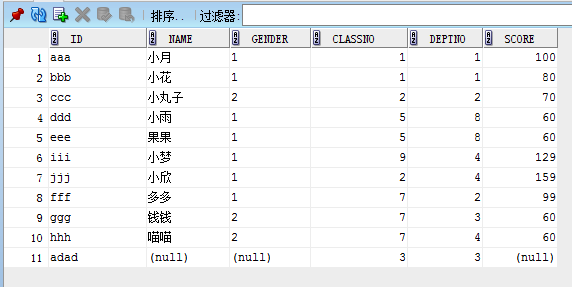
1.count
--count (distinct|all)

select count(1) as count from student;--效率最高

select count(*) as count from student;

select count(distinct score) from student;
2. avg
--avg (distinct|all)

select avg(score) score from student;

select avg(distinct score) from student;

select classno,avg(score) score from student group by classno;
3. max
--max (distinct|all)

select max(score) from student;

select classno, max(score) score from student group by classno;
4. min
--min (distinct|all)

select min(score) from student;

select classno, min(score) score from student group by classno;
5. stddev(standard deviation)标准差
--stddev

select stddev(score) from student;

select classno, stddev(score) score from student group by classno;
6. sum
--sum

select sum(score) from student;

select classno, sum(score) score from student group by classno;
7. median--中位数
--median

select median(score) from student;

select classno, median(score) score from student group by classno;
九、案例演示
【Oracle】常用的SQL语句的更多相关文章
- oracle常用的SQL语句
一些常用的SQL语句: --建表 create table adolph (id number(10,0), name varchar2(20), ...
- oracle 常用select sql语句
本人认为很实用的几条语句 1)select ... from ...into... 2)insert into ...select ... 3)select ...from ...left join ...
- Oracle数据库常用的Sql语句整理
Oracle数据库常用的Sql语句整理 查看当前用户的缺省表空间 : select username,default_tablespace from user_users; 2.查看用户下所有的表 : ...
- 经典SQL语句大全以及50个常用的sql语句
经典SQL语句大全 一.基础 1.说明:创建数据库CREATE DATABASE database-name 2.说明:删除数据库drop database dbname3.说明:备份sql serv ...
- 常用经典SQL语句大全完整版--详解+实例 (存)
常用经典SQL语句大全完整版--详解+实例 转 傻豆儿的博客 http://blog.sina.com.cn/shadou2012 http://blog.sina.com.cn/s/blog_84 ...
- 经典SQL语句大全、50个常用的sql语句
50个常用的sql语句 Student(S#,Sname,Sage,Ssex) 学生表 Course(C#,Cname,T#) 课程表 SC(S#,C#,score) 成绩表 Teacher(T#,T ...
- 常用经典SQL语句大全完整版--详解+实例 《来自网络,很全没整理,寄存与此》
常用经典SQL语句大全完整版--详解+实例 下列语句部分是Mssql语句,不可以在access中使用. SQL分类: DDL—数据定义语言(CREATE,ALTER,DROP,DECLARE) DML ...
- MySQL 常用的sql语句小结(待续)
mysql 常用的sql语句 1.查看数据库各个表中的记录数 USE information_schema; SELECT table_name,table_rows FROM tables WHER ...
- SQL Server中常用的SQL语句(转):
SQL Server中常用的SQL语句 转自:http://www.cnblogs.com/rainman/archive/2013/05/04/3060428.html 1.概述 名词 笛卡尔积.主 ...
- 说说oracle分页的sql语句
说说oracle分页的sql语句,分排序和不排序两种. 当结果集不需要进行排序时,每页显示条数为:rowPerPage,当前页数为:currentPage. 1. 相对来说,这种查询速度会快一些,因为 ...
随机推荐
- ribbon客户端负载均衡
Ribbon简介 参考:https://blog.csdn.net/chengqiuming/article/details/80711168 Ribbon是Netflix发布的负载均衡器,它有助于控 ...
- Highlight List View Objects 突出显示列表视图对象
In this lesson, you will learn how to format data that satisfies the specified criteria. For this pu ...
- DotNet Core中使用RabbitMQ
上一篇随笔记录到RabbitMQ的安装,安装完成,我们就开始使用吧. RabbitMQ简介 AMQP,即Advanced Message Queuing Protocol,高级消息队列协议,是应用层协 ...
- CSS入门(定位之浮动定位、伪类之鼠标悬停、光标修改和透明度修改和列表样式)
一.定位 所为定位,实际上就是定义元素框相对于其正常位置,应该出现在哪儿 定位就是改变元素在页面上的默认位置 分类: 普通流定位(元素默认的定位方式) 浮动定位 相对定位 绝对定位 固定定位 1.普通 ...
- 从零开始学vuejs
最近一段时间都花在了学习vue上,还总是断断续续的,学习的效果不是很明显,思考了好久了,应该是没有进行一个系统的总结,导致很多知识点总是似是而非,而且也有一部分是思维还没有从java转变过来,废话不多 ...
- Android Fragment 多层叠加时点击穿透解决方案
一.问题现象 多层fragment叠加时,点击上层fragment会使下层fragment的控件对应点击事件响应,这种现象就是点击穿透. 对于这种情况,我们一般都是对baseFragment进行vie ...
- Process finished with exit code 139 (interrupted by signal 11: SIGSEGV)
使用Qt写了个窗口,运行报错,无法正常运行python程序,获得的报错信息如下: Process finished with exit code 139 (interrupted by signal ...
- oracle 根据时间戳查询date类型sql
话不多说上sql: select to_char(1574837126879/(1000*60*60*24)+to_date('1970-01-01 08:00:00','YYYY-MM-DD HH2 ...
- java中文件复制的4种方式
今天一个同事问我文件复制的问题,他一个100M的文件复制的指定目录下竟然成了1G多,吓我一跳,后来看了他的代码发现是自己通过字节流复制的,定义的字节数组很大,导致复制后目标文件非常大,其实就是空行等一 ...
- s3c2440裸机-内存控制器(五、SDRAM编程实现)
配置内存控制器-SDRAM编程配置 2440内存控制器共有13个寄存器. BANK0--BANK5只需要设置BWSCON和BANKCONx(x为0-5)两个寄存器: BANK6.BANK7外接SDRA ...